
Is your AT&T internet acting up right when you need it most? It’s frustrating when your connection slows down, drops out, or just won’t work at all.
But don’t worry—you’re not alone, and many common issues have simple fixes you can try right now. Whether your Wi-Fi shows “connected but no internet,” or your gateway lights are flashing red, this guide will walk you through easy steps to get your AT&T internet back on track.
Keep reading, and you’ll learn how to spot problems quickly, try quick fixes, and when to reach out for expert help. Your smooth online experience is just a few troubleshooting tips away!

Credit: www.youtube.com
Internet Speed And Bandwidth
Advanced troubleshooting can help solve persistent AT&T internet problems. It goes beyond basic fixes and digs deeper into the network and device setup. These steps can identify hidden issues affecting your connection. Follow the methods below to improve your internet stability and speed.
Use At&t Erepair Tool
The AT&T eRepair tool scans your area for service problems. It checks for outages, maintenance, and line faults. You can use it anytime on the AT&T website. Enter your account details to start the scan. The tool then offers solutions based on the detected issues. It can also guide you through resetting or reconfiguring your gateway. This step saves time by pinpointing exact problems before calling support.
Contact At&t Support
When the eRepair tool does not fix your issue, reach out to AT&T Support. They have trained agents to assist with complex problems. Use the phone number or online chat for help. Keep your account information ready for faster service. Support can perform remote diagnostics on your line and equipment. They may schedule a technician visit if needed. Clear communication helps resolve your issue quickly.

Credit: www.reddit.com
Common At&t Internet Issues
Seeing “Wi-Fi connected but no internet” can confuse many users. Your device links to the router, but the internet remains unreachable. This issue stops browsing, streaming, and downloading. Many factors cause this problem, from router glitches to ISP disruptions. Simple steps often fix it quickly.
Restart And Toggle Wi-fi
Turn off your device’s Wi-Fi. Wait about 10 seconds. Turn Wi-Fi back on. This resets the wireless connection. Next, restart your router or modem. Unplug the power cable. Wait 30 seconds. Plug it back in and wait for lights to stabilize. This clears temporary network errors and refreshes connections.
Forget And Reconnect Network
Go to your device’s Wi-Fi settings. Find the problematic network. Choose “Forget” or “Remove” this network. This deletes saved network data and passwords. Now, scan for networks again. Select your Wi-Fi and enter the password. Reconnecting often solves IP or DNS conflicts causing no internet access.
Test Other Devices
Try connecting another device to the same Wi-Fi. Check if it can access the internet. If other devices work fine, the issue is with your original device. Restart or update its network drivers. If none can connect, the problem lies in the router or internet service. Contact your ISP if the problem persists.
Credit: www.att.com
Frequently Asked Questions
Why Is My At&t Internet Not Working?
Your AT&T internet may not work due to outages, loose cables, or router issues. Restart your gateway and device. Check AT&T’s outage page. Verify cable connections and gateway lights. Disconnect third-party equipment. Use AT&T eRepair or contact support for help.
What Lights Should Be On My At&t Router?
Your AT&T router lights should show a solid green power light and a solid or blinking green service light. Red or blinking red lights indicate connection issues. Solid green lights mean the router works properly and connects to the internet.
Why Is My Wifi Connected But No Internet?
Your device connects to Wi-Fi but lacks internet due to router issues, ISP outages, IP conflicts, or DNS problems. Restart your modem, forget and reconnect to the network, check other devices, run network troubleshooters, or contact your ISP for help.
Why Am I Suddenly Unable To Connect To My Wi-fi?
Sudden Wi-Fi connection issues often result from router problems, ISP outages, or device settings errors. Restart your router and device first. Check cables and ensure no service outages. Forget and reconnect to the network. If problems persist, update drivers or contact your Internet provider for support.
Why Is My At&t Internet Not Working Suddenly?
AT&T internet may stop working due to outages or equipment issues. Check the AT&T outage map and restart your gateway first.
Conclusion
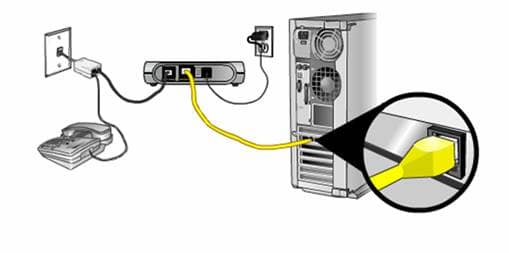
AT&T internet issues can be fixed with simple steps. Start by checking for outages in your area. Restart your modem and devices to refresh connections. Make sure all cables are firmly plugged in. Look at your gateway lights for clues about problems.
Disconnect extra equipment that might interfere with your signal. Use AT&T’s online tools if problems persist. Contact customer support for help when needed. Stay calm and follow these tips to get online fast. Reliable internet is possible with the right troubleshooting approach.



