Is your automatic gate opener acting up at the worst possible time? You’re not alone.
When your gate won’t open or close smoothly, it can disrupt your day and even affect your home’s security. But before you call in a professional, there are simple troubleshooting steps you can take yourself to get things moving again.
In this guide, you’ll learn how to quickly identify common problems, from power issues and sensor blocks to remote control glitches and noisy motors. By the end, you’ll have the confidence to fix many automatic gate opener troubles on your own—or know exactly when to call an expert. Keep reading to protect your investment and restore your gate’s smooth operation today.
Common Gate Issues
Automatic gate openers make access easy and secure. Yet, like all machines, they face common issues. Understanding these problems helps keep your gate working smoothly. Below are typical challenges that gate owners face.
Power Problems
Power issues stop gates from opening or closing. Causes include power outages, tripped breakers, or loose wiring. Check if the gate has power supply. Look for blown fuses or circuit breakers. Reset breakers or replace fuses if needed. Inspect wires for damage or disconnection. Ensure the main power switch is on. Sometimes, the motor itself may fail due to electrical faults. Call a professional if you cannot find the problem.
Remote Control Failures
Remote controls may stop working or lose range. Dead or weak batteries are common causes. Replace batteries with fresh ones first. Check if the remote is paired correctly with the gate. Interference from other devices can block signals. Try operating the gate closer to the receiver. If the remote is damaged, consider a replacement. Always keep a manual way to open the gate.
Sensor Malfunctions
Sensors detect obstacles and control gate movement. Dirt, dust, or spider webs can block sensors. Clean sensor lenses gently with a soft cloth. Misaligned sensors cause the gate to stop or reverse. Adjust sensors to face each other directly. Check wiring for cuts or loose connections. Faulty sensors may need replacement. Test sensors regularly for proper function.
Mechanical Wear And Tear
Moving parts wear out over time and cause noise or slow motion. Hinges, rollers, and chains need regular lubrication. Remove dirt and debris from tracks and wheels. Tighten loose bolts and screws to avoid misalignment. Replace worn rollers or broken parts quickly. Lack of maintenance leads to motor strain and failure. Schedule regular checks to extend gate life.

Credit: topens.com
Power Troubleshooting
Power issues are a common cause of automatic gate opener failures. Troubleshooting power problems is the first step in restoring gate function. This section guides you through basic checks to identify and fix power-related faults. Simple tools and careful observation can save you time and money.
Checking Power Supply
Start by verifying the gate opener’s power source. Ensure the outlet or power line is working properly. Use a voltage tester or plug in another device to confirm power presence. Look for loose wires or damaged cords that may interrupt the connection. Confirm the power switch to the gate opener is turned on. A stable power supply is essential for smooth gate operation.
Circuit Breaker And Fuse Inspection
Locate the circuit breaker panel for the gate opener. Check if any breakers have tripped or fuses are blown. Reset tripped breakers by switching them off and then on again. Replace blown fuses with ones matching the correct rating. A faulty breaker or fuse can cut power to the gate opener, stopping its function. Regular inspection prevents unexpected shutdowns.
Battery Replacement
Many automatic gate openers rely on backup batteries during power outages. Check the battery condition and voltage using a multimeter. Replace old or weak batteries to ensure reliable operation. Use batteries recommended by the gate opener manufacturer. Proper battery maintenance avoids gate failure during emergencies or power cuts.
Remote And Keypad Fixes
Remote and keypad issues often cause automatic gate openers to stop working correctly. These controls rely on batteries, signals, and programming to function well. Troubleshooting these areas can restore smooth operation quickly. Below are simple fixes to common remote and keypad problems.
Replacing Remote Batteries
Dead batteries are the top reason remotes fail. Open the remote case carefully using a small screwdriver. Remove old batteries and insert new ones with correct polarity. Use high-quality alkaline batteries for longer life. Test the remote after replacing batteries. If it still does not work, check the contacts for corrosion and clean them gently with a dry cloth.
Signal Interference Solutions
Signal interference can block remote commands from reaching the gate. Common causes include nearby radio devices, metal objects, and thick walls. Move closer to the gate and try again. Remove or relocate any large metal objects near the receiver. Change the remote’s location or angle. If interference persists, consider installing a signal booster or using a different frequency remote.
Reprogramming Remotes
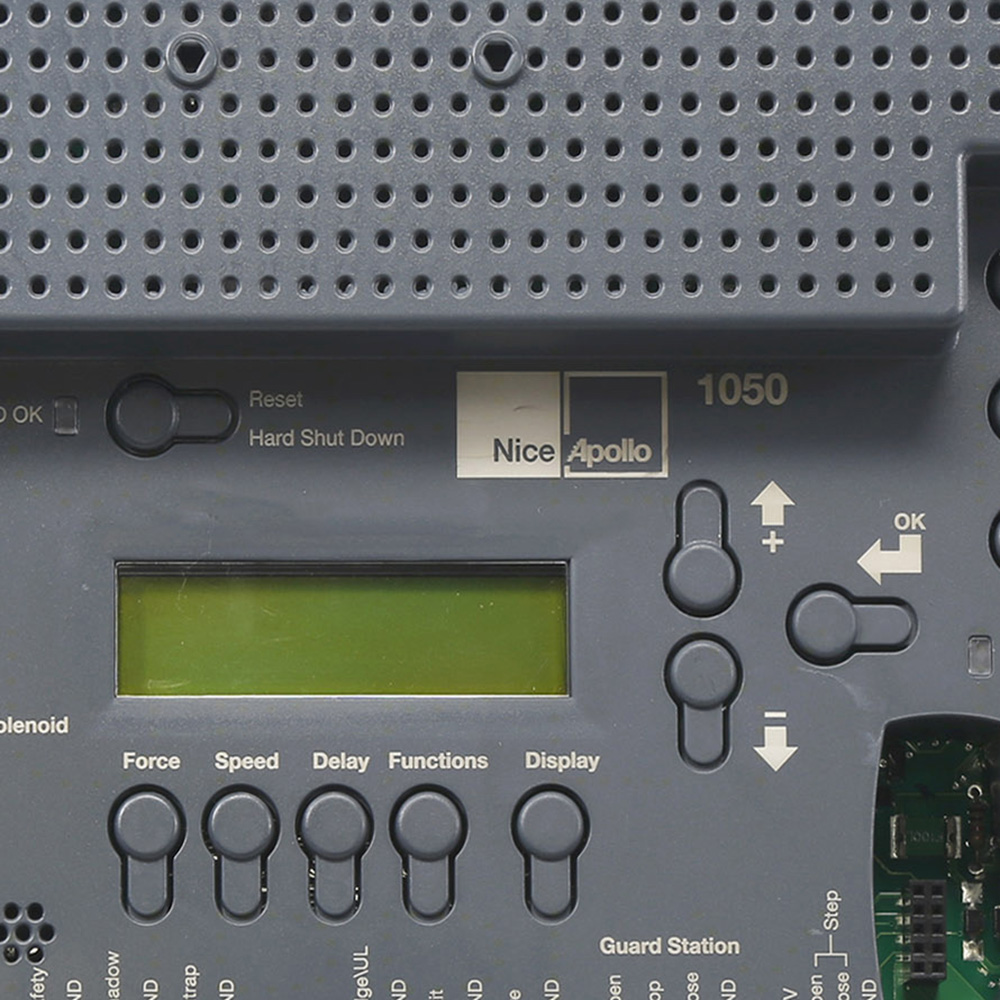
Sometimes remotes lose their programming and cannot communicate with the gate. Locate the gate opener’s control box and find the programming button. Press and hold it until the indicator light flashes. Press a button on the remote to sync it. Release both buttons once the light stays solid or blinks differently. Repeat for additional remotes. Consult the manual for model-specific steps.
Sensor Care
Proper sensor care keeps your automatic gate opener working smoothly. Sensors detect obstacles and ensure safety by stopping the gate when needed. Dirt, misalignment, or wiring problems can cause sensor failure. Regular maintenance helps avoid gate malfunctions and costly repairs.
Cleaning Sensor Lenses
Dirty sensor lenses block signals and stop the gate from working. Use a soft cloth and mild cleaner to wipe lenses gently. Avoid harsh chemicals that can damage sensors. Clean lenses at least once a month or after bad weather.
Realigning Sensors
Misaligned sensors fail to detect objects correctly. Check if sensors face each other directly and are at the same height. Adjust the angle or position slightly until the indicator light turns on. Test the gate after realignment to confirm proper operation.
Inspecting Sensor Wiring
Worn or loose wiring causes sensor errors or no response. Look for frayed wires or loose connections near the sensor and control box. Secure any loose wires and replace damaged cables. Turn off power before handling wiring to stay safe.
Mechanical Adjustments
Mechanical adjustments keep your automatic gate opener working smoothly. These fixes often solve common problems fast. Regular checks and simple tweaks can extend your gate’s life.
Focus on key areas like tracks, moving parts, and worn components. Small changes help avoid costly repairs later.
Clearing Tracks And Debris
Tracks clogged with dirt or leaves stop the gate from moving freely. Clean tracks regularly to remove all debris. Use a brush or cloth to clear dust and small stones. Check for any objects blocking the path. Clean tracks help the gate slide smoothly without extra strain.
Lubricating Moving Parts
Moving parts need lubrication to reduce friction and wear. Apply a light oil or grease on hinges, rollers, and chains. Avoid heavy grease that attracts dirt. Lubricate parts every few months or after heavy use. Proper lubrication keeps the gate quiet and moving easily.
Replacing Worn Components
Worn parts cause jerky movements and strange noises. Inspect rollers, hinges, and gears for cracks or damage. Replace any parts that look weak or broken. Use manufacturer-approved components for best results. Replacing worn pieces protects the motor and improves gate performance.
Credit: apollogateopeners.com
Noise And Movement Issues
Automatic gate openers make entry easy and secure. Noise and movement problems disrupt this convenience. These issues often signal worn parts or loose hardware. Ignoring them can cause bigger damage. Troubleshooting early helps keep the gate working smoothly and quietly.
Identifying Noise Causes
Listen carefully to your gate when it moves. Squeaks or grinding sounds show worn gears or lack of grease. Clicking noises often come from loose bolts or screws. Sudden loud bangs may mean the motor struggles or hits an obstacle. Noticing these sounds early helps target the exact problem.
Tightening Loose Hardware
Loose bolts or screws cause rattling and shaky gate movement. Use a wrench or screwdriver to check all hardware parts. Tighten any loose nuts, bolts, and screws firmly but gently. Pay special attention to hinges, brackets, and motor mounts. Properly secured parts reduce noise and improve gate stability.
When To Lubricate
Dry parts create friction and noise during gate movement. Apply lubricant to hinges, rollers, chains, and gears regularly. Use grease or oil made for metal moving parts. Avoid over-lubricating, which can attract dirt and cause clogs. Lubricate at least twice a year or when noise starts to appear.
Manual Release And Reset
The manual release and reset functions are essential for managing an automatic gate during power failures or malfunctions. These features allow you to operate the gate manually and restore normal operation after troubleshooting. Understanding how to use them ensures safety and convenience when technology fails.
Engaging Manual Mode
Manual mode lets you open or close the gate without power. Locate the manual release lever or key switch near the motor. Turn or pull it gently to disengage the motor from the gate. This action frees the gate, allowing you to move it by hand. Always secure the gate once moved to prevent accidental closure or injury.
Resetting The Gate System
Resetting the gate system clears minor faults and restores function. First, switch off the power supply to the gate motor. Wait for about 30 seconds to let the system reset fully. Turn the power back on and test the gate with the remote or control panel. This simple step fixes many common issues and avoids complex repairs.
Using Emergency Overrides
Emergency overrides provide a backup method to operate the gate in urgent situations. These overrides might include a battery backup or manual keypad entry. Check your gate system manual for the specific override options available. Using these features ensures access even during total power loss or system failure.
When To Call Experts
Automatic gate openers offer convenience and security. Simple issues can be fixed at home. Some problems require expert attention. Knowing when to call a professional saves time and avoids damage. Experts have the right tools and skills for safe repairs.
Electrical Repairs
Electrical faults can be tricky and dangerous. Problems like wiring damage or motor failure need expert care. Incorrect fixes may cause short circuits or fire hazards. Professionals diagnose electrical issues with special equipment. They ensure all repairs meet safety standards.
Persistent Mechanical Failures
Mechanical parts wear out over time. If the gate keeps jamming or moves unevenly, call an expert. They can spot hidden problems like broken gears or worn rollers. DIY repairs might not fix deep mechanical faults. Experts replace parts correctly to restore smooth operation.
Sensor Replacement
Sensors control gate safety and movement. Faulty sensors cause the gate to stop or reverse unexpectedly. Replacing sensors needs precision and correct alignment. Professionals have the knowledge to install sensors properly. This avoids false triggers and keeps your gate reliable.
Preventative Maintenance Tips
Preventative maintenance is key to keeping your automatic gate opener working smoothly. Regular care reduces breakdowns and extends the life of the system. Simple tasks done on a schedule can save time and money in repairs. Follow these tips to maintain your gate opener in top condition.
Regular Cleaning
Clean your gate and opener parts often. Dirt and debris can block sensors and tracks. Use a soft brush or cloth to remove leaves, dust, and grime. Avoid harsh chemicals that might damage the components. Keeping everything clean helps the opener work without strain.
Scheduled Lubrication
Lubricate moving parts regularly to reduce friction and wear. Apply lubricant to hinges, chains, rollers, and gears. Use a lubricant made for gate openers or machinery. Avoid over-lubricating, which can attract dirt. Proper lubrication keeps the gate moving smoothly and quietly.
Routine Inspections
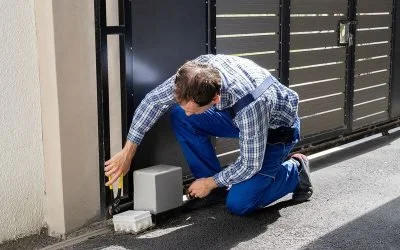
Inspect the gate opener system on a fixed schedule. Check for loose bolts, worn parts, and damaged wiring. Test the safety sensors and remote controls. Look for signs of rust or corrosion. Early detection of problems prevents bigger issues later. Replace worn components promptly to keep the gate safe and reliable.
Credit: www.intelegates.com
Frequently Asked Questions
What Are The Most Common Electric Gate Problems And How Can They Be Fixed?
Common electric gate problems include power issues, remote failure, debris blockage, worn parts, and sensor misalignment. Fix these by checking power, replacing batteries, clearing obstructions, lubricating parts, aligning sensors, inspecting wiring, and using manual release. Call a professional for complex electrical or mechanical faults.
How Do You Troubleshoot An Automatic Gate Opener?
Check the power supply and remote batteries. Clear debris from sensors and tracks. Lubricate moving parts. Align sensors properly. Inspect wiring for damage. Use manual release to test operation. Call a professional if problems persist or for complex electrical and mechanical issues.
How Do I Reset An Automatic Gate?
To reset an automatic gate, turn off the power, wait 30 seconds, then turn it back on. Press the reset button if available. Clear any obstructions and ensure sensors align properly. Consult the manual or call a professional if the gate doesn’t reset.
What To Do When Electric Gates Won’t Open?
Check the power supply and circuit breaker first. Replace remote batteries. Clear debris from sensors and tracks. Use manual release if needed. Lubricate moving parts. Realign sensors. Call a professional for electrical or mechanical issues beyond basic fixes.
What Causes My Automatic Gate Not To Open Or Close?
Power outages, dead remote batteries, or blocked sensors often stop gate movement. Check the power supply, replace batteries, and clear sensor obstructions first.
Conclusion
Automatic gate opener problems can disrupt daily routines. Simple checks often solve common issues fast. Clear debris, replace batteries, and lubricate parts regularly. Align sensors and inspect wiring to keep gates working well. Complex faults need professional repair to prevent damage.
Regular maintenance extends gate life and ensures safety. Stay patient and follow steps carefully for best results. Troubleshooting keeps your gate reliable and convenient every day.