Is your car’s Bluetooth acting up just when you need it most? You’re not alone.
Whether you’re trying to make a call hands-free or stream your favorite playlist, connection problems can quickly turn a smooth drive into a frustrating experience. But don’t worry—most Bluetooth issues can be solved with a few simple steps. In this guide, you’ll discover easy-to-follow fixes that will get your car’s Bluetooth working reliably again.
Ready to take control and enjoy seamless connectivity on the road? Let’s dive into the troubleshooting tips that will save your drive from silence and disconnect.
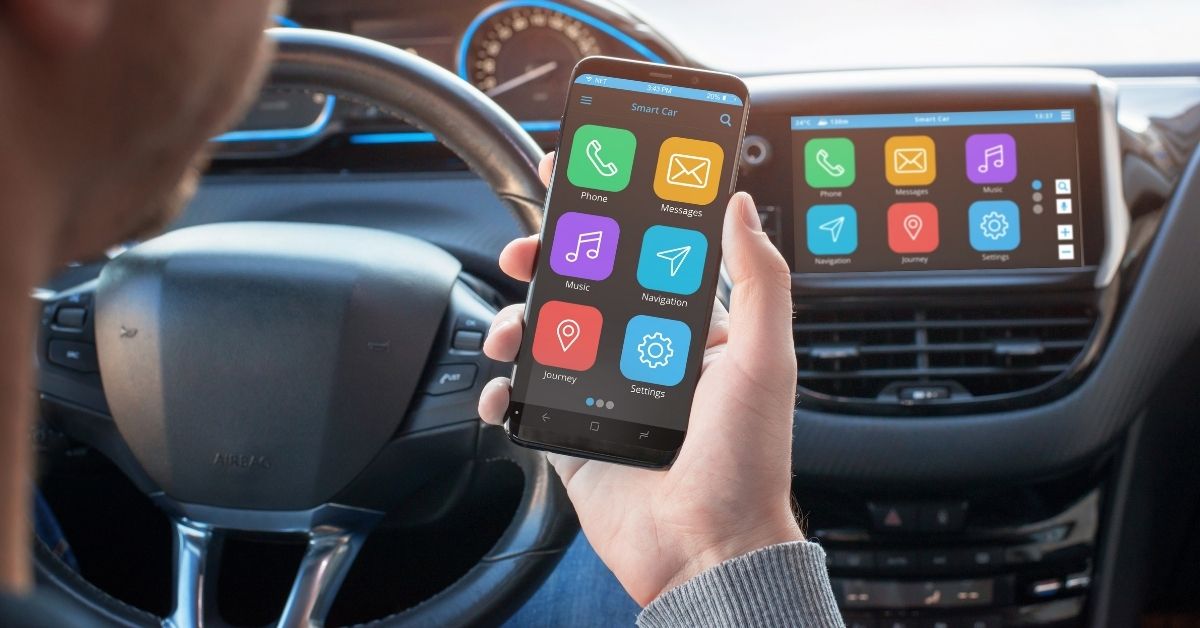
Credit: sierrablancamotors.com
Common Bluetooth Issues
Bluetooth connectivity in cars can sometimes be a source of frustration. Many drivers face issues that stop their devices from pairing or streaming properly. Understanding common Bluetooth problems helps in quickly fixing them and getting back on the road with hands-free convenience.
Some Bluetooth issues occur frequently across different car models and phone types. These problems often stem from simple causes that anyone can troubleshoot. Below are the most common Bluetooth problems and what causes them.
Temporary Glitches
Bluetooth connections can fail due to small, temporary glitches. These glitches happen when the car or phone software gets stuck or confused. Restarting both devices usually clears these errors. Turning Bluetooth off and back on can refresh the connection and solve many problems.
Device Memory Limits
Cars and phones store paired device information in memory. When too many devices are saved, new connections may not work. Clearing old or unused devices from the pairing list frees up memory. This simple step often restores proper Bluetooth function.
Outdated Software
Old software versions cause compatibility and connection issues. Both your car’s infotainment system and phone need regular updates. Installing the latest updates fixes bugs and improves Bluetooth stability. Check for updates in your phone settings and car manual.
Compatibility Problems
Not all phones work perfectly with every car Bluetooth system. Differences in Bluetooth versions or protocols can cause issues. Some features may not be supported on certain devices. Checking your car’s manual or manufacturer website helps confirm compatibility before pairing.

Credit: www.youtube.com
Quick Fixes
Quick fixes often solve common car Bluetooth problems fast. These steps reset connections and clear minor glitches. Trying simple solutions first saves time and stress. Follow these easy tips to get your Bluetooth working again quickly.
Restart Phone And Car
Turn off your phone completely, then turn it back on. Switch off your car’s engine and wait about a minute. Restart the car’s infotainment system by turning the car back on. This resets both devices and often restores Bluetooth connections.
Toggle Bluetooth
Go to your phone’s settings and turn Bluetooth off. Wait a few seconds, then turn it on again. This can refresh the Bluetooth signal and fix minor connection problems. Sometimes toggling Bluetooth helps the device find your car faster.
Check Audio Settings
Open Bluetooth settings on your phone and find your car’s device name. Make sure both “Media audio” and “Phone audio” options are turned on. Check your phone’s call audio routing to ensure sound plays through the car speakers. Incorrect settings may block audio from streaming properly.
Re-pair Devices
Delete or forget your car’s Bluetooth device from your phone’s paired list. Also, remove your phone from the car’s paired devices. Restart both devices, then connect them again by following the pairing process. Re-pairing clears old data and can fix connection errors.
Intermediate Solutions
Intermediate solutions help fix car Bluetooth issues beyond basic steps. These methods address software glitches and interference problems. They improve connection stability and sound quality. Follow these tips to enhance your car Bluetooth experience.
Update Software
Outdated software often causes Bluetooth problems. Check for updates on your phone and car system. Install all available updates to fix bugs and improve compatibility. Updated software ensures smoother connections and fewer dropouts.
Clear Bluetooth Cache
Bluetooth cache stores temporary data that may cause errors. Clearing this cache resets Bluetooth settings on your phone. Go to your phone’s settings, find the Bluetooth app, and clear its cache and data. This step resolves many pairing and connection issues.
Avoid Interference
Other wireless devices can disrupt Bluetooth signals. Move away from crowded areas with many electronics. Turn off or move other Bluetooth devices nearby. Reducing interference helps keep a stable and clear connection between your phone and car.
Advanced Troubleshooting
Advanced troubleshooting helps solve tough Bluetooth problems in cars. These steps go beyond simple fixes. They target deeper system issues or compatibility problems. Follow each carefully for better results.
Reset Car System
Resetting the car system can clear hidden errors. Find the reset option in your car’s settings menu. This action restores factory settings for Bluetooth and infotainment. The system starts fresh with no old data causing conflicts.
Note that reset removes all paired devices. You will need to pair your phone again. This step often fixes persistent connection failures or audio glitches.
Test Another Phone
Try connecting a different phone to your car’s Bluetooth. This test shows if the problem is with your phone or the car system. If the second phone connects smoothly, your phone may need further checks.
If the other phone also fails to connect, the car system likely has an issue. Testing another device helps narrow down the cause quickly.
Consult Manual Or Dealer
Check your car manual for specific Bluetooth troubleshooting tips. Manuals often include model-specific reset instructions and error codes. Follow these carefully to avoid mistakes.
Contact your car dealer if problems continue. They have tools and knowledge to diagnose complex Bluetooth issues. Professional help can save time and prevent damage to your car’s system.
Tips For Better Connectivity
Improving your car Bluetooth connection can make driving safer and more enjoyable. Simple steps can help keep your connection stable and clear. Follow these tips to reduce frustration and get the most from your system.
Keep Software Updated
Always update your phone and car software. Manufacturers fix bugs and improve Bluetooth with updates. Check for updates regularly in your phone’s settings and your car’s infotainment system. Updated software helps avoid connection drops and pairing errors.
Limit Paired Devices
Too many paired devices can confuse your car’s Bluetooth. Remove devices you no longer use. Keep only the essential phones paired. This reduces interference and speeds up the connection process. A cleaner list means fewer connection problems.
Maintain Clear Signal
Avoid obstacles between your phone and the car’s Bluetooth receiver. Metal objects or thick cases can block the signal. Keep your phone close to the dashboard for better reception. Also, move away from other wireless devices that may cause interference.

Credit: www.youtube.com
Frequently Asked Questions
Why Is The Bluetooth In My Car Not Working?
Bluetooth in your car may fail due to outdated software, pairing conflicts, or temporary glitches. Restart devices, update software, and re-pair them to fix issues. Clear old connections if memory is full. Check phone settings for audio permissions and try resetting the car’s system if problems persist.
How To Reset Car Bluetooth Device?
To reset your car Bluetooth, turn off both car and phone, delete paired devices, then restart and re-pair them. Check for software updates. If issues persist, perform a factory reset on the car’s infotainment system following the user manual.
How To Diagnose Bluetooth Problems?
Restart your phone and car system, toggle Bluetooth off/on, then re-pair devices. Update software and clear Bluetooth cache. Check audio settings and interference. If issues persist, reset the car’s system or try another device. Consult the manual or dealer for further help.
Why Is My Phone Suddenly Not Connecting To Carplay?
Your phone may not connect to CarPlay due to software glitches, outdated updates, or pairing conflicts. Restart both devices, update software, and re-pair to fix. Clear Bluetooth cache and check settings if problems persist.
Why Won’t My Car Bluetooth Connect To My Phone?
Car Bluetooth may fail to connect due to outdated software or pairing issues. Restart both devices and try re-pairing to fix common problems. Make sure your phone’s Bluetooth settings allow media and call audio.
Conclusion
Car Bluetooth issues can frustrate anyone on the road. Restarting devices often solves many problems fast. Make sure your phone and car software stay updated. Re-pair your devices carefully and check audio settings. Clearing cache and avoiding interference help too.
If problems continue, try resetting the car system. Testing another phone can pinpoint the source. Remember, simple steps often fix most connection troubles. Keep your Bluetooth working smoothly for safer, hands-free driving.