
Is your Carrier AC acting up when you need it most? Maybe it’s running but not cooling, or it won’t turn on at all.
Before you call for expensive repairs, there are simple steps you can take to fix the problem yourself. This Carrier AC Troubleshooting Guide is designed just for you — to help you quickly identify common issues and get your system back to cooling your home efficiently.
From checking thermostat settings to inspecting critical components like the contactor and capacitor, you’ll learn practical tips that save time and money. Keep reading to take control of your comfort and avoid unnecessary service calls.

Credit: www.luce.sg
Common Carrier Ac Issues
Carrier AC units are reliable but can face common problems over time. Knowing these issues helps you act fast and avoid bigger troubles. This guide covers frequent Carrier AC issues and simple ways to spot them. Understanding these problems saves time and money on repairs.
Unit Runs But Doesn’t Cool
The AC runs, but the air stays warm. This often means a dirty air filter or blocked vents. A malfunctioning thermostat or low refrigerant also causes poor cooling. Sometimes, dirty condenser coils reduce efficiency. Check these parts to restore cool air quickly.
Ac Not Turning On
The unit fails to start at all. First, check the thermostat settings and power supply. A tripped circuit breaker or blown fuse can stop the AC. Faulty wiring or a broken contactor may also cause this problem. Inspect electrical parts carefully for safe operation.
Frozen Evaporator Coils
Ice forms on the evaporator coils, stopping cool air flow. This happens due to low refrigerant or poor airflow. Dirty filters or blocked ducts reduce airflow, leading to freezing. Turn off the AC and clean filters to prevent damage. Call a professional if ice persists.
Electrical Problems
Electrical faults cause frequent shutdowns or failure to start. Loose wires, worn capacitors, or bad relays are common culprits. These issues can create safety risks and damage the unit. Regular electrical checks keep your Carrier AC safe and reliable.
Refrigerant Leaks
Low refrigerant means the AC cannot cool properly. Leaks in coils or connections cause this loss. Signs include hissing sounds and warm air from vents. Leaks harm the environment and increase energy costs. A certified technician can find and fix leaks efficiently.
Basic Troubleshooting Steps
Basic troubleshooting steps help identify common issues with your Carrier AC unit. These steps are simple and save time before calling a technician. Most problems come from small errors that anyone can fix.
Follow these steps carefully to improve your AC’s performance. They ensure your system runs smoothly and cools your home efficiently. Start with easy checks and move to more detailed inspections.
Check Thermostat Settings
Make sure your thermostat is set to cool mode. The temperature should be lower than the room temperature. Confirm the fan is on auto, not on manual. Replace batteries if the display is blank. Incorrect settings cause the AC to stop or not cool properly.
Inspect Air Filter
A dirty air filter blocks airflow and reduces cooling. Remove the filter and check for dust or debris. Replace or clean it if it looks clogged. Change filters every 1-3 months for better air quality and efficiency. A clean filter helps your AC work without strain.
Examine Power Supply
Check if the AC unit is getting power. Look for tripped breakers or blown fuses in the electrical panel. Ensure the outdoor unit is plugged in and switched on. Power issues often stop the AC from turning on or cause intermittent problems.
Look For Blocked Vents
Blocked vents stop cool air from spreading inside. Remove furniture or objects blocking the vents. Clean vents and registers from dust buildup. Keep all vents open for proper airflow. Clear vents help your AC cool every room evenly.
Diagnosing Key Components
Diagnosing key components in your Carrier AC unit helps identify common problems fast. It guides you through checking parts that often cause issues. These checks can save time and money by avoiding unnecessary repairs. Focus on critical components to find the root cause of the problem.
Contactor Inspection And Replacement
The contactor controls power to the compressor and fan. Look for signs of wear or burning on its contacts. A faulty contactor may cause the AC to stop working or run intermittently. Replace the contactor if it shows damage or does not click when powered. This simple fix often restores normal operation.
Capacitor Check
Capacitors provide the extra boost needed to start motors. Test the capacitor with a multimeter for proper microfarad rating. A weak or swollen capacitor can prevent the compressor or fan from starting. Replace any capacitor that fails the test. This step improves the AC’s ability to cool efficiently.
Compressor Functionality
The compressor is the heart of your AC system. Listen for unusual noises or vibrations during operation. Check if the compressor starts and runs smoothly. A compressor that fails to start or overheats may need professional repair. Monitoring the compressor helps maintain cooling performance and energy efficiency.
Condenser Coil Cleaning
The condenser coil releases heat from your home. Dirt and debris block airflow and reduce cooling capacity. Clean the coils gently using a soft brush or hose with low pressure. Keep the area around the condenser clear of leaves and dust. Clean coils improve airflow and help the AC cool better.
Resetting Your Carrier Ac
Resetting your Carrier AC unit can solve many common issues quickly. A reset clears errors and refreshes the system. This simple step often restores normal operation without extra repairs. Follow these easy steps to reset your Carrier AC safely and correctly.
Locate The Reset Button
First, find the reset button on your Carrier AC unit. It is usually on the control panel or near the compressor. Sometimes, the reset button is small and may need a pointed object to press. Check your user manual if you cannot see it right away.
Perform A System Reset
Press and hold the reset button for about 5 seconds. Release the button and wait for the system to reboot. The AC will turn off and then back on. This process clears temporary faults and restarts the internal controls. If your unit has no reset button, try turning the power off for 5 minutes and then back on.
When To Reset Your Unit
Reset your Carrier AC after a power outage or electrical surge. Also reset if the unit stops cooling or responds slowly. If the AC runs but does not blow cold air, a reset may help. Avoid frequent resets; use this method only when necessary to avoid system stress.
Preventing Common Issues
Preventing common issues with your Carrier AC helps keep it running smoothly. Small steps can stop bigger problems later. Regular care saves money and avoids discomfort. Focus on key maintenance tasks to extend your AC’s life and improve efficiency.
Regular Filter Replacement
Change the air filter every 1 to 3 months. A clean filter improves air flow and cooling. Dirty filters cause the system to work harder and use more energy. Replace filters more often if you have pets or allergies. Check the filter monthly to avoid buildup.
Routine Coil Cleaning
Clean the evaporator and condenser coils yearly. Dust and dirt reduce heat exchange efficiency. Dirty coils make the AC less effective and increase energy use. Use a soft brush or coil cleaner to remove debris. Keep the area around the outdoor unit clear of plants and dirt.
Maintaining Proper Refrigerant Levels
Check refrigerant levels for leaks or low pressure. Low refrigerant reduces cooling power and can damage the compressor. Only certified technicians should handle refrigerant refills. Early detection prevents costly repairs and keeps your AC working well. Regular service helps maintain correct refrigerant amounts.
Avoiding Short Cycling
Prevent the AC from turning on and off too quickly. Short cycling strains the compressor and wastes energy. Wait at least three minutes before restarting the unit after turning it off. This pause protects the compressor from damage. Use a timer or count slowly to ensure the right wait time.
When To Call A Professional
Knowing when to call a professional for Carrier AC troubles saves time and avoids damage. Some problems need expert care beyond simple fixes. A skilled technician has the right tools and knowledge to handle complex issues. Attempting repairs without experience can worsen the problem or cause safety risks. Below are key signs that show it is time to seek professional help.
Persistent Cooling Problems
When your Carrier AC keeps running but does not cool, a deeper issue exists. This may involve low refrigerant, dirty coils, or a faulty thermostat. Simple cleaning or resetting may not fix it. Persistent cooling problems often need a professional diagnosis and repair. Continuing to use the AC in this state wastes energy and raises bills.
Electrical Wiring Concerns
Electrical problems can cause your AC to fail or work erratically. Flickering lights, tripped breakers, or burning smells indicate wiring issues. Handling electrical parts without proper training is dangerous. Professionals can safely inspect, repair, or replace wiring and components. Calling a technician prevents fire hazards and equipment damage.
Compressor Failures
The compressor is the heart of your Carrier AC system. Signs of failure include strange noises, frequent shutting off, or no cooling at all. Compressor repairs require special tools and skills. Trying to fix it yourself often leads to costly mistakes. A certified technician can test and replace the compressor if needed.
Refrigerant Handling
Refrigerant leaks reduce AC performance and harm the environment. Handling refrigerant requires certification and strict safety rules. Only licensed professionals can add or recover refrigerant legally. They also detect leaks and fix them properly. Do not attempt refrigerant work on your own to avoid fines and health risks.
Tips For Efficient Ac Operation
Efficient operation extends your Carrier AC unit’s life and cuts energy costs. Small habits improve comfort and system health. Follow these simple tips to keep your AC running smoothly and avoid common issues.
Use Thermostat Delays
Thermostat delays stop the AC from turning on and off too fast. This pause protects the compressor from damage. It also helps balance the refrigerant pressure inside the system. Many thermostats have built-in delays, but wait a few minutes after turning off your AC before restarting it. This habit saves energy and prevents wear.
Wait Before Restarting
Wait at least three minutes before turning your AC back on after shutting it off. This time allows the system’s pressure to equalize. The compressor needs this break to start smoothly. Restarting too soon causes stress and can lead to failure. Use a timer or count slowly to three for best results.
Monitor System Performance
Keep an eye on how your AC performs daily. Check for unusual noises or weak airflow. Monitor cooling levels and energy bills for sudden changes. Regular checks help spot problems early. Fix small issues before they become expensive repairs. Clean filters and clear vents to keep air flowing well.
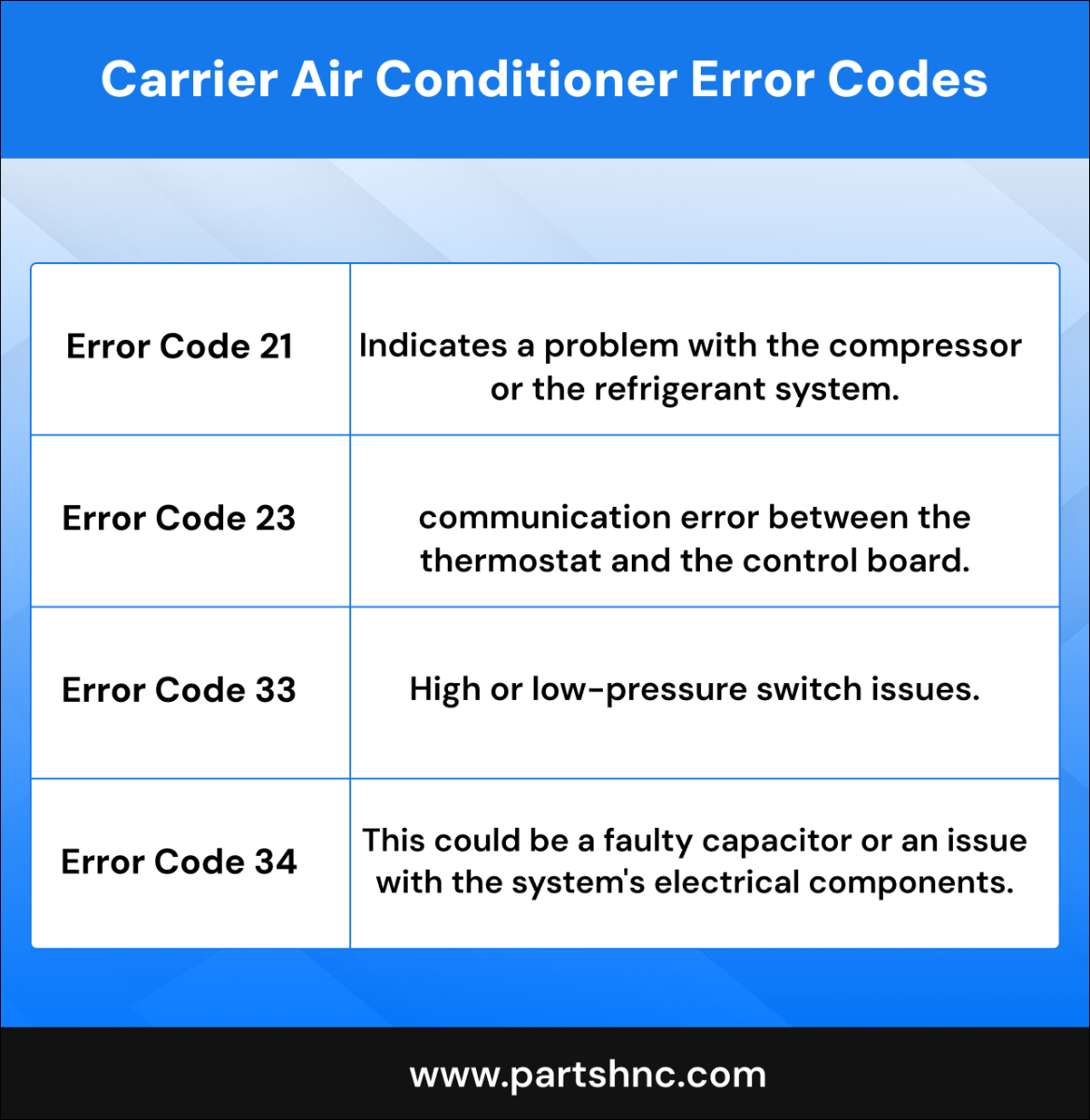
Credit: www.partshnc.com
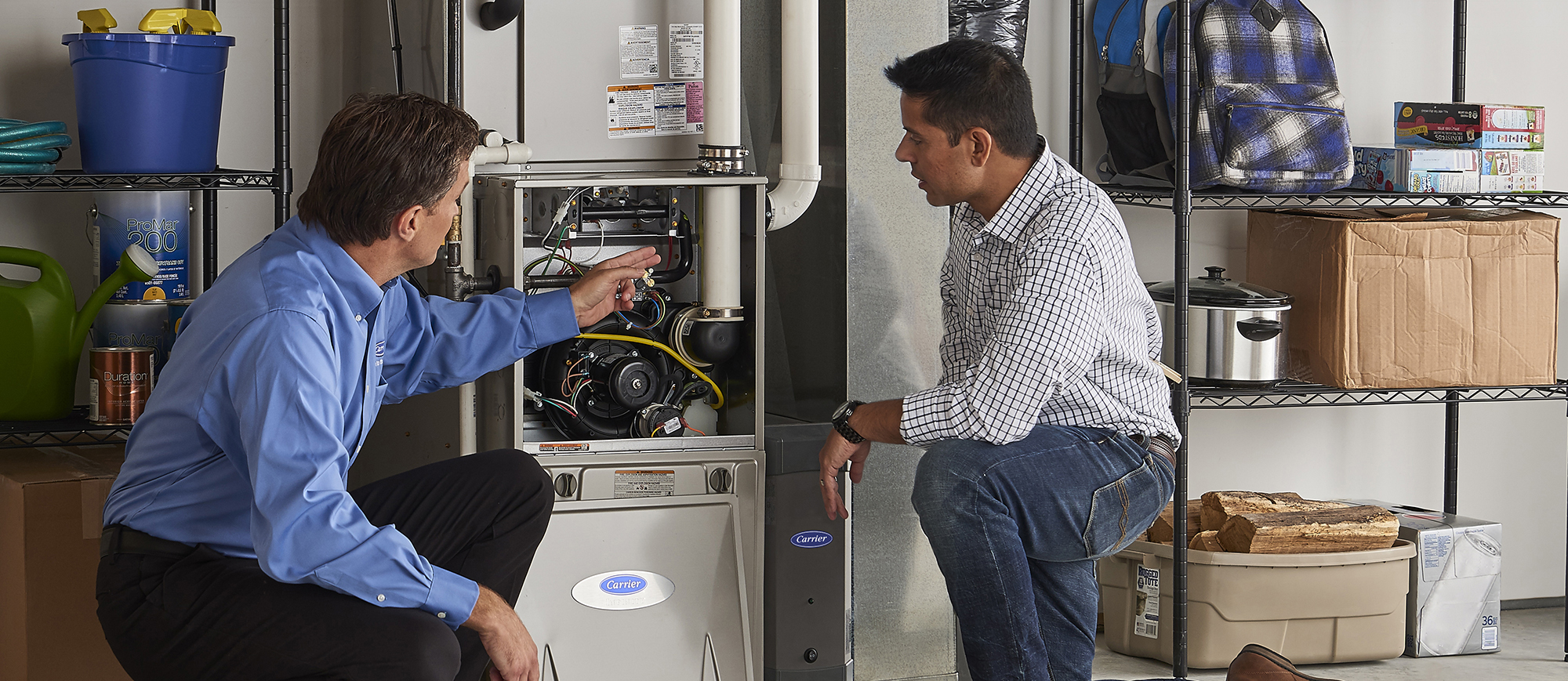
Credit: www.carrier.com
Frequently Asked Questions
What Are Common Carrier Ac Issues?
Common Carrier AC issues include dirty air filters, incorrect thermostat settings, refrigerant leaks, frozen coils, faulty compressors, blocked vents, and electrical problems.
What Is The 3 Minute Rule For Ac?
The 3-minute rule for AC means waiting three minutes after turning off the unit before restarting it. This protects the compressor by allowing pressure to equalize, prevents short cycling, and helps the system reset properly. Follow this rule after power outages, manual shutdowns, or thermostat changes.
How Can I Troubleshoot My Carrier Ac Unit?
Check thermostat settings and power supply first. Inspect contactor and capacitor for damage. Clean or replace dirty filters. Ensure vents and coils are clear. Wait three minutes before restarting to protect the compressor. Call a professional if issues persist.
Where Is The Reset Button On A Carrier?
The reset button on many Carrier models is near the blower motor or inside the burner compartment. It usually appears red or yellow. Press it once and wait a few minutes for the system to restart.
What Causes My Carrier Ac Unit To Stop Cooling?
A dirty air filter or blocked vents often reduce cooling. Refrigerant leaks and dirty condenser coils also affect performance. Check these first for better airflow and cooling.
Conclusion
Troubleshooting your Carrier AC can save time and money. Start with simple checks like thermostat settings and power supply. Clean or replace filters to improve airflow and cooling. Inspect parts such as the contactor and capacitor for damage. Allow the unit to rest before restarting to protect the compressor.
Regular maintenance helps prevent common problems and keeps your AC running well. Use this guide to confidently spot and fix issues early. Stay cool and comfortable with a well-functioning Carrier air conditioner.



