
Is your doorbell chime silent when someone’s at the door? Or maybe it rings with a strange, weak sound that leaves you guessing?
If your doorbell isn’t working right, it can be frustrating—and even embarrassing when guests arrive. But before you rush to replace the whole system, there’s good news: many common doorbell chime problems have simple fixes that you can do yourself.
In this guide, you’ll discover easy steps to troubleshoot your doorbell chime, from checking wires and batteries to adjusting settings and understanding mechanical issues. Keep reading, and you’ll be back to hearing that clear, welcoming ring in no time.
Common Chime Issues
Doorbell chimes can stop working for several reasons. Understanding common issues helps you fix problems faster. Some issues are simple, others need careful attention. This section covers main chime problems and basic troubleshooting tips.
Mechanical Failures
Mechanical chimes may fail due to worn parts or dust buildup. Dust can block the hammer or rods, causing no sound or weak chimes. Misaligned parts prevent the chime from striking correctly. Low voltage also affects mechanical movement, making chimes sluggish or silent. Cleaning and realigning parts often restores the sound.
Electrical Problems
Loose wires cause the chime to stop working or ring intermittently. Bad transformers fail to supply enough power for the chime. Dead or weak batteries in wireless doorbells also cause issues. Check connections and replace damaged wires. Swap out old batteries and test the transformer for proper voltage output.
Smart Chime Connectivity
Smart doorbell chimes rely on Wi-Fi to function. Poor Wi-Fi signal or out-of-range placement causes connection loss. This results in missed chimes or delayed ringing. Resetting the chime or router can help. Place the chime closer to the router for a stronger signal. Keep firmware updated for better reliability.
Incorrect Settings
Settings may silence the chime without your notice. Night shutoff or silent mode disables sound during certain hours. Volume settings might be too low to hear. Check the chime’s manual for setting adjustments. Make sure sound is enabled and volume is at a comfortable level.
Fixing Mechanical Chimes
Mechanical doorbell chimes add charm but can develop issues over time. Fixing these chimes requires simple steps that anyone can follow. Understanding common problems helps in quick repairs. This guide covers key fixes to bring your chime back to life.
Dust And Worn Parts
Dust buildup can stop the chime from working properly. Worn parts like hammers and rods lose their strength. Check for dirt on the moving parts and clean gently. Replace any parts that look worn or damaged. Keeping parts in good shape ensures clear sounds.
Lubrication And Cleaning
Dry parts cause sluggish or off-key chimes. Use a small amount of clock-safe oil on hinges and levers. Avoid over-oiling as it attracts more dust. Clean the chime rods with a soft cloth to remove grime. Regular cleaning and lubrication keep the chime smooth.
Synchronizing Strike Mechanism
Misaligned strike mechanisms cause wrong or skipped chimes. Check if the hour hand matches the number of strikes. Move the hour hand slowly to sync it with the chime. Adjust the V-shaped lever if it jams or sticks. Proper synchronization restores accurate ringing.
Adjusting Night Shut Off
Many chimes have a night shut off feature to silence at night. This switch can accidentally turn on and stop the chime. Locate the ANSO (Automatic Night Shut Off) switch and check its position. Turn it off to allow chimes any time. Adjusting this setting prevents silent surprises.
Repairing Wired And Wireless Doorbells
Repairing wired and wireless doorbells requires careful steps to identify and fix common issues. Both types can face problems like weak signals, power loss, or damaged parts. Understanding basic troubleshooting helps restore your doorbell’s sound quickly.
Wired doorbells depend on stable electrical connections. Wireless models rely on batteries and clear signals. Checking each part can reveal where the problem lies. Follow these steps to fix your doorbell chime effectively.
Checking Batteries And Wiring
Start with the simplest cause: dead batteries in wireless doorbells. Replace old batteries with fresh ones. For wired doorbells, inspect wiring for loose or damaged spots. Tighten screws and reconnect wires if needed. Faulty wiring often stops the chime from working.
Testing Transformer Voltage
Transformers power wired doorbells by lowering home voltage to a safe level. Use a multimeter to test the voltage output. It should match the doorbell’s required voltage, usually between 16-24 volts. A weak or no reading means the transformer needs repair or replacement.
Eliminating Wireless Interference
Wireless doorbells use radio signals that can face interference. Move the chime unit closer to the button to improve reception. Avoid placing it near metal objects or electronics that block signals. Changing the wireless channel on some models helps reduce interference.
Replacing Faulty Chime Units
Chime units can wear out over time from constant use. If sound is weak or missing, replace the chime with a new one. Choose a model compatible with your doorbell system. Installing a new chime often restores loud, clear sound quickly.

Credit: www.magic-vacation.com
Smart Doorbell Troubleshooting
Smart doorbells bring convenience but can face common issues. Troubleshooting helps restore their function quickly. Focus on network, signal, and firmware for best results. These steps often solve most smart doorbell problems.
Resetting Network Connections
Start by restarting your router and smart doorbell. Disconnect the doorbell from Wi-Fi and reconnect it. This refreshes the connection and clears minor glitches. Use the app to remove the device, then add it back. A stable network link is essential for proper chime alerts.
Improving Wi-fi Signal
Weak Wi-Fi can cause missed doorbell rings or delays. Move the router closer to the doorbell if possible. Remove obstacles like walls or large furniture between them. Use a Wi-Fi extender to boost signal strength. Check signal strength in the doorbell app. Strong signal ensures reliable notifications and sound.
Updating Firmware And Settings
Keep your smart doorbell’s firmware up to date. Manufacturers release updates to fix bugs and improve performance. Check the app for any available updates. Also, review your doorbell settings regularly. Adjust volume, motion alerts, and chime options as needed. Updated firmware and correct settings enhance overall operation.
Step-by-step Troubleshooting
Troubleshooting your doorbell chime can solve most common problems quickly. This step-by-step guide will help you find the issue and fix it. Follow each step carefully to restore your doorbell’s sound. Understanding your doorbell type and checking power are key starting points. Cleaning and adjusting settings often fix minor issues. Let’s begin.
Identifying Doorbell Type
Start by finding out your doorbell type. It can be wired or wireless. Wired doorbells connect with electrical wires from the transformer. Wireless doorbells use batteries and connect via radio signals. Knowing the type helps choose the right troubleshooting steps. Look at the chime box and button for clues. Check your doorbell manual if available.
Inspecting Power Sources
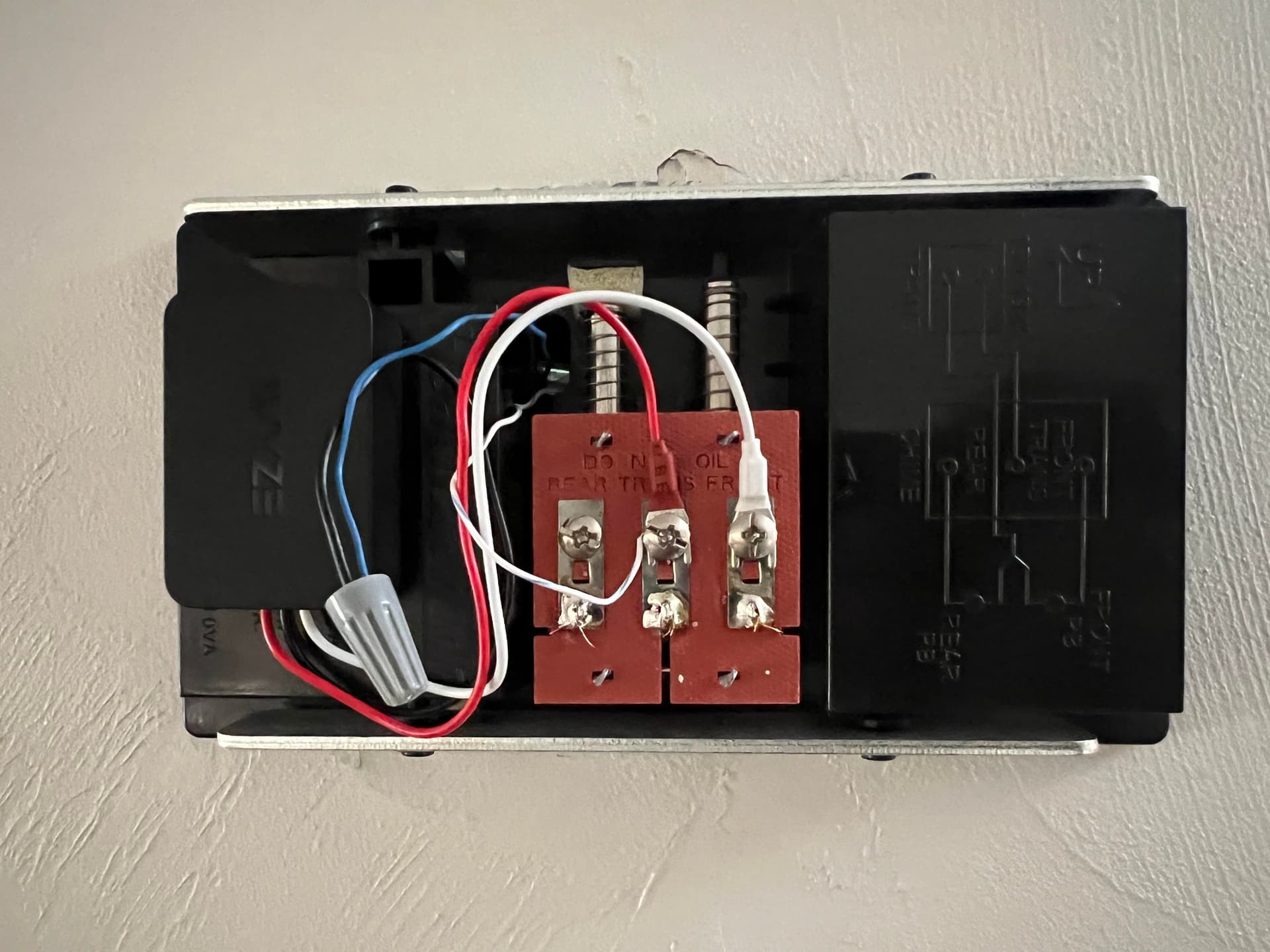
Power problems cause many chime issues. For wired doorbells, check the transformer near your main electrical panel. Use a voltage tester to ensure it works. Inspect wires for damage or loose connections. For wireless doorbells, replace or recharge batteries in both button and chime unit. A weak battery can stop the chime from ringing. Make sure power supply is stable and secure.
Cleaning Chime Components
Dirt and dust can block the chime’s sound. Turn off power before cleaning. Use a soft brush or cloth to remove dust from the chime box. Check the striker or hammer inside the chime. Clean any buildup that stops it from moving freely. Avoid using water or harsh chemicals. Keep parts dry to prevent rust or damage. Cleaning can restore clear, loud chime sounds.
Adjusting Sound Settings
Some doorbells have volume or sound settings. Check the chime box for controls or switches. Adjust volume to a higher level if it is too low. Some models have night mode or silent settings. Make sure these are turned off during the day. For smart doorbells, check app settings for sound control. Reset settings if the chime still does not ring properly. Proper adjustment improves your doorbell’s performance.
Credit: vidscola.com
Signs Of A Bad Chime
A doorbell chime signals visitors and alerts you to arrivals. Noticing unusual sounds or no sound at all may indicate a bad chime. Identifying the signs early helps fix issues quickly. Here are common signs your doorbell chime might be failing.
No Sound Or Weak Sound
A doorbell that makes no sound or a very weak sound often means the chime is faulty. Check if the chime unit receives power and if the wiring is intact. Dust, dirt, or worn-out parts inside the chime can also cause this problem. Weak sound might be a sign of low voltage or a failing transformer.
Constant Or Incomplete Ringing
If the doorbell rings continuously without stopping, the chime may be stuck or damaged. Incomplete ringing, where the sound cuts off too soon, also points to a mechanical or electrical issue. Loose wires or misaligned internal parts often cause these problems. Such signs show the chime needs repair or replacement.
Single Note Ringing
A chime that usually plays multiple notes but suddenly rings only a single note suggests worn or broken components. The hammers or rods inside might be misaligned or dirty. Cleaning and adjusting these parts may help, but persistent single-note ringing signals deeper mechanical failure.
When To Call A Professional
Knowing when to call a professional for doorbell chime issues saves time and prevents damage. Some problems look simple but hide deeper faults. Handling complex repairs without skills can be risky and ineffective. Professionals have tools and training to fix tough problems safely and quickly. Here are key signs that you should seek expert help for your doorbell chime.
Complex Wiring Issues
Wiring problems often cause doorbell chimes to fail. Faulty, frayed, or tangled wires can be hard to find and fix. A professional can trace wires behind walls and test electrical flow. They know how to handle voltage safely and prevent shocks. Complex wiring repairs need special tools and experience to avoid further damage.
Mechanical Repairs
Doorbell chimes with mechanical parts can wear out or get stuck. Dust, misaligned hammers, and broken levers stop the chime from sounding right. Fixing these parts requires careful cleaning and precise adjustments. Professionals can lubricate and repair worn components to restore smooth function. Mechanical repairs are delicate and best left to experts.
Persistent Connectivity Problems
Smart doorbell chimes rely on Wi-Fi and settings to work well. Persistent disconnections or poor signal often need advanced troubleshooting. Professionals check network issues, reset devices, and update software. They can also replace defective parts to keep your smart chime reliable. Ongoing connectivity problems usually require expert intervention.
Credit: integradiversidade.com.br
Frequently Asked Questions
How To Fix A Doorbell Chime That Is Not Working?
Check the doorbell’s power source and replace dead batteries. Inspect wiring for damage or loose connections. Test the transformer voltage. Clean the chime mechanism from dust. Reset smart chimes and Wi-Fi if applicable. Consult a professional for complex electrical or mechanical issues.
What Are Common Chime Problems?
Common chime problems include mechanical wear, loose wiring, dead batteries, faulty transformers, Wi-Fi issues, and incorrect settings like silent mode or night shutoff. Cleaning, tightening connections, replacing batteries, and resetting settings often fix these issues quickly.
How To Tell If A Doorbell Chime Is Bad?
A bad doorbell chime often produces no sound, irregular tones, or weak volume. Check for loose wires, dead batteries, or low voltage. Dirt or worn parts can cause misalignment and poor sound. Test power and settings, and replace faulty components to restore function.
Why Does My Doorbell Ding But Not Dong?
Your doorbell dings but not dongs due to worn parts, misaligned hammers, or electrical issues like loose wiring or a faulty transformer. Clean, tighten connections, and check power sources. Mechanical adjustments or replacements may be necessary to restore the dong sound.
Why Is My Doorbell Chime Not Ringing At All?
A common cause is a broken wire or dead transformer. Check wiring connections and replace the transformer if needed.
Conclusion
Troubleshooting a doorbell chime can be simple with the right steps. Check batteries, wiring, and the transformer first. Clean mechanical parts if sounds are off or irregular. For wireless chimes, watch for signal interference or weak Wi-Fi. Small fixes often restore your doorbell’s sound quickly.
Don’t ignore loose connections or worn parts—they cause most problems. If issues persist, consider professional help to avoid damage. Keeping your doorbell chime in good shape ensures you never miss a visitor’s ring.



