
Is your DSC alarm system beeping unexpectedly or showing a yellow triangle on the keypad? These warning signs can be frustrating and confusing, especially when you rely on your security system to keep your home or business safe.
But don’t worry—you’re not alone, and most common DSC alarm issues have simple fixes. In this guide, you’ll discover easy troubleshooting steps that put you back in control of your system quickly. Whether it’s a trouble light, communication error, or sensor fault, understanding what these alerts mean and how to address them will save you time and stress.
Keep reading to learn how to silence those annoying beeps, clear trouble codes, and ensure your DSC alarm system works flawlessly again.
Common Dsc Alarm Issues
DSC alarm systems are reliable but can show some common issues. These problems often signal that the system needs attention or repair. Knowing these issues helps in quick troubleshooting.
Many users report trouble signs that appear on the keypad. These signs warn about system faults or errors. Recognizing these signals and understanding their meaning saves time and stress.
Yellow Triangle Indicator
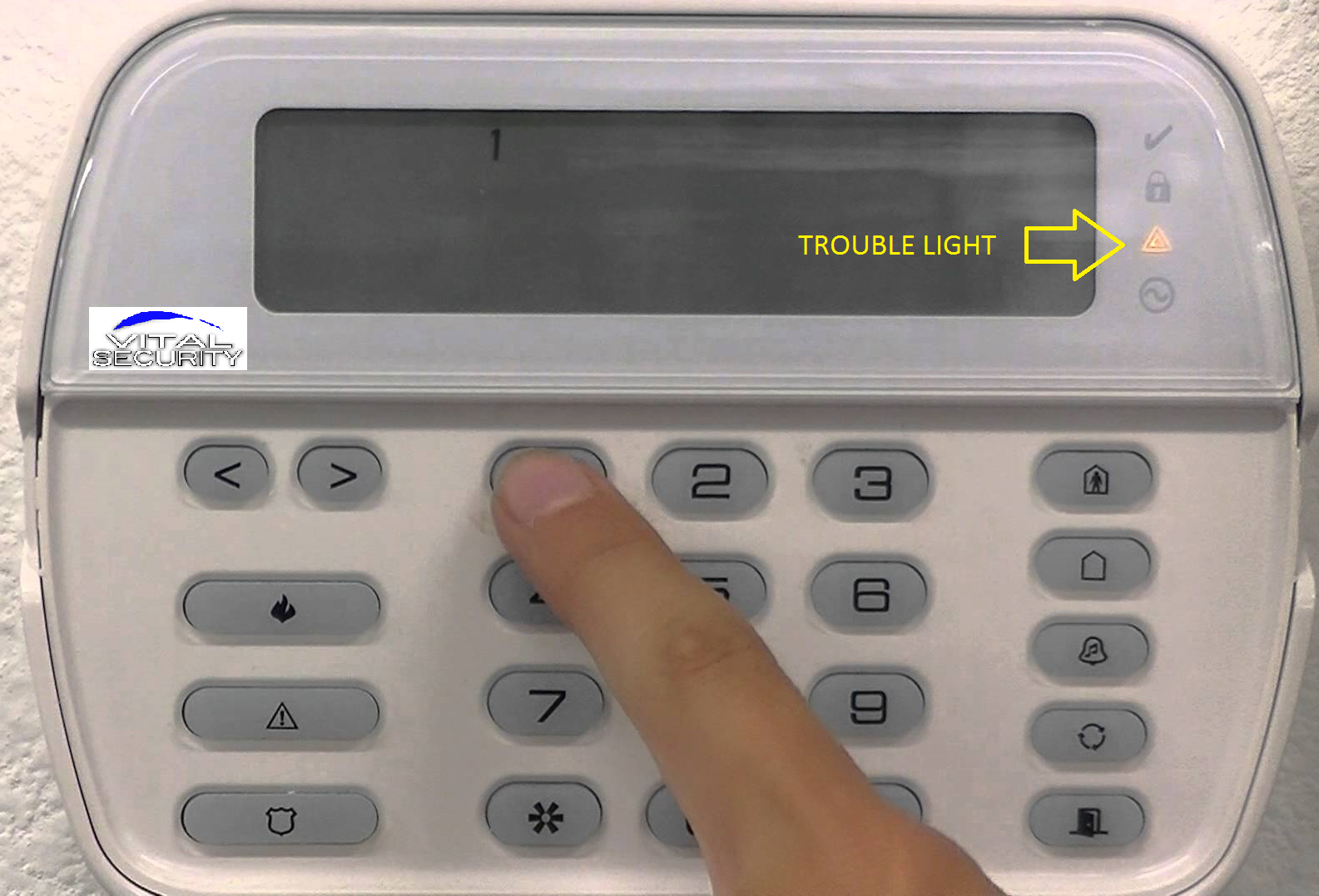
The yellow triangle on a DSC alarm keypad means a trouble condition exists. It often appears after power outages or wiring problems. This light warns that the system is not fully ready or safe.
To clear the yellow triangle, check all sensors and wiring connections. Sometimes, a simple power reset fixes the issue. Disconnect the main power and backup battery for a few minutes.
Keypad Beeping Causes
Keypad beeping usually signals an alert or trouble. Common causes include low battery, communication failure, or open zones. The sound repeats until the problem is fixed or silenced.
Press the ” key to stop the beeping temporarily. Then, find the root cause by checking sensors, batteries, and connections. Fixing the issue will stop the beeping permanently.
Red Lock And Arming Failures
The red lock light means the system cannot arm correctly. This often happens due to an open zone or sensor fault. The alarm will not activate until all zones are secure.
Check each zone to ensure doors and windows are closed. Inspect sensors for damage or loose wires. Fixing these problems clears the red lock and allows arming.

Credit: www.youtube.com
Trouble Code Identification
Identifying trouble codes on a DSC alarm system is key to quick problem solving. These codes tell you what needs attention. Understanding them helps keep your security system working well. This section explains how to find and read these codes.
Accessing Trouble Menu
Start by entering your user code on the keypad. Then press the “” key followed by “2” to open the trouble menu. The keypad will display trouble codes one by one. Use the arrow keys to scroll through codes. Press “” to exit the menu when done.
Decoding Led Indicators
Look at the keypad’s LED lights to find trouble signals. A yellow triangle means a system trouble exists. The red lock light shows the system is armed or in alarm. Blinking or steady lights give clues about the type of issue. Each pattern matches a specific trouble code.
Common Trouble Codes
- 110: Low backup battery – replace the battery soon.
- 120: AC power failure – check power supply and wiring.
- 130: Zone fault – inspect sensors and wiring for damage.
- 140: Telephone line trouble – verify phone line connection.
- 150: Module supervision – check keypad or module communication.
Knowing these codes helps fix issues fast. Always address the root cause to clear the trouble light.
Quick Fixes For Dsc Alarms
DSC alarm systems often show trouble alerts that need quick attention. These alerts help protect your home but can be annoying if not fixed fast. Quick fixes can stop beeps and clear errors. Follow simple steps to handle common problems. This helps keep your security system working well without delay.
Silencing The Trouble Beep
The trouble beep sounds to warn you of an issue. To stop the beep, press the key on your keypad. This silences the sound but does not fix the problem. Check the trouble light or message to find what caused the beep. Use this step to stop noise while you plan a proper fix.
Performing A System Reset
Resetting the system can clear minor faults. First, disconnect the alarm’s power supply. Remove the backup battery if possible. Wait for about five minutes. Reconnect the power and battery. This refreshes the system and may clear some errors. If the trouble returns, deeper troubleshooting is needed.
Clearing Trouble Codes
Clearing trouble codes removes error messages from the display. Enter your user code, then press and 2. This opens the trouble menu. Use the keypad to review error details. Fix the underlying problem before clearing codes. Press to exit the menu after clearing. Codes will stay off only if the issue is fixed.
Sensor And Wiring Checks
Checking sensors and wiring is key in fixing DSC alarm system issues. These parts often cause trouble signals or false alarms. Careful inspection helps find problems fast. This step saves time and avoids costly repairs.
Below are simple checks to spot sensor faults and wiring problems. Understanding these can keep your alarm system working well and secure your home effectively.
Inspecting Faulty Sensors
Start by examining all sensors for damage or dirt. Dust and spider webs can block sensors. Clean them gently with a soft cloth. Look for cracks or loose parts on the sensor casing. Faulty sensors often cause false alarms or trouble alerts.
Test each sensor by triggering it manually. For example, open a door or window linked to a sensor. Check if the alarm responds correctly. Replace any sensor that does not react properly.
Verifying Wiring Connections
Next, check the wiring connections at the control panel and sensors. Loose or corroded wires cause communication errors. Turn off the system power before touching wires. Inspect each wire for breaks or frays.
Ensure all wires fit tightly into terminals. Use a screwdriver to secure loose screws. If wires look damaged, replace them with the correct type. Good wiring prevents false trouble signals and keeps the system reliable.
Handling Module Supervision Errors
Module supervision errors occur when the control panel loses connection with a sensor or keypad. Check wiring and power supply to each module. Inspect connection points for corrosion or loose pins.
Reset the system after fixing wiring issues. This clears supervision errors on the keypad. If errors continue, test the modules individually. Replace faulty modules to restore full system function.
Battery And Power Issues
Battery and power issues are common causes of trouble in DSC alarm systems. Low or dead batteries can trigger warning lights and beeping sounds. Power interruptions may cause the system to reset or behave unexpectedly. Knowing how to handle these problems keeps your alarm reliable and secure.
Replacing Backup Batteries
Backup batteries provide power when the main source fails. Over time, these batteries lose charge and need replacement. Open the alarm panel carefully to access the battery compartment. Remove the old battery and insert a new one that matches the specifications. After replacement, close the panel securely and check the system status. Regular battery checks help prevent unexpected alarms or failures.
Dealing With Power Interruptions
Power outages can cause your DSC alarm to enter a trouble mode. The keypad may display a yellow triangle or red lock light. Disconnect the main power and backup battery for a few minutes to reset the system. Reconnect power and observe if the trouble lights clear. Frequent power interruptions might require checking your home’s electrical setup or using a surge protector.
Preventing Auto-arming Problems
Power and battery issues can cause auto-arming to fail. Ensure the backup battery is always charged and the power supply is stable. Avoid unplugging the system or turning off the circuit breaker. Regular maintenance and monitoring of power sources prevent false alarms and system faults. This keeps your DSC alarm ready to protect your home at all times.
Credit: www.myvitalsecurity.com
Advanced Troubleshooting Steps
Advanced troubleshooting steps help solve complex DSC alarm system issues. These steps go beyond basic fixes and address deeper problems. Follow each carefully to restore your system quickly. Understanding these techniques improves your control and confidence.
Communication Troubleshooting
Communication errors often cause trouble lights on the keypad. Check all wiring connections between the panel and keypads. Loose or damaged wires can disrupt signals. Reset the panel by disconnecting power and backup battery for a few minutes. This can clear temporary faults. If the problem persists, inspect phone or internet lines if used for monitoring. Replace faulty cables or modules to restore communication.
Master Code Recovery
The master code controls your DSC alarm system settings. Forgetting it can block access to important functions. Look for the code in your user manual or documentation first. Some models allow resetting the master code by using default factory codes. If that fails, power cycle the panel and try again. Avoid multiple incorrect attempts to prevent system lockout. Contact your system provider for guidance on code recovery.
When To Contact Professionals
Certain issues need expert help to avoid damage or voiding warranties. Call a professional if wiring problems are complex or hidden. Also seek help if the control panel fails to reset or respond. Alarm monitoring setup and code recovery beyond basic steps usually require technician support. Professionals have the tools and knowledge to fix problems safely. Do not delay contacting them to keep your home secure.
Maintenance Tips
Proper maintenance keeps your DSC alarm system working well. It helps avoid problems and keeps your home safe. Simple steps can prevent many common issues. Follow easy tips to maintain your alarm system.
Regular System Checks
Check your alarm system regularly to find issues early. Test sensors and detectors to ensure they work properly. Look for any damaged wires or loose connections. Make sure the keypad displays no error messages. Regular checks help you fix small problems before they grow.
Updating Firmware
Keep your system’s firmware up to date. Firmware updates improve security and fix bugs. Visit the manufacturer’s website for the latest version. Follow instructions carefully to update the system safely. Updated firmware helps your alarm run smoothly and protects against new threats.
Preventing Future Trouble Conditions
Prevent trouble by keeping the system clean and dry. Avoid placing sensors near heat or moisture sources. Replace batteries on time to avoid low power warnings. Secure all wiring to prevent damage from pets or children. Good care reduces false alarms and system errors.

Credit: smiththompson.com
Frequently Asked Questions
What Does Yellow Triangle Mean On Dsc Alarm?
The yellow triangle on a DSC alarm indicates a trouble condition in the system. It signals issues like faulty sensors, wiring problems, or communication errors. Pressing silences the beep, but fix the underlying problem to clear the warning permanently.
How To Get Rid Of Yellow Triangle On Dsc Alarm?
To clear the yellow triangle on a DSC alarm, identify and fix the trouble cause. Silence beeps by pressing. Reset the system by disconnecting power and backup battery for several minutes. Ensure all sensors and wiring are secure to remove the trouble indicator permanently.
How Do I Clear The Trouble On My Dsc Alarm?
Press to silence the beep. Check sensors, wiring, and module connections for faults. Fix issues to clear the trouble light permanently. Use your master code to access settings or contact a professional if needed.
How To Check Trouble On Dsc Alarm?
Check DSC alarm trouble by viewing the keypad’s yellow triangle or beep alerts. Press 2964for details. Inspect sensors, wiring, and connections. Press to silence beeps and exit. Fix issues to clear trouble permanently. Use your master code or contact a professional if needed.
What Does The Yellow Triangle Mean On Dsc Alarm?
The yellow triangle shows a trouble condition in the DSC alarm system. It means there is a fault or issue needing attention. This light helps identify problems early.
Conclusion
Troubleshooting your DSC alarm system becomes easier with clear steps. Always check sensors, wiring, and power sources first. Silence beeps by pressing the “” key to stop noise temporarily. Remember, fixing the root problem clears trouble lights permanently. Keep your master code handy or seek expert help if needed.
Regular maintenance helps prevent future issues and keeps your home safe. Stay calm and follow these simple tips for effective DSC alarm troubleshooting.



