
If you rely on frequency drives to keep your motors running smoothly, you know how frustrating it can be when something goes wrong. Maybe your drive is tripping unexpectedly, making strange noises, or your motor just isn’t performing like it should.
You might feel stuck wondering where to start fixing the problem. That’s exactly why understanding frequency drive troubleshooting is essential—it puts you in control and saves you time and money. You’ll discover simple, practical steps to identify common faults, uncover what’s really causing your drive issues, and learn how to prevent them from happening again.
Ready to stop guessing and start fixing? Keep reading to master your frequency drive troubleshooting skills today.
Common Vfd Faults
Variable Frequency Drives (VFDs) are vital for controlling motor speed and energy use. Common faults can disrupt operations and cause downtime. Understanding these faults helps you maintain system reliability and reduce repair costs.
Many faults arise from environmental factors and installation errors. Overheating, overcurrent, loose connections, capacitor failures, and power quality issues top the list. These problems often cause the VFD to trip or fail prematurely.
Overheating Causes
Overheating is a frequent cause of VFD failure. Dust buildup blocks cooling fans and vents. Poor ventilation increases internal temperature rapidly. High ambient temperature worsens the problem. Overloading the motor also raises heat inside the drive.
Overcurrent And Overload
Overcurrent occurs when the motor draws more current than rated. Fast acceleration or heavy mechanical loads cause this. Overload trips protect the VFD but stop operations. Repeated overloads can damage internal components.
Loose Connections
Loose wiring leads to intermittent faults and voltage drops. Vibration and poor installation cause connections to loosen. This creates sparks and heat, damaging terminals. Regular checks can prevent this issue.
Capacitor Failures
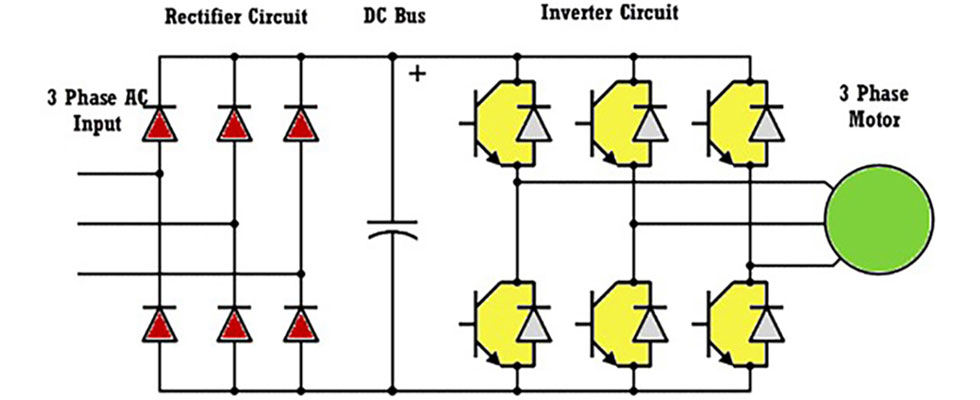
Capacitors store energy and smooth voltage inside the VFD. Age, heat, and voltage spikes shorten their life. Failed capacitors cause voltage ripple and erratic drive behavior. Signs include unusual noises or frequent faults.
Power Quality Issues
Poor power quality affects VFD performance. Voltage sags, surges, and harmonics stress the drive. Unstable power can cause unexpected trips or errors. Installing filters and surge protectors improves power quality and drive reliability.

Credit: electrical-engineering-portal.com
Internal Component Failures
Internal component failures often cause frequency drive issues. These failures reduce drive performance and can stop operations. Understanding key parts helps in quick troubleshooting. Two main components to watch are power semiconductors and capacitors. Faults in these parts are common and affect drive reliability.
Power Semiconductors
Power semiconductors control electric flow in the drive. They switch current on and off rapidly. Damage happens from overheating or electrical surges. Signs include frequent tripping or drive shutdowns. Testing these parts requires special tools. Replacement restores normal function and prevents further damage.
Capacitor Degradation
Capacitors store and release electric energy inside the drive. Over time, they lose capacity and efficiency. Heat, age, and voltage stress cause this wear. Symptoms include unusual noises or drive instability. Visual inspection can reveal bulging or leaks. Timely replacement avoids sudden drive failures.
Quick Diagnostic Steps
Quick diagnostic steps help identify problems with a frequency drive fast. These checks catch common issues early. Following simple actions saves time and reduces downtime. Regularly performing these steps keeps your system reliable and efficient.
Check Display Panel
Start by examining the frequency drive’s display panel. Look for error codes or warning messages. These codes provide clues about the issue. Ensure the screen is clear and not flickering. A blank or unresponsive panel may indicate power or internal faults. Note any unusual symbols or alerts shown.
Listen For Unusual Noises
Turn on the drive and listen carefully. Strange sounds like buzzing, clicking, or grinding hint at mechanical or electrical problems. Normal operation is usually quiet or has a steady hum. Noises can indicate worn bearings, loose parts, or electrical arcing. Pay attention to any changes in sound compared to normal use.
Inspect For Burnt Smells
Sniff around the frequency drive for burnt odors. A burning smell often signals overheating or electrical shorts. It may come from damaged wiring, burned components, or overheated circuits. Do not ignore this sign as it could lead to serious failure. Turn off power before inspecting closely.
Monitor Motor Performance
Observe how the motor runs with the frequency drive. Check for irregular speed changes, vibrations, or stalls. Poor motor performance suggests drive output issues or wiring problems. Smooth and consistent motor operation means the drive is likely working well. Note any drops in power or unusual behavior during operation.
Preventive Measures
Preventive measures reduce frequency drive problems before they start. Regular care keeps drives running smoothly and extends their life. Follow simple steps to avoid common issues and costly repairs.
Maintain Clean Environment
Keep the drive area free from dust and dirt. Dust blocks ventilation and causes overheating. Use filters and clean regularly. Avoid placing drives near sources of moisture or chemicals.
Proper Motor And Drive Sizing
Match the drive size to the motor load. Oversized or undersized drives cause stress and faults. Check motor requirements and choose a compatible drive. Correct sizing prevents overheating and electrical faults.
Adjust Acceleration Ramps
Set smooth acceleration and deceleration times. Fast ramps cause overcurrent and stress on components. Slow ramps reduce mechanical wear and electrical spikes. Adjust settings based on load and application needs.
Secure Wiring Connections
Ensure all wiring is tight and secure. Loose connections cause voltage drops and faults. Regularly inspect terminals and cables for wear or damage. Use correct wire sizes and proper grounding methods.
Ensure Adequate Cooling
Provide proper airflow around the drive. Overheating damages internal parts and triggers trips. Use fans or cooling systems if needed. Avoid blocking vents and keep ambient temperature within limits.
Troubleshooting Tools
Troubleshooting a frequency drive requires the right tools to identify problems quickly. These tools help pinpoint issues that cause drive failures or poor performance. Using proper equipment saves time and reduces downtime. The following tools are essential for effective frequency drive troubleshooting.
Using Drive Monitoring
Drive monitoring tools track the drive’s operation in real time. They record data such as voltage, current, and temperature. This data reveals irregularities or faults in the system. Monitoring helps detect problems before they cause a shutdown. It also provides insight into drive health and performance trends.
Diagnostic Software
Diagnostic software connects to the frequency drive for detailed analysis. It reads error codes and fault logs stored in the drive. This software also allows configuration checks and firmware updates. Using diagnostic tools simplifies troubleshooting by guiding users through fault resolution steps. Many drives come with dedicated software for this purpose.
Thermal Imaging
Thermal imaging cameras detect hot spots on the drive and motor. Overheating parts often indicate electrical or mechanical issues. This tool helps find cooling problems, loose connections, or failing components. Thermal scans are non-contact and provide immediate visual feedback. Regular thermal checks prevent damage caused by excessive heat.
Multimeter And Oscilloscope
A multimeter measures voltage, current, and resistance to check electrical continuity. It helps find wiring faults and verify power supply levels. An oscilloscope shows signal waveforms and frequency patterns. This tool identifies noise, distortion, or irregular signals in the drive output. Together, these instruments diagnose electrical faults accurately and efficiently.
Credit: www.pumpsandsystems.com

Credit: www.fluke.com
Frequently Asked Questions
How To Tell If A Vfd Drive Is Bad?
Signs of a bad VFD drive include frequent tripping, overheating, unusual noises, burnt smell, and inconsistent motor performance. Check for display errors, loose connections, and visible damage. Monitor for high ripple voltage or DC bus issues to diagnose faults early.
What Is The Most Common Vfd Failure?
The most common VFD failure is overheating caused by dust buildup and poor cooling. Overcurrent and loose connections also frequently cause faults. These issues damage internal components like capacitors and power semiconductors, leading to drive malfunctions and trip faults. Proper maintenance prevents most failures.
What Are Common Vfd Troubleshooting Tips?
Common VFD troubleshooting tips include checking for overheating, inspecting connections, verifying proper cooling, monitoring fault codes, and testing power quality. Clean dust buildup, ensure correct motor sizing, and review acceleration settings to prevent overloads and faults. Regular maintenance helps avoid common failures.
Why Is My Vfd Drive Not Responding?
Your VFD drive may not respond due to loose wiring, blown fuses, or power supply issues. Check for overheating, faults, or incorrect settings. Ensure proper cooling and verify input voltage. Faulty components or software errors can also cause non-responsiveness. Regular maintenance prevents common failures.
What Causes Frequent Tripping In Frequency Drives?
Frequent tripping often results from overheating, overcurrent, or loose electrical connections. Dust and poor cooling reduce drive performance and cause faults. Checking airflow and cleaning the drive can help prevent trips.
Conclusion
Troubleshooting frequency drives takes patience and careful checks. Start by inspecting cooling and airflow to prevent overheating. Check connections to avoid loose wiring problems. Watch for signs like unusual noises or error codes. Regular maintenance keeps drives running smoothly. Small issues can cause big failures if ignored.
Understanding common faults helps fix problems faster. Stay calm and follow steps methodically. This approach saves time and reduces downtime. Keep your frequency drives healthy for better machine performance.



