
Is your GE washer flashing lights and leaving you puzzled? These blinking signals aren’t random—they’re your washer’s way of telling you something needs attention.
You might feel frustrated or unsure about what to do next, but understanding what those flashing lights mean can save you time and money. In this guide, you’ll discover simple, step-by-step troubleshooting tips to decode those signals and get your washer running smoothly again.
Whether it’s a control board glitch, a door latch issue, or a reset you can do yourself, you’ll learn how to tackle the problem confidently. Keep reading, and take control of your GE washer’s flashing light troubles today!
Common Causes Of Flashing Lights
Flashing lights on your GE washer often signal underlying issues. Understanding common causes helps to diagnose problems faster. Flashing lights usually indicate errors that need attention. These errors can disrupt your washer’s normal operation. Identifying the root cause saves time and prevents further damage.
Control Board Errors
The control board acts as the washer’s brain. Faulty control boards often cause flashing lights. Electrical surges or moisture may damage the board. A damaged control board can misinterpret signals. This leads to blinking lights and unresponsive controls. Replacing or resetting the control board often fixes the issue.
Door Lock Malfunctions
The washer door must lock securely to start a cycle. If the door lock fails, lights may flash continuously. A broken latch or sensor can trigger this error. The washer detects the door as open and stops operation. Checking and repairing the door lock resolves flashing light problems.
Moisture And Damage Issues
Water or moisture inside the control panel causes errors. Moisture can short circuit electrical parts, leading to blinking lights. Physical damage from impacts may also cause light flashing. Inspect the washer for leaks or cracked panels. Drying and repairing moisture damage often stops the flashing lights.
Basic Reset Techniques
Basic reset techniques are the first step to fix flashing lights on a GE washer. These methods help clear minor errors and restore normal function. Most issues arise from power glitches or control board hiccups. Simple resets often solve these problems without needing a technician.
Try these easy reset steps before moving to complex repairs. They are safe and quick to perform. Following the correct reset process can save time and money.
Power Reset Steps
Unplug the washer from the power source. Wait at least one minute to clear residual power. Plug the washer back in and turn on the power. For electronic controls, select any cycle and press Start. The washer should respond normally. For timer knob models, turn the knob clockwise, then back to a setting other than final spin. Restore power to complete the reset.
Lid And Motor Reset For Top-loaders
Open and close the lid firmly to ensure it is fully latched. Press and hold the Start button for 5 seconds. The washer may beep or the lights flash. This signals the motor reset is complete. If no response, repeat the steps once more. This reset helps if the washer thinks the lid is open or the motor is stuck.
Electronic Control Reset Method
Turn off the washer power. Press and hold the Start button. While holding Start, turn the cycle selector dial one click right, then one click left, then one click right again. The lights should flash or the washer beep. Release the Start button. Turn the washer back on and test a wash cycle. This method resets the control board on many GE models.
Using Diagnostic Mode
Using the diagnostic mode on your GE washer helps identify problems quickly. It reveals error codes and system issues. This mode is a powerful tool for troubleshooting flashing lights. Understanding how to access and interpret diagnostic mode saves time and effort. It guides you through effective repairs.
Accessing Diagnostic Mode
Start by turning the washer’s power off. Next, press and hold specific buttons based on your model. Common buttons include “Start” and “Soil Level.” Hold them while turning the power back on. Keep holding until the lights blink or a code appears. This confirms diagnostic mode is active.
Each GE washer model may use a different button combination. Check your user manual for exact instructions. The control panel lights will flash in a unique pattern. This signals the washer is ready to display error codes.
Reading And Clearing Error Codes
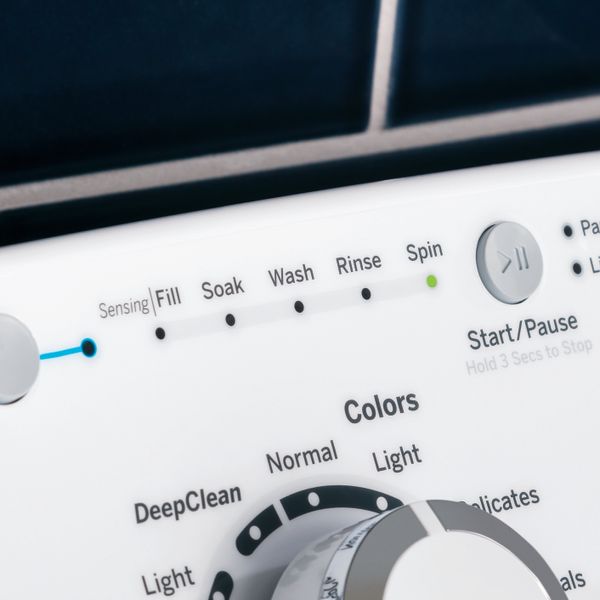
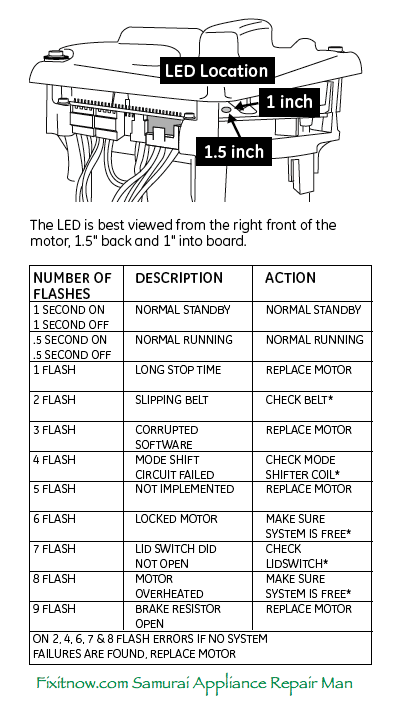
Error codes appear as blinking lights or numbers on the display. Each code points to a specific fault, such as door lock or water supply issues. Write down the code shown before proceeding. Consult your washer’s manual or online resources for code meanings.
To clear error codes, press the “Start” button or a reset combination. This resets the control board and turns off flashing lights. If the error repeats, the problem may need a professional repair. Using diagnostic mode helps you understand if the washer needs parts replaced or a simple reset.
Credit: www.spencerstv.com
Signs Of A Faulty Control Board
Identifying signs of a faulty control board in your GE washer helps prevent bigger problems. The control board acts as the machine’s brain, managing all functions. When it fails, the washer may show unusual symptoms that disrupt normal operation. Recognizing these signs early allows for timely troubleshooting and repair.
No Response From Buttons
Pressing the control panel buttons but seeing no reaction can indicate control board failure. The board may not send signals to start or change cycles. This lack of response stops the washer from operating properly.
Erratic Machine Behavior
The washer might start and stop randomly or skip parts of the cycle. This erratic behavior often points to control board issues. The board sends mixed or faulty commands that confuse the machine.
Persistent Error Codes
Error codes flashing on the display repeatedly suggest control board faults. These codes usually mean the board detects a problem it cannot fix. Ignoring persistent errors can lead to complete washer shutdown.
Power And Display Issues
The washer may fail to power on or show an incomplete display. Dim lights, flickering screens, or no display at all often relate to control board defects. These issues prevent you from controlling or monitoring the washer.
Unusual Clicking Sounds
Hearing strange clicking noises during operation can signal control board trouble. The board may be trying to activate parts but failing. These sounds often accompany other symptoms like unresponsiveness or errors.
Testing The Control Board
Testing the control board is a key step in troubleshooting flashing lights on a GE washer. The control board manages all machine functions. Faults here can cause blinking lights and errors. Checking it helps identify if the board needs repair or replacement.
Safety Precautions
Always unplug the washer before testing the control board. This prevents electric shock and damage. Wear insulated gloves for added protection. Work in a dry area to avoid accidents. Never touch live wires or terminals.
Service Mode Entry
Enter service mode to test the control board functions. Turn the washer on but do not start a cycle. Press and hold the “Start” button while turning the cycle selector dial. Follow the model-specific steps in the manual. The display will show codes or lights indicating the board status.
Voltage And Power Checks
Use a multimeter to check power at the control board. Test the voltage at the input terminals. Confirm it matches the washer’s power requirements. Check for loose or burnt wires on the board. Low or no voltage indicates power supply issues or a bad control board.

Credit: www.youtube.com
Credit: fixitnow.com
Frequently Asked Questions
Why Are The Lights Flashing On My Ge Washer?
Flashing lights on your GE washer usually indicate control board errors or door lock issues. Check the door latch and reset the machine by unplugging it. Inspect the control panel for damage or moisture. Consult the manual for diagnostic mode to identify error codes.
Why Are The Lights On My Washing Machine Blinking?
Blinking lights on your washing machine usually indicate control board errors or door lock issues. Check the door latch and power cycle the machine. Inspect for moisture or damage on the control panel. Resetting the washer often resolves blinking light problems.
How Do I Reset A Ge Washer Machine?
To reset a GE washer, unplug it for 1 minute. Plug it back in, select a cycle, and press Start. For top-loaders, perform a lid/motor reset by opening and closing the lid until lights flash. Refer to your manual for model-specific diagnostic mode resets.
How To Tell If Ge Washer Control Board Is Bad?
A bad GE washer control board shows no power, unresponsive buttons, blinking lights, random starts/stops, or persistent error codes.
Why Are My Ge Washer Lights Flashing Repeatedly?
Flashing lights often mean the washer detects an error. Common issues include door lock problems or control board faults. Checking these parts can help identify the cause.
Conclusion
Flashing lights on your GE washer often mean a simple error or reset is needed. Start by checking the door latch and power connections. Try basic resets like unplugging or using the control panel buttons. If lights keep flashing, consult your washer’s manual for diagnostic mode steps.
Small fixes usually solve the problem without expert help. Regular maintenance helps prevent future blinking light issues. Stay calm and follow these easy steps to keep your washer running smoothly.



