
If your Genie Silentmax 1000 garage door opener is not working, first make sure the sensor eyes are clean and the wire connections are secure. Also, check that the sensors are facing each other.
If the issue persists, try unplugging the opener and plugging it back in. A flashing red light on the opener indicates a malfunction, which could be caused by dirty lenses or loose wires. If your garage door keypad stops working after changing the battery, check for damaged or frayed wiring.
It’s also recommended to check the wall console’s Sure-Lock™ setting and ensure it’s turned off. Troubleshooting your Genie Silentmax 1000 garage door opener is essential to identify and resolve any issues with its functionality.
Genie SilentMax 1000 No Power: How to Fix It Fast
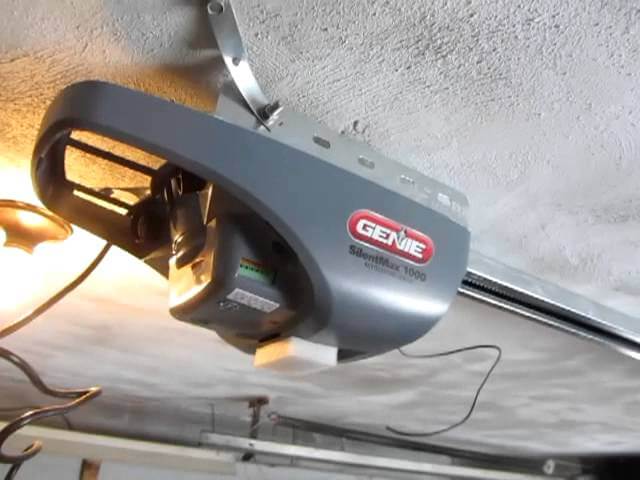
If your Genie SilentMax 1000 garage door opener suddenly stops working and shows no signs of power, don’t panic. In most cases, the issue is electrical and can be resolved with a few simple checks. Follow the steps below to safely diagnose and restore power.
1. Check the Power Connection
Start with the basics. Make sure the opener’s power cord is firmly plugged into the ceiling outlet. Over time, vibration from regular operation can loosen the plug.
- Confirm the cord is securely inserted into both the outlet and the motor unit.
- Avoid using extension cords — Genie recommends plugging the opener directly into a dedicated outlet.
If the unit still shows no lights or response, move to the next step.
2. Test the Outlet for Power
Sometimes the issue isn’t the opener — it’s the outlet.
Plug a working device (like a lamp or phone charger) into the same outlet.
- If the device turns on, the outlet is working.
- If it doesn’t, check your home’s breaker panel.
Garage outlets are often connected to a GFCI circuit. Look for a nearby GFCI outlet and press the RESET button if needed.
3. Inspect the Power Cord for Damage
Carefully examine the opener’s power cord.
Look for:
- Frayed wires
- Cuts or cracks in insulation
- Burn marks
A damaged cord can prevent proper power flow and may create a safety hazard. If you notice visible damage, replace the cord or contact Genie customer support for a compatible replacement part.
4. Check the Circuit Breaker or Fuse
Go to your home’s electrical panel and locate the breaker labeled “Garage” or “Garage Door.”
- If the breaker is tripped, switch it fully OFF, then back ON.
- If your system uses a fuse and it appears blown, replace it with one of the same amperage.
If the breaker trips again immediately, stop troubleshooting and consult a licensed electrician — this may indicate a wiring issue.
5. Check for Internal Power Supply Failure
If the outlet works, the breaker is fine, and the cord isn’t damaged — but the unit remains completely dead — the problem may be internal.
Possible causes:
- Failed transformer
- Blown internal circuit board
- Surge damage
At this point, review your owner’s manual or contact Genie Company support for model-specific guidance.
When to Call for Service
If your Genie SilentMax 1000 shows no LED lights, makes no sound, and does not respond to wall controls or remotes after completing these steps, professional servicing may be required.
Electrical components inside the opener are not user-serviceable unless you have technical experience.
Genie SilentMax 1000 Manual: Where to Find It & How to Use It
The Genie SilentMax 1000 manual is your go-to resource for setup, troubleshooting, maintenance, and understanding error codes. Whether you’re installing the opener for the first time or fixing a performance issue, the official guide provides model-specific instructions designed to keep your garage door operating safely and smoothly.
Where to Find the Genie SilentMax 1000 Manual
Start by checking the printed booklet that came with your opener. If you no longer have the physical copy, you can download a digital PDF from the official Genie Company website under the support or manuals section.
Make sure you select the exact SilentMax 1000 model number, as wiring diagrams and troubleshooting steps may vary slightly between versions.
How to Use the Troubleshooting Section
The troubleshooting section is one of the most valuable parts of the manual.
It provides step-by-step instructions for common issues such as:
- Garage door not opening or closing
- Wall console not responding
- Remote control syncing problems
- Flashing LED light patterns
- Safety sensor alignment issues
Each problem includes diagnostic steps and recommended fixes. Following the guide carefully can often resolve issues without the need for professional service.
Understanding Error Codes and LED Indicators
The SilentMax 1000 does not have a digital display, but it uses LED light signals to indicate errors.
The manual explains how to interpret:
- Blinking light patterns
- Sensor-related warnings
- Motor overload signals
Learning what these signals mean helps you quickly identify whether the issue is electrical, mechanical, or sensor-related.
Proper Operation and Maintenance Guidelines
Beyond troubleshooting, the manual outlines best practices for safe operation and routine maintenance.
Key maintenance recommendations include:
- Lubricating moving parts periodically
- Inspecting safety reversal systems
- Checking sensor alignment
- Testing door balance
- Tightening loose hardware
Routine maintenance helps extend the lifespan of your opener and reduces unexpected breakdowns.
Why the Manual Matters
Using the official Genie SilentMax 1000 manual ensures:
- Accurate model-specific guidance
- Safe troubleshooting procedures
- Proper installation and wiring reference
- Compliance with manufacturer safety standards
Before replacing parts or calling for service, always consult the manual first — it can save time, money, and unnecessary repairs.
Genie SilentMax 1000 Solid Red Light: Causes and Quick Fixes
If your Genie SilentMax 1000 shows a solid red light, it usually indicates a problem with the safety sensor system (Safe-T-Beam®). When this happens, the garage door may refuse to close or reverse immediately after starting to close.
Below are the most common causes and how to fix them.
1. Check the Safe-T-Beam® Sensors for Obstructions
The SilentMax 1000 uses Genie’s Safe-T-Beam® system to prevent the door from closing on objects or people.
Inspect both sensors located near the bottom of the garage door tracks:
- Remove boxes, tools, or debris blocking the beam
- Clear away dust, spider webs, or dirt
- Make sure nothing is interrupting the invisible infrared beam
Even a small object can trigger a solid red warning light.
2. Make Sure the Sensors Are Properly Aligned
Misalignment is one of the most common causes of a solid red LED.
Each sensor should:
- Face directly toward the opposite sensor
- Sit at the same height on both sides
- Show steady indicator lights (not blinking)
If one sensor is slightly tilted or bumped, realign it until both units face each other squarely.
3. Clean the Sensor Lenses
A dirty lens can block the infrared signal and cause the opener to stay in alert mode.
Use a soft microfiber cloth to gently wipe both lenses. Avoid harsh cleaners — a dry cloth is usually enough.
After cleaning, test the door again to see if the red light clears.
4. Inspect Wiring at the Sensors and Motor Unit
Loose or damaged wiring can interrupt communication between the sensors and the opener.
Check for:
- Loose terminal connections
- Frayed or pinched wires
- Corrosion at connection points
Secure any loose wires. If wiring appears damaged, it may need replacement.
5. When to Consult the Manual or Replace Parts
If alignment, cleaning, and wiring checks do not resolve the issue, consult the official manual from Genie Company for model-specific LED diagnostics.
Persistent solid red light issues may indicate:
- Failed Safe-T-Beam sensor
- Internal circuit board issue
- Power supply irregularity
At that point, contacting Genie support or a qualified garage door technician is recommended.
Quick Summary
A solid red light on the Genie SilentMax 1000 almost always points to a sensor-related issue — obstruction, misalignment, dirty lenses, or wiring problems. In most cases, the fix is simple and does not require professional service.
Genie SilentMax 1000 Safe-T-Beam Malfunction: Causes & How to Fix It
If your Genie SilentMax 1000 won’t close and the opener lights are blinking or staying red, the issue is likely related to the Safe-T-Beam® system. This safety feature prevents the garage door from closing if something is detected in its path.
When the system malfunctions, the door may:
- Refuse to close
- Reverse immediately after starting to close
- Flash indicator lights
- Show a steady or blinking red sensor light
Here’s how to diagnose and fix the problem.
1. Check for Obstructions in the Sensor Path
The Safe-T-Beam® sensors are installed near the bottom of both garage door tracks. They create an invisible infrared beam across the doorway.
- Remove boxes, tools, leaves, or debris blocking the beam
- Check for spider webs or dust buildup
- Make sure nothing is interrupting the line of sight
Even small objects can trigger a malfunction.
2. Make Sure the Sensors Are Properly Aligned
Misalignment is one of the most common causes of Safe-T-Beam failure.
Each sensor should:
- Face directly toward the opposite sensor
- Be mounted at equal height
- Display steady indicator lights (not flickering)
If one sensor has been bumped, gently adjust it until the indicator light becomes steady.
3. Clean the Sensor Lenses
Over time, dirt and dust can block the infrared signal.
Use a soft, dry microfiber cloth to clean both lenses. Avoid using chemicals or wet cleaners that could damage the lens surface.
After cleaning, test the garage door again.
4. Inspect Wiring Connections
Loose or damaged wires can interrupt communication between the sensors and the opener motor head.
Check for:
- Loose terminal screws
- Frayed or pinched wires
- Corrosion at connection points
Secure any loose connections and replace damaged wiring if necessary.
5. Consult the Official Manual for Model-Specific Diagnostics
If the issue persists after cleaning, aligning, and checking wiring, refer to the official manual from Genie Company for model-specific LED diagnostics and wiring diagrams.
Persistent Safe-T-Beam errors may indicate:
- A failed sensor unit
- Internal control board issue
- Power supply instability
In these cases, professional service may be required.
Why the Safe-T-Beam System Matters
The Safe-T-Beam® system is a federally mandated safety feature designed to prevent injury and property damage. Disabling or bypassing it is not recommended and may violate safety regulations.
Always restore proper sensor function before operating your garage door normally.
Genie SilentMax 1000 Remote Troubleshooting: Quick Fixes That Work
If your Genie SilentMax 1000 remote is not working, the problem is usually minor and easy to fix. Whether the door won’t respond at all or works intermittently, follow these step-by-step troubleshooting solutions to restore proper operation.
1. Replace the Remote Batteries
Weak or dead batteries are the most common cause of remote failure.
- Open the battery compartment on the remote
- Replace with fresh batteries (match the correct type listed inside the remote)
- Make sure batteries are inserted with correct polarity
After replacing the batteries, test the remote while standing within 10–20 feet of the opener.
2. Check for Signal Interference or Obstructions
Your remote uses radio frequency (RF) signals to communicate with the opener.
Make sure:
- You are within normal operating range
- There are no large metal objects blocking the signal
- Nearby LED light bulbs are not causing interference (some LED bulbs can disrupt RF signals)
If the wall button works but the remote does not, interference is a likely cause.
3. Reprogram the Remote to the Opener
If the remote has lost synchronization, you may need to reprogram it.
Basic programming steps:
- Locate the Learn/Program button on the opener motor unit.
- Press and release the button (the LED should begin blinking).
- Within 30 seconds, press the button on your remote.
- Wait for the opener light to flash or click to confirm programming.
If programming fails, repeat the process carefully.
For model-specific instructions, refer to the official manual from Genie Company.
4. Check the Antenna on the Motor Unit
Ensure the opener’s antenna wire is:
- Hanging down freely
- Not wrapped around metal components
- Not damaged or cut
A damaged antenna can reduce signal range or prevent the remote from working entirely.
5. When to Replace the Remote
If:
- New batteries don’t fix the issue
- Reprogramming fails
- The remote works only intermittently
The remote itself may be faulty and need replacement.
Quick Diagnosis Guide
- Remote doesn’t work at all → Replace batteries or reprogram
- Remote works only up close → Check antenna or interference
- Wall button works but remote doesn’t → Likely programming or signal issue
Most Genie SilentMax 1000 remote problems can be fixed in minutes without professional service.
Frequently Asked Questions
Why Is My Genie Garage Opener Not Working?
To fix your Genie garage opener, clean the sensor eyes, secure wire connections, and ensure they are facing each other. Try unplugging and re-plugging the unit. If the Safe-T-Beam light is blinking, check for obstructions and loose wires. For keypad issues, inspect the wiring and consider weather damage.
Refer to GenieDoor. com for troubleshooting guides.
How Do I Reset My Genie Silentmax 1000 Garage Door Opener?
To reset your Genie Silentmax 1000 garage door opener, start by removing power from the unit by disconnecting it from the outlet. Then, locate the red “Learn” button on the opener’s motor head and press and hold it for about 10 seconds until the LED light turns off.
Finally, release the button and your garage door opener should be reset.
What Does A Flashing Red Light Mean On A Genie Garage Door Opener?
A flashing red light on a Genie garage door opener indicates a malfunction. Check the lenses for cleanliness, look for obstructions or loose wires, and ensure that the eyes are directed at each other.
Why Is My Garage Door Keypad Not Working After Changing Battery?
If your garage door keypad is not working after changing the battery, check the wiring for any damage. Frayed wires or damage due to weather can cause issues with specific keys. Troubleshoot by ensuring clean connections and directing the lens of the keypad towards the motor head.
Also, try unplugging and replugging the garage door opener.
Why Is My Genie Garage Opener Not Working?
To troubleshoot the issue, ensure the sensors are clean and properly connected, and the eyes are facing each other. Additionally, try unplugging and re-plugging the opener.
Conclusion
If you are facing issues with your Genie Silentmax 1000 garage door opener, don’t worry, there are troubleshooting steps you can take. Ensure that the sensors are clean and properly aligned, and check the wire connections. If the opener still isn’t working, try unplugging it and plugging it back in.
If you encounter a flashing red light or keypad issues, you can follow specific troubleshooting guides provided by Genie. By following these steps, you can identify and resolve the problem with your Genie Silentmax 1000 garage door opener.




We have a Genie, Silent Max, 100, Revolution Series. It came with the house we moved into last month. The RED light in the unit keeps flashing. The garage door open and it’s making a horrible LOUD clicking noise. When we try to close the door , it doesn’t close all the way and comes back up about 24 inches. We do NOT have an owners manual. Any help would be greatly appreciated.
I did put a carton under the door . The door comes down, makes a LOUD noise, it touches the carton and goes back up……so the safety feature works. Thank you for any advice on this Sunday afternoon.
Thanks for the detailed explanation — that really helps.
Since the door reverses when it hits the carton, your safety sensors are working correctly. The flashing red light and loud clicking noise usually point to a travel limit or force setting issue.
Here’s what I recommend:
1. Check the down travel limit: If the opener thinks the floor is “higher” than it actually is, it will reverse. Locate the travel adjustment screws on the motor unit and slightly increase the DOWN limit (small turn at a time).
2. Inspect the door tracks and rollers: Look for binding, debris, or a bent track. The loud clicking may be the motor struggling.
3. Test door balance: Pull the emergency release and manually lift the door halfway. If it won’t stay in place, the springs may need professional service.
If the clicking continues, avoid forcing it — internal gears may be worn.