
Is your Goovi vacuum acting up just when you need it most? It’s frustrating when your trusted cleaning companion suddenly stops working, won’t charge, or gets stuck during its routine.
But don’t worry—you don’t have to call for expensive repairs or toss it aside just yet. In this guide, you’ll discover simple, effective troubleshooting tips that anyone can follow. From fixing charging issues to clearing debris from brushes and sensors, you’ll learn how to get your Goovi vacuum back on track quickly.
Keep reading, and you’ll soon have your vacuum running smoothly again, making your cleaning routine easier and stress-free.
Common Power Problems
Power problems are common issues with Goovi vacuums. They often stop the vacuum from turning on or charging. These issues can be simple to fix. Focus on the charging contacts, dock station, battery, and power cycling to find solutions.
Cleaning Charging Contacts
Charging contacts connect the vacuum to its dock. Dirt or dust can block this connection. Use a dry cloth to clean the metal contacts on the vacuum and the dock. Make sure both surfaces are free of grime. This helps the vacuum charge properly and keeps the power flow steady.
Checking The Dock Station
The dock station must be plugged in and working well. Check the power cable and outlet to see if they have power. Look for indicator lights on the dock. If the dock has no lights, it may not supply power to the vacuum. Move the dock to a different outlet if needed.
Battery Issues
The vacuum’s battery can lose charge over time. If the vacuum won’t hold power, let it charge fully. A battery that drains quickly might need replacing. Use only the battery type recommended by Goovi. Avoid using the vacuum if the battery is swollen or damaged.
Power Cycling The Vacuum
Power cycling resets the vacuum’s system. Turn off the vacuum and unplug it from the dock. Wait for about 30 seconds. Turn the vacuum back on and place it on the dock to charge. This simple step can fix minor software glitches affecting power and charging.
Credit: www.walmart.com
Clearing Obstructions
Clearing obstructions is a key step to keep your Goovi vacuum running well. Dust, hair, and small debris can block parts and stop the vacuum from working properly. Regular cleaning helps avoid these problems and improves performance. Follow these simple steps to clear obstructions easily.
Emptying The Dustbin And Filter
Start by removing the dustbin from the vacuum. Empty all dirt and debris into a trash bin. Check the filter inside the dustbin. Tap it gently to remove dust, or rinse it with water if it is washable. Make sure the filter is dry before putting it back. A clean dustbin and filter help the vacuum suck better.
Removing Debris From Brushes And Wheels
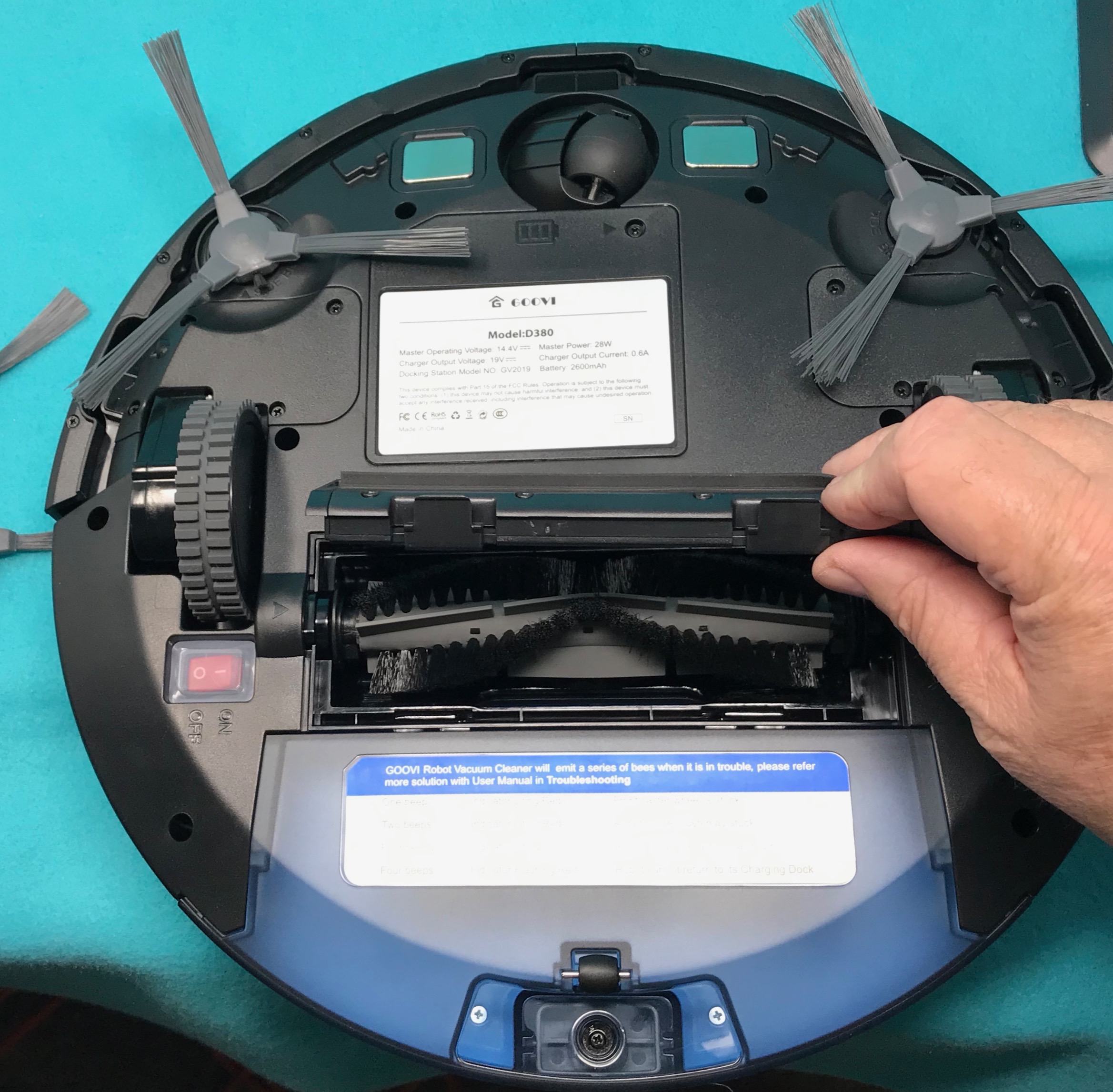
Check the main brush and side brushes for tangled hair or threads. Use scissors or fingers to cut and pull out any debris. Look at the wheels and clear away any dirt or small objects stuck there. Clean brushes and wheels allow the vacuum to move and clean smoothly.
Cleaning Sensors
Wipe the sensors on the bottom and front of the vacuum with a dry, soft cloth. These sensors help the vacuum avoid obstacles and navigate your home. Dust or smudges can block the sensors and cause errors. Keep them clean for better navigation and fewer issues.
Navigation And Software Fixes
Navigation and software issues often cause Goovi vacuum problems. Resolving these can improve cleaning efficiency and device responsiveness. Simple steps help the vacuum move better and work without errors. Follow these fixes to keep your robot running smoothly.
Clearing The Vacuum’s Path
Obstacles confuse the vacuum’s sensors and navigation system. Remove items like cords, small rugs, and toys from the floor. Ensure the vacuum has a clear route to clean all areas. This prevents it from getting stuck or missing spots. Check for low furniture or tight corners that may block its movement.
Performing A Factory Reset
Software glitches cause erratic behavior or freezing. A factory reset restores the vacuum to original settings. Locate the reset button by checking the user manual. Press and hold the button for a few seconds until the vacuum restarts. This clears temporary bugs and refreshes its system.
Updating App And Firmware
Outdated software limits vacuum functions and causes errors. Open the Goovi app and check for updates regularly. Install the latest firmware on the vacuum through the app. Updates improve navigation algorithms and fix known bugs. Keep both app and vacuum software up to date for best performance.
Credit: the-gadgeteer.com
Troubleshooting Specific Issues
Troubleshooting specific problems with your Goovi vacuum can save time and effort. Identifying the exact issue helps in applying the right fix quickly. Below are solutions for common problems users face.
Vacuum Not Charging
Check if the charging dock is plugged in and powered on. Dirt on the metal contacts can block charging. Wipe the contacts on both the vacuum and dock with a dry cloth. Battery age affects charging; an old battery may need replacement. Ensure the vacuum sits properly on the dock to connect correctly.
Vacuum Stuck Or Moving In Circles
Remove any obstacles like cords or small objects from the vacuum’s path. Clean the wheels and brushes to remove hair or debris. Dirty sensors can confuse the vacuum’s navigation; gently wipe the sensors with a dry cloth. Reset the vacuum to clear any software glitches causing erratic movement.
Sudden Shutdowns And Overheating
Check for blockages in the vacuum’s air vents and dustbin. Empty the dustbin if full, and clean or replace filters regularly. Overheating may occur if the motor is clogged or obstructed. Allow the vacuum to cool down before restarting. Avoid running the vacuum continuously for long periods to prevent overheating.
Routine Maintenance Tips
Maintaining your Goovi vacuum regularly helps it work better and last longer. Simple care routines prevent common problems and improve cleaning performance. Follow these easy maintenance tips to keep your vacuum in top shape.
Regular Cleaning Schedule
Clean the dustbin after every use. Empty it to avoid blockages. Remove hair and dirt from brushes and wheels weekly. Check the filter and wash it if the model allows. A clean vacuum picks up dirt more efficiently.
Battery Care
Charge the vacuum fully before first use. Avoid leaving it plugged in all the time. Let the battery drain sometimes to keep it healthy. Replace the battery if runtime shortens significantly. Proper battery care extends vacuum life.
Sensor Calibration
Wipe sensors gently with a soft, dry cloth often. Keep sensors free from dust and smudges. Recalibrate sensors if the vacuum misses spots or moves oddly. Clear sensors ensure better navigation and cleaning accuracy.
Credit: smarthomeways.com
When To Contact Support
Knowing when to contact Goovi vacuum support can save time and avoid frustration. Some problems need expert help beyond simple fixes. Recognize signs that require professional assistance to keep your vacuum working well.
Persistent errors, strange noises, or parts not responding are clear signals. Also, complex issues with sensors or software updates may need direct support. Understanding the right moment to reach out ensures your vacuum gets proper care fast.
Model-specific Assistance
Each Goovi vacuum model has unique features and parts. Support teams offer help tailored to your model’s design and functions. They provide specific instructions or replacement parts that match your device perfectly.
Manuals and troubleshooting guides may cover general issues. But support can guide you through model-specific steps. This helps fix problems accurately and avoids damage from wrong attempts.
Repair Options
Support can explain repair choices based on your vacuum’s condition. Some problems need simple part replacements. Others might require professional service or sending the vacuum to a repair center.
They can confirm if repairs are cost-effective or if buying a new unit is better. Knowing repair options helps you decide the best way to restore your vacuum.
Warranty And Service
Goovi vacuums usually come with a warranty covering defects and faults. Support can check if your problem is covered under warranty terms. This may save you repair costs or get free parts and service.
They also guide you on service centers authorized by Goovi. Using authorized services keeps your warranty valid and ensures quality repairs. Contact support to understand warranty rules and service steps.
Frequently Asked Questions
Why Has My Robot Vacuum Stopped Working?
Your robot vacuum may stop working due to a drained battery, dirty charging contacts, a full dustbin, or tangled brushes. Clean sensors, clear obstructions, ensure the dock is plugged in, and try resetting the device. Regular maintenance often resolves power, charging, and navigation issues.
How Do I Reset My Vacuum?
To reset your vacuum, turn it off, unplug it, wait 10 seconds, then plug it back in and turn it on. Check your manual for a specific reset button or factory reset instructions. This clears software glitches and often restores normal function.
Why Has My Vacuum Cleaner Suddenly Stopped Working?
Your vacuum may have stopped due to a clogged brush, full dustbin, or blocked filters. Check power supply and battery. Clean sensors and remove obstructions. Reset the device if needed. Replace the battery if it won’t hold a charge. Contact support for persistent issues.
What Is The Most Common Problem With Vacuum Cleaners?
The most common vacuum cleaner problem is clogged brushes or filters, causing loss of suction and poor cleaning performance.
How Do I Fix Goovi Vacuum Not Charging Properly?
Clean the charging contacts on both the vacuum and dock with a dry cloth. Ensure the dock is plugged in and its indicator lights are on. Let the battery charge fully or replace it if it won’t hold charge.
Conclusion
Troubleshooting your Goovi vacuum can save time and money. Simple steps like cleaning brushes and emptying the dustbin often fix issues. Check charging contacts and ensure the dock works properly. Removing obstacles helps your vacuum navigate smoothly. Resetting the device can solve software glitches.
If problems persist, contacting customer support is the best option. Regular maintenance keeps your vacuum running longer and better. Stay patient and follow these easy tips for a cleaner home.



