
Is your Hisense television acting up when you just want to relax and watch your favorite show? Whether the screen flickers, the sound suddenly disappears, or the TV won’t turn on at all, these frustrating issues can ruin your viewing experience.
But don’t worry—you’re not alone, and most problems have straightforward fixes you can try right now. In this guide, you’ll discover simple steps to troubleshoot common Hisense TV issues like black screens, audio glitches, app crashes, and power troubles. By following these easy tips, you’ll save time, avoid costly repairs, and get your TV back to perfect working order.
Ready to take control of your Hisense TV problems? Let’s dive in and solve them together.

Credit: www.ifixit.com
Picture Problems
Picture problems on Hisense televisions can disrupt your viewing experience. These issues range from a black screen with sound to flickering or lines on the display. Most problems relate to hardware or connection faults. Simple checks and fixes often restore the picture quickly. Understanding common picture issues helps you troubleshoot effectively.
Black Screen With Sound
A black screen with sound usually signals backlight failure. The LEDs behind the screen may be faulty. Another cause is a problem with the TCON board. You can test this by shining a flashlight on the screen. If you see faint images, the backlight is likely the issue. Power cycling the TV sometimes helps. Persistent problems need professional repair or part replacement.
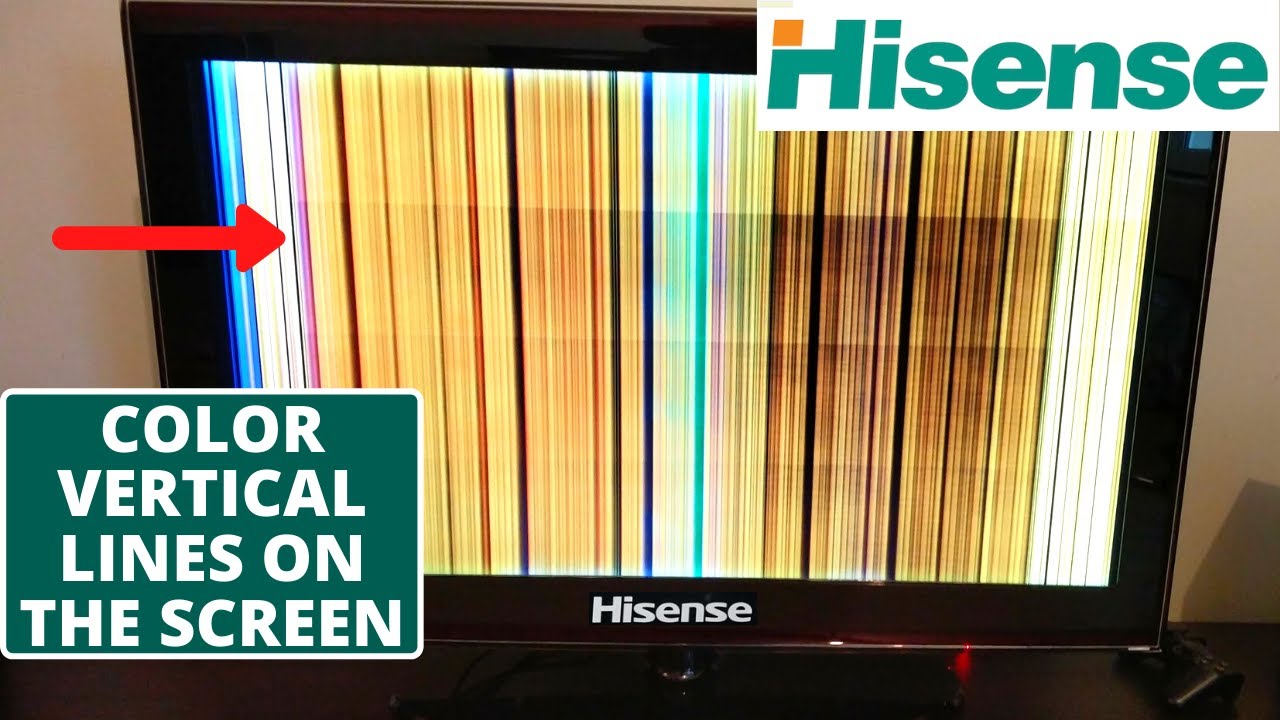
Screen Flickering And Lines
Screen flickering or visible lines often come from loose or damaged cables. It can also be a software glitch. Start by reseating the HDMI and power cables. Updating the TV’s firmware can fix software-related flickering. Adjusting picture settings may reduce flicker and lines. If the issue continues, internal hardware like the main board might be faulty.
Cable And Connection Checks
Check all cables connecting your Hisense TV. Loose or damaged HDMI, component, or power cables cause many picture problems. Disconnect and reconnect cables firmly. Use different cables to rule out faults. Inspect ports for dust or damage. A secure connection ensures a stable signal and clear picture. Replace any worn cables immediately for the best results.

Credit: www.ifixit.com
Sound Troubles
Sound troubles can spoil your viewing experience on a Hisense television. These issues range from no sound to audio delays and problems with external speakers. Identifying the exact cause helps fix the problem quickly. This guide covers common sound problems and simple solutions to get your TV audio working again.
No Sound Issues
First, check if the TV is muted or the volume is very low. Confirm that the audio output is set correctly in the TV’s settings menu. Inspect all cables connecting the TV to external devices for any loose or damaged wires. Try restarting your TV by unplugging it for a minute, then plugging it back in. If no sound persists, the TV’s internal speakers or main board might need professional repair.
Audio Sync Problems
Audio sync issues cause the sound to lag behind or come before the picture. This mismatch can happen due to processing delays in the TV or connected devices. Check if your TV has a sound delay or lip-sync setting and adjust it. Resetting the TV or updating its firmware can also resolve sync problems. If using external devices, ensure their audio and video settings match your TV’s output.
External Audio Setup
Connecting soundbars or home theater systems enhances audio quality but may cause issues. Use the correct cables, such as HDMI ARC or optical audio, for best results. Set your TV’s audio output to external speakers in the settings menu. Test the external device with another source to confirm it works. If sound is still missing or distorted, check the external system’s input settings and volume controls.
Smart Tv Glitches
Smart TV glitches can interrupt your viewing experience. These issues often affect app performance and connectivity. Troubleshooting helps keep your Hisense TV running smoothly. Understanding common glitches saves time and frustration.
App Crashes And Freezes
Apps may crash or freeze during use. This happens due to software bugs or outdated apps. Close the app and reopen it to refresh. Clear the app cache if possible. Reinstall the app if crashes continue. These steps often fix minor app problems quickly.
Firmware Updates
Firmware controls your TV’s software and features. Outdated firmware can cause glitches and slow performance. Check for updates regularly in the settings menu. Download and install updates carefully. Updates improve stability and fix bugs. Restart the TV after updating to apply changes.
Router And Restart Steps
Internet connection issues cause streaming problems and app errors. Restart your router to refresh the connection. Unplug the TV and router for 30 seconds. Plug them back in and power on. This simple step often resolves network glitches. Check Wi-Fi signal strength for better performance.
Credit: www.youtube.com
Power And Restart Issues
Power and restart problems can disrupt your Hisense TV viewing experience. These issues often cause frustration and confusion. Understanding common causes helps you fix them quickly. Simple checks and resets can restore normal TV function. This section covers key power and restart concerns and easy solutions.
Tv Won’t Turn On
Check if the TV is plugged in securely. Try a different power outlet to rule out socket issues. Press the power button on the TV itself, not just the remote. Unplug the TV for one minute, then plug it back in and try again. Inspect the power cord for damage. If the screen stays black, the power supply inside might need service.
Random Restarts
Random restarts often happen due to firmware glitches. Update the TV’s software to the latest version available. Unstable power supply or surges can cause restarts. Use a surge protector to protect your TV. Overheating can also force the TV to restart. Ensure the vents are clear and the TV is not in a hot area. Reset the TV to factory settings if restarts continue.
Hdmi Cec And Remote Checks
HDMI CEC lets devices control your TV’s power and volume. Sometimes, this feature causes unwanted restarts or power offs. Disable HDMI CEC in the TV settings to test if it stops the problem. Check the remote control for stuck buttons or low batteries. Replace batteries regularly to avoid signal issues. Use the TV buttons to rule out remote problems.
General Fixes
General fixes resolve many common Hisense TV issues fast. These easy steps often restore normal function. Trying them first saves time and money. Basic troubleshooting covers power, software, and settings. Follow simple instructions carefully for best results.
Power Cycling
Power cycling resets the TV by turning it off and on. Unplug the TV from the power outlet. Wait at least 60 seconds to clear memory and settings. Plug the TV back in and turn it on. This method fixes many problems like freezing or no picture.
Firmware Updates
Firmware updates improve TV performance and fix bugs. Check for updates in the TV’s settings menu. Connect the TV to the internet for automatic updates. Download and install the latest version carefully. Updates can solve app crashes, sound issues, and screen problems.
Factory Reset Methods
Factory reset restores the TV to original settings. This deletes all personal data and apps. Use it only if other fixes fail. Access the reset option in the settings menu under “System” or “Support.” Follow on-screen instructions to complete the reset. The TV restarts with default settings after reset.
Reset Button Location
Knowing the reset button location on your Hisense TV can solve many issues quickly. This button helps restore the TV to default settings without complex steps. It is useful for fixing frozen screens, unresponsive remotes, or other glitches. The reset button is small and often hidden for safety. Understanding how to find and use it saves time and effort during troubleshooting.
Finding The Reset Hole
The reset hole is a tiny pinhole on the TV’s back or side. It is sometimes near the power port or HDMI inputs. Use a flashlight to spot it clearly. The hole is usually labeled “Reset” or marked with a small circle. Avoid pressing other buttons by mistake. Use a paperclip or a similar thin object to press inside the hole gently.
Using The Reset Button
Insert a paperclip into the reset hole carefully. Press and hold the reset button for about 10 seconds. Release the button once the TV screen goes black or restarts. This action forces the TV to reboot and clears minor errors. Do not press the button too hard to avoid damage. After resetting, check if the TV works normally.
Menu-based Factory Reset
You can also reset the TV through its menu options. Press the Home button on your remote to open settings. Navigate to System or Support, then find the Reset or Factory Reset option. Enter the PIN if prompted; the default is usually 0000 or 1234. Confirm the reset to erase all custom settings and apps. This method fully restores the TV to factory defaults.
Frequently Asked Questions
What Is The Common Problem Of Hisense Tv?
Common Hisense TV problems include black screens from backlight failure, no sound due to audio settings, app crashes, screen flickering, and random restarts caused by power or HDMI issues. Simple fixes involve power cycling, checking cables, updating firmware, or factory resetting.
Where Is The Reset Button On Hisense Tv?
The reset button on a Hisense TV is a small, recessed pinhole located on the back or side panel. Use a paperclip to press and hold it for 10 seconds to reset the TV.
How To Troubleshoot A Hisense Smart Tv?
Troubleshoot Hisense smart TV by power cycling it, checking HDMI cables, updating firmware, and adjusting settings. Perform a factory reset if issues persist. Test sound, apps, and connections. For power or display problems, inspect cables and disable HDMI CEC. Replace hardware only if necessary.
What Is The Average Lifespan Of A Hisense Tv?
The average lifespan of a Hisense TV is about 7 to 10 years with normal use. Proper care can extend its durability.
Why Does My Hisense Tv Screen Go Black But Sound Works?
A black screen with sound usually means the backlight or TCON board failed. Use a flashlight test to see if the image is faint. If yes, the LED strips likely need repair or replacement.
Conclusion
Troubleshooting your Hisense TV can solve many common problems quickly. Simple steps like power cycling, checking cables, and updating software often fix issues. Screen flickering, sound problems, or app crashes usually need basic resets or setting adjustments. Persistent faults might require professional help or part replacement.
Keep your TV’s firmware updated for better performance. Regular maintenance helps avoid future problems. Stay calm and follow each step carefully. Your Hisense TV can work well again with the right approach.



