
Is your Honeywell thermostat acting up and leaving you frustrated? Whether your heating won’t turn on, the screen goes blank, or the temperature just doesn’t feel right, you’re not alone.
These common problems can quickly disrupt your comfort and peace of mind. But before you call a technician or replace the entire unit, there are simple troubleshooting steps you can try yourself. In this guide, you’ll learn how to identify and fix the most frequent Honeywell thermostat issues.
By following these easy tips, you’ll save time, avoid costly repairs, and get your home’s temperature back on track. Keep reading—your perfect indoor climate is just a few fixes away!
Credit: www.esseg.eu
Common Honeywell Issues
Honeywell thermostats often face common issues that disrupt home comfort. These problems range from simple screen glitches to complex connectivity troubles. Understanding these common issues helps in quick identification and easy fixes. This section highlights frequent Honeywell thermostat problems and what causes them.
Unresponsive Screens
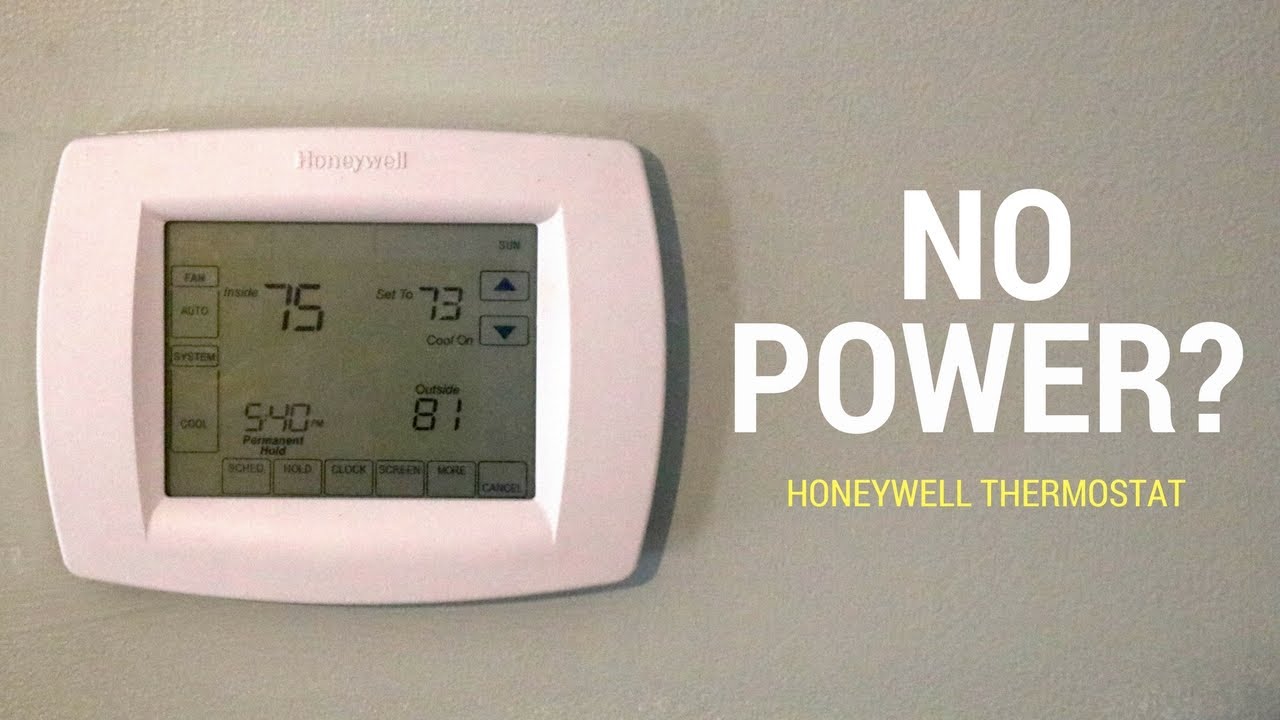
Unresponsive or blank screens are a typical Honeywell thermostat problem. Dead batteries often cause this issue. Sometimes, a tripped circuit breaker cuts off power to the thermostat. Loose wiring or a blown fuse can also stop the screen from working. Resetting the thermostat or replacing batteries usually helps. For wiring problems, switch off the power before checking connections.
Inaccurate Temperature Readings
Incorrect temperature readings frustrate many Honeywell users. Dust on the thermostat sensor can skew the temperature. Poor placement, like near a heat source or direct sunlight, affects accuracy. Sensor failure inside the thermostat also causes wrong readings. Cleaning the sensor and moving the thermostat to a better spot can fix this. Replace the thermostat if the sensor is faulty.
Hvac System Problems
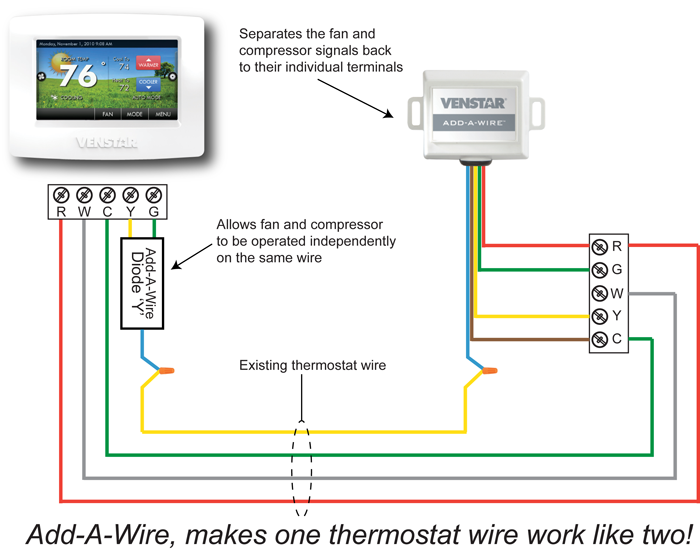
Honeywell thermostats sometimes fail to control HVAC systems properly. The system may run constantly or turn on and off too fast. Incorrect thermostat settings, like wrong mode or fan settings, cause this. Loose or corroded wiring, especially the ‘C’ wire, disrupts signals. A tripped safety switch inside the furnace or air handler can cut power. Check settings, wiring, and safety switches to solve these problems.
Wi-fi Connectivity Issues
Wi-Fi problems affect smart Honeywell thermostats mostly. Incorrect Wi-Fi passwords stop the thermostat from connecting. Distance from the router or weak signals cause dropouts. Temporary glitches need a network reset or thermostat reboot. Ensure the thermostat is within good range of the router. Updating firmware can also improve connectivity stability.
Credit: kashifiqbal.com
Basic Fixes
Basic fixes solve many Honeywell thermostat problems quickly. These steps check power, wiring, and settings. They require no special tools or skills. Following these tips helps restore your thermostat’s normal function fast. Start with simple checks before calling for help.
Replacing Batteries
Many Honeywell thermostats run on batteries. Dead batteries cause blank screens and unresponsive controls. Replace batteries every year or when the display dims. Use fresh, high-quality batteries for best results. Open the battery compartment carefully and install new batteries with correct polarity.
Checking Circuit Breakers
Tripped circuit breakers cut power to your thermostat. Find your home’s electrical panel and look for any tripped switches. Reset the breaker by flipping it off and on. This restores power to the HVAC system and thermostat. If breakers trip repeatedly, call an electrician to inspect the system.
Securing Wiring Connections
Loose or corroded wires cause thermostat failures. Turn off power at the breaker before touching wires. Remove the thermostat cover and check all wire connections. Tighten any loose wires and clean corrosion with a dry cloth. Ensure each wire fits firmly in its terminal. Reattach the cover and restore power.
Adjusting Thermostat Settings
Incorrect settings cause heating or cooling issues. Check the system mode: Heat, Cool, or Off. Set the fan to Auto for automatic operation. Adjust the temperature to a comfortable level. Some thermostats have advanced settings; reset them to default if unsure. Confirm your thermostat matches your HVAC system type.
Advanced Troubleshooting
Advanced troubleshooting helps solve complex Honeywell thermostat problems. Basic checks may not fix every issue. Dig deeper to find the root cause of your thermostat’s malfunction. Understanding these steps can save time and avoid costly repairs.
Resetting Your Thermostat
Resetting clears minor software glitches affecting performance. Locate the reset button or remove the thermostat from its base. Hold the reset button for 5 to 10 seconds or remove the batteries for a minute. Power the thermostat back on and check if it works properly. This simple step often restores normal function without further effort.
Inspecting Furnace And Air Handler
Check the furnace and air handler for visible problems. Ensure all panels are closed securely, as open panels can trigger safety switches. Look for dust buildup or debris blocking vents or sensors. Listen for unusual noises that might indicate mechanical issues. Confirm the power supply to these units is stable and breakers are not tripped. Proper furnace and air handler operation is critical for thermostat accuracy.
Addressing Sensor And Fuse Issues
Thermostat sensors may fail due to dust or damage, causing wrong temperature readings. Clean sensors gently with a soft cloth. Replace sensors if cleaning does not help. Check fuses on the thermostat’s control board for signs of burning or damage. Replace blown fuses with the exact type specified by Honeywell. Faulty sensors or fuses often cause system shutdowns or erratic behavior.
Reset Methods
Resetting your Honeywell thermostat can solve many common problems. Different models require different reset methods. Knowing the right reset process helps restore normal function quickly. Below are simple steps for various Honeywell thermostat types.
Factory Reset For Touchscreen Models
Start by accessing the main menu on your thermostat. Select “Settings” or “Advanced Settings.” Look for the “Reset” option and choose “Factory Reset.”
This action clears all settings and returns the device to original factory defaults. The thermostat will restart automatically after the reset. You must reconfigure your preferences afterward.
Resetting Battery-powered Models
Remove the thermostat from its wall plate carefully. Open the battery compartment and take out the batteries. Wait about one minute before reinserting the batteries.
Press and hold the reset button if your model has one. Replace the thermostat on the wall plate and check for normal operation. This soft reset clears minor glitches effectively.
Reconnecting Wi-fi And Schedules
After a reset, Wi-Fi settings often erase. Go to your thermostat’s network menu and select your Wi-Fi network. Enter your Wi-Fi password carefully to reconnect.
Once connected, verify your heating and cooling schedules. Reprogram your preferred times and temperatures. This ensures your system runs smoothly and efficiently.
When To Seek Help
Knowing when to seek professional help is vital for your Honeywell thermostat. Some issues need expert care to avoid further damage. Troubleshooting can fix many problems, but certain signs signal it’s time to call a technician.
Persistent Problems After Troubleshooting
If your thermostat still acts up after basic fixes, do not ignore it. Repeated failures suggest a deeper issue beyond simple troubleshooting. Continuous problems might cause your HVAC system to work inefficiently. Persistent errors can raise energy bills and discomfort. A professional can diagnose and repair complex faults safely.
Hvac Unit Malfunctions
Your thermostat controls the HVAC system’s operation. If the HVAC unit does not respond or runs erratically, it may not be the thermostat alone. Mechanical parts like compressors, fans, or valves could fail. Strange noises, uneven heating, or cooling are red flags. Technicians have the tools to inspect and fix HVAC components properly.
Handling Low-voltage Wiring Concerns
Low-voltage wiring connects the thermostat to your HVAC system. Loose or damaged wires cause many thermostat problems. Working with electrical wiring can be risky without knowledge. Sparks or shorts may happen if handled incorrectly. Calling a professional ensures safe inspection and repair of wiring issues. Proper wiring keeps your system stable and efficient.
Credit: coolwithbowman.com
Expert Tips
Expert tips help keep your Honeywell thermostat working well. Small habits and careful setup can prevent many common problems. Follow these easy steps to maintain your thermostat and improve its performance.
Maintaining Your Thermostat
Clean the thermostat regularly to avoid dust buildup. Dust can block sensors and cause wrong temperature readings. Use a soft brush or cloth. Replace batteries every year or when the screen dims. Check for loose wires by turning off power first. Tighten connections to avoid power loss or glitches.
Optimizing Thermostat Placement
Place the thermostat on an inside wall away from direct sunlight. Avoid spots near windows, doors, or vents. These areas can cause false readings. Keep it at eye level for easy access and accurate temperature sensing. Do not place near heat sources like lamps or appliances. Good placement helps your HVAC system run efficiently.
Preventing Common Issues
Set the correct mode and temperature for each season. Use “Auto” fan mode to save energy and prevent system wear. Close furnace doors and check safety switches after maintenance. Avoid frequent temperature changes to stop short cycling. For smart thermostats, keep your Wi-Fi password updated and reset the network if connection drops. These tips reduce errors and extend thermostat life.
Frequently Asked Questions
What Are Common Honeywell Thermostat Problems?
Common Honeywell thermostat problems include unresponsive screens, inaccurate temperature readings, HVAC system not cycling properly, and Wi-Fi connectivity issues. Causes often involve dead batteries, loose wiring, tripped breakers, or incorrect settings. Basic fixes include replacing batteries, checking wiring, and resetting the device.
How Do I Reset A Honeywell Thermostat?
Press the Menu button, select Reset, then choose Factory Reset and confirm. For battery models, remove and reinsert batteries. Check your model’s manual for exact steps.
What Is A Common Problem With A Thermostat?
A common thermostat problem is inaccurate temperature readings caused by dirty sensors or poor placement. Other issues include unresponsive screens, dead batteries, or wiring faults. These problems often disrupt HVAC operation, requiring battery replacement, wiring checks, or professional repair for complex faults.
Why Is My Honeywell Thermostat Not Stopping At Set Temperature?
Your Honeywell thermostat may not stop at the set temperature due to incorrect settings, loose wiring, or a faulty sensor. Check batteries, ensure proper mode (Auto/On), and secure wiring. Reset the thermostat to clear glitches. Call a professional if issues persist after troubleshooting.
What Causes A Honeywell Thermostat Screen To Go Blank?
A blank screen often means dead batteries or a tripped circuit breaker. Loose wiring or a blown fuse can also cause this issue. Checking power sources is the first step to fix it.
Conclusion
Honeywell thermostat problems can often be fixed with simple steps. Check batteries, wiring, and settings first. Make sure your thermostat has power and connections are tight. Clean sensors if temperatures seem wrong. Resetting the device can clear many minor glitches.
For smart thermostats, verify Wi-Fi settings carefully. Some problems need professional help. Don’t hesitate to call an expert if issues persist or feel complex. Keeping your thermostat working well ensures comfort and saves energy. Regular checks help avoid bigger problems later.
Stay proactive and enjoy a smoothly running system.



