Is your Hotpoint dishwasher giving you trouble right when you need it most? You’re not alone.
Many Hotpoint owners face common issues like dishes not coming out clean, the machine not draining properly, or strange flashing lights that leave you guessing. But before you call a repair service or consider buying a new one, there’s good news—you can often fix these problems yourself with the right know-how.
In this guide, you’ll discover simple, step-by-step troubleshooting tips tailored specifically for Hotpoint dishwashers. Whether your dishwasher won’t start a cycle, is leaking, or smells bad, keep reading to learn how to get your appliance back to perfect working order quickly and without stress. Your next load of spotless dishes is just a few fixes away!
Common Hotpoint Dishwasher Issues
Hotpoint dishwashers are popular for their reliability, but they can face common issues. These problems often affect performance and convenience. Understanding these issues helps in quick troubleshooting and repair. Below are some frequent problems Hotpoint dishwasher users encounter.
Dishes Not Cleaning Properly
Dirty dishes after a wash cycle is a common complaint. Clogged spray arms or filters block water flow. Using too much detergent or the wrong type can cause residue. Overloading the dishwasher prevents water from reaching all dishes. Regularly clean filters and spray arms to maintain cleaning efficiency.
Dishwasher Won’t Start
The dishwasher may fail to start due to power supply issues. A faulty door latch stops the cycle from beginning. Control board or timer problems can also cause startup failure. Check the power connection and ensure the door is securely closed. Resetting the dishwasher might help in some cases.
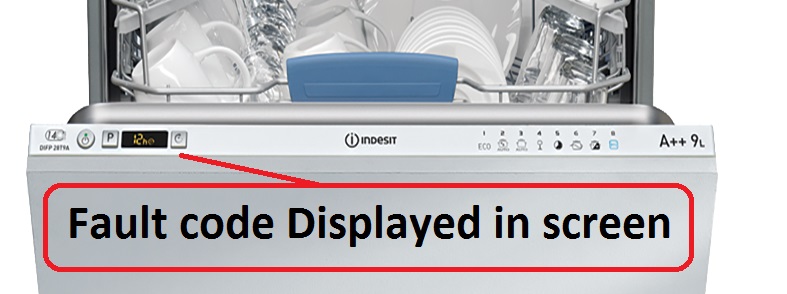
Flashing Lights And Error Codes
Flashing lights often signal specific errors. Error codes point to problems like water supply or drainage issues. A faulty water inlet valve can cause blinking lights. Consult the user manual for code meanings. Use a multimeter to test electrical parts when needed.
Water Not Draining
Standing water at the bottom is a sign of drainage problems. Blocked filters or drain hoses are frequent causes. A malfunctioning drain pump can also prevent water removal. Clean the drain area and check hoses for clogs. Replace the pump if it fails to operate.
Leaks And Water Damage
Leaks may appear around the door or under the dishwasher. Damaged door seals or loose hoses often cause leaks. Check for cracks in the tub or door gasket. Tighten connections and replace faulty seals to stop leaks. Early detection prevents water damage to floors.
Unusual Noises
Loud or strange sounds can signal mechanical issues. Objects caught in the spray arm or pump cause noise. Worn-out motor bearings also produce unusual sounds. Inspect the dishwasher interior for foreign items. Call a technician if noise continues after cleaning.
Foul Odors
Bad smells come from leftover food and trapped moisture. Dirty filters and drain areas breed bacteria. Regular cleaning with vinegar or baking soda helps. Run empty cycles with cleaning agents to freshen the dishwasher. Keep the door slightly open after use to dry out moisture.
Quick Fixes For Cleaning Problems
Cleaning problems in Hotpoint dishwashers happen often. Simple fixes can restore their performance fast. These quick fixes help keep your dishwasher working well and your dishes spotless. Follow easy steps to improve cleaning and avoid common issues.
Cleaning Spray Arms And Filters
Spray arms can get clogged with food or hard water. Remove them carefully and rinse under warm water. Use a toothpick to clear tiny holes. Filters trap food particles and must be cleaned regularly. Take out filters and wash with soapy water. Clean spray arms and filters once a month for best results.
Proper Loading Techniques
Loading dishes correctly improves cleaning. Place plates and bowls facing the spray arms. Avoid overcrowding to let water reach all items. Keep large items away from the detergent dispenser. Load cups and glasses upside down. Proper loading prevents blocked spray and poor cleaning.
Choosing The Right Detergent
Use detergents made for dishwashers only. Avoid regular dish soap, which causes foam and damage. Choose powder, gel, or tablet based on your preference. Check the detergent’s instructions for the right amount. Proper detergent helps remove grease and food better.
Using Rinse Aid And Hot Water
Rinse aid reduces spots and speeds drying. Fill the rinse aid dispenser regularly. Use hot water for the best cleaning results. Run the hot water tap before starting the dishwasher to ensure hot water enters quickly. Rinse aid and hot water improve shine and cleanliness.
Resetting Your Hotpoint Dishwasher
Resetting your Hotpoint dishwasher can often solve common problems quickly. This simple step helps clear minor errors and restores normal function. Knowing how to reset your machine saves time and avoids unnecessary repairs.
Follow clear instructions to reset your dishwasher safely. Understanding where the reset button is and the right procedure ensures success. Also, learn when a reset is the best choice for troubleshooting.
Locating The Reset Button
Most Hotpoint dishwashers have a reset button under the kick plate. Remove the kick plate carefully to access the area below the door. Look around for a small button labeled “Reset” or “Test.”
The reset button is usually near the control board or power supply. It may be a small black or red button. Check your user manual if you have trouble finding it.
Step-by-step Reset Procedure
Start by opening the dishwasher door fully. Press and hold the reset button for about 3 to 5 seconds. Release the button and close the door firmly.
Wait a few minutes for the dishwasher to reset its system. You may hear a beep or see lights flash. This means the reset was successful.
Try running a short cycle to check if the dishwasher works normally after the reset. If problems persist, further troubleshooting may be needed.
When To Perform A Reset
Perform a reset if your dishwasher stops mid-cycle or won’t start. It also helps if the machine shows error codes or blinking lights.
Resetting is useful after a power outage or sudden electrical issue. It clears the control board and can fix minor glitches.
A reset is not a fix for mechanical problems like leaks or broken parts. Use it as a first step before calling a technician.
Credit: centr-zoru.com.ua
Troubleshooting Power And Cycle Issues
Power and cycle issues often stop Hotpoint dishwashers from working properly. These problems can prevent the machine from starting or completing a wash cycle. Fixing them requires checking a few key parts that control power and operations. Simple tests can show if these parts are broken or just need a reset.
Checking The Door Switch
The door switch stops the dishwasher from running when the door is open. If the switch is faulty, the dishwasher won’t start any cycle. Press the switch manually to hear a click sound. No click means it might be broken and needs replacing. Clean the switch area to remove dirt or debris. A loose or damaged door latch can also cause switch issues.
Inspecting The Electronic Control Board
The control board manages all dishwasher functions. A damaged board can cause power or cycle failures. Look for burnt marks or broken parts on the board. Use a multimeter to check for electrical continuity. Reset the dishwasher by unplugging it for a few minutes. If problems continue, the control board may need professional repair or replacement.
Verifying Power Supply Connections
Loose or damaged power connections stop the dishwasher from receiving electricity. Check the plug and wall outlet for any damage. Make sure the power cord is firmly attached to the dishwasher. Inspect wiring inside the machine for signs of wear or breaks. Use a voltage tester to confirm power is reaching the dishwasher. Secure all connections before testing the cycle again.
Dealing With Drainage Problems
Drainage problems can stop your Hotpoint dishwasher from working well. Water may stay inside or drain very slowly. This can cause bad smells and dirty dishes. Fixing these issues fast keeps your dishwasher running smoothly and your kitchen clean.
Start by checking simple parts that often block water flow. Small clogs can be the main cause. Cleaning these parts usually solves the problem. Follow the steps below to find and clear the trouble spots.
Clearing Clogged Drain Hoses And Filters
Remove the drain hose from the dishwasher carefully. Look inside for any dirt, food, or debris blocking the flow. Use a long brush or a piece of wire to push out clogs. Rinse the hose with water to clear leftover dirt.
Next, check the dishwasher filter. It collects food particles during washing. Take the filter out and wash it under running water. Use a soft brush to remove stuck bits. Clean filters help water drain better and keep the dishwasher fresh.
Removing Food Buildup In The Sump
The sump is the area where water collects before draining. Food pieces can settle here and cause blockages. Open the dishwasher bottom to access the sump. Remove any visible food debris by hand or with a cloth. Clean the area gently to avoid damage.
Regular cleaning of the sump stops bad smells and improves drainage. Do this every few weeks to keep your dishwasher working well.
Checking The Drain Pump And Float Switch
The drain pump pushes water out of the dishwasher. It can get stuck or broken. Listen for unusual noises during the drain cycle. If the pump does not run, it may need repair or replacement.
The float switch stops the dishwasher from overflowing. It senses water level inside. Check if the float moves up and down freely. Clean around the float to remove dirt that may block it. A stuck float switch can cause drainage issues or error codes.
Fixing Leaks And Seal Problems
Leaks and seal problems are common issues with Hotpoint dishwashers. These problems can cause water to escape, damaging floors and cabinets. Fixing leaks quickly helps avoid costly repairs. Most leaks happen around the door or under the machine. Checking seals and parts regularly keeps your dishwasher working well.
Inspecting And Replacing Door Gaskets
Door gaskets are rubber seals around the dishwasher door. They stop water from leaking out during cycles. Over time, gaskets can crack or become loose. Check the gasket for tears, gaps, or dirt buildup. Clean the gasket with a damp cloth to remove debris. If damaged, replace the gasket with a new one. A tight door seal prevents water leaks and improves dishwasher performance.
Ensuring Proper Door Latch And Leveling
The door latch keeps the dishwasher door closed tightly. A faulty latch can cause leaks. Test the latch by closing the door firmly and trying to open it. Replace the latch if it feels loose or broken. Also, check if the dishwasher is level. Use a spirit level on top of the machine. Uneven placement can cause water to leak from the door or bottom. Adjust the dishwasher feet to make it level.
Checking Water Inlet Valve And Hoses
The water inlet valve controls water flow into the dishwasher. A broken valve may leak water inside or outside the machine. Inspect the valve for cracks or water pooling. Hoses connected to the valve can also leak if loose or damaged. Tighten hose clamps and replace any worn hoses. Make sure hoses are not kinked or bent, allowing proper water flow. Fixing these parts stops leaks and keeps your dishwasher safe.
Eliminating Odors And Mold
Odors and mold can develop inside a Hotpoint dishwasher due to trapped food particles and moisture. These problems cause unpleasant smells and can affect the dishwasher’s performance. Regular cleaning and maintenance help keep the dishwasher fresh and hygienic. Follow these simple steps to eliminate odors and mold effectively.
Cleaning Filters And Sump Areas
Dirty filters and sump areas trap food debris and cause bad smells. Remove the filter from the dishwasher base carefully. Rinse it under running water using a soft brush to clear all particles. Check the sump area below the filter for leftover debris. Clean it with a cloth or sponge to remove any buildup. Regular cleaning prevents mold growth and keeps water flowing smoothly.
Running Vinegar Or Hot Water Rinse Cycles
Running a rinse cycle with vinegar helps remove odors and mold. Place a cup of white vinegar on the top rack. Run a hot water cycle without detergent to flush out buildup. Vinegar kills bacteria and dissolves mineral deposits. Alternatively, run an empty cycle with the hottest water setting. This process refreshes the dishwasher and clears away any lingering smells.
Using Detergent Correctly To Prevent Odors
Using too much or the wrong detergent causes residue and bad smells. Always use the detergent recommended for your Hotpoint dishwasher. Measure the detergent according to load size and water hardness. Avoid using regular dish soap, which creates excessive suds. Proper detergent use ensures dishes come out clean and the machine stays odor-free.

Credit: www.scribd.com
Addressing Unusual Noises
Unusual noises from your Hotpoint dishwasher can signal a problem inside. Strange sounds may come from parts that are stuck, loose, or clogged. Identifying the source is important for quick repair. Small fixes often stop the noise and protect your dishwasher from damage. Below are simple steps to address these noises.
Adjusting Dish Placement
Improper dish placement often causes banging or rattling sounds. Overloaded racks or items touching the spray arms can block rotation. Move dishes to avoid contact with moving parts. Keep heavier items on the bottom rack. Ensure cups and bowls do not clatter during the wash cycle. Correct placement reduces noise and improves cleaning.
Clearing The Drain Pump And Impeller
Debris can get stuck in the drain pump or impeller. This blockage causes grinding or humming noises. Turn off the dishwasher and unplug it. Remove the lower rack and filter to access the pump area. Check for food particles, broken glass, or small objects. Clean out any blockage carefully. Clearing these parts often stops loud noises and helps drainage.
Inspecting Pump Bearings And Loose Parts
Worn pump bearings produce whining or buzzing sounds. Loose screws or parts inside can also rattle. Listen closely to find the noise source. Tighten any loose screws or brackets. If bearings seem worn, consider calling a technician. Regular inspection prevents bigger problems and keeps your dishwasher quiet.
Maintenance Tips For Longevity
Proper maintenance keeps a Hotpoint dishwasher running smoothly for years. Small actions prevent major problems and improve performance. Regular care lowers repair costs and keeps dishes spotless.
Follow these simple maintenance tips to extend your dishwasher’s life. Clean parts, check seals, and avoid buildup. These steps help your machine work efficiently every day.
Regular Filter And Spray Arm Cleaning
Filters catch food particles and need frequent cleaning. Remove the filter and rinse it under warm water. Use a soft brush to clear stuck debris. Clean spray arms by removing them and washing holes with a toothpick or small brush. This ensures water sprays properly and dishes get clean.
Routine Inspection Of Seals And Hoses
Check door seals for cracks or damage that cause leaks. Wipe seals with a damp cloth to keep them flexible. Inspect hoses for signs of wear, cracks, or leaks. Replace damaged hoses immediately to prevent water damage and maintain pressure. Tight connections keep your dishwasher running without issues.
Preventing Mineral Buildup And Residue
Hard water causes mineral deposits inside the dishwasher. Run a cleaning cycle monthly using a dishwasher-safe descaler or vinegar. Avoid using too much detergent to reduce residue. Scrape food off dishes before loading to prevent clogs. Keeping minerals and residue away improves cleaning and prolongs machine life.

Credit: www.youtube.com
When To Call A Professional
Knowing when to call a professional for your Hotpoint dishwasher can save time and money. Some problems need expert help to fix properly. This guide helps you spot signs that require a technician’s attention. Acting early can prevent bigger issues.
Signs Of Mechanical Failure
Listen for unusual noises like grinding or banging. These often mean broken parts inside. If the dishwasher does not drain or fill with water, a pump or valve may be faulty. Doors that won’t latch or stay closed also suggest mechanical trouble. These issues need skilled repair to avoid damage.
Dealing With Electrical Component Issues
Electrical problems can stop your dishwasher from running cycles. Flickering or flashing lights can indicate a faulty control board or wiring issue. If the machine does not start or suddenly stops, there might be a power supply problem. Avoid opening electrical parts yourself. A qualified technician can safely diagnose and fix these issues.
Finding Reliable Repair Services
Choose repair services with good reviews and experience with Hotpoint dishwashers. Check for licensed and insured technicians. Local companies often respond faster. Ask about warranties on repairs and parts. Clear communication about costs and timelines helps avoid surprises. Trust experts who use genuine Hotpoint parts for lasting results.
Frequently Asked Questions
Is There A Reset Button On A Hotpoint Dishwasher?
Yes, Hotpoint dishwashers have a reset button. Locate it under the kick plate and press it for a few seconds to reset.
Why Won’t My Hotpoint Dishwasher Run A Cycle?
A Hotpoint dishwasher may not run due to a faulty control board, damaged power supply, or a failed door switch. Check these components first.
What Do The Flashing Lights On My Hotpoint Dishwasher Mean?
Flashing lights on a Hotpoint dishwasher indicate errors like water inlet valve issues, door latch problems, or drainage faults. Check the manual for specific light codes. Reset the dishwasher by pressing the reset button under the kick plate to clear minor faults.
What Is The Most Common Problem With Dishwashers?
The most common dishwasher problem is poor cleaning. It often results from clogged filters, spray arms, or wrong detergent use. Regularly cleaning filters, proper loading, and using suitable detergent prevent this issue effectively.
How Do I Reset My Hotpoint Dishwasher?
To reset, locate the reset button under the kick plate. Press and hold it for a few seconds, then release. This often clears minor errors.
Conclusion
Troubleshooting your Hotpoint dishwasher can save time and money. Simple checks often solve common issues. Clean filters and spray arms regularly for best results. Make sure to load dishes properly and use the right detergent. Watch for blinking lights as they signal specific problems.
Resetting the dishwasher may fix some errors quickly. Persistent problems might need professional help. Staying proactive keeps your dishwasher working well longer. Small efforts lead to cleaner dishes and less hassle. Keep this guide handy for quick Hotpoint dishwasher fixes.