
If you work with HPLC chromatography, you know how frustrating it can be when your results don’t come out as expected. Maybe your peaks look strange, the baseline is noisy, or your retention times keep shifting.
These problems slow you down and make it hard to trust your data. But what if you could quickly pinpoint the cause and fix it yourself? This guide on HPLC chromatography troubleshooting is designed just for you. You’ll learn simple ways to identify common issues and practical steps to solve them—helping you get back on track fast.
Keep reading, and take control of your HPLC system like a pro.
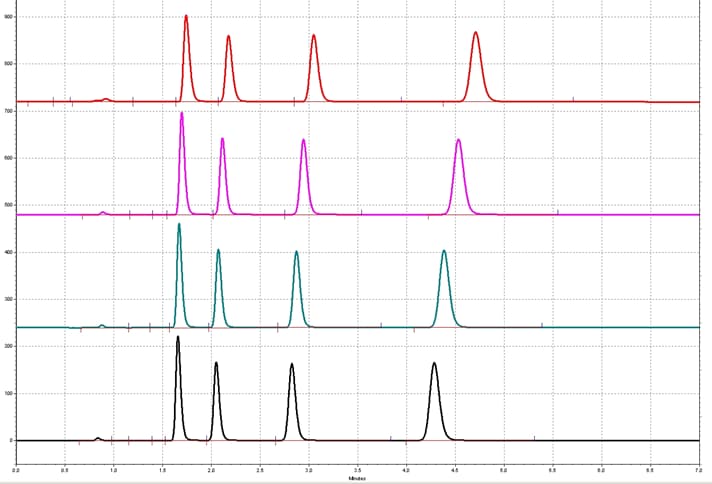
Credit: www.ssi.shimadzu.com
Common Hplc Issues
High-Performance Liquid Chromatography (HPLC) is a powerful tool for chemical analysis. Despite its effectiveness, users often face common issues that affect results. Identifying these problems quickly helps maintain accuracy and efficiency. Troubleshooting focuses on key symptoms that indicate underlying problems in the system.
Retention Time Drift
Retention time drift happens when peaks appear earlier or later than expected. This shift can confuse compound identification. Causes include temperature changes, mobile phase variations, or column aging. Regularly checking and stabilizing conditions reduces this problem. Equilibrate the column before runs to keep retention times stable.
Noisy Baseline
A noisy baseline shows as random fluctuations in the detector signal. It makes it hard to see small peaks. Possible reasons are pump issues, contaminated solvents, or detector instability. Using high-purity solvents and checking pump seals can improve the baseline. Also, clean the detector flow cell to remove deposits.
Peak Tailing And Broadening
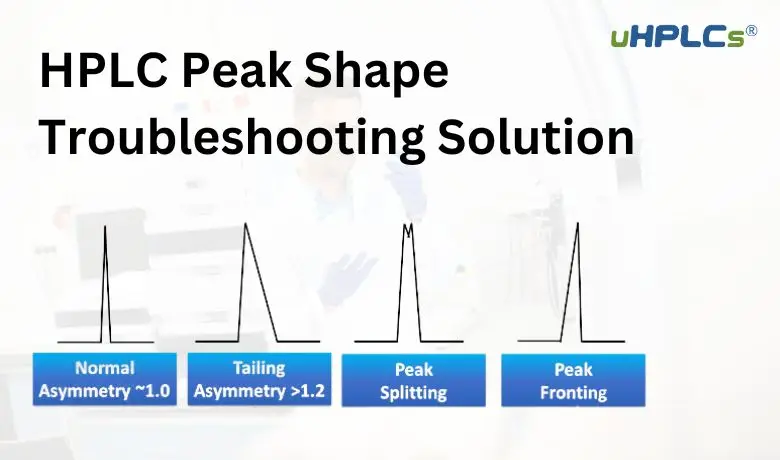
Peak tailing means the peak shape is stretched or asymmetrical. Broadening means peaks become wider and less sharp. Both reduce resolution and quantitation accuracy. Causes include column contamination, sample overload, or poor mobile phase quality. Using proper sample preparation and regular column maintenance helps maintain peak shape.
High System Pressure
High system pressure signals blockages or leaks in the system. It can damage the pump or column if ignored. Causes include clogged filters, dirty columns, or air bubbles. Check and replace filters often. Flush the system with appropriate solvents to clear blockages. Inspect connections to avoid leaks.
Unexpected Or Missing Peaks
Unexpected peaks may come from contamination or degraded samples. Missing peaks happen if compounds do not elute properly. Problems can stem from incorrect mobile phase composition or injector errors. Verify sample preparation and mobile phase recipes carefully. Clean the injector and check injection volumes to ensure consistent results.

Credit: www.sigmaaldrich.com
Root Causes To Check
HPLC chromatography troubleshooting starts with identifying root causes. Problems like retention time shifts, noisy baselines, or poor peak shapes often arise from simple issues. Checking key areas helps to find the source quickly. This saves time and improves results.
Focus on core components of the HPLC system. Each part affects the outcome. Quality of the mobile phase, pump operation, column health, detector accuracy, and injector function all matter. Inspecting these areas reveals common faults and guides repairs.
Mobile Phase Quality
Impurities in the mobile phase cause noise and poor peaks. Use high-purity solvents and fresh mobile phases. Check pH and composition carefully. Contaminated or old solvents harm separation and detection. Always filter solvents before use to remove particles.
Pump And Flow Problems
Irregular flow rates cause retention time shifts and peak distortion. Inspect pump seals and check for leaks. Air bubbles in the system disturb pressure and flow. Clean or replace worn pump parts regularly. Ensure pump delivers stable, consistent flow for reliable results.
Column Condition
Dirty or damaged columns reduce resolution and cause peak tailing. Flush columns properly after each run. Use guard columns to protect the main column. Replace columns showing signs of contamination or pressure build-up. Proper storage extends column life and performance.
Detector Performance
Faulty detectors cause baseline noise and signal loss. Check lamp intensity and alignment. Clean flow cells to avoid contamination. Replace lamps or cells if signals weaken. Regular calibration ensures accurate and stable detection.
Injector Integrity
Injector faults lead to poor peak shape and inconsistent injection volumes. Inspect injector seals and sample loops for wear. Clean injector components to prevent blockages. Ensure correct injection technique to maintain reproducible results. Replace parts showing damage or leaks.
Quick Fixes For Common Problems
Quick fixes for common HPLC chromatography problems help save time and reduce frustration. These simple steps often restore system performance fast. Routine care and small adjustments keep runs smooth and reliable.
Focus on basic checks first. Many issues stem from solvent quality, flow rate, or detector settings. Cleaning parts and using protective elements prevent damage and contamination. These tips aid in quick troubleshooting and better results.
Refreshing And Degassing Solvents
Old or contaminated solvents cause noisy baselines and poor peak shapes. Use fresh, high-purity solvents for best results. Degas solvents to remove air bubbles that disturb flow and detection. Simple vacuum or helium degassing methods work well. Always prepare solvents before starting runs.
Cleaning And Replacing Components
Dirty or worn parts reduce system efficiency. Regularly clean the injector, tubing, and column to prevent clogs. Replace seals and filters showing wear or damage. Check column life; replace it if peaks become broad or tail badly. Clean components improve accuracy and repeatability.
Adjusting Flow Rate And Temperature
Incorrect flow rates cause retention time shifts or poor separation. Match flow rate to method guidelines and column type. Adjust temperature to optimize peak shape and reduce viscosity. Small temperature changes can improve resolution and reduce backpressure. Monitor these settings regularly during runs.
Using Guard Columns And Filters
Guard columns protect the main column from particulates and contaminants. Install guard columns to extend column life and maintain performance. Use inline filters to trap particles in the mobile phase. Replace filters often to avoid pressure buildup. These simple parts save costly replacements.
Optimizing Detector Settings
Detector sensitivity and wavelength affect signal quality. Set the detector wavelength to match analyte absorbance. Adjust sensitivity to avoid noise or signal loss. Clean the detector flow cell to remove deposits. Proper detector settings yield clearer peaks and better quantitation.
Step-by-step Troubleshooting
Troubleshooting HPLC chromatography requires a clear, step-by-step approach. This method helps find issues faster and solves problems effectively. Systematic checks reduce errors and improve results. Follow these steps carefully to isolate and fix problems in your HPLC system.
Isolating System Components
Start by testing each part of the HPLC system alone. Check the pump, injector, column, and detector separately. This process identifies which component causes the problem. Replace or repair the faulty part before moving on. Isolation helps avoid unnecessary fixes and saves time.
Verifying Operational Parameters
Confirm all settings match the method requirements. Check flow rate, temperature, pressure, and mobile phase composition. Incorrect parameters often cause poor peak shape or retention time shifts. Adjust settings carefully and observe any changes. Proper conditions ensure reliable and consistent chromatography.
Testing With Standard Samples
Run known standard samples through the system. Compare results with expected values. This step checks system accuracy and sensitivity. If standards show errors, suspect hardware or method issues. Use standards regularly to maintain system performance and detect problems early.
Monitoring System Performance Trends
Track data from each run over time. Look for gradual changes in pressure, baseline noise, or peak shapes. Trends reveal wear, contamination, or leaks. Early detection allows preventive maintenance. Keep detailed logs to help identify recurring problems and improve troubleshooting.
Preventive Maintenance Tips
Preventive maintenance is key to keeping your HPLC system running smoothly. Regular care reduces unexpected breakdowns and extends the life of your equipment. Simple maintenance habits help avoid common chromatography problems. These tips save time and improve your results.
Regular System Cleaning
Clean the system regularly to remove dirt and residues. Flush the system with appropriate solvents after each use. Clean the injector, tubing, and detector parts carefully. Prevent buildup that can block flow or cause contamination. Clean parts ensure accurate and consistent results.
Scheduled Component Replacements
Replace worn parts before they fail. Change seals, filters, and pump pistons on a set schedule. Use manufacturer recommendations as a guide. Old parts cause leaks, pressure drops, or poor performance. Timely replacements keep the system stable and reliable.
Proper Sample Preparation
Prepare samples carefully to avoid contamination. Filter samples to remove particles that can clog columns. Use clean containers and tools during preparation. Avoid injecting air bubbles or impurities. Good sample prep protects the column and improves data quality.
Consistent Mobile Phase Handling
Use fresh and properly mixed mobile phases every time. Filter and degas solvents to prevent bubbles and particles. Store mobile phases in clean containers with tight caps. Avoid mixing incompatible solvents that can damage the system. Consistent mobile phases ensure steady pressure and clear peaks.
Credit: uhplcs.com
Advanced Troubleshooting Techniques
Advanced troubleshooting techniques help solve complex HPLC chromatography issues. These methods go beyond basic checks and repairs. They target hidden or persistent problems affecting results. Using these strategies improves accuracy and extends system life. Let’s explore some key advanced approaches for troubleshooting HPLC.
Backflushing Columns
Backflushing columns clears blockages and contamination inside the column. It involves reversing the flow of solvent through the column. This process removes trapped particles and debris. Backflushing helps restore column performance and peak shape. It also prevents pressure buildup that can damage the system. Always follow column manufacturer guidelines for safe backflushing.
Using Diagnostic Software
Diagnostic software analyzes system performance and detects faults. It monitors pressure, flow rate, and detector signals. The software can identify leaks, pump issues, or detector problems quickly. It also logs data for trend analysis and preventive maintenance. Using diagnostic tools reduces downtime and improves troubleshooting speed.
Analyzing Chromatographic Data
Careful analysis of chromatographic data reveals underlying problems. Examining peak shape, retention times, and baseline noise is essential. Changes in these parameters may indicate column degradation or mobile phase issues. Comparing current data with previous runs helps spot inconsistencies. This approach guides targeted corrective actions for better results.
Consulting Manufacturer Resources
Manufacturer resources provide valuable troubleshooting advice and technical support. User manuals, knowledge bases, and online forums contain practical solutions. Manufacturers may offer software updates, repair kits, or replacement parts. Contacting technical support can clarify complex issues. These resources help resolve problems efficiently and maintain system reliability.
Frequently Asked Questions
What Are The Common Errors In Hplc?
Common HPLC errors include poor peak shape, retention time drift, noisy baseline, high pressure, and low sensitivity. Check mobile phase, pump, column, detector, and injection system for issues. Proper sample prep, solvent quality, and equipment maintenance prevent these problems effectively.
What Is The Rule Of 3 In Hplc?
The rule of 3 in HPLC states that a peak is considered resolved if the resolution exceeds 1. 5, often approximated by three times the peak width. This ensures clear separation of compounds for accurate analysis.
How To Clean A Clogged Hplc Column?
Flush the clogged HPLC column with a suitable strong solvent like methanol or acetonitrile. Use low flow rates to avoid damage. Backflush if possible to remove debris. Repeat cleaning cycles until pressure normalizes and performance improves. Always filter samples and mobile phases to prevent future clogs.
Why Is My Chromatography Not Working?
Chromatography issues often stem from poor sample prep, contaminated mobile phases, leaks, or incorrect flow rates. Check pump, column, detector, and solvent quality. Ensure proper equilibration, degas solvents, and avoid air bubbles. Verify connections and clean components to restore performance.
What Causes Baseline Noise In Hplc Chromatography?
Baseline noise often results from pump issues, air bubbles, or detector instability. Checking for leaks and lamp performance usually helps fix it quickly.
Conclusion
Effective HPLC troubleshooting helps maintain accurate chromatography results. Check mobile phase quality and pump performance regularly. Inspect the column for contamination or damage often. Monitor detector settings and injector function carefully. Small changes can cause big problems in your data.
Stay patient and methodical when solving issues. Clear, consistent peaks improve your analysis confidence. Keep records of problems and fixes for future reference. This approach saves time and reduces errors. Troubleshooting becomes easier with practice and attention to detail.



