
Is your Kenmore front load washer showing strange error codes? Don’t worry—you’re not alone.
These codes can be confusing, but they’re designed to help you quickly identify what’s wrong with your machine. Whether your washer won’t drain, the door won’t unlock, or it won’t spin properly, understanding these troubleshooting codes puts the power in your hands to fix the problem fast.
You’ll learn how to read common Kenmore front load washer error codes, what they mean, and simple steps you can take right now to get your washer running smoothly again. Keep reading—you’re just a few easy fixes away from hassle-free laundry days.
Common Error Codes
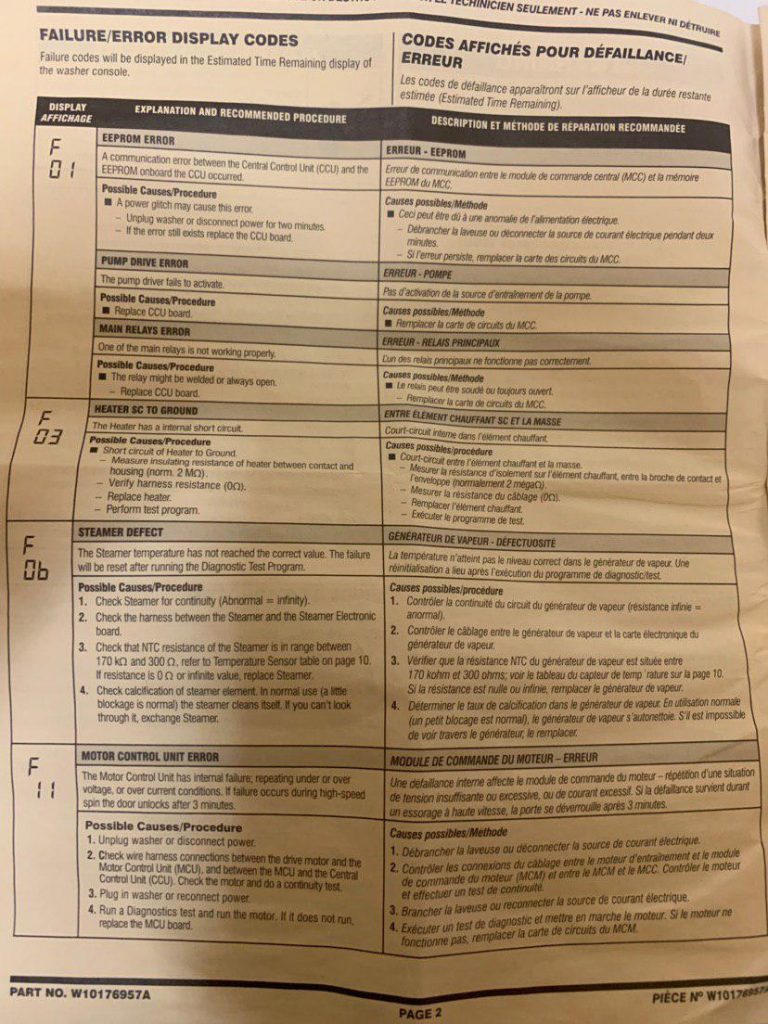
Kenmore front load washers sometimes display error codes during operation. These codes help identify common issues quickly. Understanding these codes saves time and avoids costly repairs. Below are some frequent error codes and their meanings.
Drain Error (oe/dr)
The OE or DR code means the washer cannot drain water. This often happens because of a clogged drain pump or filter. Small objects like coins or lint can block the drain system. The drain hose may also be kinked or blocked, stopping water flow.
To fix this, unplug the washer first. Clean the drain pump filter by opening the access panel. Check and straighten the drain hose. These steps usually clear the problem and stop the error code.
Unbalanced Load (dc/ue)
The dC or UE code shows the washer load is uneven. Clothes may be piled to one side, causing the drum to wobble. This stops the washer from spinning properly. It can happen with heavy items or small loads.
Open the door and redistribute the clothes evenly. Make sure the washer is level on the floor. Avoid washing a single heavy item alone. Balancing the load helps the washer work smoothly and stops the error.
Motor Lock (le)
The LE code signals a motor lock problem. It means the motor is stuck or overloaded. This can happen if the drum is jammed or the motor control board has an issue. Sometimes the wiring or a faulty sensor causes this error.
Try unplugging the washer for a few minutes to reset it. Check for any objects blocking the drum. If the error remains, the motor or control board may need professional repair. Do not force the drum to avoid damage.
Causes Of Drain Issues
Drain issues in Kenmore front load washers often cause error codes and disrupt washing cycles. These problems stop water from leaving the machine properly. Understanding common causes helps fix the issue fast. Most drain problems come from blockages or faulty parts. This section covers the main reasons for drain failures.
Clogged Drain Pump And Filter
The drain pump and filter collect debris during washing. Coins, hairpins, and lint can block them. A clogged pump slows or stops water flow. Check the filter at the bottom front of the washer. Remove any debris to restore drainage. Cleaning this part often solves error codes related to drainage.
Blocked Or Kinked Drain Hose
The drain hose carries water out of the washer. A kink or blockage in the hose stops water flow. This causes water to stay inside the drum. Inspect the hose at the back of the washer. Straighten any bends and remove blockages. Proper hose placement is crucial for smooth drainage.
Water Level Sensor Problems
The water level sensor controls water amount and drainage. A blocked air tube or a broken sensor sends wrong signals. This can cause the washer to stop draining. Check the sensor and its air tube for blockages or damage. Fixing or replacing the sensor can clear drainage errors.
Door Lock Problems
Door lock problems are a common issue with Kenmore front load washers. These problems often prevent the washer door from locking or unlocking properly. When the door lock fails, the washer may not start or may stop mid-cycle. This issue can trigger error codes that help identify the problem.
The door lock ensures safety by keeping the door closed during washing and spinning. A malfunctioning door lock assembly can cause the washer to display error codes related to door lock failure. Understanding these codes can help diagnose the problem quickly and avoid unnecessary repairs.
Faulty Door Lock Assembly
The door lock assembly can wear out over time or become damaged. A faulty assembly may not engage or release the door lock properly. This causes the washer to think the door is open, stopping the cycle for safety reasons.
Common signs of a faulty door lock include the door not locking at all or staying locked after the cycle ends. The washer might show error codes like “dL” or “door lock error.” Replacing the door lock assembly usually solves these problems.
Manual Door Unlock Steps
Sometimes the door can get stuck due to a lock problem. You can manually unlock it with a simple process. First, unplug the washer to ensure safety. Next, remove the top panel of the washer carefully.
Locate the manual release tab on the door lock assembly. Pull the tab gently to release the door lock. This allows you to open the door without causing damage. Manual unlocking helps when the washer won’t unlock after a cycle.

Credit: www.youtube.com
Control Board And Sensor Faults
Control board and sensor faults often cause error codes on Kenmore front load washers. These faults disrupt normal machine operations. The control board manages signals between parts. Sensors monitor water level, door lock, and other functions. Detecting faults early can prevent bigger problems and costly repairs.
Communication Errors With Control Board
Communication errors happen when the control board fails to talk to other parts. The washer might stop mid-cycle or show error codes. This problem can come from loose wiring or a damaged control board. Check for burnt smells or visible damage on the control board. Resetting the washer by unplugging it may clear minor errors. Persistent errors usually need professional repair or board replacement.
Pressure Switch Malfunctions
The pressure switch controls water level in the washer. A faulty pressure switch gives wrong signals to the control board. This can cause the washer to overfill or not fill at all. Blocked or kinked air tubes connected to the switch cause malfunctions too. Cleaning or replacing the pressure switch often solves the issue. Testing the switch with a multimeter helps confirm its condition.
Diagnostic Mode Access
Accessing the diagnostic mode on your Kenmore front load washer helps identify specific issues quickly. This mode reveals error codes that point to problems needing attention. Understanding how to enter and read these codes saves time and money on repairs. It allows you to take the right steps before calling a technician. Follow the simple instructions below to use diagnostic mode effectively.
How To Enter Diagnostic Mode
Start by turning the washer off. Press and hold the “Spin” and “Soil” buttons together. While holding, turn the washer’s control knob to the “Diagnostic” position. Release the buttons after a few seconds. The washer will enter diagnostic mode and display error codes. Make sure the door is closed during this process. Some models may vary, so check your manual if these steps do not work.
Reading And Interpreting Codes
Once in diagnostic mode, the washer will show a series of codes. Each code represents a different issue. For example, “OE” usually signals a drainage problem. Use the washer’s manual or an online guide to understand what each code means. Pay close attention to recurring codes; they indicate persistent problems. After noting the codes, exit diagnostic mode by turning the washer off. This quick check helps you pinpoint faults and decide on the next repair steps.
Troubleshooting Steps
Troubleshooting Kenmore front load washer error codes starts with simple steps anyone can follow. These steps often fix common problems like drainage or door lock errors. They help avoid costly repairs and get your washer running again quickly.
Follow these clear, easy actions to solve issues safely and effectively. Begin with unplugging the machine, then check key parts like the drain pump filter and hose. Make sure your washer is level, and try resetting it if needed. Each step targets common causes behind error codes.
Unplugging For Safety
Always unplug the washer before starting any checks or repairs. This prevents electric shock and protects you from injury. Safety first. Never work on the machine while it is still plugged in.
Cleaning Drain Pump Filter
Locate the drain pump filter at the bottom front of the washer. Place a shallow pan to catch water. Open the filter cover and remove any debris such as coins, lint, or hairpins. Clean the filter thoroughly to ensure smooth drainage.
Checking Drain Hose Condition
Inspect the drain hose at the back of the washer. Look for kinks, bends, or blockages that stop water flow. Make sure the hose is positioned at the right height. A blocked or mispositioned hose can cause error codes and drainage problems.
Leveling The Washer
Check if the washer is sitting evenly on the floor. Use a level tool to confirm. Adjust the washer’s feet to make it stable. An unlevel washer can cause vibrations, noise, and error codes during cycles.
Resetting The Washer
Unplug the washer and wait about one minute. Plug it back in and open the door. Close the door firmly and start a new cycle. Resetting can clear error codes and restore normal operation. It’s a quick way to refresh the machine’s system.
When To Call A Professional
Some Kenmore front load washer issues require expert help. Knowing when to call a professional saves time and prevents damage. Complex repairs involve electrical parts or hard-to-reach components. Handling these without proper skills can be unsafe and worsen the problem.
Replacing Drain Pump Or Door Lock
Drain pump and door lock are common failure points. Replacing them needs special tools and knowledge. The pump is inside the machine and connected to water and electricity. Door lock replacement involves disassembling the washer door area carefully. Professionals ensure the parts fit and work properly.
Water Level Sensor Repair
The water level sensor controls water input and drainage. It uses an air tube and electrical signals. Fixing or replacing it requires testing and precise adjustments. Incorrect repair can cause leaks or error codes. A technician can accurately diagnose and fix sensor problems.
Control Board Issues
The control board is the washer’s brain. It manages all functions and error codes. Board problems cause unpredictable behavior or no response. Repairing or replacing the control board demands advanced skills. Professionals use diagnostic tools to detect faults and fix them safely.
Credit: iskanderservices.com

Credit: www.youtube.com
Frequently Asked Questions
How To Reset A Kenmore Front Load Washer?
To reset a Kenmore front load washer, unplug it for one minute. Plug it back in and turn the dial to the “Drain/Spin” cycle. Press and hold the “Start/Pause” button for three seconds to reset the machine. This clears errors and restarts the washer.
How To Read Error Codes On Kenmore Washer?
To read Kenmore washer error codes, enter diagnostic mode by turning the cycle knob through specific steps. Check the display for codes, then refer to the manual to identify issues like drainage or door lock faults. Clear clogs and reset the machine as needed.
What Does E01 And F09 Mean On A Washing Machine?
E01 on a washing machine usually indicates a drainage problem, like a clogged pump or blocked hose. F09 means a door lock fault, often caused by a faulty lock sensor or wiring issue. Check and clean the drain filter and inspect the door lock for proper function.
How To Run Diagnostic On Kenmore Washer?
To run diagnostics on a Kenmore washer, turn the cycle selector knob one full rotation. Then, press and hold the Start/Pause button for 3 seconds to enter diagnostic mode. The washer will display error codes to help identify issues. Refer to the manual for code meanings and fixes.
What Do Kenmore Washer Error Codes Mean?
Kenmore washer error codes help identify specific problems. They show issues like drainage, door lock, or sensor faults. Reading these codes speeds up repairs and saves time.
Conclusion
Troubleshooting Kenmore front load washer codes helps keep your machine running. Simple checks like cleaning the drain filter or inspecting the hose often solve common errors. Knowing what each code means saves time and frustration. Small fixes can prevent costly repairs later.
Always unplug the washer before starting any work. For persistent problems, seek professional help to avoid damage. Staying informed ensures your washer works efficiently and lasts longer. Use this guide as a quick reference for common error codes. Keep washing without worries by addressing issues early.



