Is your Keurig 2.0 acting up right when you need your coffee fix? Whether it’s not brewing, blinking without reason, or giving you half cups, these issues can be frustrating.
But don’t worry—most Keurig 2. 0 problems have simple fixes that you can try yourself. In this guide, you’ll discover easy troubleshooting steps that save you time and money. From quick resets to cleaning tips, you’ll learn exactly how to get your machine back to perfect brewing in no time.
Keep reading, and say goodbye to coffee interruptions for good!

Credit: www.youtube.com
Power Cycle Reset
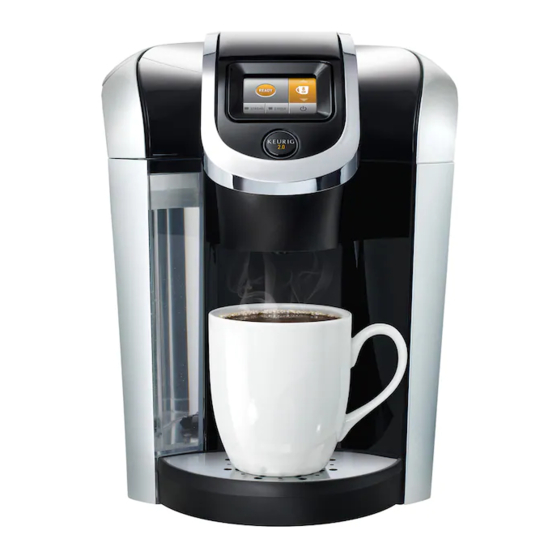
The Power Cycle Reset is a simple way to fix many Keurig 2.0 problems. It clears errors and refreshes the machine’s system. This reset often solves issues like unresponsive buttons or error lights. Follow these steps carefully to perform the reset.
Unplug And Remove Reservoir
First, unplug the Keurig from the power outlet. This step cuts off all power to the machine.
Next, remove the water reservoir from its place. Take it off gently to avoid damage.
Plug In And Wait For Indicator
Plug the machine back into the power source. Do not put the reservoir back yet.
Wait for the “Add Water” light to blink or the indicator to show readiness. This means the machine is reset and ready for the next step.
Reinstall Reservoir
Carefully place the water reservoir back onto the machine. Make sure it sits properly and is secure.
Wait for the lights to turn solid. This shows the machine is ready to brew again.
Credit: www.esseg.eu
Basic Troubleshooting Steps
Troubleshooting your Keurig 2.0 can be simple with a few basic steps. These steps often fix common issues quickly. Start with easy fixes before trying complex solutions. This saves time and avoids frustration. Follow the instructions carefully for best results.
K-cup Lever Reset
Open the K-Cup lever fully. Remove the K-Cup pod if it is stuck. Close the lever firmly to reset the brewing cycle. This action can clear any jam or misalignment. Try brewing again after the reset. This often resolves brewing errors and lever problems.
Check Power And Outlet
Make sure the power cord is plugged in securely. Check if the outlet works by testing another device. Try a different outlet to rule out power issues. Inspect the cord for any visible damage. Using a surge protector can protect your machine from power spikes. A steady power supply helps your Keurig work properly.
Advanced Fixes
Advanced fixes go beyond simple resets and cleaning. They target less obvious problems inside your Keurig 2.0. These solutions require a bit more effort but can save your machine from costly repairs.
Trying these steps carefully helps restore your brewer’s full function. Always unplug the machine before starting any advanced fix.
Clean Needles And Sensors
Coffee grounds can clog the needles that pierce the K-Cup. Blocked needles stop water flow and cause brewing errors. Use a straightened paperclip or needle to clear any debris.
Check the sensors near the needles. Dust or residue on sensors may cause wrong readings. Gently wipe sensors with a soft cloth dampened with water. Avoid harsh chemicals that can damage parts.
Regular cleaning prevents build-up and keeps your Keurig working smoothly. Perform this cleaning monthly for best results.
Thermal Fuse Reset
The thermal fuse protects your Keurig from overheating. If the machine won’t power on, the fuse might have tripped. This internal switch cuts power to avoid damage.
To reset, unplug the brewer and remove the water reservoir. Open the machine’s casing carefully to locate the thermal fuse. Press the small reset button on the fuse or replace it if needed.
After resetting, reassemble your Keurig and plug it back in. This fix restores power and prevents overheating issues. Handle internal parts gently to avoid further damage.
Common Brewing Issues
Many Keurig 2.0 users face common brewing issues that disrupt their coffee routine. These problems range from slow brewing to leaks and power failures. Understanding these issues helps in quick troubleshooting. Fixing them saves time and keeps your machine working smoothly.
Slow Flow And Half Cups
Slow flow or half cups often mean a clog. Coffee grounds or mineral buildup can block the needles. Clean the needles carefully with a paperclip. Descale the machine regularly to remove mineral deposits. Also, check if the water reservoir is seated properly. This ensures good water flow.
Leaks From Reservoir Or Lines
Leaks usually come from a loose reservoir or broken lines. Make sure the reservoir snaps into place tightly. Check for cracks or damage in the water reservoir. Inspect the water lines inside the machine for leaks or wear. Replace damaged parts to stop leaks and prevent water damage.
Failure To Heat Or Power
The machine not heating or powering on can be caused by a power issue. Check if the power cord is plugged in and undamaged. Try a different outlet to rule out power source problems. Perform a basic power cycle by unplugging the machine for a few minutes. This often resets the internal system.
Blinking Lights And No Brew
Blinking lights without brewing signal a machine error or jam. Remove and reinsert the water reservoir to reset the sensor. Open and close the K-Cup lever firmly to reset the brew cycle. Clean the needles and sensors to remove any blockages. Persistent blinking may need a deeper reset or professional help.
Maintenance Tips
Keeping your Keurig 2.0 in good shape helps it work better and last longer. Regular maintenance stops common issues and keeps your coffee fresh. Simple steps can avoid many problems and improve brewing quality.
Descaling The Machine
Descaling removes mineral deposits inside the brewer. Use a descaling solution or white vinegar. Fill the water reservoir and run the machine without a pod. Repeat until the reservoir is empty. Then, run fresh water cycles to rinse out the taste.
Removing Mineral Buildup
Mineral buildup blocks water flow and affects taste. Check the needle that pierces the pods for clogs. Use a paperclip or needle cleaner to clear the holes. Wipe the machine’s exterior and pod holder with a damp cloth. This keeps everything clean and working well.
Proper Reservoir Seating
The water reservoir must sit firmly on the base. Remove and reseat it if the machine shows an error. Make sure it clicks into place. A loose reservoir can stop the machine from brewing. Check for cracks or damage that may cause leaks.
Drm And Pod Compatibility
The Keurig 2.0 introduced a new challenge for coffee lovers: DRM and pod compatibility. This system uses digital rights management to control which pods work with the machine. Only authorized pods are accepted, limiting user choice. This change affects how users brew coffee and what pods they can use. Understanding these restrictions helps troubleshoot common issues related to pod acceptance and brewing errors.
Lockout Technology Impact
Keurig 2.0 uses lockout technology to block unauthorized pods. The machine scans each pod’s barcode before brewing. If the pod is not recognized, the brew will not start. This prevents the use of third-party or refillable pods. Users often face error messages or no brewing action. This lockout frustrates those who prefer non-Keurig brands or reusable options.
Reusable Filter Challenges
Reusable filters do not have the required digital codes. The Keurig 2.0 machine rejects these filters due to lockout rules. This limits eco-friendly choices for users. Many want to save money and reduce waste with reusable pods. Unfortunately, these options cause compatibility errors. The machine may show “pod not recognized” or fail to brew altogether.
Consumer Reactions
Many consumers reacted negatively to the new DRM system. Reviews often mention frustration and disappointment. Users complain about limited pod choices and forced brand loyalty. Some customers stopped using the Keurig 2.0 because of these restrictions. Others seek workarounds or return to older models. This backlash shows the importance of pod compatibility in user satisfaction.

Credit: www.esseg.eu
Frequently Asked Questions
How To Reset Keurig 2.0 Coffee Maker?
Unplug the Keurig 2. 0 and remove the water reservoir. Wait a few minutes, then reattach the reservoir and plug it back in. Wait for the lights to stabilize, indicating the reset is complete.
Why Was Keurig 2.0 Discontinued?
Keurig 2. 0 was discontinued due to consumer backlash against its restrictive DRM technology. Customers disliked forced use of proprietary pods. Negative reviews cited complexity and anti-consumer policies. These factors led Keurig to end the product and focus on more user-friendly brewers.
What Are The Common Keurig Problems?
Common Keurig problems include slow brewing, half cups, leaks, failure to power or heat, and blinking lights. These often result from clogged needles, mineral buildup, misaligned reservoirs, or power issues. Regular descaling, cleaning, and proper reservoir placement usually fix these issues quickly and effectively.
How Long Should A Keurig 2.0 Last?
A Keurig 2. 0 typically lasts 3 to 5 years with proper care and regular descaling. Frequent use and poor maintenance shorten its lifespan.
Why Is My Keurig 2.0 Not Brewing Coffee?
Your Keurig may need a reset or cleaning. Check if the water reservoir is full and properly seated. Also, clear any coffee grounds blocking the needles.
Conclusion
Troubleshooting your Keurig 2. 0 can be simple with the right steps. Start with a basic power reset to clear minor glitches. Clean the needles regularly to prevent clogs and improve brewing. Check the power source to avoid electrical issues.
For persistent problems, inspect the thermal fuse and consider advanced resets. Taking care of these common fixes saves time and money. Your Keurig can be ready to brew again with just a little effort. Keep these tips handy for smooth coffee making every day.