
Is your KitchenAid mixer acting up just when you need it most? You’re not alone.
Whether it’s strange noises, speed troubles, or the beater scraping the bowl, these common issues can be frustrating. But don’t worry—many problems have simple fixes you can handle yourself. In this guide, you’ll learn how to quickly troubleshoot your KitchenAid mixer, save time and money, and get back to baking with confidence.
Keep reading to discover easy steps that will have your mixer running smoothly again in no time.
Common Mixer Noises And Leaks
Common mixer noises and leaks often signal internal wear or maintenance needs. These issues affect mixer performance and lifespan. Identifying noise types and leak sources helps prevent bigger problems. Early attention keeps your KitchenAid running smoothly.
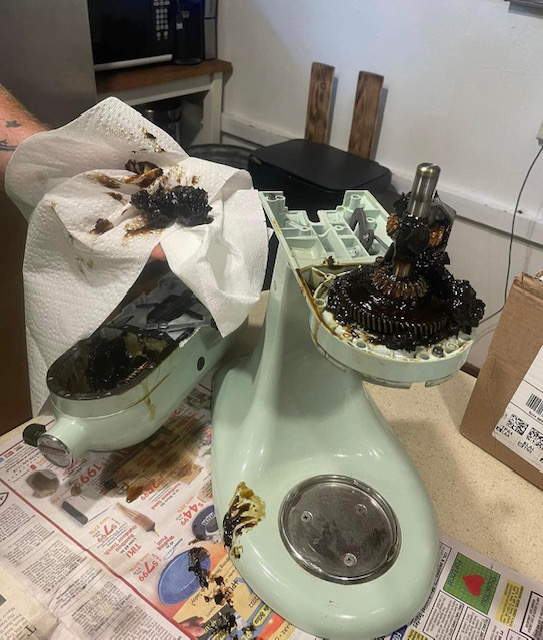
Dried Grease Effects
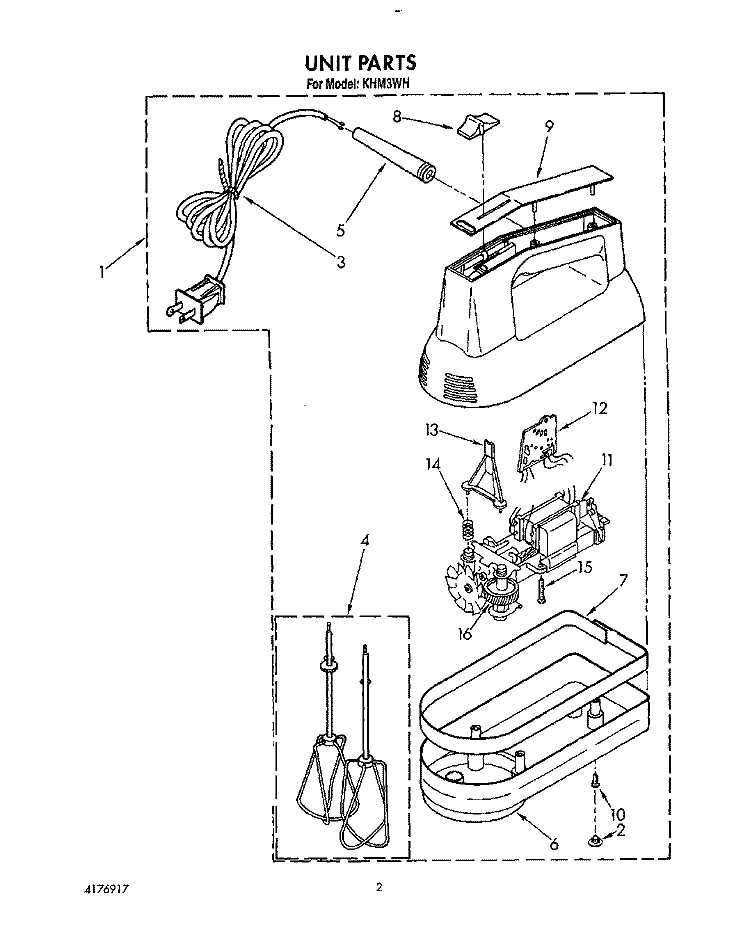
Old grease inside the mixer can harden and lose its lubricating power. This causes grinding noises during operation. The gears may wear faster due to increased friction. Dried grease also leads to leaks as it no longer seals properly. Regular use without proper lubrication worsens this condition.
Worn Worm Gear Signs
The worm gear is a plastic part designed to protect the motor. When it wears out, the mixer makes loud grinding or rattling sounds. Speed control may become erratic or stop working. Leaks of grease near the gear housing are common. Replacing a worn worm gear restores smooth operation and prevents damage.
Cleaning And Re-greasing Tips
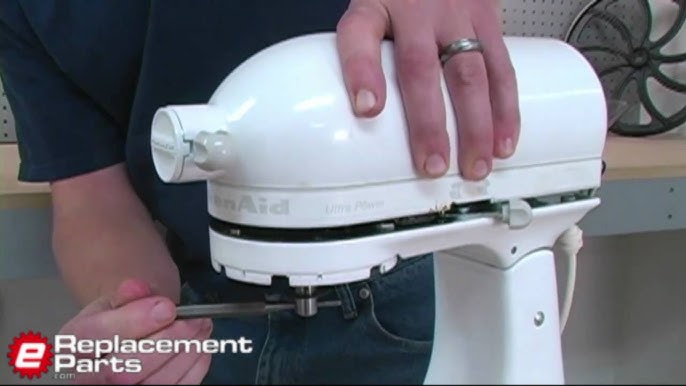
Unplug the mixer before cleaning to ensure safety. Remove the mixer head to access gears and worm gear. Clean old grease and dirt with a soft cloth and mild cleaner. Apply fresh food-grade grease evenly to all gear surfaces. Avoid over-greasing, which can cause leaks. Reassemble the mixer carefully and test for noise or leaks.
Speed Control Problems
Speed control problems can stop your KitchenAid mixer from working properly. These issues often cause the mixer to run at only one speed or not respond when you change speeds. Fixing speed control problems usually involves checking a few key parts inside the mixer. Understanding these common issues helps you troubleshoot the problem faster and get your mixer back to work.
Single Speed Operation
Sometimes your mixer runs on only one speed, often the highest. This happens when the speed control system fails to change settings. The mixer may feel like it is stuck and won’t slow down or speed up.
Check if the speed control knob turns smoothly. If it feels loose or does not click into place, the control switch might be worn out. Replacing the switch can restore full speed control. Also, inspect internal wiring for damage or loose connections.
Faulty Speed Board Issues
The speed board controls how the mixer adjusts speeds. A damaged or faulty board causes erratic speed changes or no change at all. The mixer might jump between speeds or stay stuck on one.
Look for burn marks, broken solder joints, or corrosion on the speed board. A multimeter test can confirm if the board works correctly. Replacing the board often fixes speed control problems and improves mixer performance.
Hall Sensor Malfunctions
The Hall sensor senses motor speed and helps regulate it. If the sensor fails, the mixer may not adjust speeds correctly or stop working at certain speeds.
Check the sensor for dirt or damage. Clean it gently with a soft cloth if dirty. Test the sensor with a multimeter to see if it sends the right signals. A faulty sensor usually needs replacement to restore proper speed control.
Motor Overheating And Shutdown
The motor overheating and shutdown issue is common in KitchenAid mixers. It happens when the motor works too hard or gets too hot. The mixer then stops to protect itself from damage. Understanding the causes helps fix the problem quickly. Regular checks keep your mixer running well and extend its life.
Causes Of Overheating
Overheating can happen from overloading the mixer. Mixing thick dough or large batches strains the motor. Blocked vents prevent air from cooling the motor. Dust and debris build-up inside the mixer also trap heat. Worn motor brushes cause poor electrical contact, making the motor work harder. Each of these stops the motor from working smoothly.
Clearing Dust And Vents
Dust and crumbs can block the mixer’s vents. This stops air from reaching the motor. Use a soft brush or compressed air to clean vents. Do this often to keep airflow steady. Avoid wet cleaning inside the mixer to prevent damage. Keeping vents clear helps the motor stay cool during use.
Motor Brush Wear
Motor brushes wear out after long use. Worn brushes cause sparks and poor motor power. This makes the motor overheat and shut down. Brushes are small parts but important for motor function. Replace brushes every few years or when the mixer loses power. Changing them restores motor efficiency and prevents overheating.
Credit: sanvicentebenavente.es
Beater And Bowl Clearance
The beater and bowl clearance in your KitchenAid mixer is crucial for smooth mixing. Proper clearance means the beater barely touches the bowl without scraping it. This setup helps mix ingredients evenly and prevents damage to the bowl or beater. Incorrect clearance can cause scraping, uneven mixing, or wear on parts.
Adjusting this space ensures your mixer works efficiently. It also extends the life of the attachments and bowl. Understanding how to check and fix the clearance saves time and hassle during baking.
Adjusting Beater Height
Beater height affects how well ingredients mix. If the beater scrapes the bowl, it is too low. If it misses the sides, it is too high. To adjust, turn off and unplug the mixer first. Use a screwdriver to turn the adjustment screw located near the beater shaft. Turn slowly and check the clearance by rotating the beater by hand. Aim for a small gap between the beater edge and bowl.
Small changes make a big difference. Test the mixer with a small amount of batter to ensure no scraping occurs. Proper adjustment prevents damage and improves mixing results.
Avoiding Ingredient Scraping
Scraping ingredients from the bowl sides saves time and reduces mess. A correctly adjusted beater clears most ingredients. If you notice batter stuck on the bowl, pause mixing and scrape with a spatula.
Using the right beater attachment also helps. Flat beaters work well for most batters, while dough hooks handle thick dough better. Keep the bowl clean and check the clearance regularly. This avoids buildup and keeps mixing smooth.
Mixer Power Issues
Mixer power issues can stop your KitchenAid mixer from working. This problem can be simple or need some repair. Checking the power source is the first step. Sometimes the outlet or plug is the issue. Next, inspect the power cord for damage or loose connections. Finally, worn motor brushes can cause power loss and need replacement. Follow these steps to bring your mixer back to life quickly.
Checking Power Source
Start by making sure the mixer is plugged in properly. Test the outlet with another device to see if it works. Avoid using power strips or extension cords. These can cause power drops. Reset any tripped circuit breakers in your home. A steady power supply is essential for your mixer to run smoothly.
Inspecting Power Cord
Look over the power cord carefully. Check for cuts, frays, or exposed wires. Damaged cords can stop the mixer from getting power. Ensure the cord fits tightly into the mixer and the outlet. If the cord is loose or broken, it needs replacement. A new cord is a low-cost fix that can solve many power problems.
Replacing Motor Brushes
The motor brushes wear out over time. Worn brushes cause the mixer to lose power or stop running. To replace them, unplug the mixer first. Remove the motor cover to access the brushes. Take out the old brushes and insert new ones. Use brushes made for your KitchenAid model. Reassemble the mixer and test it. This fix can extend the life of your mixer significantly.
Credit: prarambhika.com
Resetting The Mixer
Resetting your KitchenAid mixer can solve many common issues quickly. Overloads or temporary faults cause the mixer to stop working. Resetting clears these faults and lets the mixer run smoothly again. This process is simple and does not require special tools. Follow easy steps to reset and get back to mixing your favorite recipes.
Using Overload Reset Button
Most KitchenAid mixers have an overload reset button. It protects the motor from damage by stopping it during heavy use. To reset, locate the small red button on the mixer’s base or back. Press the button firmly until it clicks. This action resets the motor and clears the overload condition.
Use this button only after the mixer stops working suddenly. Pressing it too often may indicate a deeper mechanical issue. Resetting allows the motor to cool and prevents permanent damage.
Proper Cooling Times
Allow the mixer to cool before resetting. The motor needs time to lower its temperature. Wait at least 15 minutes after the mixer stops. Avoid rushing the reset process. Cooling protects the internal parts from overheating and extends mixer life.
Do not operate the mixer continuously for long periods. Use breaks during heavy mixing tasks. Proper cooling prevents overloads and keeps the machine running well.
Restarting After Reset
Once cooled and reset, restart the mixer by turning it on at low speed. Check if it runs smoothly without strange sounds or stops. Gradually increase speed to your desired setting. Watch for any unusual behavior or overheating signs.
If the mixer fails to restart or trips again, inspect the motor and gears. Professional repair may be needed. Resetting solves many simple problems but cannot fix all mechanical failures.
Maintenance Tips
Proper maintenance keeps your KitchenAid mixer running smoothly. Small steps extend its life and improve performance. Follow these simple tips to avoid common problems and enjoy your mixer for years.
Regular Use Benefits
Using your mixer often helps keep parts moving well. Regular motion stops grease from drying out. It prevents gears from sticking and reduces motor strain. Even short mixing sessions once a week help maintain smooth operation.
Cleaning Mixer Vents
Clear vents stop the motor from overheating. Dust and crumbs can block airflow. Use a soft brush or cloth to clean vents gently. Avoid water near vents to prevent damage. Clean vents regularly, especially after heavy use.
Lubrication Practices
Lubrication keeps gears running quietly and smoothly. Use food-safe grease designed for mixers. Avoid over-greasing as it may cause leaks. Check the manual for lubrication points and frequency. Proper lubrication reduces wear and noise in your mixer.
Credit: www.youtube.com
Frequently Asked Questions
What Are Common Kitchenaid Mixer Problems?
Common KitchenAid mixer problems include noise or grease leaks, speed control issues, motor overheating, beater scraping the bowl, and failure to start. Cleaning, adjusting, re-greasing, or replacing parts like the worm gear or motor brushes often resolves these issues quickly and effectively.
How To Reset Kitchenaid Mixer?
To reset a KitchenAid mixer, unplug it first. Wait 5 minutes to let it cool. Plug it back in and test. If issues persist, check the speed control and motor brushes. Regular maintenance prevents frequent resets.
Why Isn’t My Kitchenaid Mixer Turning On?
Check the power outlet and cord for issues. Inspect and replace worn motor brushes. Ensure the mixer is properly plugged in.
Do Kitchenaid Mixers Have A Lifetime Guarantee?
KitchenAid mixers do not offer a lifetime guarantee. They come with a limited warranty covering parts and labor for one year. Extended warranty options may be available through retailers or third-party providers. Always check specific model warranty details before purchase.
What Causes Kitchenaid Mixer To Make Loud Noises?
Loud noises often come from dried grease or a worn worm gear. Regular use helps keep the grease moving and prevents noise. Re-greasing or replacing the worm gear can fix this issue.
Conclusion
Troubleshooting your KitchenAid mixer can save time and money. Many common problems have simple fixes. Regular cleaning and maintenance keep your mixer running smoothly. Small parts like worm gears or brushes wear out but replace easily. Adjusting the beater height improves mixing performance.
Watch for overheating and give your mixer breaks to cool down. With these tips, your mixer stays reliable for years. Stay patient and follow steps carefully for best results. Your KitchenAid mixer is ready to help with every recipe.



