
Is your LG G5 acting up when you least expect it? Maybe the screen freezes, the battery drains too fast, or apps won’t update.
Frustrating, right? You’re not alone, and the good news is many common LG G5 problems have simple fixes you can try yourself. In this guide, you’ll discover easy troubleshooting tips that get your phone back to running smoothly—no tech jargon, just clear steps you can follow right now.
Keep reading, and take control of your LG G5’s performance today!
Credit: www.att.com
Common Lg G5 Issues
Many LG G5 users face common issues that affect daily phone use. These problems can disrupt calls, apps, and battery life. Understanding these issues helps in quicker fixes. The most frequent problems include screen freezing, battery drain, app errors, sound glitches, and connectivity troubles. Below is a clear look at these common LG G5 issues.
Screen Freezing And Unresponsiveness
The LG G5 screen may freeze or stop responding to touch. This often happens after installing new apps or updates. It can make the phone hard to use or restart. Restarting the phone by holding the power and volume down buttons can help. If freezing continues, checking for system updates or resetting settings may fix the issue.
Battery Drain Problems
Many users report fast battery drain on their LG G5. Apps running in the background or screen brightness can cause this. Turning off unused apps and lowering brightness saves battery life. Battery health may also decline over time, requiring replacement. Using battery saver mode extends daily use without charging.
App Download And Update Failures
Issues with downloading or updating apps often occur on the LG G5. This can be due to slow internet or insufficient storage space. Clearing cache and data of the Play Store app can fix download errors. Checking Wi-Fi or mobile data settings ensures a stable connection for updates.
Audio And Sound Glitches
Sound problems include no audio, crackling, or low volume. These glitches often happen during calls or media playback. Restarting the phone or removing connected Bluetooth devices can solve sound issues. Adjusting audio settings or cleaning the headphone jack also helps improve sound quality.
Connectivity And Internet Issues
Connection problems like weak Wi-Fi or mobile data loss are common on the LG G5. Restarting the device or toggling airplane mode can restore connections. Forgetting and reconnecting to Wi-Fi networks often fixes internet drops. Checking for software updates keeps network functions stable and fast.
Quick Fixes
Quick fixes can resolve many common LG G5 issues fast. These simple steps require no special tools. They help avoid lengthy troubleshooting or repair visits. Try these easy methods first to get your phone working smoothly again.
Force Restart Using Buttons
Press and hold the Power and Volume Down buttons simultaneously. Keep holding for about 10 to 15 seconds. The phone will vibrate and restart. This method helps if the phone is frozen or unresponsive.
Removing And Reinstalling Battery
Power off your LG G5 completely. Remove the back cover and take out the battery carefully. Wait for 30 seconds before reinserting the battery. Close the cover and power on the device. This can fix power-related problems.
Clearing Cache And Data
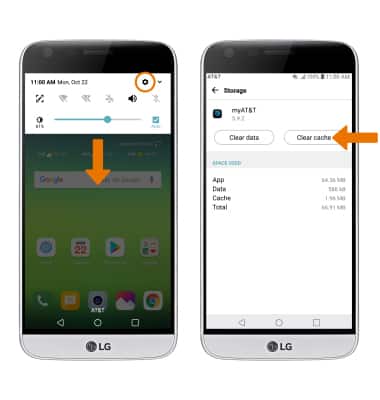
Open the Settings app and go to Apps or Application Manager. Select the problematic app from the list. Tap on Storage, then choose Clear Cache. If issues continue, tap Clear Data to reset the app. This removes corrupted temporary files.
Checking Notification Led Settings
Go to Settings and select Sound or Notifications. Find the Notification LED option and ensure it is turned on. If the LED is off, enable it to receive visual alerts. This helps with missed notifications or alerts.
Advanced Troubleshooting
Advanced troubleshooting goes beyond basic fixes. It helps solve deep software or hardware issues on the LG G5. These steps require caution but can restore your phone’s performance. Follow each method carefully to avoid data loss or damage.
Performing A Factory Reset
A factory reset erases all data and settings on your LG G5. It restores the phone to its original state. This step fixes persistent software problems. Back up important files before starting. To reset, go to Settings > Backup & Reset > Factory Data Reset. Confirm and wait for the phone to restart. This process may take several minutes.
Unlocking Bootloader
Unlocking the bootloader allows you to install custom software on your LG G5. It removes restrictions set by the manufacturer. This step is necessary for advanced customizations. Visit the official LG developer website to get the unlock key. Follow the instructions carefully to avoid bricking your device. Unlocking will erase all data, so back up first.
Using Custom Roms
Custom ROMs replace the phone’s original operating system. They offer new features and updates not available on stock firmware. Choose a ROM compatible with the LG G5 model. Download it from trusted sources. Use a custom recovery tool like TWRP to install the ROM. Installing custom ROMs can improve speed and fix bugs. This process requires an unlocked bootloader.
Replacing Faulty Hardware Components
Hardware issues cause some LG G5 problems. Common faulty parts include the battery, screen, or charging port. Identify the broken component by testing or visual inspection. Purchase genuine replacement parts for best results. Use proper tools and follow guides to replace parts safely. If unsure, seek professional repair services. Replacing hardware can extend the phone’s life significantly.

Credit: www.reddit.com
Software Updates And Patches
Software updates and patches play a vital role in keeping your LG G5 running smoothly. These updates fix bugs, improve performance, and enhance security. Regularly installing updates ensures your phone stays compatible with new apps and features.
Sometimes, software updates specifically target common problems, such as display glitches or sound issues. Applying these patches can solve many frustrations without needing technical help. Staying updated also protects your device from security risks.
Installing Official Updates
Access your LG G5 settings and select “About phone.” Tap “Software updates” to check for new versions. Download and install any available updates using a stable Wi-Fi connection. Avoid interrupting the process to prevent errors.
Official updates come directly from LG or your carrier. They are tested to work well with your device. Installing them keeps your phone safe and stable.
Addressing Hdr And Display Issues
HDR problems may cause colors to look strange or details to fade. Some updates improve HDR performance and fix display bugs. Enable “Filmmaker mode” in display settings to enhance picture quality on supported apps.
If screen flickers or blacks appear raised, check for patches that target these bugs. Restart your phone after updating to apply changes fully.
Fixing Sound And Notification Bugs
Sound may cut out or notifications fail due to software glitches. Update your LG G5 to fix these bugs. After updating, adjust sound and notification settings to ensure they work properly.
Go to Settings > Sound > Notification LED and toggle the LED on if it is off. This simple step can restore notification alerts.
Alternative Solutions
Alternative solutions offer practical ways to fix your LG G5 without relying solely on standard troubleshooting steps. These options help when basic fixes fail or when you prefer expert help. Exploring various methods can save time and effort. They also provide more tailored support for your specific issue.
Using Third-party Repair Tools
Third-party repair tools provide software solutions for common LG G5 problems. These tools can fix system errors, recover lost data, or improve performance. Many are easy to use and cost-effective compared to official repairs. Choose tools with good reviews and clear instructions to avoid further damage.
Visiting Authorized Service Centers
Authorized service centers offer reliable repairs with genuine parts. Technicians here know LG G5 hardware and software deeply. They ensure your phone gets proper care and maintains its warranty status. Service centers handle complex issues like battery replacement or screen damage professionally.
Exploring Online Forums And Communities
Online forums and communities contain valuable user experiences and solutions. You can find step-by-step guides and tips from people facing similar LG G5 problems. These platforms allow asking questions and sharing advice freely. They often provide quick help without extra cost.

Credit: www.reddit.com
Preventive Tips
Preventive care keeps your LG G5 running smoothly and avoids common issues. Small daily habits protect your phone’s key functions. Focus on battery health, temperature control, and software updates. These simple steps extend your device’s life and improve performance.
Maintaining Battery Health
Charge the battery before it drops below 20%. Avoid letting it reach zero percent. Use the original charger to ensure safe power delivery. Disconnect the charger once fully charged. Avoid overnight charging to prevent stress on the battery. Keep the battery clean and dry to avoid damage.
Avoiding Overheating
Keep the phone out of direct sunlight for long periods. Remove phone cases during heavy use to help cooling. Close unused apps running in the background. Avoid using power-hungry apps for too long. Restart the phone regularly to prevent overheating from software bugs. Do not charge the phone on soft surfaces like beds or cushions.
Regular Software Maintenance
Check for software updates often and install them promptly. Updates fix bugs and improve system stability. Clear app caches regularly to free up memory. Uninstall apps that you no longer use. Restart the phone weekly to refresh system processes. Back up important data before major updates or resets.
Frequently Asked Questions
Is The Lg G5 Still Supported?
The LG G5 no longer receives official software updates or security patches. Support has ended since its release in 2016. Users rely on custom ROMs or third-party solutions for continued functionality.
How To Hard Reset An Lg G5?
To hard reset an LG G5, press and hold the Power and Volume Down buttons simultaneously. Keep holding until the phone restarts. Release the buttons once the LG logo appears. This forces a reboot and can fix unresponsive or frozen screens.
How Do I Fix An Unresponsive Lg Touch Screen?
Press and hold the Power and Volume Down buttons together until the LG phone restarts. This often fixes unresponsive touchscreens. If the screen stays unresponsive, try removing and reinserting the battery or perform a factory reset. Seek professional repair if the issue persists.
How To Do A Hard Reset On An Lg?
Press and hold the Power and Volume Down buttons simultaneously. Keep holding until the LG logo appears, then release. The phone will reset.
How Do I Fix An Unresponsive Lg G5 Touch Screen?
Try restarting your LG G5 by holding the Volume Down and Power buttons together. Keep holding until the phone restarts. This often solves the touch screen issues.
Conclusion
Troubleshooting your LG G5 can solve many common issues quickly. Simple steps like restarting or resetting often help. Check settings carefully to avoid small problems. Keep your software updated for better performance. When problems persist, seek professional help or trusted guides.
Staying calm and patient makes fixing easier. Your LG G5 can keep working well with regular care. Don’t give up on your device too soon. Small fixes often bring big improvements.



