
If you’re struggling with your LiftMaster MyQ system and looking for clear, simple solutions, you’re in the right place. When your garage door opener acts up, the manual PDF can be a lifesaver—but only if you know how to use it effectively.
This guide will walk you through the most common issues and quick fixes, helping you troubleshoot like a pro. Whether your safety sensors are misaligned, your remote isn’t responding, or the blinking light has you puzzled, we’ll break down each problem into easy steps you can follow right now.
Keep reading to take control of your LiftMaster MyQ and get your garage door working smoothly again.
Common Liftmaster Issues
LiftMaster garage door openers are reliable but can face issues over time. Knowing common problems helps fix them fast. This section explains frequent LiftMaster troubles and simple ways to solve them.
Sensor Problems
Sensors near the door bottom detect obstacles. Dirt or misalignment stops the door from closing. Clean sensor lenses carefully. Remove anything blocking sensors. Adjust sensors until both show solid green lights.
Lock Feature Activation
The wall control has a lock feature. When active, remotes stop working. Check the wall control panel. Press the lock button to disable this feature. This often restores remote control function immediately.
Power Glitches
Power interruptions cause opener resets. A quick power cycle can help. Unplug the opener for a minute. Plug it back in and test the door. This clears temporary errors and restores normal operation.
Motor Resistance Errors
The motor senses resistance when the door is heavy or stuck. This triggers errors and stops the door. Check door balance and remove objects blocking it. After clearing the path, power cycle the opener to reset the motor sensor.
Wiring Issues
Loose, damaged, or reversed wires cause many problems. Inspect wires near sensors and the motor unit. Look for loose staples, corrosion, or breaks. Secure or replace damaged wires to ensure proper connection and function.

Credit: support.chamberlaingroup.com
Sensor Troubleshooting
Sensors play a key role in the safe operation of your LiftMaster garage door. Problems with these sensors often cause the door to stop or reverse. Troubleshooting sensors helps restore smooth function without delay. This section covers simple steps to fix sensor issues using your LiftMaster MyQ manual PDF.
Cleaning Sensor Lenses
Dirty sensor lenses block the signal between sensors. Use a soft cloth to gently wipe each lens. Avoid harsh cleaners that can damage the surface. Clean lenses ensure clear communication and reduce false error signals.
Checking For Obstructions
Objects in front of sensors can stop the door from closing. Remove any items like leaves, dirt, or debris near the sensor area. Keep the sensor path clear to allow proper operation and avoid safety interruptions.
Aligning Sensors Properly
Misaligned sensors cause the door to reverse or stop. Sensors must face each other directly, usually about 6 inches above the ground. Adjust the brackets slowly until both sensor lights turn solid. Proper alignment ensures reliable door movement.
Verifying Solid Sensor Lights
Both sensors show a solid light when working correctly. A blinking or off light signals a problem. Check wiring connections for looseness or damage. Confirm power is reaching the sensors. Solid lights mean the sensors are ready to operate safely.
Lock Feature Fixes
The lock feature on your LiftMaster MyQ wall control can sometimes cause confusion. It disables remote controls, making it seem like the garage door opener is not working. Knowing how to fix this can save time and frustration. This section covers simple steps to identify and disable the lock feature. Follow these tips to restore normal function quickly.
Identifying Lock Activation
The lock feature activates to prevent unwanted use of remotes. Check your wall control panel for a blinking or steady lock icon. If the remotes stop working but the wall control still operates, the lock feature might be on. This feature blocks remote signals but allows manual control. Confirm lock activation by pressing the lock button on the wall control. A light or icon will indicate if it is active.
Disabling Wall Control Lock
To disable the lock feature, press and hold the lock button on the wall control for about 3 seconds. The lock light will turn off, showing the feature is off. This restores remote control use immediately. If this does not work, try power cycling your garage door opener by unplugging it for 30 seconds. Plug it back in and repeat the lock button step. This resets the system and clears the lock status.

Credit: device.report
Power Cycling Methods
Power cycling is a simple yet effective way to fix many LiftMaster MyQ issues. It helps clear temporary errors and refreshes the system. This method often restores normal function without needing complex repairs. Below are key power cycling methods to troubleshoot your LiftMaster MyQ.
Resetting The Opener
Start by unplugging the garage door opener from the power source. Wait about 30 seconds to 1 minute. This pause allows the internal memory to clear minor faults. Plug the opener back in and test the remote or wall control. This reset can fix many common problems, such as unresponsive controls or blinking lights.
Resetting the opener is quick and requires no tools. It often solves issues caused by power surges or minor software glitches. Repeat this step if the problem returns after some time.
Dealing With Temporary Glitches
Temporary glitches can cause the MyQ system to freeze or act oddly. Power cycling helps by cutting off power completely. Unplug the opener, wait at least 60 seconds, then reconnect power. This forces the device to reboot fresh.
If the MyQ app or remote does not connect, power cycling can restore communication. Also, check your Wi-Fi signal during this process to ensure a stable connection. Performing power cycles regularly can keep your opener running smoothly without persistent errors.
Motor And Resistance Solutions
The motor and resistance issues often cause LiftMaster MyQ garage door problems. These issues can stop the door from opening or closing smoothly. Finding the cause helps fix the problem quickly.
Several simple checks can improve motor function and reduce resistance. These include checking door balance, removing obstructions, and inspecting the RPM sensor. Each step targets common causes of motor strain.
Checking Door Balance
Start by disconnecting the door from the opener. Lift the door halfway and see if it holds its position. If it falls or rises, the springs may be unbalanced. Unbalanced doors put extra strain on the motor. Adjusting or replacing springs restores balance and eases motor work.
Removing Physical Obstructions
Check the tracks and path for objects blocking the door. Dirt, debris, or small items can stop the door or increase resistance. Clean the tracks and clear any obstacles. Smooth movement reduces motor effort and prevents damage.
Inspecting Rpm Sensor
The RPM sensor monitors motor speed and detects problems. Dirt or misalignment can cause false resistance signals. Clean the sensor carefully and check its wiring. Tighten connections or replace the sensor if faulty. A good sensor ensures the motor runs at the right speed.
Wiring Checks
Wiring checks are a key step in fixing LiftMaster myQ issues. Faulty wiring can cause the opener to fail or behave oddly. Careful inspection helps find and fix wiring problems fast. Follow simple steps to keep wires in good shape. This avoids many common troubles with LiftMaster devices.
Inspecting For Loose Connections
Loose connections often cause power or signal loss. Look at wire terminals on the opener and sensors. Tug gently to test if wires move. Tighten screws or push wires firmly into connectors. Make sure no wires hang freely or dangle. Secure connections ensure steady current and strong signals.
Detecting Shorted Or Reversed Wires
Shorted wires create a direct path between conductors. This causes malfunction or no operation. Check for bare wires touching each other or metal parts. Use a multimeter to test continuity if possible. Reversed wires may stop sensors from working correctly. Confirm wire colors match the manual’s diagram. Correct wiring prevents shorts and wrong signals.
Preventing Corrosion And Damage
Corrosion weakens wire contacts and blocks electricity flow. Inspect wires for rust, green deposits, or discoloration. Clean with a dry cloth or fine sandpaper if needed. Replace wires with severe corrosion. Avoid water exposure by sealing openings and using weatherproof covers. Keep wires away from sharp edges and heat sources. Good care extends wire life and keeps the system reliable.
Blinking Light Codes
Blinking light codes on your LiftMaster MyQ device serve as important signals. They help identify issues quickly. Understanding these codes can simplify troubleshooting and save time. Each pattern and location of blinking tells a different story. This guide breaks down the blinking light codes to help you fix problems effectively.
Identifying Light Location
The first step is to find where the light blinks. It could be on the motor head or the wall control panel. Lights on the motor head usually show mechanical or sensor issues. Wall control panel lights often indicate lock or power problems. Spotting the exact location helps narrow down the cause fast.
Decoding Blink Patterns
Blinking patterns vary in speed and number of flashes. Count how many times the light blinks before pausing. Note if the flashes are slow or fast. This pattern is a code that points to a specific error. Recording the pattern helps match it to the right fix in the manual.
Common Blink Code Meanings
One blink often means a safety sensor issue. Sensors may be dirty, blocked, or misaligned. Two blinks can indicate a lock feature is active. This disables remote control temporarily. Three blinks might show a power cycle is needed due to a glitch. Five or more blinks usually signal motor resistance or wiring problems. Knowing these common codes helps troubleshoot quickly.
Resetting Liftmaster Opener
Resetting your LiftMaster opener can solve many common issues. It clears errors and restores default settings. This process helps if the opener is unresponsive or acting strangely. Follow these simple steps to reset your LiftMaster opener safely.
Locating The Learn Button
The Learn button is key for resetting your LiftMaster opener. It is usually on the back or side of the motor unit. Look for a small square button, often yellow, purple, red, or orange. You may need a ladder to reach the opener. Pressing this button starts the reset process.
Performing A Factory Reset
Press and hold the Learn button for about 10 seconds. The indicator light will turn off. This means the opener memory is erased. Release the button once the light goes out. The opener resets to factory settings. You must reprogram remotes and keypads after this step.
Clearing Remote And Keypad Memory
Clearing memory removes all programmed remotes and keypads. Press and hold the Learn button for 6 seconds. The light will blink or turn off. This clears all devices from the opener. You can now add new remotes or keypads. This step fixes issues with unresponsive controls.
Visual Troubleshooting Guides
Visual troubleshooting guides simplify the process of fixing LiftMaster MyQ issues. They use images and videos to show each step clearly. These guides help users understand problems faster. Visual aids reduce confusion and make repair tasks easier.
Visual guides cover many common problems. They include sensor alignment, blinking light codes, and wiring checks. Users follow these guides to save time and avoid mistakes. They provide confidence during troubleshooting.
Video Walkthroughs
Video walkthroughs show LiftMaster MyQ troubleshooting in action. They demonstrate how to identify issues like sensor misalignment or flashing lights. Videos often include tips to avoid common errors. Watching a video helps users see exactly what to do.
Many videos focus on specific problems. For example, one video explains how to fix blinking light codes on the motor head. Another video shows steps to realign safety sensors for smooth door operation. These visual examples make complex steps simple.
Step-by-step Instructions
Step-by-step instructions break down troubleshooting into small, clear actions. Each step explains what to check or fix next. These instructions often have pictures or diagrams for better understanding.
For example, a guide might list checking sensor lights first. Then it shows how to clean lenses and adjust sensor positions. Next steps cover inspecting wires and testing the lock feature. Following these steps ensures thorough troubleshooting.
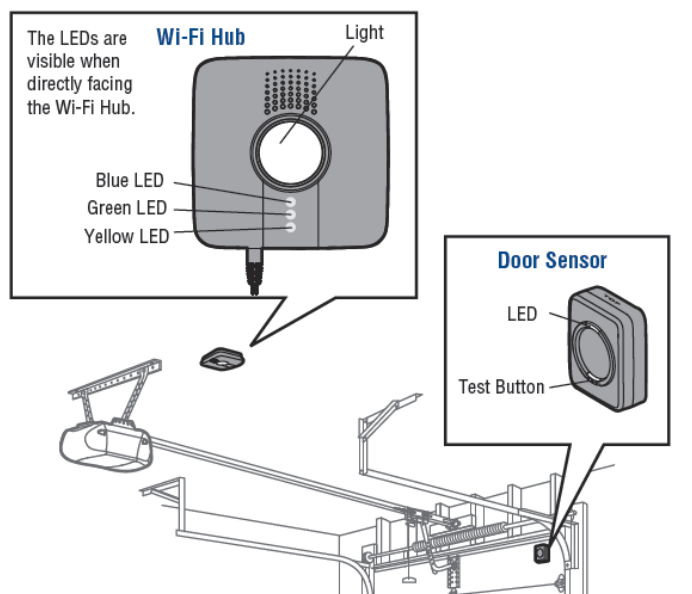
Credit: help.fluenthome.com
Frequently Asked Questions
What Does A Flashing Light On A Liftmaster Garage Door Opener Mean?
A flashing light on a LiftMaster garage door opener indicates sensor issues, wiring problems, or the lock feature is active. Clean and realign sensors, check wires, or disable the lock to resolve it. Power cycle the opener if needed.
Is There A Reset Button On Liftmaster?
LiftMaster has a “Learn” button (yellow, orange, red, or purple) to reset remote codes by holding it until the LED turns off. A separate button resets travel and force limits. Factory reset clears all wireless settings, requiring reprogramming of remotes and keypads.
What Does It Mean When One Garage Door Sensor Is Green And One Is Yellow?
A green sensor means it works properly. A yellow sensor indicates misalignment, dirt, or obstruction. Clean and realign sensors for proper function.
Why Is My Garage Door Not Responding To Remotes And/or Keypad?
Your garage door may not respond due to dead remote batteries, misaligned or dirty safety sensors, or active lock mode on the wall control. Check for loose or damaged wires and reset the opener by pressing the “Learn” button to clear any glitches.
What Does A Flashing Light On Liftmaster Myq Mean?
A flashing light usually signals a problem with sensors or wiring. Check sensor alignment and clean their lenses for steady lights.
Conclusion
Troubleshooting your LiftMaster myQ system can feel tricky at times. This guide simplifies common problems with clear steps. Check sensors, wires, and lock features carefully. Small fixes often solve blinking lights and connection issues. Keep your manual PDF handy for quick reference.
Taking a calm, step-by-step approach helps restore your garage door’s function. Stay patient and follow instructions closely for the best results. Your LiftMaster myQ will work smoothly again soon.



