
Is your Linear gate opener acting up when you least expect it? You rely on smooth and secure gate operation every day, so when it stalls, jerks, or won’t respond, it can throw off your entire routine.
But don’t worry—you don’t have to be a technician to tackle common issues. This guide on Linear Gate Opener Troubleshooting walks you through simple, effective steps to identify and fix the most frequent problems quickly. Whether your gate won’t open, moves sluggishly, or your remote won’t connect, you’ll find clear solutions here that save you time and stress.
Keep reading to regain full control of your gate and avoid costly repairs. Your hassle-free gate starts now!
Basic Reset Steps
Basic reset steps are essential for troubleshooting a Linear gate opener. These steps help restore the system to its default state. They often fix minor glitches and communication errors. Resetting is usually the first step before seeking professional help. Below are simple methods to reset your Linear gate opener safely and effectively.
Power Cycle Method
Start by turning off the power supply to the gate opener. You can do this by switching off the circuit breaker or unplugging the unit. Wait for about 30 seconds to let the system fully power down. Restore power by turning the breaker back on or plugging the unit in. Test the gate using your remote or keypad to see if it responds correctly. This simple power cycle often resolves basic electronic issues.
Control Board Reset
Power off the gate opener completely before opening the control box. Locate the reset button on the control board; it may be labeled “Reset” or “Reboot.” After finding the button, restore power to the unit. You will need to reprogram your remote or keypad. Press the “Learn” button on the control board, then press a button on your remote to pair them. Test the gate operation to confirm the reset worked.
Manual Override Use
Locate the manual release key or lever on the gate motor unit. Use this to disengage the motor gears safely. Move the gate by hand to the fully open or closed position. Re-engage the motor by reversing the manual release process. Find the “Learn” or “Limit” buttons on the control board to reset the gate’s open and close limits. Follow your gate’s manual carefully to complete this step. This method is helpful for a full system reset.
Common Gate Issues
Linear gate openers can face various common issues that disrupt smooth operation. Identifying these problems early helps maintain security and convenience. Troubleshooting these issues often saves time and repair costs.
Power And Remote Failures
Power problems often cause gate openers to stop working. Check if the unit is plugged in or if a circuit breaker tripped. Remote control failures can happen due to dead batteries or signal interference. Replace batteries and test the remote closer to the gate. Sometimes, reprogramming the remote solves connection issues.
Obstructions And Debris
Objects blocking the gate path prevent movement and cause errors. Leaves, sticks, and dirt can build up along the track or near sensors. Remove any debris to ensure the gate moves freely. Also, check for ice or snow in cold weather, which can block the gate’s path.
Mechanical Wear And Tear
Parts like gears, rollers, and hinges wear out over time. This wear causes grinding noises or slow gate movement. Lubricate moving parts regularly to reduce friction. Replace damaged components to avoid further damage. Regular maintenance extends the gate opener’s life.
Sensor And Wiring Problems
Faulty sensors often cause the gate to stop or reverse unexpectedly. Dirt or misalignment can block sensor signals. Clean sensor lenses and realign them carefully. Wiring issues, such as loose connections or damaged cables, also affect performance. Inspect wiring and tighten connections to restore function.
Quick Fixes
Quick fixes can solve many common problems with your Linear gate opener. These simple steps often restore proper function fast. Try these easy checks before calling a professional.
Checking Power Supply
Ensure the gate opener is connected to power. Check the circuit breaker or fuse box. A tripped breaker or blown fuse can stop the opener from working. Confirm the power cord is not damaged or unplugged. Use a voltage tester to verify power at the unit.
Replacing Remote Batteries
Weak or dead batteries can cause remote controls to fail. Open the remote case carefully. Replace old batteries with fresh ones of the same type. Test the remote after replacing batteries. Keep spare batteries handy for quick swaps.
Clearing Tracks And Sensors
Debris or dirt can block the gate’s path or sensors. Inspect the tracks for leaves, stones, or grease build-up. Clean the tracks with a brush or cloth. Check safety sensors for alignment and dirt. Wipe sensor lenses gently with a soft cloth to improve signal.
Lubricating Moving Parts
Dry or rusty parts cause the gate to move slowly or stop. Apply a silicone-based lubricant to hinges, rollers, and chains. Avoid oil-based lubricants that attract dirt. Lubricate regularly to keep parts moving smoothly. This reduces wear and extends the opener’s life.

Credit: www.youtube.com
Reprogramming Tips
Reprogramming your linear gate opener can fix many common issues. It ensures the remote and keypad communicate properly with the gate. Setting the correct open and close limits helps the gate stop at the right points. Using the learn and reset buttons is key to syncing devices and clearing errors. Follow these simple tips to make the process smooth and effective.
Pairing Remotes And Keypads
Start by clearing previous settings on the control board if needed. Press the “Learn” button on the opener’s control panel. Then, press a button on the remote or keypad. The gate’s indicator light will flash to confirm pairing. Test the remote or keypad to check the connection. Repeat these steps for each remote or keypad you want to add.
Setting Open/close Limits
Locate the limit adjustment buttons or dials on the control board. Use the remote or manual controls to move the gate to the fully open position. Press the “Set Open” button to store this limit. Next, move the gate to the fully closed position. Press the “Set Close” button to save the closing limit. This helps prevent damage by stopping the gate at the correct points.
Using Learn And Reset Buttons
The “Learn” button is used for syncing remotes and keypads. Press it once, then press the remote button to program. The “Reset” button clears all saved remotes and settings. Hold the reset button for several seconds to erase previous codes. After resetting, you must reprogram all remotes and keypads. Use these buttons carefully to avoid losing your device settings.
Maintenance Advice
Proper maintenance keeps your Linear gate opener working smoothly and extends its life. Small tasks done regularly prevent many common problems. Follow these simple steps to maintain your gate opener and avoid costly repairs.
Regular Cleaning
Clean the gate opener and surrounding area often. Remove dirt, leaves, and dust from the motor and tracks. Use a soft cloth and mild cleaner to wipe the parts. Avoid water near electrical components to prevent damage. Keeping the opener clean helps it run without interruptions.
Inspecting Wiring And Hardware
Check wires and connections every few months. Look for loose, frayed, or damaged wires. Tighten screws and bolts on the motor and gate frame. Replace any worn or broken parts immediately. Good wiring and hardware prevent electrical faults and mechanical failure.
Lubrication Schedule
Lubricate moving parts like hinges, rollers, and chains regularly. Use a lubricant recommended by the manufacturer. Apply it sparingly to avoid attracting dirt. Lubrication reduces friction and noise while helping the gate move smoothly. Follow the schedule in your manual for the best results.
When To Call A Professional
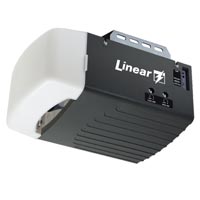
Contact a professional if the gate opener stops working after basic checks. Avoid fixing electrical or mechanical parts beyond your skill level. Professionals have the tools and knowledge to diagnose complex problems. Early expert help can save money and prevent further damage.
Credit: support.garagedoorzone.com
Safety And Precautions
Safety is crucial when troubleshooting a linear gate opener. Ignoring precautions can cause injury or damage. Always prioritize safety before starting any repair or inspection. This section explains key safety tips for handling manual release, avoiding electrical hazards, and following manufacturer guidelines.
Handling Manual Release
Use the manual release only if the gate opener stops working. Locate the release mechanism carefully. Pull or turn it gently to disengage the motor. Do not force the gate open or closed. Keep hands and fingers clear of moving parts. After manual operation, re-engage the motor properly before use.
Avoiding Electrical Hazards
Turn off power before touching any wiring or components. Unplug the gate opener or switch off the circuit breaker. Use insulated tools to prevent shocks. Avoid working in wet conditions to reduce risk. Check for damaged wires and repair them before restoring power. Never bypass safety devices on the gate opener.
Following Manufacturer Guidelines
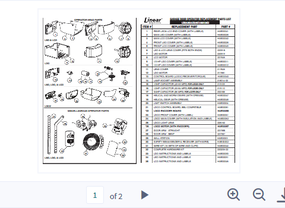
Always read the user manual before troubleshooting. Follow the exact steps recommended by the manufacturer. Use only approved replacement parts and tools. Do not modify the gate opener’s control board or motor. Keep the manual for future reference. Contact professional support if unsure about any procedure.
Credit: support.garagedoorzone.com
Frequently Asked Questions
How Do I Reset My Gate Opener?
To reset your gate opener, first disconnect power by unplugging or turning off the breaker. Restore power and test the gate. If it fails, press the reset button on the control board, then reprogram remotes using the “Learn” button. Always check the manual for specific steps.
How To Reset Linear Gate Opener?
To reset a Linear gate opener, first disconnect power by turning off the breaker or unplugging. Wait 10 seconds, then restore power. If needed, press the reset button inside the control box. Reprogram remotes by pressing the “Learn” button and pairing devices.
Test gate operation afterward.
What Are The Most Common Electric Gate Problems And How Can They Be Fixed?
Common electric gate problems include power issues, remote failure, obstructions, slow movement, and unusual noises. Fix these by checking power, replacing batteries, clearing debris, lubricating parts, aligning sensors, inspecting wiring, and using manual release. Consult a professional for complex electrical or mechanical issues.
Why Is My Gate Opener Not Responding?
Your gate opener may not respond due to power issues, dead remote batteries, blocked sensors, or motor failure. Check power supply, replace batteries, clear obstructions, inspect wiring, and ensure manual mode is off.
How Do I Reset My Linear Gate Opener?
Reset your Linear gate opener by turning off its power source first. Wait a few seconds, then turn the power back on. Test the gate using your remote or keypad to check if it works.
Conclusion
Troubleshooting your Linear gate opener becomes easier with simple checks. Always start by inspecting power sources and wiring connections. Clear any blockages or debris that may hinder gate movement. Use the reset steps carefully to restore normal function. Regular maintenance helps avoid common problems and prolongs gate life.
Following these easy tips keeps your gate working smoothly and reliably.



