
Is your Maytag dishwasher acting up right when you need it most? You’re not alone—and the good news is, many common problems have simple fixes you can try yourself.
Whether your dishwasher won’t start, won’t drain, or leaves your dishes less than sparkling, understanding the basics of Maytag dishwasher troubleshooting can save you time, money, and stress. In this guide, you’ll find easy-to-follow tips that help you quickly identify and solve common issues.
Ready to get your dishwasher back to running smoothly? Let’s dive in and tackle those problems step-by-step!
Power Issues
Power issues are a common reason why a Maytag dishwasher may not start or function properly. These problems can stop the dishwasher from turning on or cause it to lose power during a cycle. Understanding the possible causes helps fix the problem quickly.
Start by checking the basic electrical components. Many power problems come from simple issues like tripped breakers or faulty door latches. Sometimes the dishwasher’s control lock feature may be active, preventing it from operating.
Follow these steps to identify and resolve power issues efficiently.
Circuit Breaker Check
First, check the circuit breaker connected to the dishwasher’s power. A tripped breaker cuts the electrical supply instantly. Locate your home’s breaker box and look for a switch in the off position. Flip it back to on to restore power.
If the breaker trips again, the dishwasher may have an electrical fault. Avoid resetting repeatedly. Call a professional to inspect the wiring or internal components.
Door Latch Problems
The dishwasher won’t start if the door latch does not close properly. This latch signals the machine that the door is secure and safe to run. Open and close the door firmly to ensure it clicks into place.
Inspect the latch for damage or debris blocking it. Clean the latch area gently and try closing the door again. Replace the latch if it looks broken or worn out.
Control Lock Activation
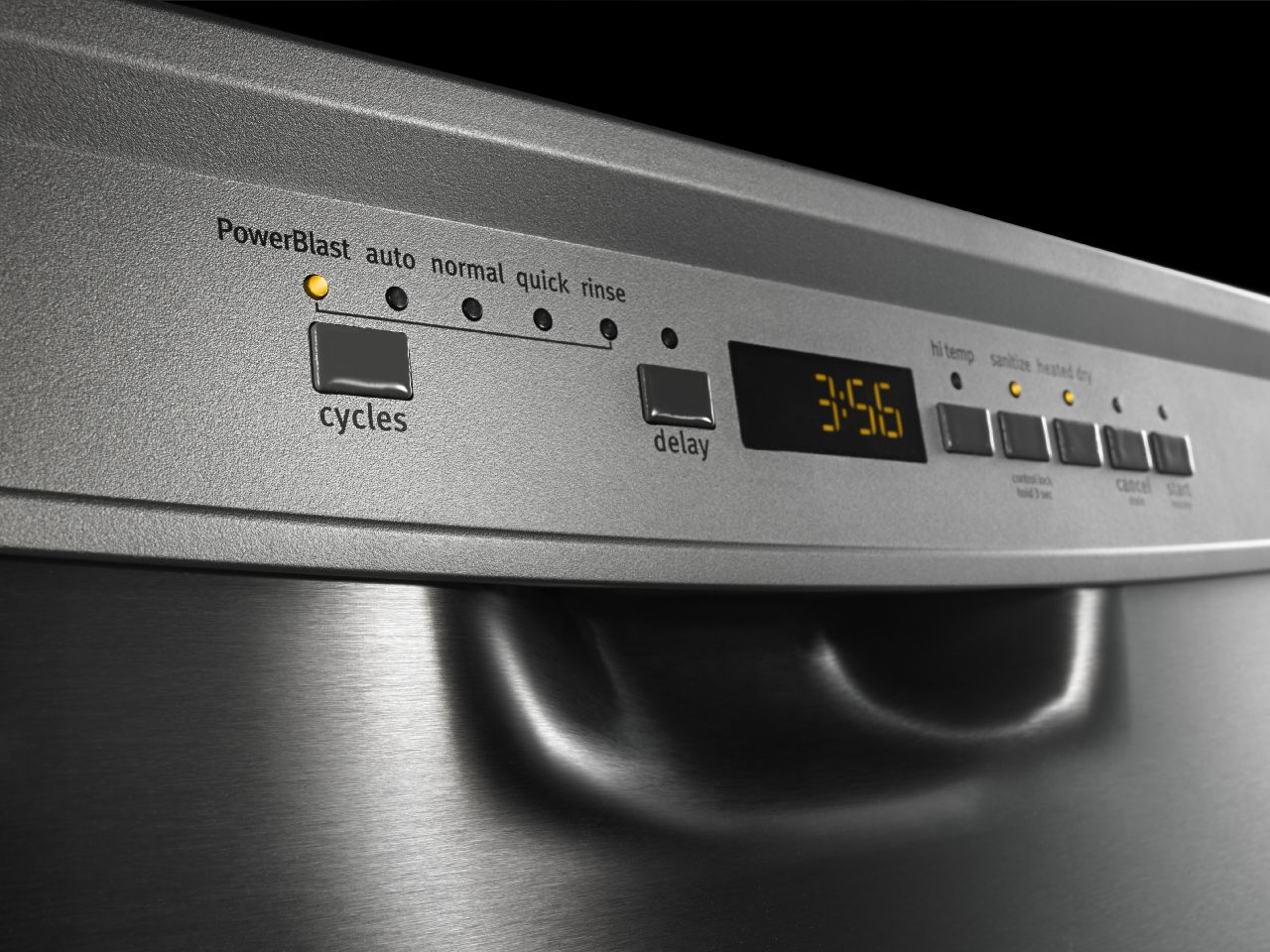
Maytag dishwashers often have a control lock to prevent accidental starts. If this lock is on, the buttons will not respond. Look for a lock icon or a light on the control panel.
Press and hold the control lock button for 3 to 5 seconds to turn it off. The dishwasher should now accept commands and start normally. Check your model’s manual for exact instructions.
Filter Cleaning
Cleaning the filter in your Maytag dishwasher is crucial for its smooth operation. A clean filter prevents food particles from blocking water flow. This helps your dishes come out cleaner and avoids bad smells inside the dishwasher.
Most Maytag dishwashers have filters located at the bottom. These filters catch leftover food and debris. Regular cleaning keeps your dishwasher working efficiently and extends its life.
Locating The Filter
First, open the dishwasher door fully. Remove the bottom rack to see the base of the dishwasher. The filter usually sits beneath the spray arm at the bottom.
Look for a round or cylindrical mesh part. This is the filter assembly that traps food particles during the wash cycle.
Removing And Cleaning
To remove the filter, twist it counterclockwise. Lift it straight up to take it out. Some models have two parts, so separate them carefully.
Rinse the filter under warm running water. Use a soft brush or cloth to scrub away stuck food and grease. Avoid harsh tools that could damage the mesh.
Check the filter housing for debris. Wipe the area clean with a damp cloth to ensure no blockages remain.
Reinstalling The Filter
After cleaning, place the filter back in the housing. Align it properly to fit securely. Twist clockwise until it locks in place.
Make sure the filter sits flat and tight to prevent leaks or clogs during the wash cycle.
Cleaning Frequency
Clean the filter every month or more often if you use the dishwasher daily. Heavy use may require cleaning every two weeks.
Regular filter cleaning improves washing results and stops odors. It also lowers the risk of dishwasher malfunctions.
Drainage Problems
Drainage problems are common issues with Maytag dishwashers. These problems stop water from draining properly after a wash cycle. Standing water inside the dishwasher can cause bad smells and poor cleaning results. Understanding the causes helps fix the problem quickly and keeps your dishwasher running smoothly.
Clogged Filter Effects
The filter traps food particles and debris during washing. A clogged filter blocks water flow and stops drainage. Water may stay at the bottom of the dishwasher after the cycle ends. Regular cleaning of the filter is necessary. Remove the bottom rack, twist out the filter, and rinse it under warm water. This simple step improves drainage and prevents odors.
Blocked Spray Arms
Spray arms distribute water to clean dishes. Food debris can block spray arm holes. This blockage reduces water pressure and affects drainage. Remove the spray arms and clean the holes with a toothpick or small brush. Clear spray arms ensure water flows well and drains properly.
Water Inlet Valve Issues
The water inlet valve controls water entering the dishwasher. If it is faulty, water may not drain correctly. A stuck valve can cause water to stay inside. Check the valve for damage or clogs. Replace the valve if it does not open or close properly. Proper valve function is essential for good drainage.

Credit: www.maytag.com
Poor Cleaning Results
Poor cleaning results can make your Maytag dishwasher frustrating to use. Dishes may come out dirty, spotted, or with leftover food. Several simple fixes can improve your dishwasher’s cleaning power. Focus on spray arm care, correct loading, and proper detergent use. These steps help your dishwasher clean dishes thoroughly every time.
Spray Arm Maintenance
Spray arms push water to clean dishes. Clogged holes reduce water flow and cleaning power. Check spray arms for food particles or mineral build-up. Remove the spray arms carefully. Use a toothpick or small brush to clear blocked holes. Rinse the spray arms under running water. Make sure they spin freely when reinstalled. Clean spray arms improve water reach and dish cleanliness.
Loading Tips
How you load your dishwasher affects cleaning results. Avoid overcrowding dishes or blocking the spray arms. Place larger items on the sides or back, not the center. Face dirty surfaces toward the spray arms. Avoid nesting bowls or stacking items too closely. Separate items to allow water to reach all surfaces. Proper loading helps water and detergent reach every dish.
Detergent Use
Using the right detergent amount is important. Too little detergent leaves dishes dirty. Too much detergent causes residue and spots. Use a high-quality detergent made for dishwashers. Check the detergent dispenser for clogs or damage. Store detergent in a dry place to keep it fresh. Follow the detergent instructions on the package. Proper detergent use helps remove grease and food stains.
Control Panel Troubles
The control panel is the brain of your Maytag dishwasher. It manages all functions and settings. Problems here can stop the dishwasher from working correctly. Common issues include unresponsive buttons, error codes, or the panel not lighting up. Troubleshooting control panel troubles requires a few simple checks. These steps help identify if the issue is power-related, electronic, or due to a safety component. Follow these tips carefully to diagnose and fix control panel problems.
Power Reset Steps
Start by resetting the dishwasher’s power. This can fix minor glitches in the control panel. First, turn off the dishwasher and unplug it from the wall outlet. Wait for at least 5 minutes to let the system reset. Plug the dishwasher back in and turn it on. Check if the control panel responds normally. A power reset clears temporary errors and refreshes the system’s memory. If the panel is still unresponsive, continue to the next step.
Diagnosing Control Board
The control board controls the dishwasher’s operations. Faulty boards cause buttons to stop working or display errors. Inspect the control board for signs of damage or burning. Test the board using a multimeter to check for continuity and power flow. Look for loose or corroded wiring connections. Replace the control board if you find any burnt components or broken circuits. This step requires care, as the control board is sensitive to static electricity and damage.
Thermal Fuse Check
The thermal fuse protects the dishwasher from overheating. If it blows, the control panel may stop working. Locate the thermal fuse, usually near the control board or behind the control panel. Use a multimeter to test its continuity. No continuity means the fuse is blown and needs replacement. Replace the thermal fuse with an exact match for your model. This simple check can restore control panel function and prevent further damage from overheating.
Credit: fredsappliance.com
Error Codes
Maytag dishwashers use error codes to signal specific problems. These codes show on the control panel. Understanding them helps you fix issues faster. It saves time and avoids unnecessary repairs. Knowing what each code means guides your next steps effectively.
Common Error Messages
Common error codes include F1, F2, and F3. F1 means water fill problem. The dishwasher may not get enough water. F2 signals a heating issue. The water might not reach the right temperature. F3 points to a drainage problem. The dishwasher cannot drain water properly. Each code helps identify the exact problem. Check your user manual for a full list of codes.
Running Diagnostic Tests
Maytag dishwashers have built-in diagnostic tests. These tests check different parts of the machine. To run a test, press and hold certain buttons. Usually, it involves the Start and Cancel buttons. The dishwasher will run a cycle and display codes. These codes reveal hidden issues. Running diagnostics helps confirm the problem before repairs.
When To Call A Technician
Call a technician if error codes persist after basic fixes. Complex problems need professional tools and knowledge. Also, avoid DIY repairs if you see electrical or water leaks. Technicians can safely fix these issues. Persistent error codes may indicate deeper problems. Early professional help prevents costly damage later.
Reset Procedures
Resetting your Maytag dishwasher can fix many common issues. Reset procedures clear errors and refresh the system. This helps your dishwasher run smoothly again. Below are simple reset methods anyone can try at home.
Hard Reset Method
Start by turning off the dishwasher power. Unplug it from the outlet or switch off the breaker. Wait for about five minutes to let the system reset. After that, plug it back in and turn the power on. This hard reset clears the control board memory and may solve glitches.
Drain And Restart
If your dishwasher stops mid-cycle, try draining and restarting it. Press the cancel or drain button to empty the water. Wait a minute for the pump to remove all water. Then, close the door and start a new wash cycle. This method helps clear water blockages and resets the cycle.
Button Combinations
Some Maytag models use button presses for resets. Press and hold the Start button for three to five seconds. Release it and wait for the dishwasher lights to flash. This signals the reset is complete. Check your user manual for specific button combos. These resets refresh the control panel without unplugging the machine.
Maintenance Tips
Proper maintenance helps keep your Maytag dishwasher working well. Simple care prevents common problems and extends its life. Follow these maintenance tips regularly to avoid costly repairs and improve cleaning performance.
Monthly Cleaning Routine
Clean your dishwasher every month to remove food and grease. Take out and rinse the filter with warm water and a soft brush. Wipe the door seals and spray arms to clear debris. Run an empty cycle with dishwasher cleaner or vinegar. This removes buildup and keeps the machine fresh.
Avoiding Harsh Chemicals
Use gentle cleaning products made for dishwashers. Harsh chemicals can damage parts and cause leaks. Avoid bleach, ammonia, and abrasive powders. These harm the finish and sensitive components. Stick to mild detergents and natural cleaners to protect your appliance.
Consulting The Manual
Read your Maytag dishwasher manual carefully. It has important instructions for cleaning and care. Follow the recommended maintenance schedule and tips. The manual also explains how to fix minor issues safely. Keep it handy for quick reference whenever you need help.
Credit: www.ingesegur.com
Frequently Asked Questions
What Button Do I Push To Reset My Maytag Dishwasher?
To reset your Maytag dishwasher, press and hold the “Start/Reset” button for 3 seconds. This clears errors and restarts the cycle.
What Button Do I Push To Reset My Dishwasher?
Press and hold the “Start/Reset” button for 3 to 5 seconds to reset your dishwasher. The control panel will clear and restart.
How Do You Run A Diagnostic Test On A Maytag Dishwasher?
To run a diagnostic test on a Maytag dishwasher, press and hold the “Heated Dry” and “Normal” buttons simultaneously for three seconds. The dishwasher will enter diagnostic mode, displaying error codes if any issues exist. Follow the codes to identify and fix problems.
Does My Maytag Dishwasher Have A Filter That Needs To Be Cleaned?
Yes, most Maytag dishwashers have a filter that requires regular cleaning. Locate it under the bottom rack and rinse it monthly. Cleaning prevents odors, clogs, and improves washing performance. Check your model’s manual for specific instructions to maintain optimal dishwasher function.
How Do I Reset My Maytag Dishwasher Quickly?
Press and hold the Start/Reset button for about 3 seconds. The dishwasher will drain and reset. This clears most minor errors.
Conclusion
Maytag dishwasher issues can often be fixed with simple steps. Regularly clean the filter to keep it running well. Check for error codes to identify specific problems fast. Use the manual for guidance on resetting or testing. Small maintenance tasks save time and avoid bigger repairs.
Stay patient and follow each step carefully. Your dishwasher will work smoothly and last longer. Troubleshooting helps you save money and avoid service calls. Keep your kitchen running with a well-maintained Maytag dishwasher.



