
Are you having trouble with your MPPT solar charge controller and unsure where to start? Whether your system isn’t charging properly or you’re seeing strange readings on the display, these issues can be frustrating.
But don’t worry—most problems with your MPPT controller come down to simple fixes that you can handle yourself. In this guide, you’ll learn how to spot common issues, perform quick checks, and troubleshoot like a pro. By following easy steps, you’ll get your solar setup back on track and working efficiently in no time.
Keep reading to discover practical solutions that save you time and money!
Common Problems
MPPT solar charge controllers are vital for efficient solar power use. Despite their reliability, problems can occur. Knowing common issues helps keep your system running smoothly. Below are frequent problems with MPPT controllers and how to identify them.
No Charging Or Output
No charging or output is a common complaint. This issue often happens due to loose or damaged wiring. Check all connections between the solar panels, controller, and battery. A blown fuse or tripped breaker can also stop charging. Sometimes, the battery may be fully charged, so the controller stops output to protect it. Inspect solar panel voltage to ensure sunlight reaches the panels. Dirt or shading on panels reduces power and charging ability.
Low Charging Current
Low charging current reduces the efficiency of your solar system. This problem can arise from poor panel placement or dirty panels blocking sunlight. Wiring that is too thin or too long causes voltage drops, lowering current. Incorrect settings in the controller, such as low voltage or current limits, also affect charging. Battery health impacts current; a damaged battery draws less power. Confirm the controller matches the solar panel’s specifications for best results.
Erratic Readings And Display Issues
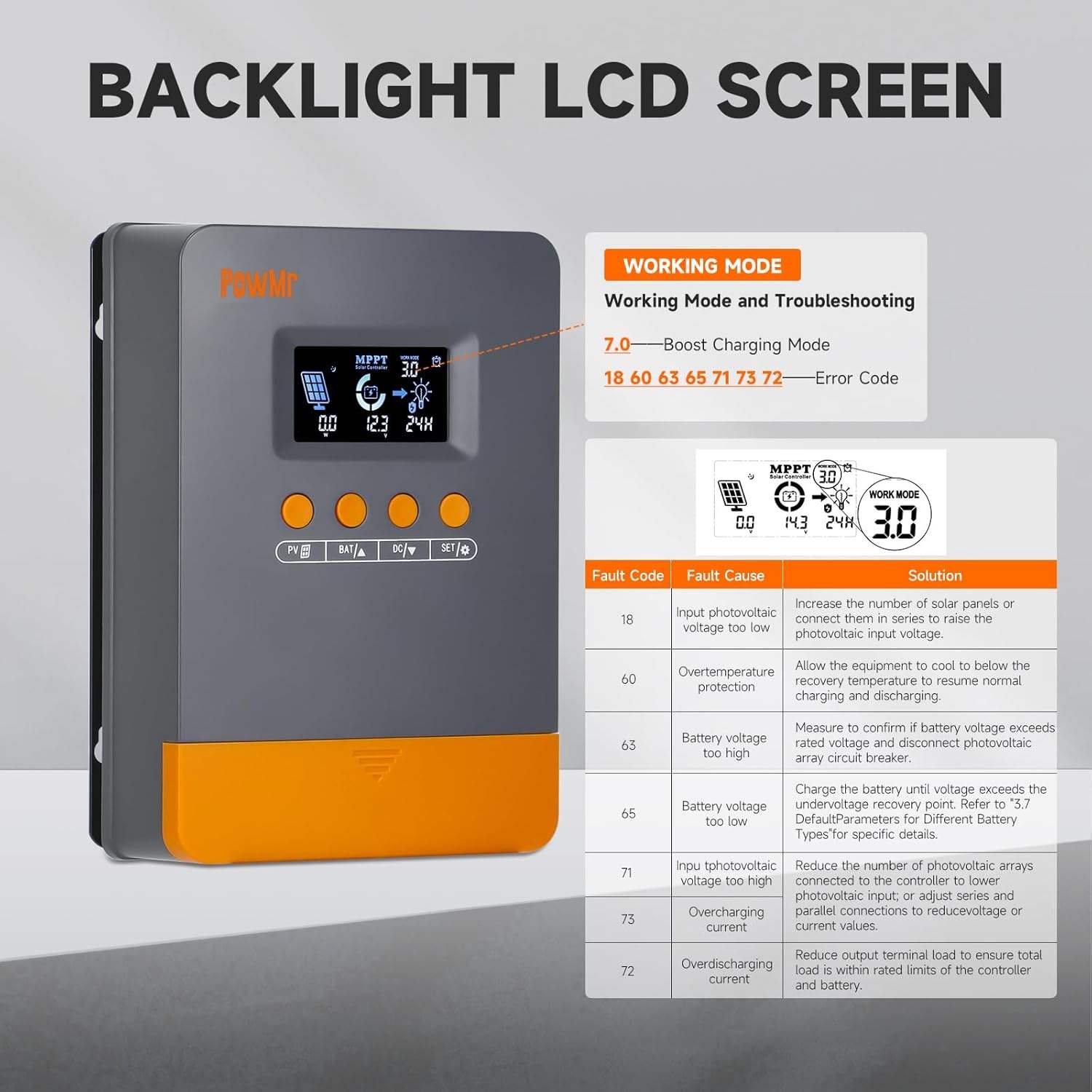
The controller’s display may show erratic readings or fail to update. This problem may come from electrical noise or interference. Loose connections or corrosion can disrupt data signals. Firmware glitches or outdated software also cause display errors. Resetting the controller often clears temporary faults. If the issue persists, check for damaged internal components. Accurate readings are crucial for monitoring and maintaining your solar system.
Overcharging
Overcharging damages batteries and shortens their life. The MPPT controller should prevent this by regulating voltage. Overcharging occurs if the controller is incorrectly set or malfunctions. Faulty voltage sensors can miss battery status changes. Wiring errors may send incorrect signals to the controller. Regularly check battery voltage and temperature to catch overcharging early. Use a quality controller with reliable safety features to avoid this risk.

Credit: www.youtube.com
Quick Fixes
Quick fixes for MPPT solar charge controllers often solve common problems fast. These simple steps help restore your system’s function without needing expert tools. Start with easy checks before moving to complex troubleshooting. This saves time and avoids unnecessary replacements.
Secure Connections
Loose wires cause many MPPT controller issues. Check all cable connections to ensure they are tight. Inspect terminals for corrosion or dirt. Clean contacts gently if needed. Proper connections improve current flow and system stability.
Clear Panel Obstructions
Solar panels must receive full sunlight to work well. Remove leaves, dust, or snow blocking the panels. Check for shading from trees or buildings during the day. Clean panels with a soft cloth and water to maximize power output.
Replace Fuses And Breakers
Fuses and breakers protect your system from electrical faults. A blown fuse or tripped breaker stops power flow. Test fuses with a multimeter to find breaks. Replace damaged fuses and reset breakers carefully. This restores safe current paths.
Update Firmware
Firmware controls how your MPPT charge controller operates. Outdated software may cause errors or poor performance. Visit the manufacturer’s website for the latest firmware version. Follow instructions to update safely. Updated firmware can fix bugs and improve efficiency.
Step-by-step Checks
Troubleshooting an MPPT solar charge controller requires a clear and simple approach. Step-by-step checks help identify common problems quickly. Following these steps ensures you cover all critical areas. This process improves the chance of fixing the issue without extra costs.
Visual Inspection
Start by examining the controller and its connections. Look for loose or damaged wires. Check for corrosion on terminals. Inspect the solar panels for dirt or cracks. Clean panels if needed. Confirm the controller’s screen and LEDs work properly. Any physical damage might affect performance.
Power Connection Sequence
Follow the correct order when connecting power sources. First, connect the battery to the controller. Then connect the solar panels. This order prevents damage to the controller. Avoid connecting solar panels before the battery is attached. Proper sequence ensures safe and stable operation.
Battery Voltage Measurement
Measure the battery voltage using a multimeter. Check the voltage at the battery terminals. Compare it to the recommended levels for your battery type. Low voltage may indicate a discharged or faulty battery. High voltage could signal overcharging or a controller fault. Accurate reading guides your next steps.
Fuses And Breakers Inspection
Check all fuses and circuit breakers in the system. Look for blown fuses or tripped breakers. Replace any faulty components with the correct type and rating. Faulty fuses or breakers can stop the charging process. Keeping these parts in good condition protects your system from damage.
Credit: smartbuy.alibaba.com
Configuration Tips
Proper configuration of your MPPT solar charge controller is key for efficient charging and system safety. Small setting errors can reduce battery life or solar output. Adjust settings carefully to match your battery type and system needs. Follow these simple tips to ensure your controller works well and lasts longer.
Correct Battery Settings
Set the battery type in the controller menu. Choose from options like lead-acid, lithium, or gel. Each battery type needs different charging profiles. Wrong settings may cause undercharging or overcharging. Check your battery manual and match the settings exactly.
Voltage And Current Limits
Set the maximum voltage and current limits according to your solar panel and battery specs. Overloading the controller can cause damage. Too low limits may reduce power output. Use the rated values found on your equipment labels. These limits protect the system and keep it stable.
Temperature Compensation
Enable temperature compensation if your controller has this feature. It adjusts charging voltage based on battery temperature. Batteries need less voltage when warm and more when cold. This helps prevent overcharging or undercharging in changing weather. Keep temperature sensors clean and placed correctly.
Sensor Calibration
Calibrate sensors regularly to keep readings accurate. Check voltage and current sensors against a reliable meter. Incorrect sensor data can cause wrong charging decisions. Follow the controller’s manual for calibration steps. Accurate sensors improve system efficiency and battery health.
Maintenance Advice
Proper maintenance keeps your MPPT solar charge controller working well. It extends the life of your system and prevents common issues. Small efforts regularly save time and money later. Focus on key areas to keep the controller and panels in top shape.
Panel Cleaning
Clean solar panels improve energy capture. Dust, dirt, and bird droppings block sunlight. Use a soft cloth and water for cleaning. Avoid harsh chemicals or abrasive materials. Clean panels once a month or after storms. This simple step boosts power output and controller efficiency.
Wire And Terminal Care
Check wires and terminals often for damage or corrosion. Loose connections reduce system performance and can cause faults. Tighten all screws and clamps securely. Replace frayed or broken wires immediately. Clean corroded terminals with a brush and vinegar solution. Proper wiring ensures safe and steady power flow.
Firmware Updates
Keep your controller’s firmware updated. Manufacturers release updates to fix bugs and improve features. Connect the controller to a computer or use a USB drive to update. Follow the user manual carefully. Updated firmware helps prevent errors and improves system stability.
Regular System Testing
Test your solar system regularly to spot problems early. Check voltage and current readings on the controller display. Confirm the battery is charging properly. Listen for unusual noises or smells. Run a full system check every few months. Routine tests maintain peak performance and avoid costly repairs.
Credit: ibreeze.com.au
When To Seek Help
Knowing when to seek help for your MPPT solar charge controller saves time and prevents damage. Some problems need expert skills beyond basic troubleshooting. Recognizing these signs ensures your system works well and lasts longer.
Internal Controller Faults
Internal faults can cause your controller to stop working properly. These include damaged circuits or overheating inside the device. Such issues often show as error codes or a complete shutdown. Simple fixes like checking connections won’t solve these. A professional technician should inspect and repair these faults.
Firmware Bugs
Firmware controls how your MPPT charge controller operates. Bugs or glitches in firmware can cause strange behavior. Examples include incorrect battery readings or failure to track solar power. Updating firmware can fix these problems. If updates do not help, contacting the manufacturer or a specialist is best.
Manufacturer Support
Manufacturer support offers guidance and repair options. Use it when your controller is under warranty or if you face complex faults. They provide official updates, manuals, and troubleshooting tips. Experts from the manufacturer can guide you safely through repairs or replacements.
Frequently Asked Questions
How Do I Reset My Mppt Solar Charge Controller?
To reset your MPPT solar charge controller, first cover the solar panels or do it at night. Then disconnect the battery by removing its fuse or turning off the circuit breaker. After a few minutes, reconnect the battery and power on the controller.
How To Tell If A Solar Charge Controller Is Bad?
Check for inconsistent or reduced power output, no charging, erratic display, or blown fuses. Inspect wiring, connections, and battery settings. Clean panels and ensure proper sunlight. Persistent issues may indicate a bad solar charge controller needing replacement.
What Are Common Mppt Controller Problems?
Common MPPT controller problems include no charging, low current, erratic readings, overcharging, and wiring issues. Check connections, shading, battery settings, and firmware.
Why Is My Mppt Solar Controller Not Charging?
Your MPPT solar controller may not charge due to loose connections, wrong settings, full battery, shading, or blown fuses. Check wiring, panel voltage, and battery health. Clean panels and ensure correct configuration for proper charging.
How Do I Reset My Mppt Solar Charge Controller?
To reset, first cover the solar panels or do it at night. Disconnect the battery by removing the fuse or turning off the breaker. Wait a few minutes, then reconnect to restart the controller.
Conclusion
Troubleshooting an MPPT solar charge controller takes patience and careful checks. Start by inspecting all connections and battery settings. Look for loose wires, blown fuses, or shading on panels. Measure voltages with a multimeter to find irregularities. Many issues come from simple mistakes or environmental factors.
Fixing these often restores normal function quickly. If problems persist, consult the user manual or contact support. Regular maintenance keeps your system running efficiently. Stay attentive to signs of trouble for best solar performance.



