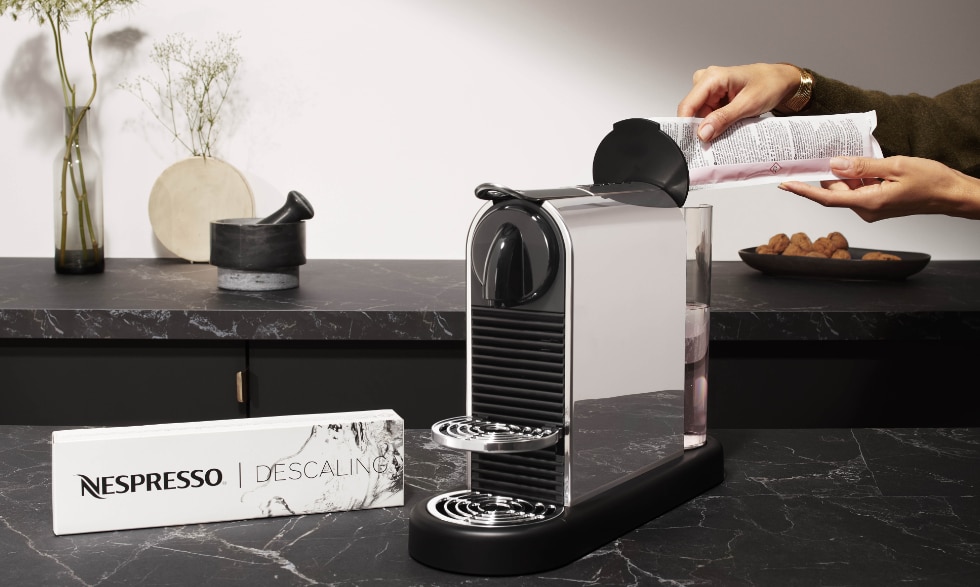
Is your Nespresso machine giving you trouble when it’s time to descale? You’re not alone.
Descaling is key to keeping your coffee tasting great and your machine running smoothly, but sometimes the process can get stuck, the descaling light won’t turn off, or the machine might even stop mid-cycle. Don’t let these hiccups ruin your coffee routine.
In this guide, you’ll find simple, step-by-step solutions to common Nespresso descaling problems. Whether your machine won’t enter descaling mode, the light keeps blinking, or it just won’t finish the cycle, we’ll help you fix it fast. Keep reading to get your Nespresso back in perfect shape—so you can enjoy every cup without a hitch.
Common Descaling Issues
Descaling keeps your Nespresso machine running well. It removes mineral build-up inside the machine. Despite its importance, some users face issues during descaling. These problems stop the process or leave the machine in error mode. Understanding common descaling issues helps solve them fast. This saves time and prevents damage. Below are frequent problems and simple fixes.
Machine Stops Mid-descale
The machine may stop before finishing descaling. This often happens because of partial water flow blockage. Mineral deposits can clog pipes or valves. Sensors might also misread the process, causing a shutdown.
Check the water tank and pod holder. Clean any visible dirt or scale. Try running the descaling cycle again. If it stops again, clean the internal parts using a soft brush or needle. This clears blockages and restores flow.
Descale Light Remains On
The descale light stays on after descaling. This means the machine did not fully complete the process. Sometimes, more rinsing is needed to remove all descaling solution.
Run several rinse cycles with fresh water. Use tap water instead of filtered water for better results. Also, check the machine’s sensors. Clean the water tank sensor and the needles that puncture capsules. Some models require a reset using a button combination. Follow your machine’s manual for exact steps.
Blinking Red Light After Descaling
A blinking red light signals a problem after descaling. A slow red blink means the machine is cooling down after heavy use. Wait for it to stop blinking before using it again.
A steady red light shows a controller error. Unplug the machine and let it rest for a few hours. This resets the system and often clears the error. If the light remains red, contact customer support for help.
Quick Fixes
Quick fixes often solve common Nespresso descaling issues fast. These simple steps clear blockages and reset sensors. They help your machine run smoothly again. Try each fix carefully before moving to complex solutions.
Check Water Reservoir
Make sure the water reservoir is filled with clean water. Remove and rinse it to remove any dirt or buildup. Check if the reservoir sits firmly in place. Loose placement can stop water flow during descaling. Use fresh, cold water for the best results.
Clean Pod Holder And Needles
Remove the pod holder and clean it thoroughly. Use a soft brush or cloth to clear coffee grounds. Check the needles for clogs or coffee residue. Clean needles gently with a pin or small brush. Blocked needles can stop water flow and trigger errors.
Run Additional Rinse Cycles
Run extra rinse cycles with fresh water after descaling. This helps remove leftover descaling solution and debris. Use plain tap water, not filtered water, to aid sensor reset. Repeat rinsing until the machine stops showing the descale alert. This step often fixes sensor and buildup problems.
Resetting Your Machine
Resetting your Nespresso machine can solve many descaling problems. Sometimes, the machine’s system needs a quick reset to clear errors. Resetting helps refresh the machine’s internal settings. It can fix sensor glitches or incomplete descaling alerts.
Knowing how to reset your Nespresso properly saves time and hassle. Some resets are easy and quick. Others need specific steps based on your machine model. Follow the right method for the best results.
Soft Reset Techniques
A soft reset is a simple way to restart your machine’s system. Unplug the machine from the power source. Wait for about 10 to 15 seconds. Plug it back in and turn it on. This action clears minor software errors and resets the internal system.
Another soft reset method is to hold down the power button. Press and hold it for 5 to 10 seconds until the machine powers off. Release the button and press it again to turn the machine on. This can help clear stuck descaling notifications.
Model-specific Reset Steps
Different Nespresso models require unique reset steps. For the VertuoLine, press and hold the button for 7 seconds. The light will blink rapidly, showing the reset is active. Release the button to finish.
For the OriginalLine, press and hold the lungo and espresso buttons together for 3 seconds. The lights will flash to confirm the reset. Release the buttons and the machine will restart.
Always check your user manual for exact instructions. Resetting correctly ensures your machine returns to normal and descaling alerts clear properly.

Credit: inocolombia.com
Clearing Blockages
Blockages often cause Nespresso machines to stop working properly during descaling. Clearing these blockages helps restore smooth water flow and proper function. Small clogs in needles or water paths reduce pressure and cause errors. Regular cleaning prevents these issues and keeps your machine ready for brewing.
Using A Paperclip To Clear Needles
The machine needles can get clogged by coffee grounds or mineral buildup. Use a thin paperclip to gently poke the holes and clear any debris. Insert the paperclip carefully into each needle to avoid damage. This simple step helps restore water flow through the capsule. Clean needles regularly to prevent future blockages.
Ensuring Proper Water Flow
Check the water reservoir for cleanliness and proper placement. Remove and rinse it under running water to clear any sediment. Run a water-only cycle to flush out the machine’s internal system. This helps remove scale or residue blocking the pipes. Proper water flow ensures the descaling process completes fully without errors.
Avoiding Future Problems
Preventing future descaling issues extends the life of your Nespresso machine. Simple habits can keep your coffee maker running smoothly. This section covers easy steps to avoid common problems.
Using Correct Water Type
Always use fresh, clean water for your Nespresso machine. Tap water may cause mineral buildup, but hard water makes this worse. Consider filtered or bottled water with low mineral content.
Hard water leads to faster scale buildup inside the machine. This causes frequent descaling and possible damage. Using the right water reduces the need for descaling often.
Regular Maintenance Tips
Clean your Nespresso machine regularly to avoid blockages. Empty and rinse the drip tray and capsule container after each use. Wipe the exterior with a damp cloth to keep it tidy.
Run a water-only cycle weekly to clear any coffee residue. Check and clean the coffee outlet and water tank regularly. Follow the manufacturer’s descaling schedule strictly for best results.
Ignoring small maintenance tasks leads to larger issues later. Routine care saves money and extends machine life.

Credit: www.celularia.com.br
When To Contact Support
Knowing when to contact Nespresso support can save time and frustration. Some descaling problems need expert help. Understanding the signs helps you decide quickly. Here are key situations to consider.
Hardware Issues
Descaling errors caused by hardware faults need professional attention. If your machine stops mid-cycle repeatedly, it may signal internal damage. Sensors may misread or blockages could persist despite cleaning. Strange noises, leaks, or no power also point to hardware problems. Trying to fix these yourself might worsen the issue. Contact support to inspect and repair your machine safely.
Warranty And Replacement Options
Check if your Nespresso machine is still under warranty before seeking help. Warranty covers many hardware failures related to descaling. Support can guide you through repair or replacement based on warranty terms. They may offer free service or send a replacement unit. Understanding your warranty options ensures you get the right solution without extra cost.
Credit: www.nespresso.com
Frequently Asked Questions
Why Does My Nespresso Keep Stopping During Descaling?
Your Nespresso stops during descaling likely due to a partial water flow blockage or sensor error. Clean the pod holder, water reservoir, and needles. Run additional rinse cycles with tap water. Reset the machine by unplugging it for a few minutes before restarting the descaling process.
How Do I Force My Nespresso To Descaling Mode?
To force your Nespresso into descaling mode, turn it on and push the lever down once. Place a 1-liter container under the coffee outlet. Press the coffee button; the orange light will blink throughout descaling.
Why Is My Nespresso Blinking Red After Descaling?
Your Nespresso blinks red after descaling due to overheating or a system error. Let it cool unplugged for a few hours. If blinking persists, run additional rinsing cycles or reset the machine following your model’s instructions.
Why Is The Descaling Light Still On After Descaling?
The descaling light stays on if you missed a step, need extra rinsing, or face a sensor issue. Run more rinse cycles with tap water, clean needles, check the reservoir sensor, or reset the machine using the model-specific button combination.
Why Does My Nespresso Stop During Descaling Process?
A partial blockage or sensor error often causes the machine to stop. Check the water flow system, pod holder, and water tank. Clearing blockages usually fixes the issue.
Conclusion
Regular descaling keeps your Nespresso running smoothly. Follow steps carefully to avoid common issues. Clean water tanks and needles often to prevent blockages. Run extra rinse cycles if the descale light stays on. Take time to reset your machine properly after descaling.
Small efforts extend your coffee machine’s life and taste. Troubleshooting becomes easier with patience and proper care. Enjoy better coffee with a well-maintained Nespresso every day.