
Is your old Genie garage door opener acting up and leaving you frustrated? You’re not alone.
Many homeowners face common issues like unresponsive remotes, stubborn safety sensors, or doors that start and stop unexpectedly. The good news? Most of these problems can be fixed quickly with the right guidance—and your Genie garage door opener manual in PDF form is the key to solving them.
You’ll discover simple troubleshooting tips and clear instructions to reset, realign, and restore your opener to smooth operation. Stick with us, and you’ll soon have your garage door working like new again—no costly repairs or confusing tech talk needed. Let’s get started!
Common Genie Opener Issues
Genie garage door openers are reliable but can face issues over time. Many common problems stem from simple causes. Troubleshooting these can save time and money. Understanding typical Genie opener issues helps in quick repairs. Below are the usual problems users encounter with Genie openers.
Power Problems
Power issues often cause the opener to stop working. Check if the outlet supplies power. Look for loose wires in the powerhead or console. Unplug the opener for a few minutes to reset it. Ensure the circuit breaker is not tripped. A faulty power source is a common cause of failure.
Remote Control Failures
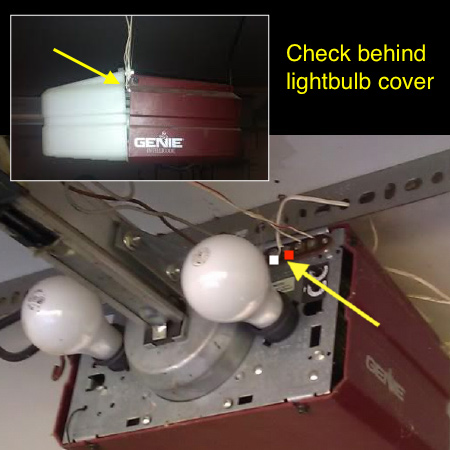
Remote controls can stop responding due to dead batteries. Replace the battery with a new one. Reprogram the remote by pressing the learn button on the opener. This button is usually red and found under the light cover. Make sure the remote’s antenna is not damaged or blocked.
Sensor Malfunctions
Safety sensors prevent the door from closing on objects. A steady red or green light on sensors means a problem. Clean sensor lenses to remove dirt or debris. Make sure sensors face each other directly and are aligned at the same height. Check sensor wiring for loose connections or damage.
Door Movement Interruptions
The door may start and stop suddenly due to sensor issues or wiring faults. Inspect the Safe-T-Beam wires for breaks or loose ends. The door’s balance can also cause interruptions. Manually lift the door; it should stay open without falling. Adjust closing force and limit settings as needed.
Noisy Or Binding Door
Noises or binding often come from worn springs or poor balance. Check the door’s springs and rollers for wear. Lubricate moving parts to reduce noise. A door that binds can strain the opener motor. Ensure the door moves smoothly by hand before using the opener.
Credit: bluemate.com
Resetting Your Genie Opener
Resetting your Genie garage door opener can solve many common problems. It clears errors and restores normal function. This process is simple and helps your opener respond correctly to remotes and controls. Follow these easy steps to reset your device and get it working smoothly again.
Using The Learn Button
Locate the “Learn” button on the opener’s motor unit. It is usually under the light cover and red or purple in color. Press and release this button once. The LED light will turn on or blink, indicating the opener is in programming mode.
Press the button on your remote control within 30 seconds. The opener will respond with a light flash or movement. This confirms the remote is paired and the reset is successful. Test the remote to ensure it works properly.
Power Cycle Reset
Unplug the garage door opener from the power outlet. Wait for about 60 seconds. This pause lets the system clear its memory and reset internal components. Plug the opener back in.
After powering on, the opener may run a self-check. Try operating the door with the wall control or remote. This reset often fixes unresponsiveness or error lights without reprogramming remotes.
Remote Reprogramming
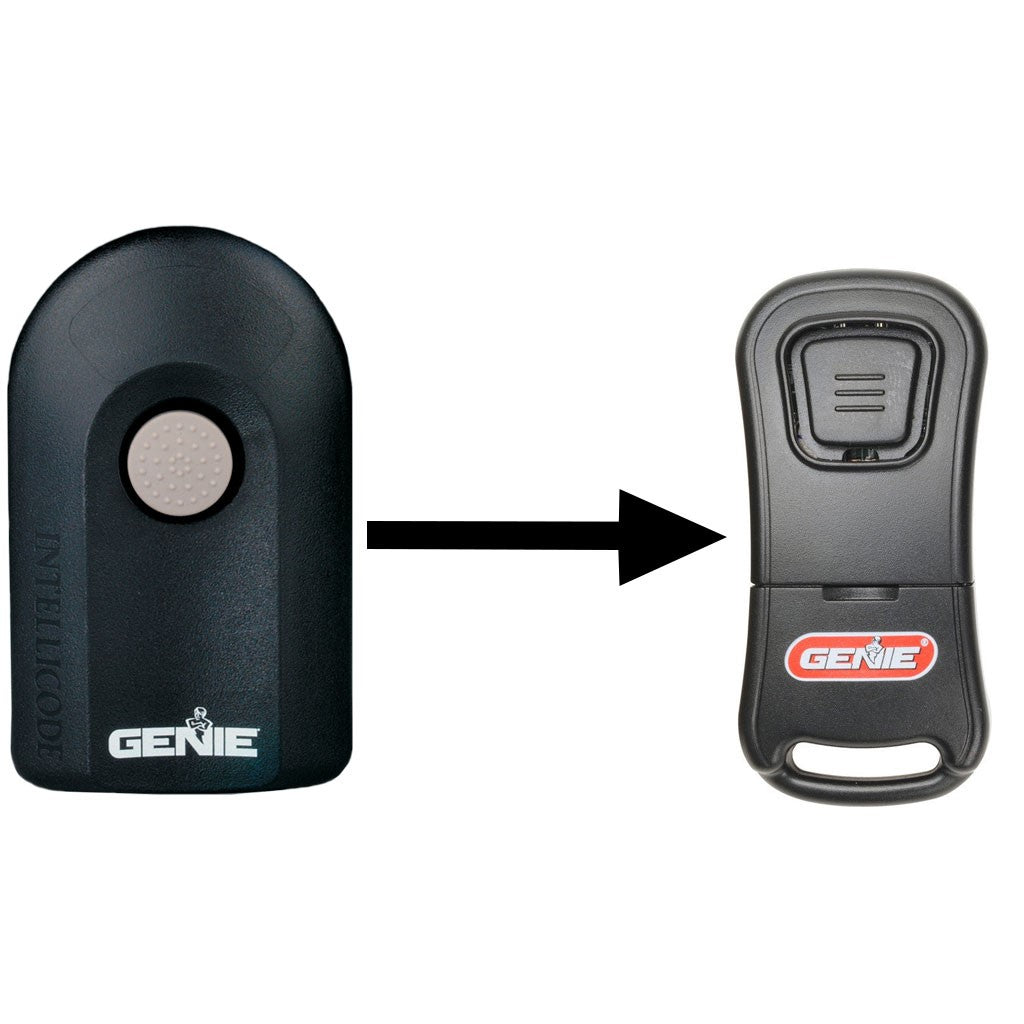
Replace the remote battery if needed before starting. Press the “Learn” button on the opener. Then press the remote’s button you want to program. The opener will signal success with a light blink or door movement.
Repeat for all remotes you use. This step ensures each remote is recognized after a reset. Keep remotes close to the opener during reprogramming for best results.
Sensor Troubleshooting
Sensors play a key role in the safe operation of your Genie garage door opener. They detect obstructions and prevent the door from closing on objects or people. Troubleshooting these sensors can fix many common issues with the door not closing or starting properly. This section explains simple steps to check and fix sensor problems.
Checking Sensor Alignment
Proper sensor alignment is crucial for the door to work correctly. The sensors must face each other directly. Both sensors should be mounted at the same height. If one sensor is tilted or moved, the door may not close. Use a level or straight edge to align the sensors. Adjust the brackets if needed until the sensor lights turn solid. A blinking or no light means the sensors are misaligned.
Cleaning Sensor Lenses
Dirty lenses can block the sensor beam. This causes the door to stop or reverse unexpectedly. Use a soft cloth and mild cleaner to wipe the sensor lenses. Avoid harsh chemicals or abrasive materials. Cleaning removes dust, spider webs, or dirt that block the beam. After cleaning, check if the sensor lights stay solid. Repeat cleaning if needed to restore proper function.
Inspecting Sensor Wiring
Sensor wiring carries signals to the garage door opener. Broken or loose wires cause sensor failure. Look for visible damage, cuts, or frayed wires near the sensors and opener. Ensure the wiring connectors are tight and secure. Gently pull on wires to test for loose connections. Repair or replace damaged wires to restore sensor operation. This step prevents false sensor errors and door malfunctions.
Adjusting Door Mechanics
Adjusting the mechanics of your old Genie garage door is key to smooth operation. Proper adjustment helps avoid damage and ensures safety. This section covers how to balance the door, inspect springs, and set travel limits and force.
Balancing The Door
Check the door balance by disconnecting the opener and lifting the door manually. It should stay open about halfway without moving. If it falls or rises, the balance is off. An unbalanced door strains the opener and can cause failure.
Adjust the tension of the springs to correct balance. Use caution and follow safety instructions. Proper balance reduces wear and improves opener performance.
Spring Inspection
Inspect springs for signs of rust, wear, or damage. Broken or weak springs affect door movement and can be dangerous. Replace damaged springs promptly with the correct type for your door.
Regular spring checks prevent sudden failures. A well-maintained spring system supports smooth opening and closing.
Setting Travel Limits And Force
Travel limits control how far the door moves up and down. Incorrect settings can cause the door to reverse or stop prematurely. Use the manual to find the limit adjustment screws or dials.
The force setting controls the opener’s power to move the door. Set it high enough to move the door but low enough to stop if an obstacle appears. Proper force prevents damage and enhances safety.
Locating Your Manual
Finding the right manual for your old Genie garage door opener is crucial for effective troubleshooting. Manuals provide step-by-step instructions and important details. They help you understand model-specific features and fixes. Locating your manual saves time and avoids guesswork. This section guides you through simple steps to find your manual quickly.
Finding Model Numbers
Start by locating the model number on your garage door opener. Check the motor housing or the back of the unit. The model number is usually on a sticker or metal plate. Write down the number exactly as it appears. This number helps identify the correct manual for your specific opener.
Downloading Pdf Manuals
Many Genie manuals are available as free PDFs online. Use the model number to search for the manual. Visit trusted websites or Genie’s official site for downloads. Save the PDF file to your device for easy access. Digital manuals are handy for quick reference during repairs.
Using Manufacturer Resources
Genie offers resources to assist owners with older models. Their website hosts manuals, troubleshooting guides, and FAQs. Customer support can help if you cannot find your manual online. Use these resources to get accurate information and support. Manufacturer help ensures you follow safe and correct procedures.

Credit: store.geniecompany.com
Quick Fixes And Tips
Quick fixes can solve many common problems with your old Genie garage door opener. These simple steps often restore normal function without needing professional help. Keep these tips handy to troubleshoot issues fast. They focus on basic checks anyone can do.
Replacing Remote Batteries
Remote control issues often come from weak or dead batteries. Open the remote case carefully. Remove old batteries and replace them with fresh ones. Use the correct battery type for your model. Test the remote after replacement. This step fixes most remote problems quickly.
Checking Power Outlets
Power supply problems cause the opener to stop working. Make sure the outlet is working by plugging in another device. Check for loose plugs or damaged cords. Unplug the opener and wait one minute before plugging it back. This reset can clear minor power glitches.
Inspecting Antennas
The antenna sends signals from the remote to the opener. Check if the antenna is hanging down and not cut or broken. Straighten the antenna if it is bent. Keep it away from metal objects that might block signals. A good antenna improves remote response and range.
Advanced Troubleshooting
Advanced troubleshooting helps fix tricky issues with your old Genie garage door opener. It goes beyond basic checks to find hidden problems. These steps require some care but can save costly repairs. Follow the guide carefully to test key components and settings.
Testing Start Capacitor
The start capacitor helps the motor run smoothly. A bad capacitor may cause the motor to hum or fail starting. To test, first unplug the opener for safety. Locate the capacitor near the motor. Use a multimeter set to capacitance mode. Disconnect the capacitor wires and measure the reading. Compare it with the value printed on the capacitor. A much lower reading means the capacitor needs replacement.
Examining Wiring Connections
Loose or damaged wires can stop the opener from working. Turn off power before checking wires. Inspect all wiring connections between the motor, sensors, and wall control. Look for frayed wires, corrosion, or loose terminals. Tighten screws if needed. Replace any damaged wires with the same gauge and type. Secure the wires to prevent future damage from door movement.
Disabling Vacation Mode
Vacation mode locks the opener to prevent remote use. It may cause the door to ignore remotes. Check your manual for the vacation mode button or switch location. Press or switch it off to disable vacation mode. Test the remote to confirm the door responds. This step often fixes unresponsive door openers during long absences.
Credit: store.geniecompany.com
Frequently Asked Questions
How To Troubleshoot A Genie Garage Door Opener?
Check power and outlet connections first. Reset by unplugging the opener for a few minutes. Inspect safety sensors for alignment and obstructions. Replace remote batteries and reprogram using the learn button. Test door balance and springs manually. Consult the Genie manual for specific error codes and adjustments.
How To Reset An Older Genie Garage Door Opener?
Press and release the “Learn” button on the opener. The LED will light up. Press your remote button to reset the code. Test the remote for proper operation. Unplug the opener for a few minutes if unresponsive, then plug it back in.
How To Reset An Old Garage Door Opener?
Press and release the opener’s learn button until the LED lights up. Then, press your remote button to reset the code. Test the remote to confirm the reset worked. Unplug the opener for a few minutes if unresponsive before retrying.
Why Is There A Solid Red Light On My Genie Garage Door Opener?
A solid red light on your Genie garage door opener means the safety sensor is blocked, misaligned, or has wiring issues. Clean sensor lenses, remove obstructions, align sensors at the same height, and inspect wiring for damage or loose connections to fix the problem.
How Do I Reset An Old Genie Garage Door Opener?
Press the learn button on the opener once. Then press your remote button within 30 seconds. This sets a new code and resets the opener.
Conclusion
Old Genie garage door openers can face common issues. Using the manual pdf helps solve most problems. Checking sensors, wiring, and power supply is key. Resetting the opener often restores normal function. Always test remotes after reprogramming the learn button.
Keeping the door balanced prevents noise and binding. Finding your model number speeds up manual searches. Following clear steps avoids costly repairs or replacements. Troubleshooting becomes easier with simple, step-by-step guidance. This ensures your garage door works safely and smoothly.



