
If your Onan generator is showing trouble codes, you might feel stuck and unsure what to do next. But don’t worry—understanding these codes is the first step to fixing the problem quickly and getting your power back.
This guide will help you decode those blinking lights and error messages, so you know exactly what’s wrong and how to solve it. Whether you’re dealing with battery voltage issues, oil pressure warnings, or engine speed faults, you’ll find clear, simple explanations and easy troubleshooting tips right here.
Keep reading, and you’ll gain the confidence to handle your Onan generator’s problems like a pro.
Credit: norwall.com
Common Error Codes
Onan generators often display error codes to help diagnose problems quickly. These codes indicate specific issues with the generator’s operation. Understanding common error codes helps owners fix minor problems without delay. Below are some frequent error codes and what they mean for your generator’s health.
Battery Voltage Issues
Battery voltage error codes show problems with the power supply. The battery might be low, disconnected, or faulty. Check battery terminals for corrosion or loose wires. A weak battery can prevent the generator from starting. Charging the battery or replacing it solves most voltage issues.
Engine Speed Faults
Engine speed faults occur when the generator runs too fast or too slow. These errors affect power output and safety. Causes include faulty sensors, mechanical problems, or fuel issues. Inspect the throttle and governor settings. Fixing these errors ensures stable generator performance.
Oil Pressure Warnings
Low oil pressure triggers warning codes to protect the engine. This may result from low oil level or a failing oil pump. Running the generator with low oil pressure can cause severe damage. Check oil levels regularly and change oil as recommended. Replace faulty oil pumps if needed.
Over Crank Alerts
Over crank alerts happen when the generator fails to start after several tries. This may indicate battery weakness or fuel delivery problems. The starter motor might also be malfunctioning. Avoid continuous cranking to prevent damage. Inspect the starter and fuel system before attempting to restart.
Service Required Indicators
Service required codes remind you to perform routine maintenance. These include oil changes, filter replacements, and system checks. Ignoring these alerts can lead to bigger issues. Schedule regular service visits based on the manufacturer’s guidelines. Keeping up with maintenance extends generator life.
Reading Blink Codes
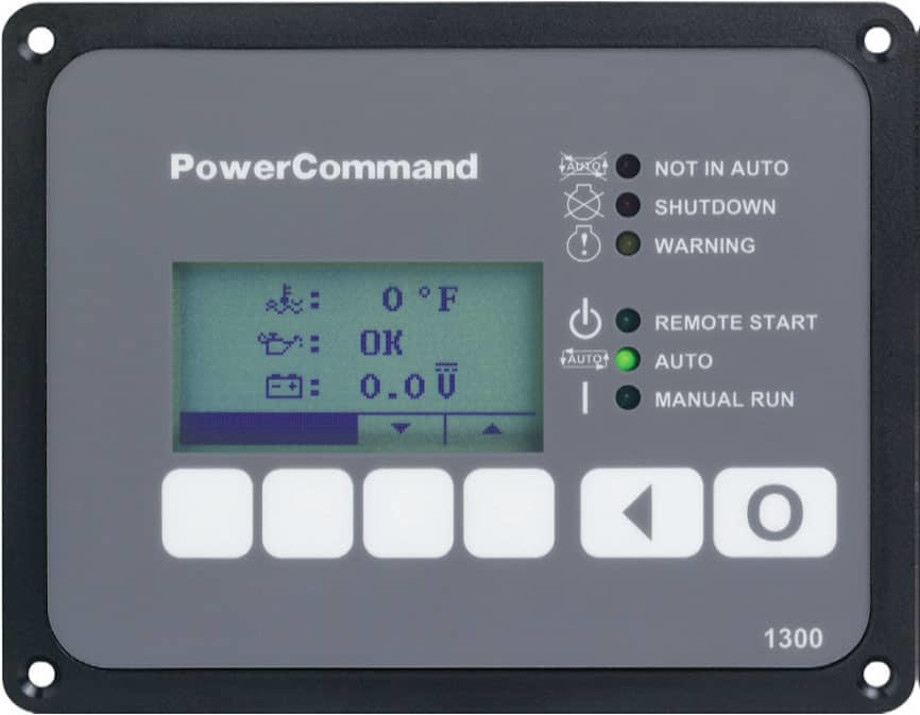
Reading blink codes on an Onan generator helps diagnose problems quickly. The generator’s status light blinks in patterns. Each pattern points to a specific fault. Learning to read these codes can save time and money. It guides you on what needs fixing or checking. This section explains how to enter fault mode, count flashes, and identify multiple codes.
Entering Fault Mode
To read blink codes, first enter fault mode. Press the Stop button three times fast on some models. The status light then begins to flash. On other models, the light may start blinking automatically when a fault occurs. Watch the light closely. It will show the fault code through a series of flashes. Entering fault mode is the first step to troubleshooting.
Counting Flashes
Count the flashes carefully to understand the code. The light flashes a number, pauses, then flashes again. The first set of flashes is the tens digit. The second set after the pause is the units digit. For example, three flashes pause, then five flashes mean code 35. Write down the numbers to avoid confusion. This process helps decode the error quickly and clearly.
Identifying Multiple Codes
The generator may show more than one fault code. It flashes one code, pauses longer, then flashes another. These codes repeat in a loop. Note all the codes shown in the sequence. Each code points to a different issue. Identifying multiple codes helps in checking all problems. It ensures a thorough diagnosis before repair or service.
Basic Troubleshooting
Basic troubleshooting helps fix common issues in Onan generators fast. It saves time and avoids costly repairs. Start with simple checks to keep your generator running smoothly. Follow these steps carefully for best results.
Checking Oil And Fuel
Check the oil level using the dipstick. Add oil if the level is low. Use the correct oil type for your model. Inspect fuel for dirt or water contamination. Replace old or bad fuel to prevent engine problems. Clean fuel caps to avoid air leaks.
Inspecting Battery And Connections
Look at the battery terminals for corrosion or loose wires. Clean terminals with a wire brush if needed. Tighten all battery connections firmly. Test battery voltage with a multimeter. Replace the battery if it cannot hold a charge.
Cleaning Air And Fuel Filters
Remove air and fuel filters carefully. Check for dirt, dust, or blockages. Clean reusable filters with soap and water. Replace disposable filters with new ones. Dirty filters reduce engine power and cause fault codes.
Resetting Circuit Breaker
Locate the circuit breaker on your generator panel. Switch it off fully and wait a few seconds. Turn the breaker back on to reset it. This clears minor electrical faults and restarts the generator. Repeat if the generator does not start.

Credit: www.scribd.com
Resetting Fault Codes
Resetting fault codes on an Onan generator clears error messages after fixing issues. This step restores normal operation and helps monitor future faults. Proper reset ensures the generator runs smoothly without false alarms. Follow simple methods to reset codes quickly and safely.
Using Stop Button Method
Press the Stop button three times quickly. This action enters fault code display mode. Watch the status light flash a series of blinks. Count the flashes before and after the pause to read codes. After viewing, press the Stop button once to clear codes. The generator resets and returns to normal.
Manual Reset Procedures
Turn off the generator and remove the key if present. Wait for a few minutes to let the system power down. Check for any visible faults or loose connections. Reinstall the cover panel securely. Turn the generator back on and press the Stop button once. This manual reset clears faults if the issue is fixed.
Advanced Fixes
Advanced fixes for Onan generator troubleshooting codes require a careful and detailed approach. These solutions go beyond basic checks and involve hands-on inspection and replacement of parts. Understanding these fixes can help restore your generator’s performance effectively.
Inspecting Brushes And Commutator
Brushes transfer electrical current to the rotating part of the generator. Worn or damaged brushes cause poor contact and error codes. Remove the brush holder to check brush length and condition. Replace brushes if they are too short or cracked. The commutator, where brushes contact, should be clean and smooth. Use fine sandpaper to clean the commutator gently. Avoid deep scratches or damage to this part.
Checking Control Board Connections
The control board manages the generator’s functions and error reporting. Loose or corroded connections cause communication faults and irregular operation. Open the control panel and inspect all wire connections carefully. Make sure connectors are tight and free from corrosion. Use contact cleaner spray for dirty terminals. Secure any loose wires and check for broken solder joints on the board. A firm connection often solves many error codes.
Replacing Faulty Components
Some parts wear out and cause persistent error codes. Common faulty components include sensors, relays, and fuses. Identify the malfunctioning part by testing with a multimeter or following the service manual’s guide. Replace the component with a genuine part for best results. Do not ignore damaged capacitors or burnt resistors on the control board. Replacing these parts restores stable generator performance and clears error codes.

Credit: greenmountaingenerators.com
Helpful Resources
Helpful resources make Onan generator troubleshooting easier. They provide clear guidance to decode error messages. These resources cover detailed steps and tips. Use them to diagnose and fix issues faster.
Operator Manual Reference
The operator manual is the first resource to check. It lists all error codes and their meanings. Manuals explain how to perform basic fixes safely. Follow instructions carefully to avoid damage. Keep the manual handy near your generator.
Instructional Videos
Videos show step-by-step troubleshooting actions visually. Watching helps you understand complex tasks better. Many videos are made by experts and users. They cover common problems and solutions clearly. Search for your model and code for specific help.
Online Forums And Communities
Forums connect you with other Onan generator users. Members share real experiences and tips. You can ask questions and get quick answers. Communities often discuss rare error codes and fixes. Join a forum to learn from others’ knowledge.
Frequently Asked Questions
What Do 3 Blinks Mean For An Onan Generator?
Three blinks on an Onan generator indicate a “Service Fault. ” It signals the need for maintenance or inspection. Check oil, battery, and filters promptly. Refer to the operator manual for detailed troubleshooting and reset instructions. Address issues to prevent further damage.
How Do I Reset My Cummins Onan Generator?
To reset your Cummins Onan generator, turn off the generator and remove the key. Locate and reset the circuit breaker. Restart the generator and check for fault codes. Consult the user manual for model-specific reset instructions and troubleshooting tips.
How To Troubleshoot An Onan Rv Generator?
Check oil and fuel levels first. Inspect battery connections and charge. Read fault codes via status light flashes. Refer to the manual for specific codes. Clear faults by pressing the Stop button three times or resetting the circuit breaker.
What Problems Can Result In A Motor Generator Trouble Code?
Motor generator trouble codes can result from low battery voltage, engine speed issues, low oil pressure, or clogged filters. Check connections, oil levels, and filters to resolve faults quickly.
What Do Onan Generator Troubleshooting Codes Mean?
Onan generator codes show specific faults or issues with the unit. They help identify problems quickly. Each code corresponds to a different error or warning.
Conclusion
Understanding Onan generator troubleshooting codes saves time and prevents damage. Always check oil, fuel, and battery first. Counting the flashing lights helps identify specific faults. Follow your model’s manual for exact code meanings. Fix issues promptly to keep your generator running smoothly.
Clearing codes after repair resets the system effectively. Keep your generator maintained for reliable performance every time.



