
Is your Orgo ice maker not working the way it should? Maybe it’s slow to make ice, or you keep seeing the “Ice Full” message even when the basket isn’t full.
These issues can be frustrating, especially when you need ice quickly. But don’t worry—you’re not alone, and many common problems have simple fixes you can do yourself. You’ll discover easy troubleshooting tips to get your Orgo ice maker back in action.
From checking water flow to resetting sensors, we’ll guide you step-by-step so you can enjoy perfectly chilled drinks again without delay. Keep reading—you’re just a few quick solutions away from solving your ice maker troubles!

Credit: device.report
Common Ice Maker Issues
Orgo ice makers are popular for quick ice production. Yet, like all machines, they face common problems. Knowing these issues helps fix them fast. This saves time and avoids costly repairs. Below are frequent problems you might see.
Water Leaks And Their Causes
Water leaks can happen in many places. Check the ice drawer first. It might not fit tightly, causing leaks. The water inlet valve may be faulty or loose. Also, the ice maker’s vent can let water escape. Leaks can damage your floor or fridge. Fix loose parts and replace damaged seals to stop leaks.
Unusual Noises During Operation
Strange sounds often mean something is wrong. A loud, high-pitched noise might come from the motor. Ice stuck inside can cause grinding sounds. Loose parts or debris can rattle during the cycle. Regular cleaning and checking for stuck ice helps. Tighten any loose screws or parts to reduce noise.
Ice Full Sensor Problems
The ice full sensor stops ice making when the bin is full. If the sensor fails, the machine may stop making ice too early. Or it might overflow ice and cause jams. Dust, ice buildup, or sensor damage cause issues. Clean the sensor gently and remove ice blockages. Replace the sensor if cleaning does not help.
Basic Troubleshooting Steps
Basic troubleshooting steps help fix common Orgo ice maker problems quickly. These steps are easy to follow and do not need special tools. They cover checking water supply, cleaning parts, and inspecting the pump. Regular checks keep the ice maker working well and prevent bigger issues.
Checking Water Supply And Filters
Start by ensuring the water supply is connected and turned on. Look for kinks or leaks in the water line. A blocked or dirty filter can stop water flow. Replace or clean the filter every few months. Clear water helps ice form faster and tastes better.
Cleaning Condenser Coils
Condenser coils remove heat and keep the machine cold. Dust and dirt on coils reduce cooling efficiency. Use a soft brush or vacuum to clean the coils gently. Clean coils improve ice production and reduce energy use. Check coils at least twice a year for best results.
Inspecting The Pump And Water Flow
The pump moves water inside the ice maker. Listen for unusual noises from the pump. Check if water flows smoothly into the ice tray. Blocked or broken pumps stop ice from forming. Clear any debris or call a technician if the pump does not work well.
Resetting The Ice Maker
Resetting the Orgo ice maker helps fix many common issues. It can clear errors and restart the ice-making cycle. This process often solves problems like no ice production or error lights.
Resetting is simple and takes only a few minutes. Knowing where the reset button is and how to use it is key. Follow the steps carefully for the best results.
Locating The Reset Button
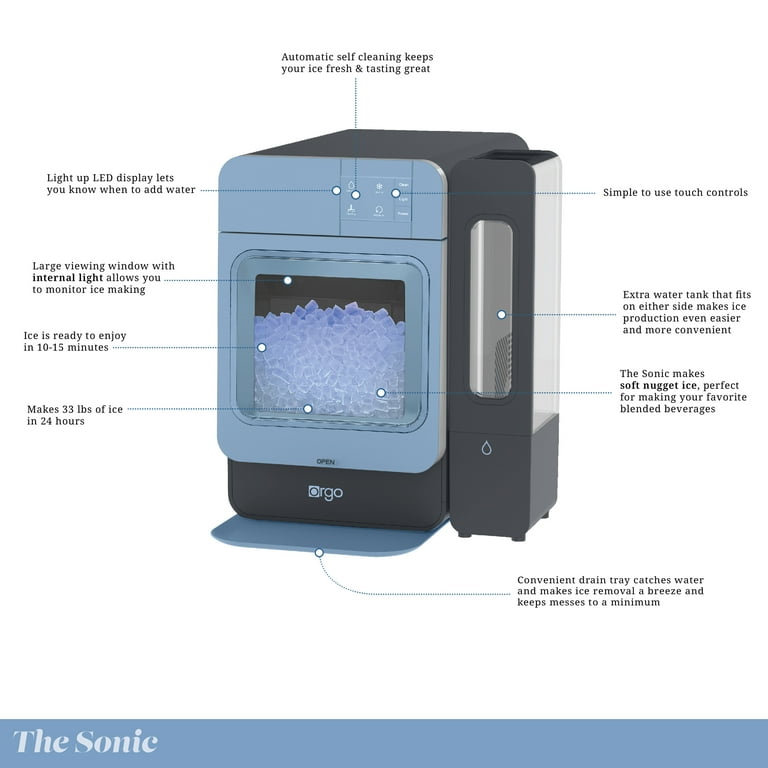
The reset button is small and sometimes hidden. Check the front or side of the ice maker unit. It may be inside the freezer compartment.
Look for a button labeled “Reset” or “Test.” It might be recessed, so use a pointed object if needed. If you cannot see it, remove the ice bucket for better access.
Step-by-step Reset Process
First, unplug the ice maker or turn off the power. Wait about 30 seconds before continuing. Press and hold the reset button for 5 to 10 seconds.
Release the button and plug the unit back in. Some models require you to press the button multiple times. Check your user manual for exact instructions.
What Happens After Reset
The ice maker will start a new cycle. You may hear the motor running or water filling the tray. The ice tray will begin to freeze water again.
If the ice maker does not restart, check the water supply. Clear any ice jams or blockages. Repeat the reset if necessary or contact support for help.
Credit: www.walmart.com
Sensor And Thermostat Issues
Sensor and thermostat issues often cause the Orgo ice maker to stop working properly. These components control the temperature and the ice-making cycle. Faulty sensors or thermostats can lead to no ice production or irregular ice sizes. Understanding how to identify and fix these problems helps keep the ice maker running smoothly.
Identifying Faulty Sensors
Check if the ice maker stops working suddenly. Sensors might fail to detect ice levels correctly. Look for error lights or unusual noises. A sensor that does not respond may need replacement. Testing with a multimeter can confirm sensor problems. Faulty sensors affect the ice maker’s timing and temperature control.
Cleaning Sensor Areas
Dirt and grime can cover sensors and cause errors. Turn off the ice maker before cleaning. Use a soft cloth and mild cleaner to wipe sensor surfaces gently. Avoid using harsh chemicals or water sprays. Clean sensors improve detection and prevent false readings. Regular cleaning helps the ice maker perform well.
Dealing With Ice Buildup
Ice buildup around sensors or thermostat blocks signals. This buildup stops the ice maker from cycling correctly. Remove ice carefully using warm water or a soft cloth. Avoid sharp tools that may damage components. Clear ice ensures accurate sensor readings and proper thermostat function. Keep the ice maker dry to prevent future buildup.
Handling Ice Quality Problems
Ice quality greatly affects how well your Orgo ice maker performs. Poor ice quality can spoil drinks and cause machine issues. It is important to handle ice problems quickly to keep ice clear and firm. Understanding common ice quality issues helps in fixing them effectively.
Reasons For Hollow Or Soft Ice
Hollow or soft ice often means the water is freezing too fast. Fast freezing traps air bubbles inside the ice cubes. Another cause is low water purity. Minerals and impurities can weaken ice structure. Incorrect machine settings might also cause soft ice. Check water temperature; it should be cool but not cold. Use filtered water to improve ice hardness. Regularly clean the ice maker to avoid buildup that affects freezing.
Fixing Ice Clumps In Bin Or Chute
Ice clumps block ice from falling properly. Warm air entering the bin causes ice to stick together. Check the door seal for leaks to stop warm air entry. Remove clumped ice carefully to avoid damage. Use a plastic scoop or soft tool to break apart clumps. Avoid metal tools that can harm the machine. Keep the ice bin dry and clean to prevent future clumps. Regular use helps keep ice separate and fresh.
When To Contact Support
Knowing when to contact support for your Orgo ice maker saves time and prevents more damage. Some problems need expert help beyond basic fixes. Recognize the warning signs early. Acting quickly can avoid costly repairs or replacements.
Signs Of Control Board Failure
The control board manages all ice maker functions. If it fails, the machine stops working properly. Watch for these signs:
- Ice maker does not start or respond to commands.
- Display panel shows error codes or nothing at all.
- Machine cycles endlessly without making ice.
- Buttons or touch controls stop working.
These problems suggest the control board may need professional diagnosis or replacement.
Replacing Faulty Components
Some parts can be replaced safely at home. Water filters, ice trays, or sensors often cause issues. Replace these if visibly damaged or malfunctioning.
Complex parts like the control board, motor, or pump require technical skills. Incorrect repairs may void warranties or cause more damage. Contact support if unsure or if multiple parts fail.

Credit: www.ebay.com
Frequently Asked Questions
What Are The Problems With The Orgo Ice Machine?
The Orgo ice machine often leaks water from the drawer or vent. It can produce loud, high-pitched noises. Ice production may slow due to clogged filters or mineral buildup. Sensor malfunctions cause false “ice full” alerts. Regular cleaning and resetting usually fix these issues.
Where Is The Ice Maker Reset Button?
The ice maker reset button is usually a small, recessed button on the front, side, or bottom of the ice maker unit inside the freezer.
What Is The Most Common Reason For An Ice Maker Not Working?
The most common reason an ice maker stops working is a clogged water filter or frozen water line blocking water flow.
Why Does My Orgo Ice Maker Say Ice Full?
Your Orgo ice maker shows “Ice Full” if the sensor detects ice blocking the basket. Clear ice clumps and reset the machine to resume.
Why Is My Orgo Ice Maker Not Producing Ice?
Low water supply or a clogged filter often stops ice production. Check water lines and clean or replace filters regularly.
Conclusion
Troubleshooting your Orgo ice maker helps keep ice flowing smoothly. Simple checks fix common problems fast. Clean filters, clear ice clumps, and reset the machine as needed. Watch for leaks or unusual noises that signal issues. Regular care extends your ice maker’s life.
Stay patient and follow steps carefully. Reliable ice is just a few fixes away. Enjoy cool drinks without the hassle.



