
Is your Peloton heart rate monitor not working the way it should? You’re not alone, and it can be frustrating when your workout data suddenly goes missing or shows strange readings.
Whether your monitor won’t connect, blinks red, or gives inaccurate numbers, understanding the common issues can save you time and stress. In this guide, you’ll learn simple, step-by-step troubleshooting tips to get your Peloton heart rate monitor back on track quickly.
Keep reading to discover how easy fixes like checking the battery, adjusting the fit, or resetting the connection can make a big difference in your ride experience. Don’t let a faulty heart rate monitor hold you back—let’s solve this together!
Common Heart Rate Monitor Issues
Peloton heart rate monitors may face common issues that affect their performance. These problems often cause frustration during workouts. Understanding these issues helps with quick fixes and uninterrupted exercise sessions.
Common problems include connection failures, unusual light signals, wrong readings, and signal drops. Each issue has simple causes and solutions to keep your monitor working well.
No Signal Or Connection
Your Peloton heart rate monitor may fail to connect to the bike or app. This happens when Bluetooth is off or the device is too far away. Low battery power can also stop the signal from working properly. Restarting the device or re-pairing the monitor often solves the issue. Ensure the monitor is close and the Bluetooth is active on your device.
Blinking Red Light
A blinking red light on the monitor usually means a battery problem or sensor error. It might indicate low battery levels or poor skin contact. Replace the battery if needed and moisten the sensor pads before wearing. Clean the sensors regularly to avoid dirt buildup, which can trigger this warning light.
Inaccurate Readings
Sometimes, the heart rate monitor shows wrong numbers or jumps around. This often happens if the strap is loose or dry. A dry sensor cannot detect your pulse accurately. Adjust the strap to fit snugly and wet the sensors slightly for better contact. Dirt or sweat on the sensors can also cause false readings, so keep them clean and dry.
Dropping Signal During Use
Signal loss during workouts can interrupt your heart rate tracking. This issue may be caused by interference from other devices or weak Bluetooth connections. Strong electronic devices nearby can block the signal. Moving closer to the Peloton console and turning off other Bluetooth devices may help. Also, check the battery and strap fit to maintain a steady connection.
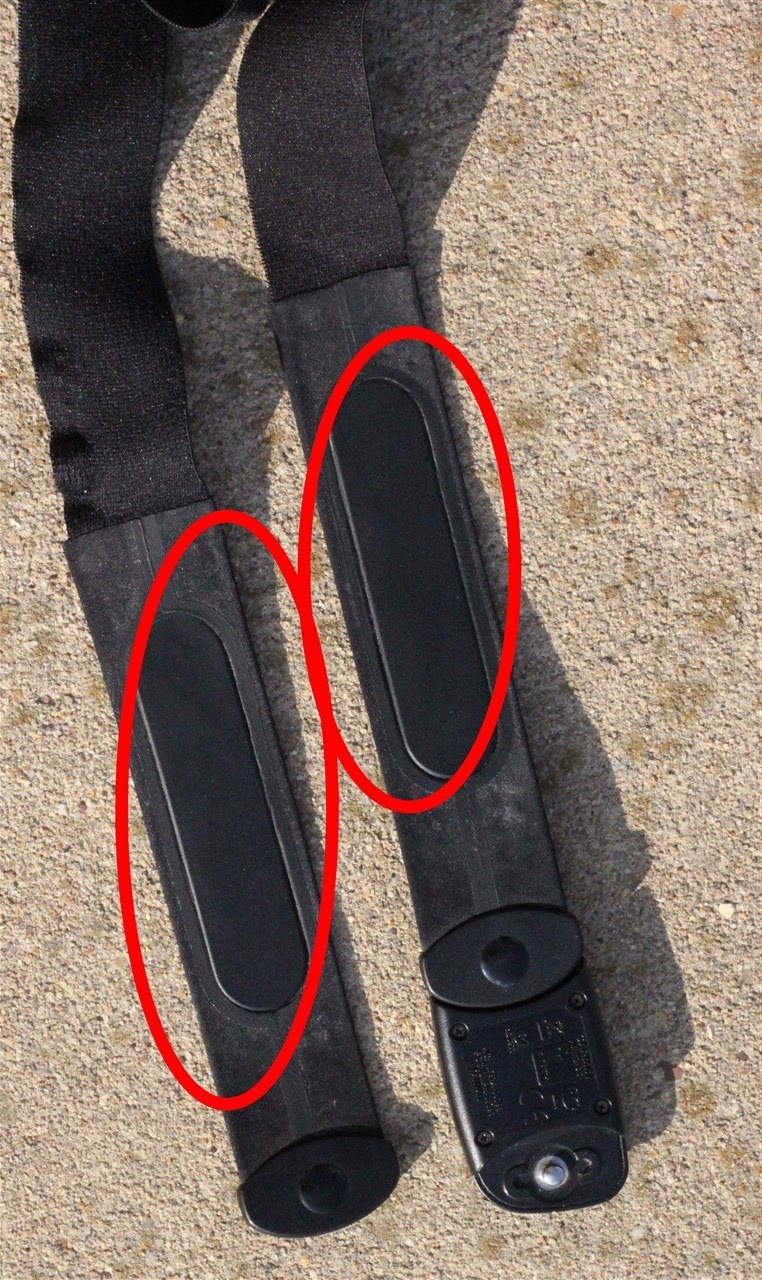
Credit: www.dcrainmaker.com
Chest Strap Contact And Fit
Proper contact and fit of your Peloton heart rate monitor chest strap is key to accurate readings. The strap must touch your skin well and fit comfortably. Poor contact or loose fit causes weak or no signal. This section explains how to improve chest strap contact for better performance.
Moistening Sensor Pads
Wet the grey sensor pads before wearing the strap. Use water or conductive gel to moisten them. Moisture helps the sensors detect your heart rate better. Dry sensors often fail to pick up signals correctly. Always moisten the pads for best results.
Proper Strap Placement
Place the strap just below your chest muscles or bra line. It should sit flat against your skin, not twisted or folded. Position the logo upright and centered. Proper placement ensures the sensors maintain contact during your workout. Avoid placing it too high or low on your torso.
Cleaning The Strap And Sensors
Clean the strap regularly to remove sweat and dirt. Use mild soap and water, but remove the sensor module first. Dirty sensors reduce signal quality. Check the metal contacts for rust or buildup. Clean sensors improve heart rate detection and extend strap life.
Adjusting Strap Tightness
Wear the strap snug, but not too tight. It should stay in place while you move. A loose strap causes poor contact and signal drops. Too tight can be uncomfortable and restrict breathing. Find a balance for secure fit and comfort during exercise.
Connection And Pairing
Connecting and pairing your Peloton heart rate monitor correctly ensures accurate tracking of your workout data. This step is crucial for a smooth exercise session. Troubles with connection or pairing can disrupt your workout flow and data recording.
Follow these simple steps to troubleshoot connection and pairing issues with your Peloton heart rate monitor.
Activating Pairing Mode
Start by activating the pairing mode on your heart rate monitor. Most models enter pairing mode automatically once they detect motion or when you press the main button. Check the user manual for exact instructions for your device. Pairing mode makes the monitor visible to your Peloton bike or app.
Using The Peloton App
Open the Peloton app on your phone or tablet. Navigate to the settings or device section. Look for the option to add or pair a heart rate monitor. Select your device from the list of available options. This ensures your Peloton app recognizes the heart rate monitor correctly.
Enabling Bluetooth And Permissions
Make sure Bluetooth is switched on both on your Peloton device and your phone or tablet. Grant the Peloton app permission to use Bluetooth and location services if asked. These permissions help the app find and connect to your heart rate monitor without issues.
Restarting Devices
Turn off your heart rate monitor and Peloton device or app. Wait a few seconds, then power them back on. Restarting clears temporary glitches. Try pairing again after the restart. This simple step often fixes connection problems quickly.
Avoiding Conflicts With Other Devices
Turn off or disconnect other Bluetooth devices nearby. Multiple devices can interfere with the connection process. Keep only your Peloton heart rate monitor active during pairing. This reduces signal conflicts and improves pairing success.
Battery And Hardware Checks
Battery and hardware problems often cause Peloton heart rate monitor issues. Checking these parts helps fix many common troubles. This section guides you through simple steps to ensure your device runs well. Follow each step carefully to avoid further damage.
Replacing The Battery
Start by turning the battery cover with a coin or flat tool. Remove the old battery gently. Insert a new battery with the plus (+) side facing out. Use the correct battery type for your model. Replace the cover securely to protect the battery inside.
Inspecting Battery Contacts
Look inside the battery compartment for metal contacts. Check if the contacts are clean and not bent. Dirt or corrosion can block power flow. Wipe contacts gently with a dry cloth if needed. Straighten bent contacts with care to improve connection.
Securing The Battery Cover
Make sure the battery cover fits tightly and clicks into place. A loose cover may interrupt the device’s power. Avoid overtightening screws to prevent damage. Proper sealing keeps moisture and dust away from the battery.
Performing A Device Reset
Resetting the heart rate monitor can clear minor errors. Press and hold the power button or follow device-specific reset steps. This process restarts the device without removing the battery. After reset, check if the monitor works properly again.
Interference And Signal Issues
Interference and signal issues often cause Peloton heart rate monitors to lose connection. These problems reduce accuracy and disrupt your workout tracking. Understanding common causes helps keep your monitor working well. Simple steps can improve signal strength and reduce interference.
Avoiding Nearby Electronics
Other electronics can interfere with your heart rate monitor’s signal. Devices like smartphones, routers, and microwaves create wireless noise. Keep your monitor away from these electronics during use. Turn off unnecessary devices near your Peloton equipment. This reduces wireless interference and improves signal clarity.
Reducing Signal Blockage
Physical objects can block the signal between your monitor and the Peloton bike. Walls, furniture, and even your own body may cause signal loss. Use the monitor in an open space with a clear line of sight to the bike. Avoid thick clothing that covers the sensor. Position yourself so the sensor faces the bike’s receiver directly.
Maintaining Sensor Cleanliness
Dirty sensors cause weak or no signal. Sweat, oils, and dirt build up on the sensor pads over time. Clean your heart rate monitor regularly with a soft cloth and mild soap. Avoid harsh chemicals that damage the sensors. Keeping sensors clean ensures good skin contact and strong signal transmission.

Credit: www.equinesportcentre.co.za
Optical Wrist-based Monitor Tips
The optical wrist-based heart rate monitor on your Peloton tracks your pulse by shining light through your skin. This technology needs proper care and adjustment to work well. Small mistakes in how you wear or clean the monitor can cause wrong or no readings. Use these tips to improve your monitor’s accuracy and reliability.
Ensuring Clean Sensor Surface
Keep the sensor surface clean for accurate readings. Sweat, dirt, or lotion can block the light. Wipe the sensor with a soft, damp cloth after each workout. Avoid using harsh chemicals or abrasive materials. Clean sensors pick up your heart rate more clearly.
Maintaining Good Skin Contact
Good skin contact is crucial for the optical sensor. The sensor needs direct contact with your skin to detect blood flow. Remove any hair under the sensor area if it is thick. Make sure your skin is dry but not too dry. Moist skin helps the sensor work better.
Checking For Proper Fit
Wear the monitor snugly on your wrist. A loose fit lets the sensor move, causing errors. It should be tight enough to stay in place but not too tight to block blood flow. Position the sensor just above your wrist bone for best results.

Credit: support.onepeloton.com
Frequently Asked Questions
Why Is My Peloton Heart Rate Monitor Not Working?
Your Peloton heart rate monitor may not work due to poor sensor contact, low battery, or Bluetooth connection issues. Ensure the strap fits snugly, sensors are moist, and clean. Restart devices, re-pair via Bluetooth, replace batteries if needed, and update firmware for optimal performance.
How To Replace Battery On Peloton Heart Rate Monitor?
Turn the back cover using a coin in the groove. Remove the old battery. Insert a new battery with the plus (+) side facing outward. Replace the back cover securely.
Why Is My Heart Rate Monitor Not Working?
Your heart rate monitor may not work due to poor sensor contact, weak battery, or Bluetooth connection issues. Ensure the strap fits snugly and sensors are moist. Clean electrodes, replace the battery if needed, update firmware, and re-pair the device.
Avoid interference from other electronics.
Why Is My Peloton Heart Rate Monitor Blinking Red?
A blinking red light on your Peloton heart rate monitor signals an error. Detach and reattach the safety key. Ensure the strap fits snugly, sensors are moist, and Bluetooth is enabled. Replace the battery if needed and restart your device to fix connection issues.
Why Is My Peloton Heart Rate Monitor Not Working?
A loose fit or dry sensors can cause no readings. Make sure the strap is snug and electrodes are moist. Also, check Bluetooth connection and try re-pairing the device.
Conclusion
Troubleshooting your Peloton heart rate monitor can feel tricky at first. Focus on simple checks like strap fit, sensor moisture, and battery life. Restart devices and re-pair Bluetooth connections to fix common issues. Keep sensors clean and ensure no interference nearby.
These steps often restore accurate readings quickly. Staying patient and methodical helps you get the best performance. Enjoy your workouts with reliable heart rate data every time.



