
Is your Pentair Intellichlor IC40 salt chlorinator acting up? When your pool’s chlorinator isn’t working right, it can quickly turn your relaxing swim into a frustrating experience.
You might notice warning lights, reduced chlorine production, or no output at all. But don’t worry—this guide is here to help you troubleshoot your Intellichlor IC40 step-by-step. By understanding common issues and simple fixes, you’ll get your system back to optimal performance in no time.
Keep reading to discover how to identify problems, reset your unit, and know when it’s time for a replacement. Your pool deserves clean, clear water—and you deserve peace of mind.
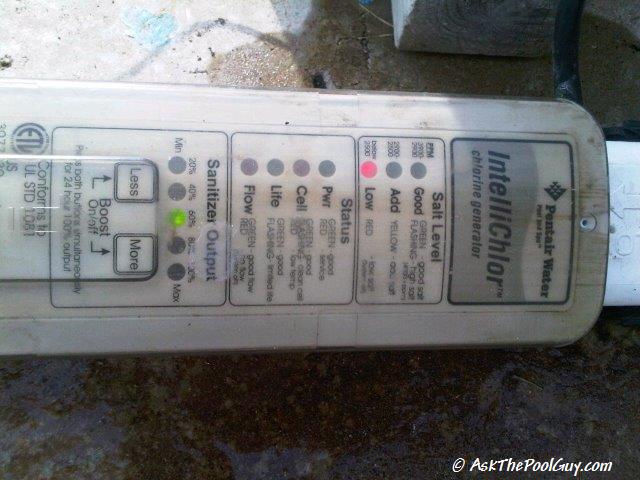
Credit: askthepoolguy.com
Common Intellichlor Issues
The Pentair Intellichlor IC40 is a popular salt chlorinator for pools. Despite its reliability, users often face common issues. Knowing these problems helps keep your pool clean and safe. Troubleshooting becomes easier with clear information. This section covers typical Intellichlor problems and how to spot them.
No Power Or Lights
No power or lights on the Intellichlor means it may not be receiving electricity. Check the power supply and circuit breaker first. Loose wires or blown fuses can cause this issue. Sometimes the control board fails and needs replacement. Always turn off power before inspecting the unit. A simple reset might fix the problem.
Low Chlorine Output
Low chlorine output reduces pool sanitation. Dirty or worn salt cells often cause this issue. Check for calcium buildup on the cell plates and clean them gently. Low salt levels in the pool water also lower chlorine production. Use a salt test kit to ensure proper salt concentration. Running the system at low flow or low temperature can reduce output too.
Salt Level Errors
Salt level errors appear on the display when the system detects incorrect salt concentration. Too low or too high salt damages the chlorinator. Test salt levels with a reliable meter. Add salt slowly to raise levels or dilute water to lower salt. Reset the system after correcting salt levels for proper reading. Avoid adding too much salt quickly.
Flow Sensor Problems
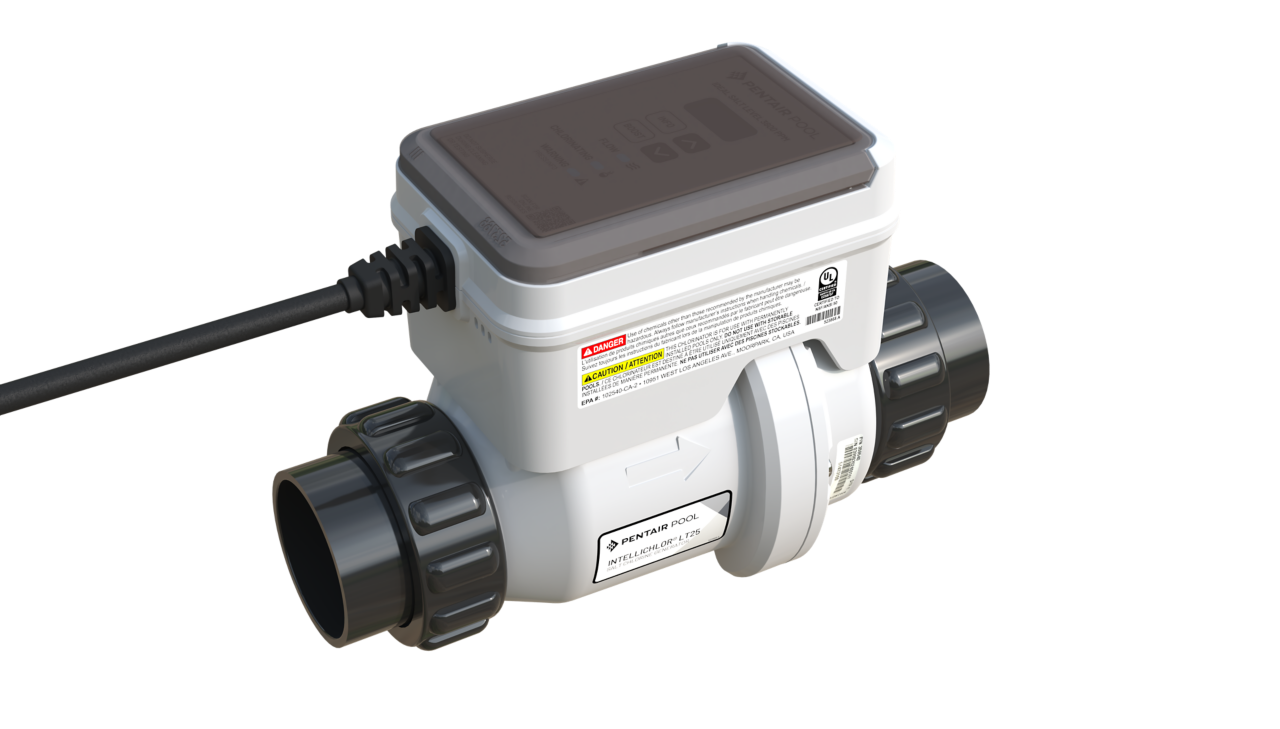
The flow sensor ensures water flows through the cell properly. If the sensor fails, the system may shut down or show error codes. Check for blockages or air bubbles in the plumbing. Clean or replace the flow sensor if it is dirty or faulty. Proper water flow is essential for safe chlorine generation. Always ensure the pump and filter are working well.
Credit: www.pentair.com
Basic Reset Techniques
Basic reset techniques can help fix common issues with the Pentair Intellichlor IC40. These steps are simple and often restore normal operation quickly. Resetting the unit may clear minor errors and improve performance. Follow these easy methods to troubleshoot your system before calling for professional help.
Power Cycling The Unit
Power cycling means turning the chlorinator off and on again. First, switch off the power at the circuit breaker. Wait about 30 seconds to one minute. Turn the power back on and check the unit’s display. This process can clear temporary faults and reset the system’s controls.
Recalibrating Salt Levels
Incorrect salt levels can cause the unit to stop working properly. To recalibrate, press and hold the salt level button on the control panel. Keep holding until the salt level reading resets. This tells the unit to recheck the pool’s salt concentration. Make sure your pool’s salt level matches the recommended range.
Resetting Error Codes
The IC40 shows error codes for various problems. To reset these, press and hold the reset button on the chlorinator. Hold for about 10 seconds until the error code disappears. If the code returns, note the code number for further troubleshooting. Resetting error codes often clears minor electronic glitches.
Checking Electrical Components
Checking the electrical components is a key step in troubleshooting the Pentair Intellichlor IC40. Faulty wiring or damaged parts often cause the system to stop working. Verifying each electrical part ensures the unit receives power and operates properly. This process helps find hidden issues fast and saves repair costs.
Follow these simple checks to inspect wiring, locate the transformer, and test the cutoff switch. Each step targets common electrical problems. Careful examination can prevent system failure and extend the life of your chlorinator.
Inspecting Wiring Connections
Start by examining all wiring connections. Look for loose or corroded wires that may interrupt power. Make sure wires are firmly attached to terminals and connectors. Check for signs of wear, cracks, or damage along the cables. Damaged wiring can cause shorts or no power supply. Tighten or replace any faulty wires to restore proper function.
Transformer Location And Function
The transformer converts house voltage to the lower power needed by the Intellichlor. Locate the transformer near the control unit or pool equipment panel. Ensure it is securely mounted and free from moisture. Test the transformer output with a multimeter to confirm it supplies the correct voltage. A bad transformer will stop the chlorinator from working. Replace it if you detect no or low voltage.
Testing The Electrical Cutoff Switch
The electrical cutoff switch protects the system by stopping power flow during faults. Find this switch near the power source or control box. Check its position; it should be fully ON to allow current. Use a multimeter to test continuity across the switch terminals. If the switch is open or faulty, the system won’t start. Replace a bad cutoff switch to restore power.
Salt Cell Maintenance
Proper salt cell maintenance keeps your Pentair Intellichlor IC40 running smoothly. The salt cell creates chlorine by converting salt in the water. Dirt, scale, and wear can reduce its efficiency. Regular care helps avoid costly repairs and extends the cell’s life.
Check the salt cell often for build-up or damage. Simple cleaning and timely replacement make a big difference. Follow these steps to maintain your salt cell effectively.
Cleaning The Salt Cell
Turn off the system before cleaning the salt cell. Remove the cell carefully from the pool’s plumbing. Rinse it with fresh water to remove loose debris.
Soak the cell in a mild acid solution to dissolve calcium build-up. Use a mixture of one part muriatic acid to ten parts water. Soak for about 10 to 15 minutes. Rinse thoroughly with water after soaking.
Never use sharp tools to scrape the cell plates. This can damage the metal plates inside. Clean the cell every 3 to 6 months for best results.
Signs Of Cell Wear Or Failure
Low chlorine production is a common sign of cell wear. Check for error codes on the Intellichlor display. Visible cracks or corrosion on the cell plates indicate damage.
Scale build-up that won’t clean off signals a worn-out cell. The system may shut down if the cell fails completely. Watch for changes in chlorine levels or flow indicators.
Regular inspections help spot problems early. Replace the cell to keep your pool safe and clean.
Replacing The Salt Cell
Turn off power and water flow before removing the old salt cell. Disconnect the cell from the plumbing and wiring carefully. Avoid pulling on wires to prevent damage.
Install the new cell following the arrows on the housing for correct water flow. Reconnect the wiring and secure the cell in place. Turn on the system and check for normal operation.
Reset the Intellichlor system if needed to recognize the new cell. Proper installation ensures efficient chlorine production and longer equipment life.
Water Chemistry Tips
Maintaining proper water chemistry is essential for your Pentair Intellichlor IC40 to work efficiently. Balanced water helps the chlorinator produce the right amount of chlorine. It also prevents damage to the salt cell and other pool equipment. Regular checks and adjustments keep your pool clean and safe.
Balancing Pool Ph
Test your pool’s pH level weekly. The ideal range is 7.2 to 7.6. Low pH can cause corrosion and skin irritation. High pH reduces chlorine effectiveness. Use pH increaser or decreaser to adjust the levels. Make changes slowly and retest after each adjustment.
Adjusting Salt Concentration
The Intellichlor IC40 needs the right salt level to work well. Check salt concentration with a salt meter. The recommended range is 3000 to 3500 ppm. Too little salt means low chlorine output. Too much salt can damage the salt cell. Add salt or fresh water to keep the balance.
Using Muriatic Acid Safely
Muriatic acid helps lower high pH and alkalinity. Always add acid to water, never water to acid. Wear gloves and eye protection when handling acid. Pour it slowly around the pool edges. Run the pump to circulate the acid evenly. Test water before and after adding acid.
Credit: www.reddit.com
Filter And Flow Issues
Filter and flow problems often cause the Pentair Intellichlor IC40 to stop working properly. The system depends on proper water flow and filter settings for efficient chlorination. Low flow or clogged filters can trigger error lights or prevent chlorine generation. Identifying these issues quickly helps maintain clean and safe pool water.
Checking Pool Filter Settings
Start by inspecting the pool filter settings. Make sure the filter is set to the correct mode, usually “Filter” or “Normal.” Incorrect settings like “Backwash” or “Waste” can reduce flow to the Intellichlor. Clean or replace filter cartridges if they look dirty or clogged. A clean filter allows water to pass freely through the system.
Bypassing The Filter For Testing
Bypass the filter to test the Intellichlor IC40 flow sensor. Set the filter valve to “Recirculate.” This skips the filter tank and sends water directly to the chlorinator. If the flow light turns on, the filter is likely the problem. Return the valve to “Filter” after testing. Bypassing helps isolate filter issues from sensor problems.
Flow Sensor Troubleshooting
Check the flow sensor for dirt or damage. Clean the sensor with a soft cloth if it appears dirty. Inspect wiring connections for looseness or corrosion. Tighten or replace wires if needed. Use a multimeter to test sensor continuity. Replace the flow sensor if it fails tests or shows physical damage. Proper flow detection ensures the Intellichlor only runs with adequate water flow.
Advanced Troubleshooting
Advanced troubleshooting for the Pentair Intellichlor IC40 involves deeper steps. This helps identify issues beyond basic fixes. Understanding detailed signals and using special tools can save time and effort. It also ensures your system works safely and efficiently.
Following these steps can help you resolve complex problems. It keeps your pool clean and the chlorinator running smoothly.
Interpreting Led Codes
The Intellichlor IC40 uses LED lights to show system status. Each pattern or color means a specific issue or condition. Learn the meaning of these codes in the user manual. Common codes include salt level warnings and cell faults.
Watch the LED lights closely during operation. This quick check often points to the root cause. Clear LED signals help you decide the next troubleshooting step.
Using Diagnostic Tools
Diagnostic tools provide detailed system information. Tools like multimeters check electrical connections and voltages. Salt test kits measure salt concentration in the pool water.
Use these tools to verify system components. They help confirm if parts like the cell or power supply are faulty. Proper tool use improves troubleshooting accuracy and safety.
When To Contact Support
Some problems need expert help. If LED codes or diagnostics show unclear errors, contact Pentair support. Also reach out if repairs require special parts or skills.
Professional assistance prevents damage and ensures warranty protection. Keep your system’s model and serial number ready for faster service.
Preventive Care Tips
Proper preventive care helps keep your Pentair Intellichlor IC40 running smoothly. Taking small steps can reduce problems and save repair costs. Simple habits protect your investment and keep your pool safe. Follow these tips to avoid frequent issues and extend your system’s life.
Regular Maintenance Schedule
Check your Intellichlor weekly for salt levels and cell condition. Clean the salt cell every 3 to 6 months to remove calcium buildup. Inspect wiring and connections for signs of wear or corrosion. Replace parts as recommended in the user manual. Keep a maintenance log to track all checks and repairs.
Avoiding Common Mistakes
Do not run the chlorinator without proper salt levels. Avoid using harsh chemicals near the cell and control panel. Never operate the unit with low water flow. Avoid cleaning the cell with abrasive tools or acidic cleaners. Do not ignore warning lights or error codes on the display.
Extending Intellichlor Lifespan
Maintain balanced pool water chemistry to prevent cell damage. Use the recirculate setting during cell cleaning to protect the filter. Store the control unit indoors away from direct sunlight and moisture. Perform seasonal inspections before high-use months. Replace the salt cell as soon as efficiency drops noticeably.
Frequently Asked Questions
How To Tell If Your Pentair Salt Cell Is Bad?
Check for error lights or flashing codes on the Pentair control panel. Inspect cell for scale or damage. Test salt levels and water flow. If chlorine output stays low despite proper salt and flow, the salt cell likely needs replacement.
What Is The Life Expectancy Of Intellichlor Ic40?
The IntelliChlor IC40 salt cell typically lasts 3 to 5 years, depending on pool usage and maintenance. Regular cleaning extends its life.
How To Reset A Pentair Salt Chlorinator?
To reset a Pentair salt chlorinator, turn off the power for 30 seconds. Then, turn it back on to reboot. Check the display for normal operation. If needed, recalibrate the salt level following the user manual instructions. This resolves most common reset issues quickly.
What Are Common Salt Chlorinator Problems?
Common salt chlorinator problems include low salt levels, dirty or worn cells, poor water flow, electrical issues, and scale buildup on the cell.
How Do I Reset The Pentair Intellichlor Ic40?
To reset, turn off the power to the unit for 30 seconds. Then, switch it back on and check the display. This often clears minor errors.
Conclusion
Troubleshooting the Pentair Intellichlor IC40 keeps your pool clean and safe. Regular checks help spot issues early and save time. Clean the cell and check salt levels for best results. Watch for error lights and reset the system if needed.
Simple fixes often solve common problems quickly. Keep your pool equipment running smoothly with these easy tips. Stay patient and follow steps carefully for lasting performance. Your pool will thank you with crystal clear water all season.



