
Is your remote car starter acting up when you need it most? You’re not alone.
Many drivers face frustrating issues like the remote not responding, the car refusing to start, or unexpected shutdowns. But before you rush to the mechanic or feel stuck in the cold, there are simple troubleshooting steps you can try yourself.
In this guide, you’ll discover easy ways to identify and fix common remote car starter problems quickly. Keep reading—your next warm, ready-to-go ride might be just a few fixes away.

Credit: www.batteriesplus.com
Common Remote Start Issues
Remote car starters offer great convenience. They let you start your car from a distance. This helps to warm or cool the vehicle before driving. Yet, remote starters can face some common issues. Knowing these issues helps in quick fixes. It saves time and avoids frustration. Below are typical problems with remote start systems.
Dead Fob Battery
The remote key fob battery often dies first. A weak battery stops the signal from reaching the car. The car will not start remotely. Replace the battery with a new one. Use the correct battery type for your fob. Test the remote after changing the battery. This simple step solves many starting problems.
Open Hood Or Doors
Remote start systems check if the hood or doors are open. If they are not fully closed, the system blocks starting. This is a safety feature. Close the hood firmly. Make sure all doors are shut tight. Check the car’s sensors if the problem continues. Sometimes sensors need cleaning or adjustment.
Engine Warning Lights
Warning lights on the dashboard can disable remote start. The system detects engine faults and blocks starting. Lights like “Check Engine” or oil pressure alerts are common reasons. Have a mechanic scan the car’s computer for error codes. Fix any issues before using the remote start again. This keeps the car safe and working well.
Coolant And Oil Pressure Problems
Low coolant or oil pressure can prevent remote start. The system protects the engine from damage by not starting. Check the coolant and oil levels regularly. Top up fluids if they are low. If pressure sensors fail, the car might not start remotely. Inspect sensors and replace faulty ones as needed.
Pre-reset Checks
Before resetting your remote car starter, perform some simple checks. These pre-reset steps help identify issues early. They save time and avoid unnecessary resets. Follow these checks to ensure your system is ready for reset.
Battery Inspection
Check the remote’s battery first. A weak or dead battery often causes start failures. Use a battery tester or replace the battery with a new one. Clean the battery contacts to ensure good connection. This step often fixes remote starter problems quickly.
Sensor Status
Verify all sensors linked to the remote start. Check if doors, hood, and trunk sensors are fully closed. An open sensor stops the remote start from working. Clean sensor areas to remove dirt or debris. Ensure sensors are not damaged or loose.
Error Code Clearance
Look for any error codes on your car’s dashboard. Error codes can block the remote start function. Use an OBD-II scanner to read and clear these codes. Clearing codes often restores remote start operation. Address any engine or sensor issues shown by codes before resetting.
Reset Techniques
Reset techniques help fix remote car starter issues fast. These methods clear errors and restore normal function. Trying a reset can solve most problems without extra tools or costs.
Below are simple reset methods. Each suits different remote starter types and problems. Follow the steps carefully for best results.
Key Cycle Method
This method works for many factory remote starters. Sit inside the car and close all doors. Insert the key and turn it to the “ON” or “Accessory” position without starting the engine. Turn the key off and on several times, usually about three to five cycles.
Listen for a chime or ding sound. This sound means the system entered programming mode. Press and hold the Lock button on your remote fob until you hear a beep. This action resets the remote starter system.
Button Sequence Reset
Some remote starters reset by pressing buttons in a special order. Check your user manual for the exact button sequence. Typically, this involves holding the Lock and Unlock buttons together for several seconds.
The remote’s LED light may flash or stay solid to show the reset worked. Test your remote by trying to start the car remotely. Repeat the sequence if it does not respond.
Master Reset For Aftermarket Systems
Aftermarket systems often have a master reset option. Locate the remote start control module under the dashboard or hood. Disconnect the module’s wiring harness carefully.
Press and hold a button on your remote while reconnecting the main power connector to the module. Keep holding the button until an LED light on the module turns on. This process resets the module to factory settings.
Battery Disconnect Hard Reset
This reset method clears all stored errors by cutting power completely. Open the car’s hood and disconnect the negative battery cable. Wait at least 10 minutes before reconnecting it.
This pause lets the car’s computer fully reset. After reconnecting, test the remote starter system. This method works well when other resets fail but use caution to avoid electrical damage.

Credit: www.youtube.com
Fob Reprogramming Steps
Reprogramming your remote car starter fob can fix many common issues. This process reconnects your remote to your vehicle’s system. Follow these simple steps carefully to ensure your fob works correctly. Start by entering programming mode, then pair the remote. Finally, test the connection to confirm success.
Entering Programming Mode
Get inside your vehicle and close all doors. Insert the key into the ignition and turn it to the “ON” position. Do not start the engine. Turn the key off and on several times quickly, usually five times. Listen for a chime or beep. This sound signals the car has entered programming mode.
Pairing The Remote
Press and hold the lock button on your remote fob. Hold it for about five seconds or until you hear a beep. This action pairs the remote with your car. Release the button and wait a few seconds. Repeat this process for additional remotes if needed.
Testing The Connection
Exit programming mode by turning the key off and removing it. Step outside the vehicle with your remote. Press the lock or start button. Check if the car responds by locking doors or starting. If it does, the reprogramming worked. If not, repeat the steps or check the fob battery.
Troubleshooting Signal Issues
Signal issues often cause remote car starters to fail. Weak or lost signals stop the remote from communicating with the car. Troubleshooting these problems helps restore normal function. The process involves checking hardware, reprogramming devices, and avoiding interference. Each step ensures the remote and car connect properly. This section covers key ways to fix signal problems quickly.
Checking Antenna And Wiring
The antenna sends and receives signals from the remote. Check the antenna for damage or loose connections. Make sure wires are intact and not frayed. A broken wire or poor connection reduces signal strength. Secure all wiring and clean connectors from dirt or corrosion. Test the antenna with a multimeter to confirm it works. Replace faulty parts to improve signal reception.
Rebinding Transmitter And Receiver
The remote transmitter and car receiver must be paired correctly. If they lose sync, signals will not register. Follow the manufacturer’s instructions to rebind the devices. Usually, this involves pressing buttons on the remote and receiver in a specific order. This step refreshes communication between devices. Rebinding solves many issues caused by lost or corrupted settings.
Avoiding Signal Interference
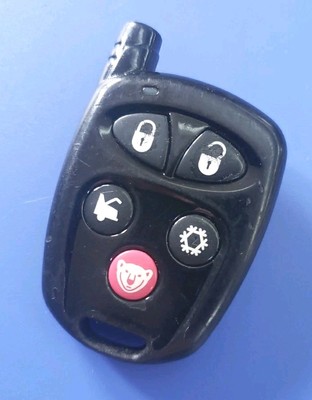
Other devices and objects can block or weaken remote signals. Metal, walls, and electronic devices cause interference. Keep the remote and car in open areas without obstacles. Avoid using the remote near Wi-Fi routers, cordless phones, or other radios. Change location and test the remote to check for interference. Clear signals improve remote start reliability and range.
Credit: www.ebay.com
Diy Fixes To Try Today
Remote car starters can stop working for simple reasons. Many problems fix fast with easy steps. Trying these fixes saves time and money. No special tools needed. Follow these tips today to get your remote starter working again.
Battery Replacement
The remote control battery often causes issues. Open the remote case carefully. Remove the old battery. Match the new battery type exactly. Insert the new battery with correct polarity. Close the case firmly. Test the remote to check if it works. Replace batteries every year for best results.
Sensor Reset
Open sensors can stop remote start from working. Check if the hood is fully closed. Make sure all doors are shut tight. Some cars have a sensor reset button inside. Press and hold this button for a few seconds. This resets the sensor system. Try the remote starter again after resetting.
Module Reboot
The remote start module can freeze or lose connection. To reboot, find the module under the dashboard. Disconnect the car battery for about 10 minutes. Reconnect the battery and turn the ignition on. This reboots the system. Test the remote starter after rebooting. This often clears minor software glitches.
Frequently Asked Questions
How Do I Reset A Car Remote Starter?
To reset a car remote starter, check the fob battery and ensure doors and hood are closed. Insert the key, turn to “ON” without starting, then press and hold the lock button on the remote. For aftermarket systems, unplug the module, hold a button while reconnecting power, then follow LED signals.
What Are Common Remote Start Problems?
Common remote start problems include dead key fob batteries, faulty hood or door sensors, and engine issues like low oil or coolant pressure.
How Do I Get My Remote Start To Work Again?
Check and replace the remote battery. Ensure doors and hood are fully closed. Clear any engine warning lights. Reset using your vehicle’s key cycle or remote start manual. Consult your car’s manual for exact steps.
Why Is My Rc Car Not Responding To The Remote?
Your RC car may not respond due to dead batteries, weak signal, or interference. Ensure both car and remote batteries are charged and paired correctly. Check for obstacles blocking the signal and confirm the remote is within range. Replace batteries or reset the remote if needed.
How Do I Reset A Remote Car Starter Quickly?
Resetting often starts with checking the key cycle method. Turn your key to “ON” without starting the engine, then hold the lock button on the fob. Wait for a chime or LED light to confirm reset mode.
Conclusion
Troubleshooting a remote car starter can save you time and money. Simple checks like battery and door status often fix problems. Resetting the system usually restores normal function quickly. Follow clear steps for your specific car and starter model. Staying patient and careful helps avoid mistakes.
Keep your remote starter working well for cold mornings or busy days. Regular maintenance prevents most issues before they start.



