
Is your Rokr Owl Clock acting up or stopped working even after you replaced the batteries? You’re not alone.
Many owners face common issues like the clock hands sticking, the pendulum not swinging, or the time freezing unexpectedly. But don’t worry—fixing your Rokr Owl Clock might be easier than you think. In this guide, you’ll discover simple, step-by-step troubleshooting tips you can try right now to bring your clock back to life.
From cleaning battery contacts to checking for internal blockages, these quick fixes could save you time and money. Keep reading to learn how to diagnose and solve your clock’s problems so it keeps ticking smoothly again.

Credit: www.robotimeonline.com
Common Power Issues
Power issues are a common reason why the Rokr Owl Clock might stop working. These problems often relate to the battery, which supplies energy for the clock’s movement. Without proper power, the clock will not keep time or may stop suddenly. Understanding the typical power problems helps you fix the clock quickly and avoid frustration.
Battery Corrosion
Battery corrosion happens when acid leaks from the battery. This causes white or greenish buildup on the terminals. Corrosion blocks power flow and stops the clock. Clean the battery contacts with a cotton swab dipped in vinegar or alcohol. Remove all residue carefully to restore good contact and power.
Incorrect Battery Placement
Placing the battery the wrong way prevents the clock from working. The battery has a positive (+) and negative (–) side. Check the battery compartment and insert the battery with the correct orientation. Even a small mistake will stop power from reaching the clock’s mechanism.
Battery Quality Concerns
Low-quality or old batteries may not provide enough power. Cheap batteries can leak or lose charge quickly. Use fresh, high-quality batteries from a trusted brand. Always replace batteries regularly to keep the clock running smoothly and avoid sudden power loss.
Mechanical Blockages
Mechanical blockages often cause Rokr Owl Clock to stop working properly. These blockages can prevent smooth movement of the clock parts. Clearing them restores the clock’s normal function. This section explains common mechanical blockages and simple fixes.
Dust And Debris Removal
Dust and small debris can settle inside the clock. They block the gears and slow down movement. Use a soft brush or compressed air to clean the inside gently. Avoid using water or harsh chemicals. Regular cleaning helps keep the clock running smoothly.
Misaligned Clock Hands
Clock hands sometimes touch or overlap. This stops the clock from ticking. Check if the hour, minute, or second hands are bent or stuck. Carefully bend them back into place, keeping a small gap between each hand. This ensures they move freely without hitting each other.
Stuck Gears And Pendulum
Gears may get stuck due to dried oil or dust build-up. The pendulum can also stop swinging if blocked or misaligned. Gently tap the pendulum to start its motion again. If gears are stuck, clean them carefully and apply a tiny drop of clock oil. Do not over-oil, as it attracts more dust.
Internal Movement Problems
Internal movement problems cause many common issues with the Rokr Owl Clock. These problems affect the clock’s gears and timing. Understanding these issues helps you fix the clock or decide if professional repair is needed.
Internal movement problems often arise from wear, dirt, or impact damage. The quartz movement inside the clock is delicate and needs care. Problems here can stop the clock from working even with fresh batteries.
Worn Quartz Movement
The quartz movement controls the clock’s timekeeping. Over time, it can wear out due to constant use. Worn parts may cause the clock to stop or lose time. Replacing the quartz movement is often the best solution.
Friction From Dirt And Dried Oil
Dirt and dried oil inside the clock create friction. This friction slows down or stops the gears. Dust can enter through small openings or from old, dirty oil. Cleaning the movement gently can restore smooth operation.
Damage From Drops Or Impacts
A drop or impact can misalign the internal parts. Even small damage can stop the clock from working. Check for loose or broken gears. Sometimes, professional repair is needed to fix impact damage properly.
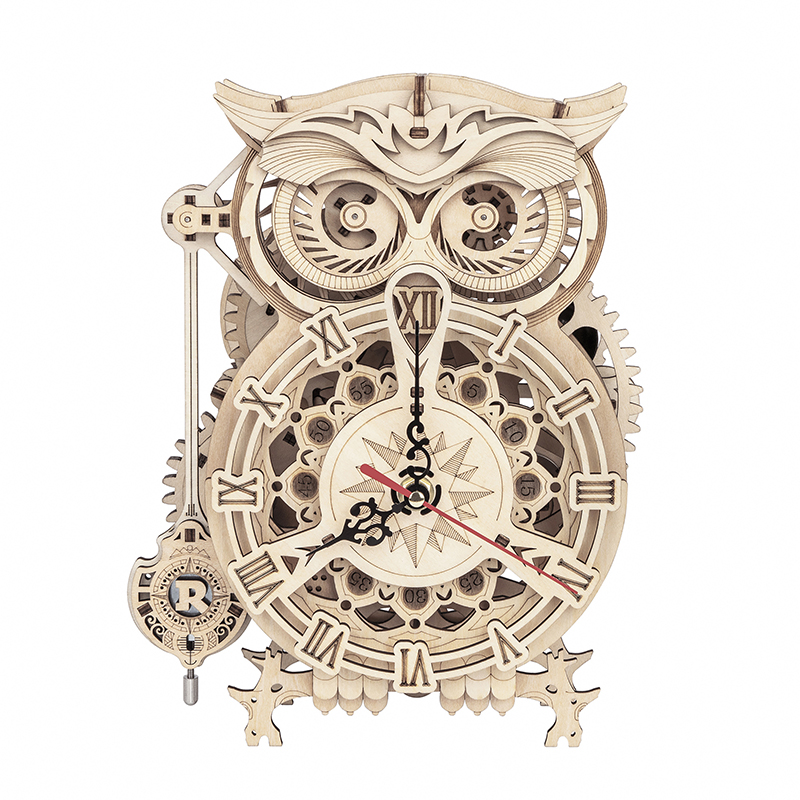
Credit: rokr.robotime.com
Basic Maintenance Tips
Basic maintenance keeps your Rokr Owl Clock running smoothly. Small care steps prevent common issues. Follow these simple tips to extend your clock’s life and accuracy.
Cleaning Battery Contacts
Remove the battery and check the contacts. Look for white or green buildup called corrosion. Use a cotton swab dipped in white vinegar or alcohol. Gently clean the contacts to remove dirt. This improves battery connection and power flow.
Lubricating Gears
Dust and old oil can slow down gears. Use a small amount of clock oil or light machine oil. Avoid over-oiling, which attracts dust. Apply oil to the gear pivots carefully. This reduces friction and keeps gears turning smoothly.
Ensuring Clock Levelness
Place the clock on a flat, stable surface. Check with a small level tool if possible. An uneven clock can stop the pendulum or gears. Levelness helps maintain accurate time and smooth movement.
Diy Repair Options
DIY repair options for your Rokr Owl Clock save time and money. These fixes help restore your clock’s function without expert help. Basic tools and patience are all you need.
Simple problems like misaligned hands or a stuck pendulum often cause the clock to stop. Replacing worn parts can bring it back to life. Below are easy steps to follow for common repairs.
Replacing Quartz Movement
The quartz movement controls the clock’s timekeeping. Buy a replacement that fits your Rokr Owl Clock model. Remove the back cover and gently pull out the old movement. Disconnect the hands carefully to avoid bending them.
Install the new quartz movement by aligning it with the center shaft. Reattach the clock hands in the correct order: hour, minute, then second hand. Secure the movement and test the clock with new batteries.
Realigning Clock Hands
Misaligned or touching hands cause the clock to stop or lose time. Remove the clock’s glass cover to access the hands. Gently pull the hands away from each other if they touch. Make sure they do not bend or hit the clock face.
Move the hands slowly to check for smooth motion. If the hands still catch or stick, slightly tighten the central nut. Test the clock by setting the time and watching the movement.
Resetting The Pendulum
The pendulum controls the clock’s rhythm and swing. First, check if the pendulum is hanging straight. Adjust the suspension spring if the pendulum is crooked or stuck. The clock must be level for the pendulum to swing freely.
Give the pendulum a gentle push to start the motion. Listen for a steady tick-tock sound. If the pendulum stops, inspect for dust or debris blocking the swing. Clean carefully with a soft brush or compressed air.

Credit: www.youtube.com
When To Seek Professional Help
Knowing when to seek professional help for your Rokr Owl Clock is key. Some problems need expert skills beyond simple fixes. Recognizing these signs can save time and prevent further damage.
Complex Internal Damage
Internal parts can break or wear out over time. If your clock shows irregular ticking or stops suddenly, it might have complex damage. Professionals can carefully open and inspect delicate components. They have tools to fix or replace broken gears and springs safely.
Antique Clock Restoration
Antique Rokr Owl Clocks require special care. Restoring them needs knowledge of old materials and designs. Professionals preserve the clock’s value and beauty while fixing issues. Attempting restoration without experience can cause permanent damage.
Specialized Movement Repairs
The clock’s movement controls timekeeping. Quartz or mechanical movements need precise calibration. If the clock keeps wrong time or stops often, specialized repair is necessary. Experts adjust or replace movements for smooth, accurate running.
Preventive Care Strategies
Preventive care strategies help keep your Rokr Owl Clock running smoothly. Small habits prevent common issues and extend the clock’s life. Consistent care reduces the need for repairs and troubleshooting. Focus on cleaning, battery quality, and clock placement to maintain peak performance.
Regular Cleaning Schedule
Dust and dirt can block clock gears and affect movement. Clean your clock every few weeks to avoid buildup. Use a soft brush or cloth to wipe the surface gently. Avoid harsh chemicals that can damage the clock’s finish. Open the back carefully and blow out dust with compressed air. Keeping the clock clean prevents friction and gear jams.
Using Quality Batteries
Low-quality batteries cause poor performance and leakage inside the clock. Choose high-quality alkaline batteries for longer life and stable power. Replace batteries at least once a year or when the clock slows down. Check battery terminals for corrosion regularly. Clean contacts with vinegar or alcohol if needed. Proper batteries ensure smooth and reliable clock operation.
Proper Clock Placement
Place the clock on a flat, stable surface to avoid misalignment. Avoid direct sunlight, which can damage the clock face and fade colors. Keep the clock away from moisture and extreme temperatures. Areas with vibrations or heavy traffic may disrupt the clock’s mechanism. Proper placement helps maintain accurate time and prevents mechanical issues.
Frequently Asked Questions
Why Is My Clock Not Working Even With New Batteries?
Your clock may have corroded battery terminals, misaligned hands, or dust blocking gears. Clean contacts, realign hands, and remove debris. Persistent issues often mean worn internal movement needing repair or replacement.
Why Has My Pendulum Clock Stopped Working?
Your pendulum clock may stop if the suspension spring is damaged or misaligned. Ensure the clock is level. Clean dirt or dust blocking the escapement and check battery contacts for cleanliness and proper placement.
Why Did My Clock Suddenly Stop Working?
Your clock may stop suddenly due to dead batteries, corroded contacts, dust blocking gears, or misaligned hands. Internal wear or damage can also cause failure. Clean battery terminals, check hand alignment, and remove dust first. If issues persist, consider professional repair or movement replacement.
What Are Common Clock Problems?
Common clock problems include slow or stopped timekeeping, corroded battery contacts, misaligned or stuck hands, dust-blocked gears, and worn-out internal movements.
Why Is My Rokr Owl Clock Not Working With New Batteries?
Check battery terminals for corrosion and clean with vinegar or alcohol. Also, ensure the hands are not bent or touching. Dust inside can block gears, so gently blow out any debris.
Conclusion
Troubleshooting your Rokr Owl Clock can be simple with these tips. Clean battery contacts and check the battery direction first. Make sure clock hands do not touch or bend. Remove dust gently to keep gears moving smoothly. If problems continue, the internal movement might need replacement.
You can try swapping the quartz movement yourself or seek professional help. Regular care helps your clock run longer and more accurately. Keep these steps in mind to enjoy your Rokr Owl Clock every day.



