
Is your Samsung front load washer acting up and leaving you frustrated? Whether it’s shaking violently during the spin cycle, leaking water, or refusing to start, these issues can disrupt your daily routine and cause unnecessary stress.
But before you call for expensive repairs, you can often troubleshoot and fix common problems yourself. In this guide, you’ll learn simple, step-by-step solutions to get your washer back in top shape. From tackling those annoying vibrations to clearing clogs and resetting your machine, you’ll gain the confidence to handle your Samsung washer like a pro.
Keep reading to save time, money, and avoid the hassle of unexpected breakdowns!
:max_bytes(150000):strip_icc()/troubleshooting-samsung-washer-problems-2147298-final-1-f27acce116a8464794c9daec061156fc.png)
Credit: www.thespruce.com
Common Washer Problems
Samsung front load washers are popular for their efficiency and gentle washing. Despite this, users often face common problems that affect performance. Knowing these issues helps in quick troubleshooting and keeps your washer running smoothly.
Common washer problems include spin cycle failures, excessive vibration, water leaks, drainage issues, machines that won’t start, and mold or odors. Each problem has specific causes and solutions. Understanding these can save time and money on repairs.
Spin Cycle Failures
The spin cycle may not start or stop unexpectedly. Clothes stay wet after the wash. This often happens due to unbalanced loads or worn suspension rods. A damaged spider bracket inside the drum can also cause spin failure. Check for error codes like UB or DC on the display.
Excessive Vibration
Strong shaking or noise during spinning is common. This usually means the washer is not level or the suspension shocks are worn. Uneven loads cause the drum to bounce. Adjust the feet to level the machine on a hard floor. Replace shocks if vibration continues.
Water Leaks
Leaks can appear around the door or under the machine. Torn door gaskets or trapped debris cause leaks. The drain pump or hoses may be loose or clogged. Detergent drawer buildup can also lead to water overflow. Inspect seals and clean filters regularly.
Drainage Issues
Water may not drain fully after washing. This causes standing water in the drum. A clogged drain filter or pump block this process. Remove lint or foreign objects from the filter. Check hoses for kinks or blockages. Proper drainage ensures clean clothes and machine health.
Machine Won’t Start
The washer may not power on or respond to controls. This can result from a tripped breaker or unplugged power cord. The door safety switch prevents starting if the door is not fully closed. Check the power source and ensure the door is locked tightly.
Mold And Odors
Front load washers are prone to mold build-up and bad smells. Moisture trapped in door seals and detergent drawers causes this. Leave the door open after washing to dry the inside. Clean the gasket and detergent drawer regularly with vinegar or mild cleaner.
Causes Behind Issues
Understanding the causes behind Samsung front load washer issues helps solve problems fast. Many common faults arise from simple mechanical or electrical faults. Identifying the root cause saves time and prevents damage. The following sections explain key reasons behind washer troubles.
Unbalanced Loads
Unbalanced loads occur when clothes gather on one side of the drum. This causes the washer to shake and may stop spinning. Spreading clothes evenly prevents this issue and keeps the machine stable.
Leveling Problems
If the washer is not level, it can vibrate excessively during cycles. This happens if the feet are uneven or the floor is unstable. Adjusting the feet or placing the washer on a solid surface fixes this problem.
Worn Suspension And Shocks
Suspension rods and shock absorbers reduce drum movement. When these parts wear out, the drum bounces too much. Replacing worn shocks restores smooth spinning and reduces noise.
Damaged Spider Bracket
The spider bracket supports the drum. Metal fatigue or rust can break it, causing noise and poor spinning. Metal pieces may appear in the drain filter, signaling this problem. Replacing the bracket is necessary to fix it.
Clogged Drain Filters
Drain filters catch lint and debris. When clogged, water cannot drain properly, affecting the spin cycle. Cleaning the filters regularly ensures efficient drainage and prevents error codes.
Door Seal Damage
The door seal keeps water inside the washer. Tears, cracks, or trapped debris cause leaks. Inspecting and cleaning the seal or replacing it when damaged stops water leaks.
Power And Safety Switch
Power issues like tripped breakers or unplugged cords stop the washer from starting. The safety switch also prevents operation if the door is not fully closed. Checking power supply and door latch solves these problems.
Quick Fixes
Quick fixes often solve common Samsung front load washer problems fast. These simple steps help restore proper function without waiting for service. Many issues come from small, easy-to-fix causes.
Try these quick fixes first before calling a technician. They save time and money.
Adjusting Machine Level
Place the washer on a flat, hard surface. Check if it rocks or tilts. Adjust the front and back feet by turning them clockwise or counterclockwise. A level machine reduces shaking and noise. Use a spirit level for accuracy.
Cleaning Drain Filters And Pumps
Locate the drain filter at the bottom front panel. Open the cover and place a towel to catch water. Unscrew the filter and remove debris like lint or coins. Clean the pump area carefully. Blockages here cause drainage problems and error codes.
Inspecting And Cleaning Door Gasket
Open the door and check the rubber gasket for dirt or damage. Remove trapped objects like coins or hair. Wipe the gasket with a damp cloth to remove mold or soap residue. A clean gasket prevents leaks and bad smells.
Removing Shipping Bolts
Shipping bolts keep the drum safe during transport. These must be removed before use. Check the back of the machine for these bolts. Unscrew all bolts and keep them for future moves. Leaving bolts in place causes shaking and damage.
Clearing Detergent Drawer
Pull out the detergent drawer completely. Rinse it under warm water to remove soap buildup. Use a brush to clean small holes and corners. A clean drawer improves detergent flow and stops overflow or blockages.
Checking Power Supply And Breakers
Ensure the washer is plugged into a working outlet. Check the circuit breaker panel for tripped breakers. Reset any tripped breaker by switching it off and on. A steady power supply keeps the washer running smoothly.
Maintenance Tips
Proper maintenance keeps your Samsung front load washer running smoothly. Small habits prevent common problems and extend the machine’s life. Follow these simple tips to avoid mold, odors, and mechanical issues. Regular care saves time and money on repairs.
Preventing Mold And Mildew
Mold grows in damp, dark places inside the washer. Clean the door seal and detergent drawer often. Wipe away moisture after each wash. Use a washer cleaner monthly to kill bacteria and mold spores. Keep the drum dry between uses to stop mildew growth.
Proper Detergent Use
Use only high-efficiency (HE) detergent for front load washers. Too much detergent causes buildup and odors. Measure detergent carefully according to load size. Avoid powder detergents that don’t dissolve well. Proper detergent use keeps your washer clean and fresh.
Leaving Door Ajar After Use
Leave the washer door slightly open after every cycle. This lets air circulate inside the drum. It helps dry out moisture and prevents bad smells. Close the door only when you add clothes or start a wash. This small step reduces mold and mildew risks.
Running Calibration Cycles
Run calibration cycles to keep your washer balanced and efficient. Check your user manual for instructions. Calibration aligns sensors and drum movement. This reduces noise, vibration, and wear on parts. Perform calibration every few months for best results.
Using Anti-vibration Pads
Place anti-vibration pads under washer feet. They absorb shaking and reduce noise. Pads help keep your washer stable on uneven floors. Stability prevents damage to internal parts. Using pads improves washing performance and protects your floor.
Diagnostic Tools
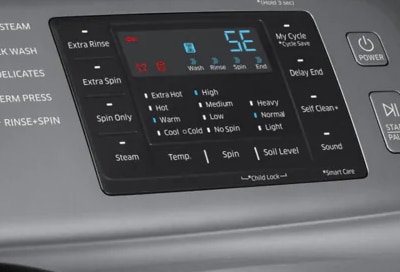
Samsung front load washers come with built-in diagnostic tools. These tools help identify and solve common washer issues quickly. Using these tools saves time and avoids unnecessary service calls. Understanding how to use diagnostic mode and read error codes is key. Simple diagnostics let you check the washer’s main functions easily.
Entering Diagnostic Mode
Start by turning the washer off. Press and hold specific buttons depending on your model, such as “Spin” and “Soil Level.” Hold them for about three seconds. The display will show a code or light up. This means the washer is in diagnostic mode. Follow your user manual for exact button combinations. This mode lets you run tests and see error codes.
Reading Error Codes
Error codes show problems inside the washer. Codes like “UE” mean unbalanced load. “4C” indicates a water supply issue. Codes appear on the display during diagnostic mode. Write down the code for reference. Check the manual or Samsung’s website for code meanings. Understanding codes helps you find the right fix fast.
Performing Simple Diagnostics
Once in diagnostic mode, run basic tests. These checks include motor function, water inlet, and drain pump operation. The washer will cycle through each test automatically. Watch for any unusual noises or error codes. If tests pass, the washer’s main parts work correctly. If not, note the errors for repair or service. Simple diagnostics help spot problems early.
Credit: www.samsung.com
Resetting The Washer
Resetting your Samsung front load washer can solve many common issues quickly. This simple step clears errors and restarts the system. It often fixes problems like unresponsive controls or error codes. Resetting does not erase your settings or damage the machine. It is a safe and easy first step in troubleshooting.
Steps To Reset Samsung Front Load Washer
First, turn off the washer using the power button. Then unplug it from the wall outlet. Wait for about one minute to let the machine fully power down. Next, plug the washer back in. Press and hold the Start/Pause button for 5 seconds. The machine will beep or flash to show the reset is complete. Finally, turn the washer on and select your wash cycle.
When To Reset
Reset the washer if it stops mid-cycle or shows an error code. Try resetting when the control panel is unresponsive or buttons do not work. It helps if the washer won’t start or door locks stay engaged. Use reset before calling for service or replacing parts. Many common faults clear up with a simple reset.

Credit: www.youtube.com
Frequently Asked Questions
What Is The Most Common Problem With Samsung Washing Machines?
The most common problem with Samsung washing machines is spin cycle failure, causing unbalanced loads, shaking, and error codes.
How To Reset Samsung Washer Front Load?
To reset a Samsung front load washer, turn off the machine and unplug it for one minute. Plug it back in, then press and hold the Start/Pause button for five seconds. This resets the control board and clears error codes.
What Is The Most Common Problem With A Washing Machine Front Loader?
The most common problem with front-load washing machines is mold and mildew buildup in the door gasket. This causes foul odors and bacterial growth. Water often gets trapped in the rubber seal and dispenser, promoting moisture. Regular cleaning and leaving the door open after use help prevent these issues.
How Do I Run Diagnostics On My Samsung Front Load Washer?
To run diagnostics on your Samsung front load washer, turn it off first. Press and hold the Spin and Temp buttons simultaneously, then press the Power button. Release all buttons when “Diagnostic Mode” appears. Follow the on-screen error codes to identify issues.
Why Is My Samsung Washer Not Spinning Properly?
A common cause is an unbalanced load or worn suspension parts. Check if clothes are evenly spread and the machine is level.
Conclusion
Samsung front load washer issues often stem from simple causes. Checking leveling, cleaning filters, and inspecting seals help fix many problems. Small fixes prevent bigger damage and save money. Regular maintenance keeps the washer running smoothly longer. Understanding common errors makes troubleshooting easier and faster.
Keep tools handy and follow safety steps while repairing. Staying calm and patient improves success with repairs. Your Samsung washer can work well again with these tips.



