
Is your Samsung refrigerator acting up and leaving you puzzled? Whether it’s not cooling properly, making strange noises, or leaking water, these issues can disrupt your daily routine and put your food at risk.
But don’t worry—you don’t have to call a technician right away. With a few simple troubleshooting steps, you can often identify and fix common problems yourself. In this guide, you’ll learn how to quickly diagnose and resolve the most frequent Samsung refrigerator troubles.
Keep reading to save time, avoid costly repairs, and get your fridge running smoothly again. Your kitchen’s best friend is just a few fixes away!
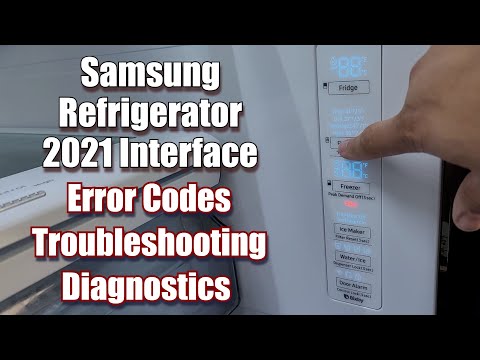
Credit: www.youtube.com
Common Problems
Samsung refrigerators are reliable but may face some common problems. These issues can affect the fridge’s performance and food preservation. Understanding these problems helps in quick troubleshooting and repair. Below are some frequent problems users face with Samsung refrigerators.
Cooling Failures
Cooling failures happen when the fridge does not keep food cold enough. This may result from a faulty evaporator fan or blocked air vents. Ice buildup inside the freezer can block airflow and reduce cooling. Defrost system problems often cause temperature rises. Check the temperature settings regularly to ensure they are correct.
Ice Maker Issues
Ice makers can stop making ice or produce small or misshaped ice cubes. Common causes include frozen water lines or a faulty water inlet valve. Sometimes, the ice maker’s motor or sensor fails. Regular cleaning of the ice maker helps prevent jams and blockages. Make sure the water supply is connected and turned on.
Water Leaks And Ice Build-up
Water leaks inside or outside the fridge may come from clogged drain holes or damaged door seals. Ice build-up happens when the defrost drain freezes. This blocks water flow and causes leaks. Clean the drain hole and check door seals for cracks or gaps. Proper door closing prevents moisture buildup and ice formation.
Error Codes
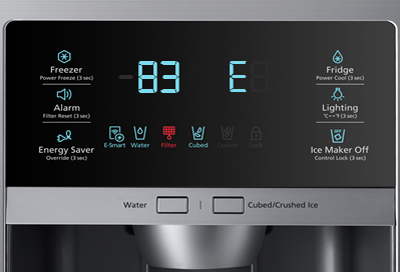
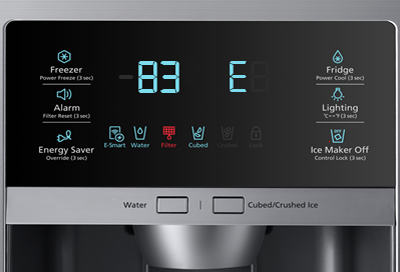
Samsung refrigerators display error codes to signal problems. These codes point to issues like sensor failures or system malfunctions. Common codes include “Er” for errors or specific numbers for different faults. Consult the user manual to identify the meaning of each code. Resetting the fridge can clear minor errors.
Unusual Noises
Buzzing, clicking, or humming noises may come from the compressor or fan motors. Loose parts or debris can cause rattling sounds. Sometimes, the ice maker makes noise during operation. Unusual noises often indicate a need for cleaning or part replacement. Listening carefully helps detect issues early before damage occurs.
Credit: www.samsung.com
Root Causes
Understanding the root causes behind Samsung refrigerator problems helps in quick diagnosis. Many common issues trace back to a few critical system failures. Identifying these faults early can prevent bigger repairs and food spoilage. Here are the main root causes that affect performance.
Defrost System Issues
The defrost system stops frost buildup inside the fridge and freezer. If it fails, ice blocks air vents and cool air cannot circulate. This leads to uneven cooling and frost-covered surfaces. Common causes include a broken defrost heater, a faulty defrost timer, or a clogged drain line. Regular checks help avoid these problems.
Sensor Failures
Sensors monitor temperature and control cooling cycles. A bad sensor sends wrong signals to the control board. This causes improper cooling or continuous running of the compressor. Temperature sensors and thermistors often fail due to wear or moisture. Replacing faulty sensors restores the fridge’s normal function.
Component Breakdowns
Key components include compressors, fans, and control boards. A compressor failure stops cooling completely. Fans move cold air inside; if they break, cold air does not spread properly. Control boards manage all functions; a malfunction leads to erratic behavior or error codes. Inspecting and replacing defective parts is essential for repair.
Basic Checks
Basic checks are the first step in fixing your Samsung refrigerator. These checks help find simple problems quickly. Start here before calling a technician. Many issues happen from small, easy-to-fix causes. Follow these steps to keep your fridge working well.
Blocked Vents And Airflow
Check the vents inside the fridge and freezer. They must be clear for cold air to move freely. Blocked vents stop air from circulating properly. Remove any food or containers blocking the vents. Clean ice or frost that may block airflow. Proper airflow keeps temperatures steady and food fresh.
Dirty Door Seals
Look at the rubber seals around the fridge doors. Dirt or debris can stop the door from closing tightly. If the door does not seal well, cold air escapes. Clean the seals with warm, soapy water and a soft cloth. Check for cracks or damage. Replace seals if they are worn out to keep the cold air inside.
Demo Mode Activation
Demo mode is a setting used in stores to show the fridge without cooling. Sometimes, this mode turns on by mistake. When demo mode is active, the fridge will not cool. Check the control panel for a demo mode icon or message. Follow the user manual to turn off demo mode. Switching it off restores normal cooling functions.
Reset Techniques
Reset techniques help fix many common Samsung refrigerator problems. Performing a reset can clear minor errors and restore normal function. These methods are simple and require no special tools.
Try these resets before calling for service. Each reset targets different issues. Follow the steps carefully for best results.
Power Cycle Reset
Unplug the refrigerator from the power outlet. Wait for at least 5 minutes. Plug it back in and turn it on. This resets the main system and clears temporary glitches. It is the easiest reset to try first.
Control Panel Reset
Locate the control panel on the refrigerator door. Press and hold the “Power Freeze” and “Power Cool” buttons together. Hold for 10 seconds until the panel restarts. This resets the control board and fixes display or function errors.
Water Filter Light Reset
After changing the water filter, reset the filter indicator light. Press and hold the “Alarm/Filter Reset” button for 3 seconds. The light will turn off, confirming the reset. This prevents unnecessary filter alerts.
Network Reset
Only for models with Wi-Fi connectivity. Open the Settings menu on the control panel. Select “Network Reset” and confirm your choice. The refrigerator will disconnect from the network and restart. Use this to fix connection or app control issues.
Temperature Settings
Setting the right temperature in your Samsung refrigerator is key for keeping food fresh. Incorrect settings can cause food to spoil or ice to melt. Understanding how to adjust these temperatures can help avoid common cooling problems. This guide explains how to change both refrigerator and freezer temperatures easily.
Adjusting Refrigerator Temperature
Find the control panel inside the fridge or on the door. Press the temperature button to change the setting. The ideal fridge temperature is usually between 37°F and 40°F (3°C to 4°C). Lower temperatures keep food fresh longer but avoid freezing items. Wait a few hours after adjusting to see the new temperature take effect.
Adjusting Freezer Temperature
Access the freezer controls on the panel or inside the freezer compartment. Set the freezer temperature to about 0°F (-18°C) for proper freezing. Too warm, and food may thaw; too cold, and ice buildup can occur. Make small changes and wait for the temperature to stabilize before adjusting again.
Fixing Cooling Issues
Cooling problems in Samsung refrigerators cause food to spoil quickly. Fixing these issues restores proper temperature and saves your groceries. Simple checks and cleaning often solve cooling failures. Understanding key parts helps you troubleshoot effectively.
Clearing Ice Blockages
Ice buildup blocks cold air flow inside the fridge. Check the vents and evaporator coils for frost or ice. Use a hairdryer on low heat or a warm cloth to melt ice gently. Avoid sharp tools to prevent damage. Clearing ice allows cold air to circulate properly.
Checking Evaporator Fan
The evaporator fan moves cold air through the fridge compartments. Listen for the fan noise when the door is closed. If silent, the fan may be broken or stuck. Remove the panel to inspect the fan blades. Clean any dust or debris. Replace the fan if it does not spin freely.
Examining Defrost Heater
The defrost heater melts frost from the evaporator coils. If it fails, ice builds up and blocks cooling. Test the heater with a multimeter for continuity. No continuity means the heater is faulty. Replace the defrost heater to restore the automatic defrost cycle and improve cooling.
Resolving Ice Maker Problems
The ice maker in your Samsung refrigerator can stop working for several reasons. These issues cause inconvenience and reduce your fridge’s functionality. Fixing ice maker problems is often straightforward. This section explains simple steps to resolve common ice maker troubles quickly.
Unfreezing Fill Tubes
Sometimes, ice blocks the fill tubes that supply water to the ice maker. This blockage stops water from reaching the ice tray. To fix this, unplug the refrigerator and locate the fill tubes. Use warm water or a hairdryer on low heat to melt the ice carefully. Do not use sharp objects to avoid damage. Once clear, plug the fridge back in and check if ice production resumes.
Inspecting Ice Maker Mechanism
The ice maker mechanism includes several moving parts that can fail. Look for jammed or broken components inside the ice maker. Open the ice maker cover and gently move the ejector arm to check for smooth motion. Remove any stuck ice or debris. Test the motor and gears for wear. Replace worn parts if necessary. Proper mechanical function ensures consistent ice production.
Replacing Sensors
Faulty sensors can cause the ice maker to stop working properly. Sensors detect water levels and temperature. Use a multimeter to test sensor continuity. If a sensor shows no signal, replace it with an original Samsung part. Installing new sensors restores accurate monitoring and ice maker operation. Always disconnect power before replacing any electrical components.
Handling Water Leaks
Water leaks in Samsung refrigerators can cause damage and inconvenience. Identifying the source quickly helps prevent bigger problems. Most leaks happen due to clogged drains, damaged water lines, or cracked tubing. Each issue has a simple solution you can try at home. Follow these steps to handle water leaks effectively.
Clearing Defrost Drains
Defrost drains often get blocked by ice or food debris. This blockage stops water from flowing to the drain pan. Water then pools inside the fridge or under it. To clear the drain, first unplug the fridge. Locate the defrost drain hole inside the freezer or fridge section. Use warm water and a pipe cleaner or a soft brush to remove the blockage. Make sure the water flows freely down the drain after cleaning. This simple fix stops leaks caused by clogged defrost drains.
Repairing Water Lines
Water lines supply water to the ice maker and water dispenser. A loose or damaged water line can cause leaks behind the fridge. Check the water line connection at the back of the fridge. Tighten any loose fittings carefully. If the line is cracked or worn, replace it with a new one. Turn off the water supply before disconnecting the line. Properly securing or replacing the water line stops leaks and ensures smooth water flow.
Fixing Cracked Tubing
Cracked tubing inside the fridge can leak water onto the floor. Inspect the tubing for visible cracks or holes. Small cracks can be sealed temporarily with waterproof tape. For a lasting fix, replace the damaged tubing. Use tubing that matches the original size and type. Turn off the fridge and water supply before starting repairs. Fixing cracked tubing prevents water damage and keeps your fridge running well.
When To Call A Technician
Knowing when to call a technician for your Samsung refrigerator saves time and prevents further damage. Some problems need expert care beyond simple fixes. Understanding these signs helps you decide the right moment to get professional help.
Persistent Cooling Failures
If your fridge keeps losing its cooling power, it signals a serious issue. Basic troubleshooting like cleaning vents or checking settings may not work. Continuous warm temperatures can spoil food quickly. A technician can inspect the compressor, fans, and sensors. They find hidden faults causing the cooling problem.
Complex Component Repairs
Samsung refrigerators have advanced parts like ice makers and digital controls. Repairing these parts requires special tools and knowledge. Attempting such fixes yourself risks more damage or voiding warranties. Problems with the defrost system or electronic boards need skilled technicians. They ensure safe and proper repairs to avoid future failures.
Cost Vs Replacement Considerations
Sometimes repair costs can be high for older models. A technician can help assess if fixing is worth it. If multiple parts fail or the fridge is inefficient, replacement might save money long term. Professionals provide honest advice based on your fridge’s condition. This helps you make a smart choice between repair or buying new.
Credit: www.samsung.com
Frequently Asked Questions
Where Is The Reset Button On Samsung Refrigerator?
The reset button on a Samsung refrigerator is usually on the control panel. Press and hold the power or reset icon for 3-5 seconds to reset. Some models require unplugging for a hard reset. Check your user manual for model-specific instructions.
What Is The Most Common Problem With Samsung Refrigerators?
The most common Samsung refrigerator problems are cooling failures, ice maker issues, and water leaks. Defrost system faults, blocked drains, and sensor malfunctions often cause these. These issues lead to temperature rise, ice buildup, and unusual noises, requiring timely repair to prevent food spoilage.
Why Is My Samsung Fridge Running But Not Cooling?
Your Samsung fridge may run but not cool due to a faulty evaporator fan, blocked vents, or defrost system failure causing ice buildup. Check for sensor issues or compressor problems. Clear blockages and ensure proper temperature settings to restore cooling.
What Is The First Thing To Check When A Refrigerator Stops Cooling?
First, check if the refrigerator is plugged in and the power is on. Then, verify temperature settings.
How Do I Reset My Samsung Refrigerator Control Panel?
To reset the control panel, press and hold the Power Cool and Power Freeze buttons together for 10 seconds. The display will turn off and on, indicating a reset. This soft reset clears minor errors quickly.
Conclusion
Samsung refrigerators may face common problems like cooling issues, leaks, or noises. Simple troubleshooting steps can often fix these problems quickly. Always check the control panel settings and perform resets if needed. Regular cleaning of vents and drains helps prevent ice buildup and leaks.
For persistent issues, contacting a professional is wise. Understanding basic fixes saves time and keeps your fridge running smoothly. Stay patient and follow instructions carefully for best results. Your Samsung fridge can work well with proper care and attention.



