Is your Schlage lock acting up when you least expect it? Whether it’s not responding to your code, the keypad is blinking red, or the knob spins freely without unlocking, these issues can be frustrating and stressful.
But don’t worry—you’re not alone, and fixing your Schlage lock might be simpler than you think. In this guide, you’ll discover easy, step-by-step troubleshooting tips that anyone can follow. From swapping out batteries to checking door alignment and even resetting your lock, we’ll walk you through each solution clearly and quickly.
Keep reading to regain control of your lock and secure your home without calling a locksmith just yet. Your peace of mind is just a few fixes away.
Battery Issues
Battery issues are a common cause of problems with Schlage locks. Low or dead batteries can cause the lock to stop responding or behave erratically. Ensuring your lock has fresh batteries is the first step in troubleshooting. Sometimes, the battery contacts inside the lock may get dirty or corroded, leading to poor connection. A simple cleaning can restore proper function. In some cases, resetting the lock by removing the batteries for a short time can clear minor errors and bring the lock back to normal.
Replace With Fresh Batteries
Start by removing the old batteries from your Schlage lock. Use new batteries that have full charge and are of good quality. Avoid mixing old and new batteries. Insert the fresh batteries firmly in the correct orientation. Check if the lock powers up and responds properly after replacement. This simple step solves most battery-related issues quickly.
Clean Battery Contacts
Battery contacts can collect dirt or corrosion over time. Open the battery compartment and inspect the metal contacts. Use a clean cloth or a small brush to remove any dirt or rust. For stubborn corrosion, gently rub the contacts with a pencil eraser. Make sure the contacts are dry and shiny before reinserting the batteries. Clean contacts improve the electrical connection and lock performance.
Reset By Removing Batteries
Sometimes the lock needs a reset to clear internal errors. Remove all batteries from the lock. Wait for about 30 seconds to 1 minute. This pause allows the lock’s memory to clear. After the wait, reinsert the batteries in the proper order. The lock should reboot and work normally. Resetting can fix minor glitches caused by power issues.

Credit: www.schlage.com
Keypad Problems
Keypad problems are a common issue with Schlage locks. These problems can prevent you from unlocking your door quickly. Simple fixes often resolve the issue. It helps to know the basic steps to troubleshoot the keypad. Focus on cleaning, pressing buttons correctly, and resetting codes to keep the lock working well.
Clean Keypad Surface
Dirt and grime can block keypad buttons. Use a soft cloth to wipe the surface gently. Compressed air can remove dust from hard-to-reach spots. Avoid using harsh chemicals that damage the keypad. Keeping the surface clean ensures the buttons respond properly.
Press Buttons Firmly
Light or quick presses may not register. Press each button firmly and hold for a second. This ensures the lock reads your input accurately. Slow, steady presses reduce input errors and help the keypad work smoothly.
Reset User Codes
Sometimes user codes stop working due to programming errors. Resetting user codes can fix this issue. Follow the lock’s manual to delete old codes and add new ones. This step refreshes the lock’s memory and restores proper function.
Mechanical Troubles
Mechanical troubles often cause Schlage locks to malfunction. These issues stop the lock from turning or latching properly. Simple fixes can solve most problems without calling a locksmith. Understanding key mechanical parts helps in quick troubleshooting. Below are practical steps to check and fix common mechanical troubles.
Check Door Alignment
Doors that sag or shift cause lock problems. Check if the door sits evenly in the frame. Tighten loose hinges to improve alignment. A well-aligned door lets the lock work smoothly. Misalignment often blocks the latch from fitting into the strike plate.
Adjust Strike Plate
The strike plate must line up exactly with the latch. Use a screwdriver to move the strike plate slightly if needed. Sometimes, filing the strike plate hole helps the latch fit better. Correct adjustment stops the lock from sticking or jamming.
Lubricate Lock Components
Dry locks can become stiff and hard to turn. Use a lock-safe lubricant like graphite or silicone spray. Apply it sparingly to the latch and internal parts. Avoid oil-based lubricants as they attract dirt. Lubrication keeps the lock parts moving freely.
Inspect Internal Parts
Remove the lock cover and batteries before inspection. Look for stuck springs, broken gears, or dirt inside. Clean any debris carefully with a soft brush. Realign parts that seem out of place. Sometimes, a gentle adjustment restores normal function.
Electronic And Firmware Fixes
Electronic and firmware issues can cause Schlage locks to act unpredictably. These problems often arise from software glitches or connectivity errors. Fixing these requires simple steps like resetting the lock or updating its firmware. Proper troubleshooting helps restore smooth operation quickly. Focus on key fixes such as factory reset, firmware updates, and Wi-Fi checks.
Perform Factory Reset
Resetting the lock clears all settings and restores factory defaults. This step fixes many software glitches and code errors. Locate the reset button or hole on your lock. Press and hold it for the time specified in the manual. Release the button after the lock beeps or flashes. Reprogram your user codes after the reset completes. Factory reset solves many electronic lock problems fast.
Update Firmware
Firmware controls your lock’s internal software and features. Outdated firmware can cause bugs or connectivity failures. Check the Schlage app or website for the latest firmware version. Connect your lock to the app via Bluetooth or Wi-Fi. Follow on-screen instructions to download and install updates. Keep your lock’s firmware current for best performance and security.
Check Wi-fi Connection
Smart locks depend on a stable Wi-Fi connection to work properly. Weak signals or network issues cause communication delays or failures. Place the lock near your router if possible. Restart your router to refresh the connection. Ensure the lock is connected to the correct Wi-Fi network. Verify your internet service is active and stable. A strong Wi-Fi link keeps your Schlage lock responsive.
Common Lock Behaviors
Schlage locks show certain behaviors that signal common issues. Recognizing these can help you fix the lock quickly. Many problems are easy to solve with simple steps.
Understanding how your lock acts during trouble saves time and effort. Watch for unusual lights or movements. These signs guide you to the right solution.
Spinning Knob Issues
The knob spins freely but the door stays locked. This usually means the internal latch is not engaging. It can happen if parts inside are worn or broken. Sometimes, the lock’s mechanism is jammed or misaligned.
Check the door alignment first. Tighten loose screws and adjust the strike plate. Lubricate the latch with graphite or silicone spray. If the problem persists, internal parts may need repair or replacement.
Red Light Blinking
A blinking red light often means the lock is not accepting the code. This can happen if the batteries are low or dead. Weak power can stop the lock from working properly.
Replace the batteries with fresh, high-quality ones. Clean battery contacts to remove any dirt or corrosion. If the red light continues, try resetting the lock. Enter the code slowly and firmly to avoid errors.
Green Light Blinking But No Unlock
The green light signals code acceptance, but the door does not open. This may mean the latch is stuck or the lock’s motor is malfunctioning. Sometimes, the strike plate is misaligned, blocking the latch.
Check the door and strike plate alignment. Lubricate the latch and internal parts carefully. Remove and reinstall batteries to reset the lock. If the issue remains, the lock might need professional servicing.

Credit: www.youtube.com
When To Seek Professional Help
Knowing when to get professional help can save time and avoid damage to your Schlage lock. Some problems need expert attention beyond simple fixes. Recognizing these moments is key to maintaining your lock’s security and function. Below are clear signs to contact professionals for assistance.
Contact Manufacturer
Reach out to Schlage’s customer service for persistent electronic issues. Faulty circuit boards or software glitches often require manufacturer support. Use their guidance for warranty-covered repairs or replacement parts. The manufacturer can provide official instructions tailored to your lock model. Avoid opening the lock yourself if it might void the warranty.
Call A Locksmith
Call a locksmith when mechanical problems block your lock from working. Broken keys, jammed bolts, or damaged internal parts need expert tools and skills. Locksmiths can also help with lock replacement or upgrades if repairs are too complex. Choose a licensed locksmith experienced with Schlage locks for reliable service. Emergency lockouts are another reason to call a professional immediately.
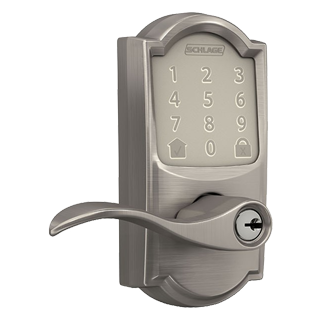
Credit: www.schlage.com
Frequently Asked Questions
What To Do If Your Keypad Lock Is Not Working?
Replace the batteries and clean contacts. Wipe the keypad and ensure correct code entry. Check door alignment and lubricate the lock. Reset codes or perform a factory reset if needed. Contact a locksmith or manufacturer for hardware issues.
Why Does My Keypad Door Lock Keep Spinning?
Your keypad lock spins freely because the internal tailpiece or actuator is broken or stripped, disconnecting it from the latch. Check alignment, replace batteries, clean parts, and lubricate. If unresolved, remove the lock for inspection or contact a locksmith for repair or replacement.
What Does It Mean When A Schlage Lock Blinks Red?
A Schlage lock blinking red signals a low battery or an incorrect code entry. Replace batteries or re-enter the code carefully.
Why Is My Schlage Lock Blinking Green But Not Unlocking?
A blinking green light means the lock recognizes your code but won’t unlock due to low battery, misaligned door, or internal jam. Replace batteries, check door alignment, and lubricate the latch. Reset or reprogram the lock if needed. Contact a locksmith if issues persist.
Why Is My Schlage Lock Keypad Not Responding?
A dead battery often causes keypad unresponsiveness. Replace batteries with fresh, high-quality ones. Clean battery contacts to ensure good connection.
Conclusion
Schlage lock problems often have simple fixes. Start by changing batteries and cleaning contacts. Ensure the door and strike plate line up correctly. Use a lock-safe lubricant to ease moving parts. Reset user codes or perform a factory reset if needed.
For smart locks, check for firmware updates. Some issues may need professional help. Regular maintenance keeps your lock working well. Keep these tips handy to solve common lock troubles quickly.