
Is your Shark Robot vacuum acting up when you least expect it? Whether it’s not charging properly, getting stuck, or refusing to connect to your Wi-Fi, these issues can quickly turn your handy cleaning assistant into a source of frustration.
But don’t worry—you’re not alone, and most problems have simple fixes you can handle yourself. In this guide, you’ll discover easy, step-by-step troubleshooting tips to get your Shark Robot back to peak performance. Keep reading to learn how to solve common glitches fast and keep your home spotless without hassle.

Credit: www.youtube.com
Charging Issues
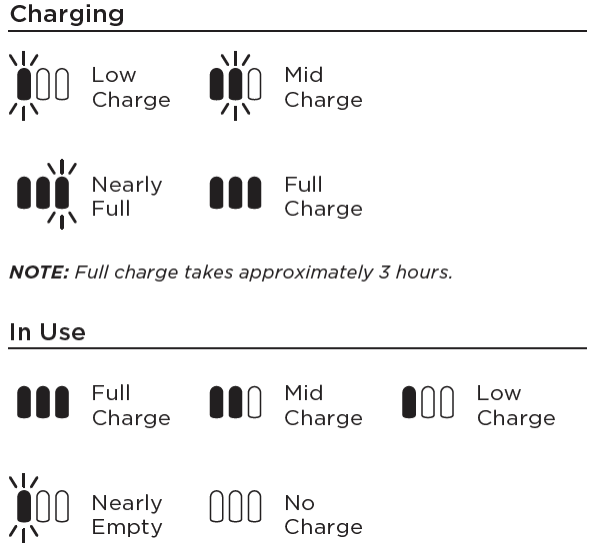
Charging issues are a common problem with Shark Robot vacuums. These problems stop the vacuum from powering up or holding a charge. Identifying the cause helps fix the issue quickly. Most charging problems relate to the contacts, dock alignment, or the battery itself.
Dirty Charging Contacts
Dirty contacts block the flow of electricity. Dust, dirt, or debris build-up can stop the vacuum from charging. Clean the contacts gently with a soft cloth or cotton swab. Avoid using water or harsh chemicals. Regular cleaning keeps the charging process smooth and reliable.
Dock Alignment Problems
Proper dock alignment is crucial for charging. If the vacuum does not sit correctly on the dock, it may not charge. Check that the vacuum’s charging points line up with the dock’s pins. Move the dock to a flat, stable surface. Make sure nothing blocks the vacuum from docking fully.
Battery Replacement Tips
Old or damaged batteries lose their ability to hold power. Replace the battery if the vacuum runs for a short time or won’t charge. Use only Shark-approved batteries for safety and performance. Follow the user manual for safe battery removal and installation. Dispose of old batteries properly at a recycling center.
Connectivity Problems
Connectivity problems can disrupt your Shark Robot’s performance. These issues often prevent the robot from syncing with the app or the Wi-Fi network. Without a stable connection, remote control and scheduling become difficult. Troubleshooting connectivity helps restore smooth operation quickly. It also ensures your robot stays updated with the latest software features and fixes.
Wi-fi Connection Failures
Wi-Fi connection failures happen when the Shark Robot cannot link to your network. Weak signals or incorrect passwords cause this problem. The robot may show offline status in the app. Restart your router and robot to refresh the connection. Keep the robot near the router during setup. Remove any network blocks like firewalls or MAC filters.
App Lag And Glitches
App lag and glitches make controlling the Shark Robot frustrating. Slow response or freezing may occur during use. Close and reopen the app to clear temporary bugs. Update the app regularly for improved stability. Clear the app cache on your phone if problems persist. Reinstall the app to fix corrupted files.
Manual Setup Steps
Manual setup helps connect the Shark Robot without automatic pairing. Turn on the robot and press the Wi-Fi button until it beeps. Open the app and select the manual setup option. Connect your phone to the robot’s temporary Wi-Fi network. Enter your home Wi-Fi details as requested. Wait for the robot to confirm the connection. This method bypasses some common pairing issues.
Navigation Errors
Navigation errors can disrupt your Shark Robot’s cleaning routine. These errors often cause the robot to get stuck or move in unexpected ways. Fixing navigation issues helps your robot clean efficiently and last longer.
Getting Stuck Frequently
Your Shark Robot may get stuck on furniture or rugs often. This happens if the robot’s path is blocked or if objects confuse its sensors. Clear clutter from floors and move small items out of the robot’s way. Check for loose wires or cords that can trap the robot. Adjust rugs or mats so edges are flat and do not catch wheels. Doing these steps reduces frequent stuck problems.
Erratic Movement Causes
Erratic movement means the robot moves randomly or spins in circles. Dirty sensors or wheels often cause this issue. Hair, dust, or debris can block sensors or jam wheels. The robot may also have trouble on shiny or reflective floors. Use a different cleaning mode or change surface types if the robot struggles. Resetting the robot can help clear temporary glitches causing strange movement.
Sensor Cleaning And Maintenance
Clean sensors regularly to keep navigation smooth. Use a soft cloth or cotton swab to remove dust from cliff and obstacle sensors. Avoid using water or harsh chemicals on sensors. Check wheels for hair or debris that can block movement. Regular maintenance prevents errors and extends your Shark Robot’s life. Schedule sensor cleaning once a week or after heavy use.
Performance Drops
Performance drops in your Shark Robot can disrupt cleaning efficiency. These drops often appear as weaker suction, slower operation, or incomplete cleaning cycles. Identifying the cause helps restore your vacuum’s power quickly. Regular checks prevent serious problems and keep your robot working well.
Loss Of Suction Power
Loss of suction is a common sign of performance issues. Dust and dirt can block air pathways inside the vacuum. The vacuum then struggles to pick up debris effectively. Check the dustbin and empty it if full. Also, inspect air vents for blockages and clean them carefully. Clear any visible debris from the suction inlet to improve airflow.
Clogged Brushes And Filters
Brushes and filters play a key role in cleaning. Hair and fibers often wrap around brushes, stopping their movement. Filters trap dust but can become clogged over time. Remove brushes and cut away tangled hair. Wash or replace filters as needed to maintain strong suction. Clean brushes and filters regularly for best results.
Battery Degradation Effects
Batteries lose capacity after many charging cycles. This reduces the vacuum’s runtime and power. A weak battery may cause the robot to slow down or stop early. Replace the battery if you notice shorter cleaning sessions. Keep charging contacts clean to help the battery charge fully. Proper battery care extends your Shark Robot’s performance life.
Hardware Troubleshooting
Hardware issues often cause Shark Robot vacuums to stop working properly. Fixing these problems quickly can keep your vacuum running smoothly. Understanding basic hardware troubleshooting helps solve common faults at home. Check parts carefully to spot any damage or blockages that affect performance.
Brushroll Obstructions
The brushroll collects dirt and debris but can get tangled easily. Hair, string, and fibers wrap around it, stopping it from spinning. Remove the brushroll and clear all obstructions with scissors or your fingers. Make sure the brushroll spins freely before reinstalling it. Regular cleaning prevents motor strain and keeps suction strong.
Wheel And Motor Blockages
Wheels can get stuck if debris or hair wraps around their axles. Check the wheels for dirt buildup and remove any blockages. Motor blockages happen when the vacuum’s moving parts jam. Listen for unusual sounds or grinding noises that signal motor problems. Clean wheels and motor parts gently to avoid damage and restore smooth movement.
Handling Loud Self-emptying
Some Shark Robot models have a self-emptying base that can be noisy. Loud sounds may mean the base is full or has debris inside. Empty the dustbin completely and check for clogs in the base unit. Clean the sensors and fans regularly to reduce noise. If loud sounds continue, inspect the base for loose parts or damage.

Credit: support.sharkclean.ca
Error Codes And Beeping
Shark robot vacuums use error codes and beeping sounds to signal issues. Understanding these signals helps you fix problems fast. Beeping often means the robot needs your attention. It could be stuck, low on battery, or facing sensor issues. Error codes give specific details about the problem. Recognizing these signs keeps your Shark robot running smoothly and extends its life.
Common Beeping Reasons
The Shark robot beeps for many reasons. A blocked brush or wheels often cause beeping. Dust or hair can jam moving parts. Low battery or charging problems also trigger sounds. Sensors detecting drops or obstacles may cause alerts too. Beeping can warn about full dustbins. Regular cleaning helps reduce these issues. Listening to beeps guides you to the right fix quickly.
Resetting The Robot
Resetting the Shark robot can clear error codes and stop beeping. Turn off the vacuum and remove it from the charging dock. Wait for a few minutes. Then, press and hold the power button for about 10 seconds. Release the button and power it back on. This simple reset often solves minor glitches. Resetting is a good first step before deeper troubleshooting.
When To Contact Support
Contact Shark support if errors or beeping continue after resets. Persistent problems may indicate hardware faults. Avoid opening the vacuum yourself. Support can guide repairs or replacements. If your robot does not charge or move, professional help is best. Keep your model and purchase details ready when calling. Expert support ensures your Shark robot gets proper care fast.
Routine Maintenance
Routine maintenance keeps your Shark Robot vacuum working well. It prevents issues like poor cleaning or unexpected stops. Simple tasks done regularly help the robot last longer and clean better.
Follow these easy steps to maintain your Shark Robot. Each step ensures the vacuum stays in good shape and works smoothly every time.
Cleaning Sensors Regularly
Sensors guide the Shark Robot around your home. Dirt or dust on sensors can cause navigation errors. Use a soft, dry cloth to wipe sensors gently. Clean sensors at least once a week. This helps avoid the robot getting stuck or missing spots.
Emptying Dustbin Properly
Empty the dustbin after every cleaning session. A full dustbin lowers suction power and cleaning efficiency. Remove the dustbin carefully to avoid spilling debris. Clean the dustbin with a damp cloth if needed. Proper emptying keeps your Shark Robot ready for the next clean.
Brush And Filter Care
Brushes pick up dirt but can get tangled with hair or threads. Remove the brush and cut away any hair or strings. Check brushes weekly to keep them spinning freely. Filters trap dust and allergens but get clogged over time. Wash or replace filters as the manual suggests. Clean brushes and filters improve suction and air quality.
Credit: sharkcleanapac.zendesk.com
Frequently Asked Questions
Why Is My Shark Robot Not Working?
Your Shark robot may not work due to low battery, clogged brushes, dirty sensors, or wheel obstructions. Clean components, check charging contacts, and ensure proper docking. Replace worn batteries if needed. Regular maintenance prevents common issues like motor jams, navigation errors, and connectivity problems.
Is There A Reset Button On The Shark Robot?
The Shark robot does not have a dedicated reset button. To reset, power it off, wait 30 seconds, then turn it back on. Use the app for software resets if available. This often resolves minor errors and connectivity issues quickly.
What Are The Common Problems With Shark Robots?
Common Shark robot problems include connectivity glitches, navigation errors, battery or charging failures, clogged brushes, dirty sensors, and loud self-emptying bases on older models. Regular cleaning and battery checks help maintain performance and prevent unexpected stops or error alerts.
Why Does My Shark Robot Vacuum Keep Stopping And Beeping?
Your Shark robot vacuum stops and beeps due to low battery, clogged brushes, dirty sensors, or blocked wheels. Clean parts and charge fully.
Why Is My Shark Robot Vacuum Not Charging Properly?
A common cause is a dirty or misaligned charging dock. Clean the contacts and ensure the robot sits correctly on the dock. Check the power source and cables for any issues.
Conclusion
Troubleshooting your Shark Robot can solve many common issues quickly. Keep sensors clean and brushes free from hair or debris. Regularly check the battery and charging contacts for proper connection. Restart the robot or reset it if needed. Follow simple maintenance steps to improve performance and avoid errors.
These tips help your Shark Robot run smoothly and last longer. Stay patient and consistent with care for the best results. Your cleaning routine will become easier with a well-maintained robot vacuum.



