Is your Sleep Number bed not feeling quite right? Maybe it’s losing air, won’t adjust, or the remote just isn’t responding.
These issues can turn your dream sleep into a restless night. But don’t worry—you’re not alone, and many common problems have simple fixes. In this guide, you’ll discover easy, step-by-step troubleshooting tips to get your Sleep Number bed back to perfect comfort.
Whether it’s air loss, pump glitches, or connectivity hiccups, we’ll walk you through practical solutions so you can enjoy restful nights again. Keep reading to solve your Sleep Number bed troubles quickly and confidently.
Common Sleep Number Bed Issues
Sleep Number beds offer adjustable comfort, but some users face common issues. Understanding these problems helps solve them quickly. Troubleshooting becomes easier with clear knowledge of typical faults. Below are frequent Sleep Number bed issues and their signs.
Sagging And Body Impressions
Sagging occurs when the mattress loses its shape over time. Body impressions form where you sleep the most. These indentations reduce comfort and support. Regularly rotating the mattress can slow sagging. Excessive sagging might require professional inspection or repair.
Air Loss And Deflation
Air loss causes the bed to feel softer than usual. Deflation may happen during the night or over days. Check for small leaks in the air chambers or tubes. Ensure the pump is running properly and the hoses are tight. Fixing air leaks restores the bed’s firmness and comfort.
Pump And Connectivity Problems
The pump controls the bed’s air pressure. If it stops working, the bed won’t adjust. Connectivity issues can prevent remote control or app operation. Restarting the pump or control box often helps. Updating the Sleep Number app may solve wireless connection errors.
Noise From Bed Components
Clicking, buzzing, or hissing sounds may come from the pump or valves. Loose parts inside the bed frame can also cause noise. Regular maintenance reduces unusual sounds. Tighten screws and check for worn parts. Persistent noise might require expert repair.
Discomfort And Pain
Discomfort can result from incorrect firmness settings. Pain may develop from poor spine alignment or pressure points. Adjust the Sleep Number setting to find the best support. Sometimes a different mattress model suits your needs better. Consult a specialist if pain continues despite adjustments.
Power Cycling The Bed
Power cycling your Sleep Number bed is a simple yet effective way to fix many common issues. This process resets the bed’s control system by turning the power off and on again. It can resolve problems like unresponsive controls, air loss, or connectivity errors. Power cycling helps refresh the system without changing your settings or preferences. Follow these steps to power cycle your Sleep Number bed safely and correctly.
Locate The Control Box
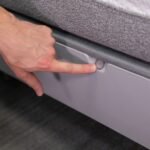
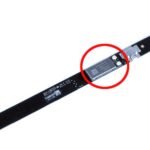
First, find the control box under your bed. This black box is called the Firmness Control System. It connects the bed to the power source. Check near the head or foot of the bed. The control box may be attached to the frame or resting on the floor. Make sure you can easily reach it before unplugging.
Unplug And Replug Power
Unplug the power cord from the wall outlet. Leave it unplugged for about 30 seconds. This pause allows the system to fully reset. After 30 seconds, plug the power cord back in. Ensure the connection is secure and tight. Wait for the bed to power on and initialize. This may take a few moments.
When To Power Cycle
Power cycle your Sleep Number bed if it stops responding. Try it when the bed won’t adjust or loses air pressure. Use power cycling if the remote control does not work. It can help fix connection errors with the Sleep Number app. Perform this step before contacting customer support. Power cycling often solves small problems quickly.
Resetting Preferences And Settings
Resetting preferences and settings can fix many Sleep Number bed issues quickly. It helps restore default options and clears minor errors. This step is useful if your bed or remote acts strangely or stops responding. Resetting ensures your bed works smoothly with your chosen comfort level.
There are different reset methods. You can reset SleepIQ settings, perform a factory reset on the remote, or use the Sleep Number app. Each method suits specific problems. Follow the steps carefully for best results.
Reset Sleepiq Settings
To reset SleepIQ settings, press the Home button on the remote first. Use the arrow keys to find System, then select Settings. Scroll to Reset Preferences and choose Reset SleepIQ. Follow the on-screen instructions to complete the reset.
This action clears your sleep data and preferences. It can fix tracking or syncing issues. After resetting, you may need to set up your SleepIQ profile again.
Factory Reset For Remotes
Perform a factory reset to fix remote control problems. Press and hold the Home and Up buttons together for about 10 seconds. The remote screen will flash, signaling the reset.
This erases all custom settings on the remote. It returns the remote to its original state. Pair the remote with the bed again after the reset.
Using The Sleep Number App For Resets
Open the Sleep Number app on your smartphone to reset your smart bed. Tap Smart Bed, then go to Settings. Select Restart Bed or run a Quick System Test.
These options refresh the bed’s system without unplugging it. The app also checks for firmware updates. Keeping the firmware current avoids many common problems.

Credit: support.sleepnumber.com
Fixing Air Loss Problems
Air loss in a Sleep Number bed can cause discomfort and disrupt your sleep. Fixing these problems quickly helps restore your bed’s ideal firmness. This section guides you through simple steps to find and fix air loss issues. Follow these tips to keep your bed working well and maintain a good night’s rest.
Checking For Air Leaks
Begin by listening for hissing sounds near the mattress. These sounds often indicate a small air leak. Press gently on the mattress surface to locate soft spots or bubbles. Use a soap and water mix on seams and valves. Bubbles will form where air escapes. Mark any leak spots to repair or report. Small leaks may be sealed with repair kits designed for Sleep Number beds.
Inspecting Hoses And Connections
Check all air hoses connected to the mattress. Look for cracks, holes, or loose fittings. Make sure hoses are firmly attached to the pump and mattress valves. Replace any damaged hoses to prevent air loss. Clean hose ends to remove dust or debris that may block airflow. Secure connections reduce the chance of air escaping and improve bed performance.
Pump Maintenance Tips
Keep the air pump clean and free from dust. Unplug the pump before cleaning with a dry cloth. Avoid using water or liquids near the pump. Ensure the pump sits on a flat, stable surface. Listen for unusual noises that may signal pump issues. Regularly check the pump’s power cord for damage. A well-maintained pump supports steady air pressure and bed firmness.
Resolving Pump And Connectivity Issues
Resolving pump and connectivity issues on a Sleep Number bed can improve your sleep experience. These problems often cause the bed not to adjust properly or lose connection with the app. Simple fixes can restore full function quickly. Focus on power supply, Wi-Fi stability, and software updates.
Ensuring Stable Power And Wi-fi
Check that the bed’s control unit is plugged in securely. A loose connection can stop the pump from working. Verify the power outlet is active by testing with another device. Ensure your Wi-Fi signal is strong near the bed. Weak Wi-Fi causes communication errors with the Sleep Number app. Restart your router if the signal seems unstable. Avoid using power strips that may cause interference.
Updating Firmware And Software
Keep the bed’s firmware up to date for smooth operation. Open the Sleep Number app and navigate to settings. Look for firmware or software updates. Download and install any available updates. Updates fix bugs that affect pump and connectivity functions. Regular updates ensure your bed works with the latest features.
Troubleshooting Bluetooth Interference
Bluetooth interference can disrupt the bed’s connection to the remote or app. Remove other Bluetooth devices near the bed. These devices can cause signal clashes. Restart the bed’s control unit and your phone’s Bluetooth. Move the phone closer to the bed while connecting. Clear the app cache and try reconnecting. This reduces connection errors and improves response time.

Credit: www.youtube.com
Reducing Bed Noise
Noise from a Sleep Number bed can disrupt your sleep and reduce comfort. Reducing bed noise helps create a peaceful sleeping environment. Addressing common noise sources is simple and effective. Small fixes often make a big difference in quieting your bed.
Tightening Loose Connections
Loose connections cause creaks and rattles in your bed frame. Check all bolts and screws under the bed. Use a wrench or screwdriver to tighten any that feel loose. Secure connections keep the bed stable and quiet. Regularly inspect connections to avoid noise buildup over time.
Replacing Worn Foam Or Hoses
Worn foam or damaged air hoses can cause squeaks or hissing sounds. Examine the foam layers for cracks or thin spots. Replace foam pieces that show wear or damage. Inspect air hoses for leaks or cracks. Replace any hoses that show signs of wear. New foam and hoses reduce noise and improve comfort.
Pump Noise Solutions
The pump may create humming or buzzing sounds during adjustment. Place a soft mat or pad beneath the pump to absorb vibrations. Ensure the pump sits on a flat, stable surface. Check the pump’s connections to avoid loose parts. If noise persists, contact Sleep Number support for pump repair or replacement options.
Adjusting Comfort Settings
Adjusting the comfort settings on your Sleep Number bed can greatly improve your sleep quality. The bed lets you change firmness levels to fit your personal needs. Small tweaks can make a big difference in comfort and support. Understanding how to adjust these settings helps resolve common issues and ensures restful nights.
Finding The Right Sleep Number
Start by testing different firmness levels on each side of the bed. Use the remote or app to increase or decrease the air pressure. Find a number that feels supportive yet soft enough for comfort. It may take a few nights to settle on the perfect setting. Remember, your ideal Sleep Number can change over time.
Using Pillows And Accessories
Adding pillows can enhance your bed’s comfort without changing the firmness. Use pillows to support your neck, back, or legs. Consider mattress toppers or pads designed for Sleep Number beds. These accessories help customize your sleep surface and improve pressure relief. Experiment with different combinations for the best fit.
Replacing Worn Foam Components
Over time, foam layers inside the bed can wear down and reduce comfort. Check for sagging or uneven areas on your mattress. Replacing worn foam parts restores proper support and firmness. Contact Sleep Number for compatible replacement foam pieces. Regular inspection helps keep your bed comfortable and functioning well.
When To Contact Customer Service
Knowing the right time to contact Sleep Number customer service can save time and prevent frustration. Troubleshooting minor issues alone is fine. Complex problems or persistent malfunctions need expert help. Customer service steps in when basic fixes fail or when professional repairs are necessary. Understanding warranty terms and repair options helps decide when to reach out.
Warranty And Repair Considerations
Check your Sleep Number bed warranty before calling customer service. Most beds come with a limited warranty covering parts and labor. Warranty length varies by model and purchase date. Repairs under warranty usually cost nothing or minimal fees. Damage from improper use or accidents might not be covered. Have your purchase details ready when contacting support. This speeds up the process and ensures clear communication.
Common Repair Costs
Repair costs depend on the problem and warranty status. Out-of-warranty repairs can include part replacements or labor charges. Typical costs range from minor fees for small parts to higher charges for control system repairs. Knowing common repair expenses helps set expectations. Customer service can provide estimates before starting repairs. This helps avoid surprise costs and plan your budget.
Getting Professional Assistance
Professional help ensures your Sleep Number bed works correctly again. Customer service can guide you to authorized repair centers or schedule in-home repairs. Technicians have the tools and training to fix complex issues safely. Use professional support for persistent air loss, control system errors, or mechanical problems. Prompt service avoids worsening damage. Always follow customer service instructions for best results.

Credit: www.youtube.com
Frequently Asked Questions
Where Is The Reset Button On A Sleep Number Bed?
The Sleep Number bed has no physical reset button. To reset, unplug the black control box under the bed, wait, then plug it back in. Use the remote’s Settings menu or Sleep Number app for specific resets or factory resets.
Why Is My Sleep Number Bed Not Working?
Check the power supply and Wi-Fi connection. Restart the control unit and app. Update firmware via the Sleep Number app. Air leaks, pump issues, or connectivity problems often cause malfunctions.
What Are Common Sleep Number Bed Problems?
Common Sleep Number bed problems include air loss, sagging, pump malfunctions, connectivity issues, noise, and night sweats. These arise from air leaks, worn foam, or software glitches. Users may also face limited warranty coverage and costly repairs for pumps or control units.
What Is The Lifespan Of A Sleep Number Bed?
A Sleep Number bed typically lasts 8 to 12 years with proper care. Regular maintenance extends its lifespan and comfort.
How Do I Reset My Sleep Number Bed Remote?
Locate the control box under the bed and unplug it from the wall. Wait 30 seconds, then plug it back in. Use the remote’s menu to perform a factory reset if needed.
Conclusion
Troubleshooting your Sleep Number bed can feel easy with clear steps. Start by checking power connections and resetting the control system. Use the remote or app to adjust settings or run diagnostics. Keep firmware updated to avoid connectivity problems. Small fixes often solve common issues like air loss or firmness errors.
Patience helps while following simple guides or videos. Your bed should feel comfortable and work smoothly again soon. Remember, regular care prevents many problems before they start.