
If you own a Trane HVAC system, you know how important it is to keep it running smoothly, especially during extreme weather. But what do you do when your unit stops working or shows an error code?
That’s where the Trane Troubleshooting Guide PDF becomes your best friend. This guide puts the power in your hands, helping you quickly identify problems and apply simple fixes without waiting for a technician. Whether your air conditioner won’t turn on, your thermostat is acting up, or you need to reset your furnace, this guide has clear, step-by-step instructions designed just for you.
Keep reading to discover how to access and use this essential resource to save time, avoid costly repairs, and get your Trane system back to peak performance in no time.
Common Trane Ac Issues
Trane air conditioners are reliable but may face some common issues over time. Knowing these problems helps with quick fixes and avoids big repairs. This guide covers the usual troubles you might see with Trane AC units.
Unit Not Turning On
The AC unit may fail to start for simple reasons. Check if the thermostat is on and set to cooling. Dead batteries in the thermostat can stop the unit from turning on. Also, ensure the outdoor condenser is plugged in and power is supplied.
Thermostat Problems
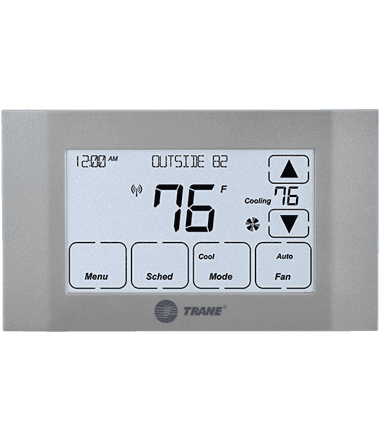
Thermostats control the temperature and signal the AC to run. Faulty wiring or old batteries can cause wrong readings. Sometimes, the thermostat settings are incorrect or the device is placed where it senses false temperatures. Replace batteries or reset the device for better performance.
Circuit Breaker Trips
Power interruptions may happen if the circuit breaker trips often. This can be due to electrical overload or short circuits in the AC. Reset the breaker to restore power. If tripping continues, call an electrician to check the wiring and unit components.
Dirty Air Filters
Clogged air filters reduce airflow and make the AC work harder. This lowers cooling efficiency and can cause damage over time. Clean or replace filters every one to three months. This keeps the air clean and the unit running smoothly.
Credit: www.trane.com
Reading Trane Error Codes
Reading Trane error codes helps identify problems with your HVAC system quickly. These codes give clear signals about what needs attention or repair. Understanding them saves time and money. Different Trane models show error codes in different ways. Some use LED blink patterns, while others have digital displays. Knowing how to read these codes is important for effective troubleshooting.
Led Blink Codes For Older Models
Older Trane models use LED blink codes on the control board. The LED light flashes a pattern to show the error type. Count the number of blinks to know the specific issue. For example, two blinks may indicate a pressure switch problem. A slow blink often means the system is running normally. Check the blink pattern carefully to avoid mistakes.
Digital Display Codes For Newer Models
Newer Trane units show error codes on a digital display. The code appears as numbers or letters on the screen. Write down the exact code shown. Each code points to a different fault or condition. These codes are easier to read than blink patterns. Refer to the Trane manual to understand each code’s meaning.
Locating The Control Board
The control board is where you find the error codes. It usually sits inside the furnace or air handler. Open the front panel to access it. Some models have a small window to see the LED light without opening the panel. For digital displays, the screen is often on the front control panel. Knowing the control board’s location helps you read error codes fast.
Using The Manual For Code Reference
The Trane troubleshooting manual explains all error codes clearly. It lists what each code means and how to fix the problem. Always use the manual for your specific model. Manuals prevent guesswork and wrong repairs. Keep a copy handy near your HVAC system for quick reference.
Resetting Your Trane System
Resetting your Trane system often resolves many common issues quickly. It helps clear minor faults and restores normal operation. Understanding how to reset your Trane unit is essential for basic troubleshooting.
This guide explains different ways to reset your system safely. Follow each step carefully to avoid damage and ensure proper function.
Physical Reset Button Locations
Most Trane systems have a physical reset button inside the unit. Check the indoor furnace or air handler near the blower motor or control board. The button is usually red or black and marked “reset.”
Some outdoor condenser units may also have a reset button. Look near the electrical service panel or at the bottom of the unit. Not all models have this button outside.
Performing A Power Cycle Reset
Power cycling is a simple reset method for all Trane units. First, find the main breaker for your HVAC system in the electrical panel. Switch it off and wait about 30 seconds.
Turn the breaker back on. This cuts power and resets the system’s controls. It helps clear minor electronic errors without opening the unit.
Safety Tips For Resetting
Always turn off power before pressing any reset button. Use a flashlight to see inside the unit clearly. Avoid touching wiring or metal parts to prevent shocks.
Wear gloves if needed and keep children away during the reset process. Follow manufacturer instructions in your Trane troubleshooting guide PDF.
When To Call A Professional
Resetting may not fix all problems. Call a professional if the system does not start after reset. Also seek help for strange noises, burning smells, or repeated shutdowns.
Technicians have tools and knowledge to diagnose complex faults safely. Regular maintenance by experts keeps your Trane system running well.

Credit: hvacallianceexpert.com
Rebooting Trane Thermostats
Rebooting Trane thermostats can solve many common issues quickly. It refreshes the system and clears minor glitches. Different Trane models may require different reboot methods. Understanding the right steps helps restore your thermostat’s function fast.
Power Cycle Method
Turn off the thermostat by pressing the power button. Wait for about 30 seconds to 1 minute. Then, press the power button again to turn it back on. This simple power cycle often resets temporary errors. It works well for most basic Trane thermostats.
Digital Menu Reset For Smart Models
Access the thermostat’s settings menu using the touchscreen. Find the “Reset” or “Factory Reset” option in the menu. Confirm your choice to start the reset process. The thermostat will reboot and restore default settings. Use this method for advanced Trane smart thermostats.
Hard Reset Via Batteries Or Faceplate
Remove the thermostat from its wall mount carefully. Take out the batteries and wait for 1 to 2 minutes. Reinsert the batteries and reattach the faceplate. The thermostat will hard reset and reboot. This method helps when the screen is frozen or unresponsive.
Maintenance Tips To Avoid Issues
Proper maintenance helps keep your Trane system running smoothly. Small actions prevent bigger problems later. Follow these simple tips to avoid common issues and extend your unit’s life. Regular checks keep your system efficient and reliable.
Regular Filter Cleaning
Clean air filters at least once a month. Dirty filters block airflow and reduce efficiency. Replace filters if they look worn or damaged. Clean filters improve air quality and system performance. This simple step lowers energy bills and prevents breakdowns.
Checking Electrical Connections
Inspect electrical connections regularly for loose wires or corrosion. Tighten any loose screws and clean any dirt. Faulty connections cause system failures and safety risks. Use a flashlight to check behind panels carefully. Secure connections help your system work without interruption.
Scheduling Professional Inspections
Have a certified technician inspect your system yearly. Professionals spot hidden issues before they cause damage. They clean coils, check refrigerant, and test system controls. Regular inspections keep your Trane unit running safely and efficiently. Early detection saves repair costs and extends system life.

Credit: support.trane.com
Troubleshooting Specific Components
Troubleshooting specific components of your Trane system helps identify issues quickly. Each part plays a vital role in overall performance. Checking these parts can save time and avoid costly repairs. This guide covers key areas to inspect and fix.
Condenser Unit Checks
Start with the condenser unit outside your home. Make sure the power is on and the unit is plugged in. Check for dirt or debris blocking airflow around the unit. Clean the coils gently with a soft brush or hose. Look for damaged or bent fins that reduce efficiency. Listen for unusual noises that may signal motor or fan problems. Ensure the fan blades spin freely without resistance.
Furnace And Air Handler Tips
Inspect the furnace or air handler inside the home. Confirm the thermostat settings match your comfort needs. Replace dirty air filters to improve airflow and system function. Check the burners for dirt or rust, which can cause weak heating. Look for error codes on the control board to diagnose issues. Clean the blower wheel and check for obstructions. Ensure all vents and ducts are open and clear.
Blower Motor And Control Board Issues
Blower motors move air through your home. Listen for humming or grinding sounds from the motor. Test if the motor runs smoothly without stopping. Check wiring connections to the motor and control board for tightness. Inspect the control board for burn marks or loose parts. Reset the system by turning off power and restarting. Replace faulty motors or boards following the guide’s instructions.
Frequently Asked Questions
How To Troubleshoot A Trane Ac Unit?
Check the thermostat is on and batteries work. Reset tripped breakers. Ensure the condenser is plugged in. Clean or replace dirty air filters. Consult the manual for error codes. Perform a power cycle reset if needed. Contact a professional for persistent issues.
How To Read Trane Error Code?
Locate the control board on your Trane unit. Observe LED blink or digital display codes. Refer to the unit’s manual or Trane’s website to interpret the error code accurately.
Where Is The Reset Button On A Trane?
The reset button on a Trane is usually inside the furnace or air handler cabinet. Check near the control board or blower motor. Some outdoor units have a red reset button near the electrical panel. Always turn off power before pressing the reset button.
How Do I Reboot My Trane Thermostat?
To reboot your Trane thermostat, turn off its power at the circuit breaker. Wait 30 seconds, then turn the power back on. The thermostat will restart and reset itself automatically.
What Is Included In The Trane Troubleshooting Guide Pdf?
The guide includes common problems, error codes, and step-by-step fixes. It helps users identify and solve issues with Trane HVAC systems. Clear instructions make troubleshooting easier for homeowners and technicians.
Conclusion
Using the Trane Troubleshooting Guide PDF helps fix common AC problems fast. It explains error codes clearly and shows where to find reset buttons. Following simple steps can save time and avoid costly repairs. Keep the guide handy for quick reference anytime your system acts up.
Regular maintenance and checks improve your unit’s performance and lifespan. This guide is a useful tool for homeowners and technicians alike. Trust it to guide you through basic troubleshooting with ease and confidence.



