
A Brizo touch faucet that won’t turn on or off usually needs fresh batteries and a clean solenoid valve. That’s the core of brizo touch faucet troubleshooting for most home users. The single most common cause is dead AA batteries in the pack under your sink. If the LED light blinks red, it’s telling you the power is too low to run the sensor. Swap all four batteries at once, don’t mix old and new ones, and test the spout again.
Why a Brizo touch faucet stops responding
The electronics inside these faucets need three things to work right: steady power, a clean water path, and an unblocked sensor. When one of those fails, the tap either ignores your hand or runs by itself. You don’t need tools to figure out which part quit.
Dead batteries are the first thing to check. The control box under the sink holds four AA cells. They don’t die all at once, so a mix of strong and weak cells confuses the circuit board. The faucet might turn on but refuse to shut off, or the blue indicator light stays dark.
Mineral buildup is the second cause. Hard water leaves calcium deposits inside the solenoid valve, which is the electronic gate that opens and closes the water flow. If your tap makes a clicking sound but no water comes out, the valve is likely stuck. You can check your local water hardness level through your municipal water provider’s annual report.
A dirty sensor is the third issue. Soap scum, hard water spots, or cooking grease coat the spout over time. The capacitive sensor reads your body’s natural electrical charge through the metal finish. A thick layer of grime blocks that signal completely. Wipe the spout with warm water and a soft cloth to see if the touch response returns.
Replace the batteries in the control box
This fix is for anyone whose faucet has gone completely silent, won’t stop running, or shows a flashing red LED near the base. It takes about five minutes and needs no special skills.
Pull the battery box out from under your sink. Press the small tab on the side to pop the cover off. Take out all four AA batteries. Don’t leave any old ones inside just because they look fine. Put in four brand-new alkaline AA batteries. Match the plus and minus signs exactly to the diagram printed inside the plastic tray.
Snap the lid shut until it clicks. Push the box back into its bracket. Wait ten seconds before you touch the spout. The system needs that pause to reset the circuit board. Tap the faucet once with your bare hand. The water should start flowing immediately, and the LED will glow solid blue.
If the light stays red after fresh batteries, the control box itself might be damaged. Water leaks under the sink can short out the contacts. Look closely at the battery terminals for green or white crust. That means corrosion got in.
You can find the exact battery type your model uses in the Brizo support manuals section on their official site. Always match your specific model number when checking parts. If the terminals are heavily corroded, replacing the whole battery box is safer than trying to scrape them clean yourself.
Clean the solenoid valve screen
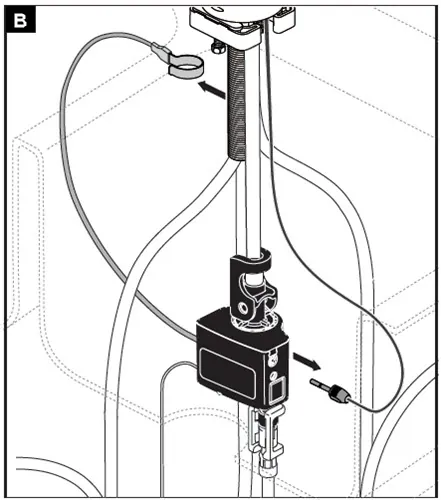
Use this method when the faucet clicks but water barely trickles out, or when it turns on fine but won’t shut off even after fresh batteries. This points to a stuck solenoid valve, not a power problem.
Shut off both hot and cold water valves under the sink first. Turn the faucet handle to release any trapped pressure. Find the solenoid valve. It’s the small cylinder where the water lines connect to the control box. Disconnect the hose leading into it.
Inside the connection point, there’s a tiny mesh filter screen. Pull it out gently with needle-nose pliers. Hold it under running water and use an old toothbrush to scrub away the brown or white grit blocking the holes. Calcium scale traps dirt here quickly if you have hard water.
Push the clean screen back in. Reconnect the hose tightly by hand. Turn the water supply back on slowly. Check every joint for drips before you put everything away. Touch the spout to test. Water should flow at full pressure and stop cleanly when you tap it again.
If cleaning doesn’t help, the internal rubber seal inside the valve has failed. That part isn’t something you should take apart. Opening the sealed valve housing risks flooding your cabinet. A licensed plumber handles valve replacements safely.
Reset the electronic control module
Try this only when new batteries and a clean valve haven’t fixed the problem. It’s for cases where the faucet turns on randomly, responds late, or ignores your touch entirely despite having power.
Unplug the battery box from the main control unit. Leave it disconnected for a full 60 seconds. This drains the leftover charge stored in the capacitors. Plug it back in firmly. The module will restart its sensor calibration cycle.
Don’t touch the spout while it resets. Give it another 30 seconds after reconnecting. Then tap it once. If it works normally, the glitch was just trapped static electricity.
If the faucet still acts up after two full resets, the control module is likely failing. This is the honest limit of what you can do yourself: the exact voltage output varies by model, and you can read your own reading off the specification sheet that came in the box. Don’t guess the numbers.
Replacing the control module costs more than a battery swap. If your faucet is under warranty, call Brizo directly before buying parts. Installing a third-party control board voids the warranty and creates a leak risk. This step isn’t for someone who wants a cheap bypass; it’s for a confirmed hardware failure.
Mistakes that damage a Brizo touch faucet
Bad advice spreads fast online, and following it can ruin the electronics or flood your kitchen. Here is what you shouldn’t do when your tap stops working.
- Using rechargeable batteries instead of alkaline. Rechargeables drop their voltage too early for the sensor to read properly. The faucet thinks it’s dying even when fully charged, causing random shutoffs.
Alkaline cells provide a steady electrical current that the control board expects, but testing these levels is a task for a technician.
If you already swapped in rechargeables, the fix takes ten seconds. Put standard alkalines back in before the solenoid starts chattering.
- Spraying vinegar directly on the spout to clean it. Acid damages the protective finish and can cause erratic sensor behavior. Damage to the finish can interfere with reliable touch detection.
Use a damp cloth with mild dish soap instead. Wipe gently so you leave the clear coat intact.
- Bypassing the solenoid valve to force water flow. Removing the electronic gate leaves you with no way to stop the water without reaching under the sink. A leak then becomes a flood.
People try this when the battery dies mid-use. Always flip the manual bypass lever on the valve body first.
- Wrapping the control box in plastic bags for waterproofing. The electronics generate heat during use. Trapping that heat melts the wire insulation and shorts the board permanently.
The factory enclosure handles normal under-sink moisture. If your cabinet leaks, fix the plumbing rather than smothering the brain.
- Hitting the spout hard to trigger the sensor. The touch technology reads electrical capacitance, not physical pressure. Banging it dents the metal and misaligns the antenna wire hidden inside.
A light brush with bare skin is all the system needs.
Keep your Brizo touch faucet working

Small habits prevent almost every issue listed above. Change how you maintain the sink area, and the electronics stay reliable much longer.
| If you’re doing this | Do this instead | Why |
|---|---|---|
| Mixing old and new batteries | Replace all six at the same time | Uneven voltage confuses the circuit board |
| Wiping the spout with harsh cleaners | Use warm water and a microfiber cloth | Chemicals strip the capacitive finish |
| Ignoring a slow drip under the sink | Dry the area and check hoses monthly | Moisture shorts out the battery contacts |
| Leaving the water supply on during vacations | Turn off the angle valves when away | Prevents pressure damage to the solenoid |
| Using generic replacement parts | Order parts matching your exact model number | Wrong fittings cause leaks the warranty won’t cover |
Never use vinegar or descaling sprays directly on the touch sensor. Acidic residue builds up inside the bezel gap over time. This creates phantom activations that mimic electronic failure. Always apply cleaner to your cloth first, never spray the faucet body.
Check your battery compartment seal each time you swap cells. A cracked gasket lets humidity reach the terminals silently. Corrosion appears as white crust weeks after exposure begins. Wipe contacts with isopropyl alcohol if you spot any oxidation before installing fresh batteries.
Frequently asked questions
Why does my Brizo touch faucet turn on by itself?
Loose wires or moisture inside the battery box cause phantom touches. The sensor picks up stray electrical signals instead of your hand. Unplug the battery pack, dry the contacts with a paper towel, and plug it back in. If pets jumping on the counter trigger it, the sensor sensitivity might be set too high for your environment.
How long do batteries last in a Brizo touch faucet?
Standard AA alkaline batteries typically last for a significant period under normal household use of around 20 activations per day. Heavy use drains them faster. You’ll know they’re dying when the blue LED light starts blinking red or the water pressure drops suddenly.
Can I use a Brizo touch faucet manually if the batteries die?
Yes, you can still operate it like a regular faucet. Pull the manual handle to turn the water on and off mechanically. The touch feature won’t work without power, but the water flow remains completely usable until you replace the batteries.
Is it safe to clean a Brizo touch faucet with vinegar?
No, acidic cleaners damage the special finish required for touch activation. The sensor detects changes in capacitance through the faucet’s finish. Vinegar strips that layer away. Stick to mild dish soap and warm water applied with a soft cloth to keep the sensor working.
What happens if the solenoid valve gets stuck open?
Water flows continuously and won’t stop when you touch the spout. Shut off the manual water valves under the sink immediately to prevent flooding. The valve needs to be removed and cleaned, or replaced entirely if the internal rubber seal has broken down.
Why is the blue light on my Brizo faucet blinking?
A blinking blue or red light is the built-in warning for low battery power. It means the voltage dropped below the level needed to run the sensor reliably. Swap out all six AA batteries in the control box. The light will return to a solid color once full power is restored.
Conclusion
If your faucet still isn’t responding after trying these fixes, it’s time to call Brizo support or a local plumber. Don’t force the handle or pull wires apart yourself—you’ll likely void your warranty and cause more damage. Keep your receipt handy when you reach out for help.
Related guides