Is your carbon monoxide detector acting up and leaving you worried? You rely on it to keep your home safe from a silent, deadly threat.
When it starts beeping unexpectedly or won’t reset, panic can set in fast. But don’t worry—this guide will help you understand common problems and fix your detector quickly. Keep reading to learn simple troubleshooting steps that can protect you and your loved ones from danger.
Common Carbon Monoxide Detector Issues
Carbon monoxide detectors are vital for home safety. They alert you to dangerous gas levels. Yet, these devices can face common issues. Knowing these problems helps keep your home safe. Troubleshooting becomes easier with clear information.
False Alarms Causes
False alarms often happen due to cooking fumes or steam. Smoke from candles or fireplaces may trigger the detector. Dust and insects inside the device can cause errors. Poor placement, like near kitchens or bathrooms, increases false alarms.
Detector Not Powering On
A detector that won’t turn on may have dead batteries. Check if the power source is connected well. Sometimes, a faulty circuit or wiring causes power loss. Resetting the device can fix minor electronic glitches.
Low Battery Alerts
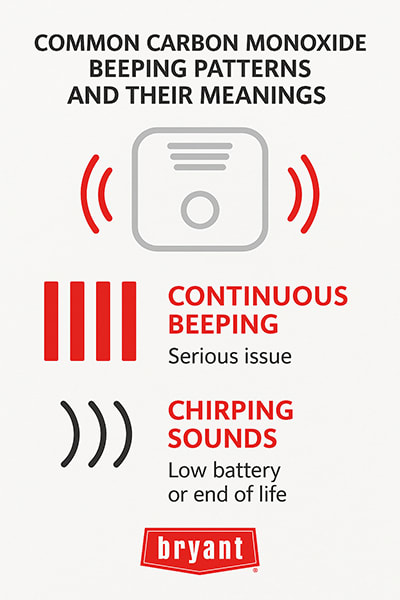
Low battery alerts are common and need quick action. Replace batteries with the correct type immediately. Some detectors beep every minute to warn about low power. Ignoring alerts can stop the detector from working.
Error Codes And Signals
Error codes vary by model but always signal a problem. Refer to the user manual to understand specific codes. Common signals include beeps, flashing lights, or voice messages. Proper response ensures the detector functions correctly and safely.
Basic Troubleshooting Steps
Basic troubleshooting steps help keep your carbon monoxide detector working well. These steps are simple and can fix common problems quickly. Follow each step carefully to ensure your detector stays reliable. Regular checks increase safety in your home.
Checking Power Supply
First, check if the detector has power. If it plugs into an outlet, make sure the outlet works. Try plugging in another device to test the outlet. For hardwired detectors, check the circuit breaker. It may have tripped and cut power to the detector.
Resetting The Detector
Resetting clears small errors in the detector’s system. Find the reset button on the device. Press and hold it for a few seconds. The detector will beep or flash to show it is resetting. This step often fixes false alarms or sensor issues.
Replacing Batteries
Most detectors need fresh batteries to work. Open the battery compartment carefully. Remove old batteries and put in new ones. Use the battery type recommended by the manufacturer. Check the battery contacts for dirt or corrosion before closing.
Cleaning The Sensor
Dust and dirt can block the sensor and cause problems. Use a soft brush or vacuum cleaner with a brush attachment. Gently clean around the sensor area. Avoid using water or cleaning sprays. Keeping the sensor clean helps the detector work correctly.
Advanced Fixes For Persistent Problems
Some carbon monoxide detectors show problems even after basic fixes. Advanced fixes help solve these persistent issues. These steps need care but improve safety and device function.
Inspecting Wiring And Connections
Check the wiring if your detector is hardwired. Loose or damaged wires cause faults. Turn off power before inspection. Look for frayed wires or poor connections. Tighten any loose wires gently. Replace damaged wires with the correct type. After fixing, restore power and test the device.
Testing With Co Simulation
Use a carbon monoxide simulator to test your detector. This tool creates safe CO levels to check alarm response. Place the simulator near the sensor. The alarm should sound quickly. If not, the sensor may be faulty or dirty. Clean the sensor with a soft brush first. Repeat the test. If still no alarm, consider replacing the unit.
Firmware Updates And Resets
Some detectors have firmware to control functions. Check the manufacturer’s website for updates. Updating firmware can fix bugs and improve detection. Follow the update instructions carefully. If problems persist, perform a factory reset. This clears settings and restores default operation. Use reset buttons or menus as described in manuals. After reset, test the detector to ensure it works.
When To Replace Your Detector
Knowing when to replace your carbon monoxide detector is crucial for home safety. These devices do not last forever. Over time, sensors lose sensitivity and may fail to alert you.
Replacing your detector on time ensures it works correctly to protect your family. Pay attention to the detector’s age and signs of malfunction. This guide helps you decide when to get a new one.
Detector Lifespan Limits
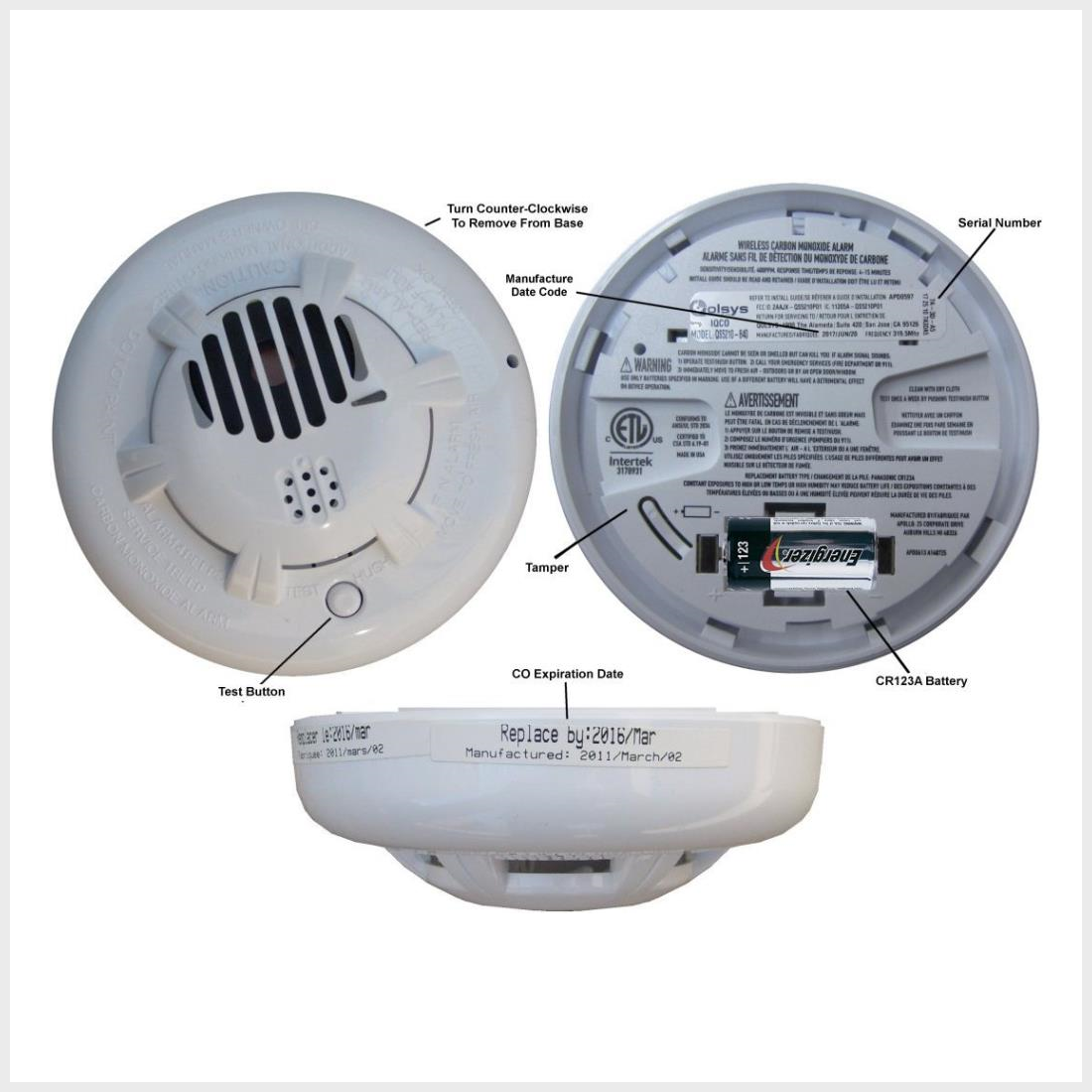
Most carbon monoxide detectors last between 5 and 7 years. Check the manufacturer’s label or manual for exact lifespan. After this time, sensors may fail without warning. Old detectors might not detect carbon monoxide properly. Replace your unit once it reaches its lifespan limit.
Signs Of Sensor Failure
False alarms or no alarms at all can indicate sensor problems. If the test button does not work, the sensor may be faulty. Frequent beeping or error messages are warning signs. A weak or no power light may also show failure. Replace the detector immediately if you notice these issues.
Choosing A New Detector
Buy a carbon monoxide detector with a clear expiration date. Look for models with digital displays and loud alarms. Choose detectors certified by safety organizations for reliability. Consider units with battery backup for power outages. Install new detectors according to the manufacturer’s instructions for best protection.
Preventive Tips For Reliable Operation
Keeping your carbon monoxide detector working well is very important. Regular checks and smart habits help your detector stay ready to alert you. Small steps can stop many common problems. These tips will guide you on how to keep your detector reliable every day.
Proper Installation Spots
Place detectors near sleeping areas. This helps you hear alarms at night. Avoid kitchens or bathrooms. Steam and smoke can cause false alarms. Install on each floor of your home. Keep detectors at least 15 feet from fuel-burning appliances. Mount detectors on the ceiling or high on walls. Carbon monoxide mixes with warm air and rises.
Regular Maintenance Schedule
Test your detector once a month. Press the test button to check the alarm. Replace batteries at least once a year. Change the entire unit every 5 to 7 years. Clean the detector gently with a vacuum or dry cloth. Avoid using water or cleaning sprays. These steps keep your detector working well.
Avoiding Environmental Triggers
Keep detectors away from dusty or humid areas. Dust and moisture can block sensors. Do not paint over your detector. Paint can cover sensors and stop alarms. Avoid placing detectors near windows or vents. Fresh air can dilute carbon monoxide and delay alarms. These simple actions help your detector work correctly.

Frequently Asked Questions
Why Is My Carbon Monoxide Detector Beeping Constantly?
A constant beep usually means low battery or a fault in the detector. Replace the battery first to see if the beeping stops. If it continues, the detector might need replacement.
How Do I Reset A Carbon Monoxide Detector?
Most detectors have a reset button on the front or back. Press and hold it for 15-20 seconds to clear alerts and reset. Check the user manual for model-specific instructions.
What Causes False Alarms In Carbon Monoxide Detectors?
False alarms can come from cooking fumes, steam, or strong chemicals nearby. Poor placement, like near kitchens or bathrooms, can also trigger false alerts. Proper installation reduces false alarms.
How Often Should I Test My Carbon Monoxide Detector?
Test your detector once a month to ensure it works properly. Press the test button until you hear the alarm sound. Regular testing keeps your home safe.
When Should I Replace My Carbon Monoxide Detector?
Replace your detector every 5 to 7 years or as per manufacturer advice. Older detectors may fail to detect carbon monoxide properly. Check the device’s expiry date often.
Conclusion
Regular checks keep your carbon monoxide detector working well. Change batteries often to avoid false alarms or failures. Clean the device gently to remove dust or dirt. Replace the detector every 5-7 years for best safety. Trust your device’s alerts and act quickly if it sounds.
Staying alert protects your home and family from danger. Simple steps help you maintain safety with ease. Don’t ignore any warning signs from your detector. Safety starts with proper care and regular troubleshooting.