You can resolve most errors by performing a simple power cycle, and you’ll find that effective davis vantage pro2 troubleshooting often starts by checking the console batteries and the sensor suite solar panel for debris. If your station stops sending data, the most common cause is a loss of wireless communication between the integrated sensor suite and the console. A quick reset often restores the connection without needing complex tools or professional help. Always check your console’s signal strength indicator to confirm if it’s receiving data.
Troubleshooting Davis Vantage power and signal issues
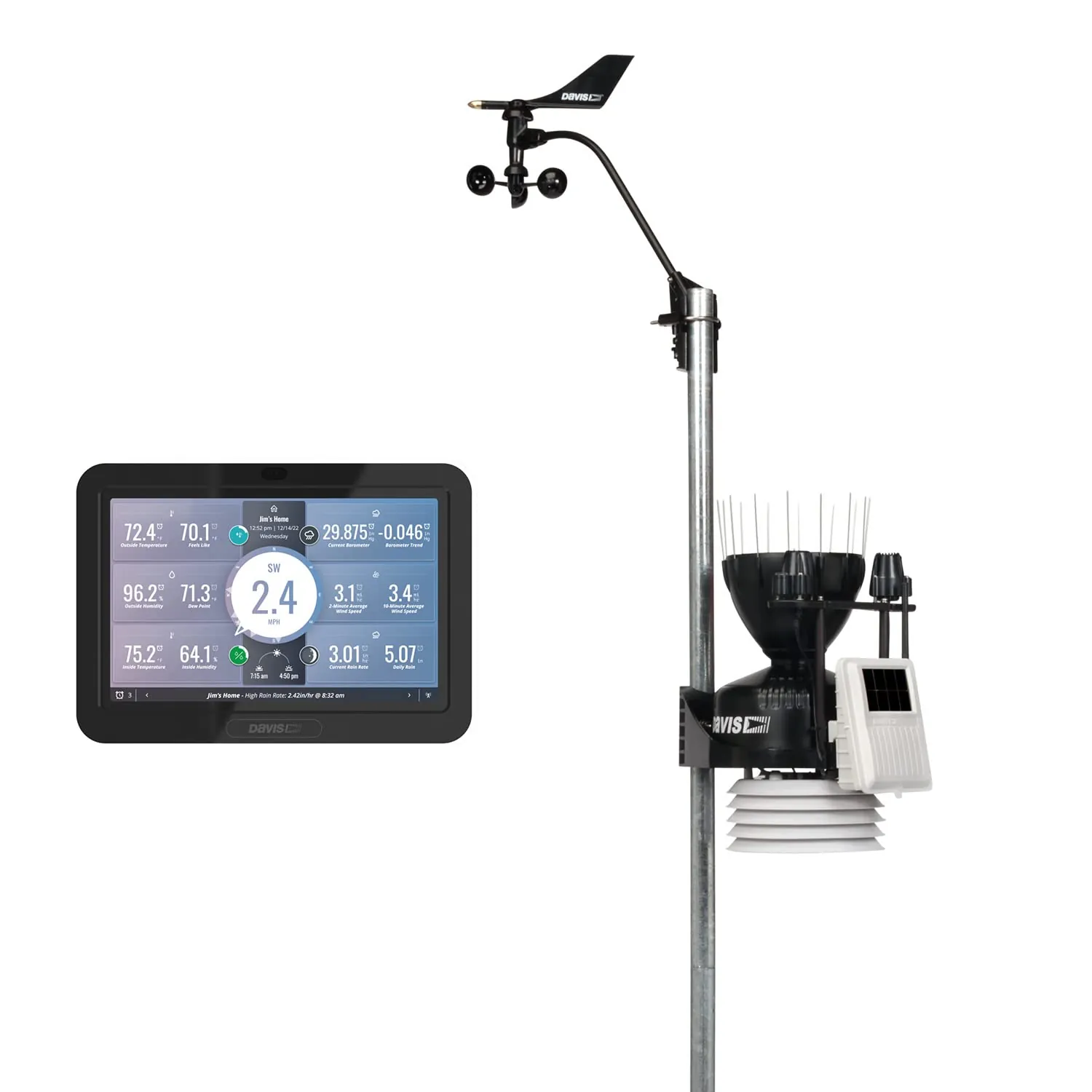
Most issues with these weather stations stem from power delivery or signal interference. If your console shows dashed lines instead of data, the wireless link between the sensor suite and the console has likely been interrupted. This happens when the sensor suite battery voltage drops too low to transmit a signal or when physical objects block the radio path. You can verify the current signal strength by looking at the reception icon on the display.
Environmental factors like heavy foliage, new metal structures, or even seasonal growth can block the radio signal. If your console is near other wireless devices, such as routers or cordless phones, these may create interference. You can find specific guidance on station placement and signal range in the Davis Instruments technical support library.
If the sensor suite battery is the culprit, the system will struggle to send data during periods of low sunlight. Even if the solar panel is clean, an old battery that no longer holds a charge will cause intermittent data loss. You should also check for any physical damage to the antenna on both the console and the sensor suite. If you see cracks or signs of water intrusion, the hardware may require professional repair.
Resetting the console and sensor link
If you notice a communication gap, a hard reset is the first step to restore the connection. To do this, remove all batteries from the console and disconnect the AC power adapter for at least 60 seconds. This clears the internal memory and forces the console to re-establish a handshake with the sensor suite. While the console is off, you should also remove the battery from the sensor suite to reset its transmitter.
After the time has passed, replace the sensor suite battery first, then plug in the console. Watch the signal reception icon on the screen; it should begin flashing as it searches for the transmitter. If the data returns, the issue was a simple software hang. If the display remains blank or shows dashes, you may need to re-enter the station ID settings in the setup menu.
This reset is for home users who notice intermittent data drops. If you have tried this twice and the station still doesn’t display wind or temperature values, the transmitter inside the sensor suite might be failing. Don’t attempt to open the transmitter housing yourself, as this can break the weather seal and void your warranty. If the hardware is damaged, contact the manufacturer or a certified weather station technician for a professional assessment.
Cleaning and inspecting the sensor suite
Debris is a frequent cause of inaccurate readings, particularly for rain gauges and wind sensors. If your rain totals are consistently low or zero, check the tipping bucket inside the rain collector for leaves, spider webs, or dirt. Use a soft brush or a damp cloth to clear the debris, being careful not to move the internal magnets. Never use harsh chemicals or pressure washers, as these can damage the delicate plastic components.
For wind sensors, ensure the anemometer cups spin freely without resistance or grinding noises. If the cups are stiff, they may have dust or corrosion inside the bearing assembly. A light cleaning with a dry cloth is usually enough. If the wind vane is stuck in one direction, check for obstructions such as bird nests or tangled wires near the pivot point.
Always perform these checks during daylight hours to ensure you can see all parts of the assembly clearly. If you aren’t comfortable working on a roof or a tall mast, hire a professional. Falling from a height is a major risk, so if your sensor suite is mounted on a high pole, leave this work to a licensed contractor. Never force any moving parts, as the plastic is brittle and breaks easily if handled roughly.
Updating console settings for accuracy
Sometimes the data is correct, but the display settings are wrong. If your console is showing incorrect pressure or temperature units, you can change these through the setup mode. Access the setup menu by holding the “Done” button and pressing the right arrow key simultaneously. From here, you can toggle between imperial and metric units, adjust the time zone, or calibrate the barometer to match a local airport reading.
Calibration is only necessary if your base station is significantly different from official local weather data. Before you change the barometer, wait at least 48 hours for the console to stabilize after a power cycle. If you adjust it too soon, you’ll introduce errors that make your data unreliable. If you’re unsure about the calibration process, consult the manual to avoid setting the values to an extreme that invalidates your readings.
This process is for users who have verified that the station is communicating but the numbers seem off. If you’re in a high-altitude location, ensure your elevation is set correctly in the setup menu. An incorrect elevation will cause the barometric pressure reading to be permanently wrong. You should check your exact elevation using a topographical map or a GPS tool before inputting the value into your console.
Troubleshooting common hardware mistakes
- Replacing batteries with low-quality brands: Cheap batteries often fail in cold weather, so always use high-quality lithium or alkaline batteries for better reliability.
- Mounting the console near a microwave: High-frequency interference from kitchen appliances will block the wireless signal, so keep the console in an open, central room.
- Ignoring the solar panel angle: If the solar panel is shaded by trees or buildings for most of the day, the internal battery will die, so ensure the panel faces the sun directly.
- Forcing the tipping bucket: If you try to manually tip the bucket to test it, do so very gently to avoid snapping the balance pivot.
- Over-tightening sensor screws: Plastic housings crack easily under pressure, so tighten screws only until they’re snug, never use a power drill.
Improving station performance and maintenance
To keep your station running well, you need to match your maintenance schedule to your local environment. If you live near the ocean, salt air can corrode connections faster, while dusty inland areas require more frequent cleaning.
| If you’re doing this | Do this instead | Why |
|---|---|---|
| Leaving batteries in all year | Replace them every 12 months | Prevents leaks that ruin the board |
| Cleaning sensors with water | Use a dry or damp cloth only | Prevents moisture from trapping dirt |
| Ignoring the signal icon | Check for new metal obstructions | Radio signals struggle through metal |
| Using standard batteries | Use lithium batteries in winter | Lithium performs better in cold |
Frequently asked questions
How long do the batteries last in the sensor suite?
Batteries typically last 12 to 18 months when using high-quality lithium cells with an unobstructed solar panel. You can monitor the exact voltage level on the console’s diagnostic screen. Note that battery life may decrease significantly in regions with limited winter sunlight.
Why is my rain gauge showing zero during a storm?
Your rain gauge is likely blocked by debris or a stuck tipping mechanism. Check the collector cone for leaves or nests, then gently move the internal tipping bucket to ensure it pivots freely. Clear any grit from the pivot point using a dry, soft brush.
Is it safe to leave the station out in a thunderstorm?
Yes, the station is safe to leave outside, provided the mounting mast is properly grounded in lightning-prone areas. While weather-resistant, the device isn’t lightning-proof. You may disconnect the console from the AC power adapter during extreme storms to prevent potential electrical surges.
How do I know if my sensor suite is dead?
Your sensor suite may be experiencing a range issue rather than a hardware failure. Ensure the console is within the recommended 1,000-foot line-of-sight range of the transmitter. If the distance is greater or obstacles exist, the signal may be too weak to reach the console.
What happens if I move the console to a different room?
Moving the console can cause connection loss due to thicker walls or increased electronic interference. Try returning the console to its original location to confirm if the new position is the cause. You’ll need to find a spot with fewer obstructions for a stable connection.
How do I recalibrate the wind speed?
You can calibrate wind speed in the setup menu by applying a percentage offset if your readings consistently differ from a reference station. Ensure the anemometer is clean and spinning freely before making adjustments. Calibration won’t fix mechanical or electrical issues causing zero readings.
Conclusion
Regular maintenance is the best way to keep your system accurate. If you ever feel that your data is consistently wrong despite cleaning and troubleshooting, compare it with official data from a nearby airport or government weather site. If the discrepancy is large and persistent, you may have a hardware failure that requires a professional to evaluate the internal components.