Is your microwave acting up right when you need it most? You’re not alone.
When your microwave stops heating or makes strange noises, it can throw off your entire routine. But before you rush to call a repair service or buy a new one, there are simple troubleshooting steps you can try yourself. This guide will help you quickly identify common microwave problems and fix them, saving you time and money.
Keep reading to get your microwave back to working perfectly in no time.
Microwave Won’t Start
When your microwave won’t start, it can disrupt your cooking plans. This problem often has simple causes. You can fix it without calling a technician. Follow these steps to find the issue quickly.
Check Power Supply
Make sure the microwave is plugged in properly. Sometimes the plug loosens from the socket. Try another appliance in the same outlet. This confirms if the socket works well. If the outlet has no power, check your home’s main power source.
Inspect Door Latch
The microwave door must close securely to start. A faulty door latch stops the microwave from running. Open and close the door firmly. Look for any damage or dirt on the latch. Clean or fix it to ensure the microwave knows the door is closed.
Reset Circuit Breaker
Microwave issues may come from a tripped circuit breaker. Locate your home’s electrical panel. Find the breaker linked to the microwave. Switch it off and on again. This resets the power and might get the microwave working again.
Microwave Not Heating
Your microwave runs, but the food stays cold. The microwave not heating is a common problem. Several parts may cause this issue. Simple tests can help find the faulty part. Safety first: always unplug the microwave before inspecting it.
Test The Magnetron
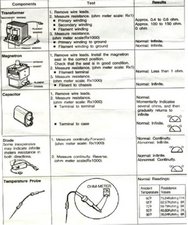
The magnetron creates the heat inside the microwave. A broken magnetron means no heat is produced. Use a multimeter to check its continuity. If the meter shows no continuity, the magnetron is likely bad. Replacing it can restore heating function.
Examine The High Voltage Diode
The high voltage diode powers the magnetron. A faulty diode blocks power flow, stopping heat. Remove the diode carefully to test it. Use a multimeter on diode mode for accuracy. A bad diode needs replacement to fix heating problems.
Check The Thermal Fuse
The thermal fuse protects the microwave from overheating. If it blows, the microwave won’t heat. Locate the fuse inside the microwave housing. Use a multimeter to test for continuity. Replace the fuse if it shows no continuity.
Uneven Heating Or Cold Spots
Microwaves sometimes heat food unevenly. Some parts become very hot, while others stay cold. This problem is called uneven heating or cold spots. It makes meals less tasty and can cause food safety issues. Fixing it is easy with a few simple steps. These tips help your microwave cook food evenly every time.
Rotate The Turntable
The turntable inside the microwave moves food during cooking. This helps heat spread evenly. If the turntable does not rotate, food cooks unevenly. Check if it spins freely. Remove any objects blocking it. If broken, replace the turntable or the motor. Always place food in the center of the turntable for best results.
Clean The Waveguide Cover
The waveguide cover sends microwaves into the oven. Food splashes or grease can dirty it. A dirty cover blocks microwave energy. This causes cold spots in food. Clean the waveguide cover gently with a damp cloth. Avoid scratching or removing it. Keep it clean to allow microwaves to flow properly.
Avoid Overcrowding Food
Putting too much food inside causes uneven heating. Crowded food blocks microwaves from reaching all parts. Spread food in a thin, even layer. Use a bigger plate if needed. Leave space between pieces. Stir or rearrange food halfway through cooking. This helps heat distribute evenly and avoids cold spots.
Microwave Makes Loud Noises
Microwaves should run quietly. Loud noises mean something is wrong. Strange sounds can be annoying and signal a problem. Fixing the noise early can stop bigger issues.
Inspect The Turntable Motor
The turntable motor spins the plate inside the microwave. A worn motor makes grinding or buzzing sounds. Remove the turntable and check if it moves freely. Replace the motor if it is damaged or noisy.
Check The Stirrer Fan
The stirrer fan spreads microwave energy evenly. Dust or debris can block the fan blades. This causes rattling or scraping sounds. Clean the fan carefully to remove dirt. Replace the fan if it is broken or bent.
Tighten Loose Parts
Loose screws or panels cause rattling inside the microwave. Open the outer cover to inspect parts. Tighten any loose screws and fasteners. Securing parts stops vibrations and loud noises.
Buttons Or Touchpad Not Working
Microwave buttons or touchpads not working can be frustrating. You cannot set the timer or start cooking. This issue often happens due to dirt, power glitches, or internal faults. Simple steps can help fix it. Some fixes do not need expert help. Here are easy ways to troubleshoot your microwave’s buttons or touchpad problems.
Reset The Control Panel
Resetting the control panel can clear small errors. Unplug the microwave from the power outlet. Wait for about five minutes. Plug it back in and try the buttons again. This step often fixes minor glitches. It refreshes the control system inside the microwave.
Clean The Touchpad
Dirt and grease can block button signals. Use a soft, damp cloth to clean the touchpad. Avoid using harsh chemicals or too much water. Gently wipe the surface until it is clean. Dry the touchpad with a dry cloth. Clean touchpads respond better to your touch.
Replace Faulty Control Board
The control board controls the buttons and touchpad. If resetting and cleaning do not help, the board may be faulty. Replacing the control board can restore button function. This task may need a technician’s help. Always unplug the microwave before opening it. Check the model number before buying a new board.
Microwave Door Won’t Close
A microwave door that won’t close can stop your appliance from working. The door has safety switches that prevent the microwave from running if not closed properly. This issue can happen for several reasons. Simple fixes might solve it quickly without the need for a technician.
Clear Obstructions
Check the microwave door and frame for dirt or food crumbs. Small objects can block the door from closing fully. Clean the edges with a damp cloth. Remove any debris stuck in the door latch or seal area. This might allow the door to close smoothly again.
Adjust Door Hinges
Loose or bent hinges can stop the door from shutting. Look at the hinges for any visible damage. Tighten loose screws with a screwdriver. If hinges are bent, gently push them back into place. Proper hinge alignment helps the door close tightly.
Replace Door Seal
The door seal keeps the microwave closed and safe. Over time, it can wear out or become damaged. Inspect the seal for cracks or tears. Replace the seal if it looks worn. A good seal ensures the door closes properly and the microwave works safely.
Microwave Light Not Working
The microwave light not working can be frustrating during cooking. It helps to see your food while heating. Without the light, it is hard to check if your meal is ready. Many causes can stop the light from working. Some are easy to fix at home.
Replace The Bulb
The bulb inside the microwave can burn out. This is the most common problem. First, unplug the microwave to stay safe. Open the microwave door and find the light cover. Remove the cover and take out the old bulb. Buy a new bulb that matches the size and type. Install the new bulb and put the cover back. Plug the microwave in and test the light.
Check The Light Socket
The socket holds the bulb and supplies power. Sometimes, it can get dirty or loose. Look inside the socket for dust or debris. Clean it gently with a dry cloth. Make sure the socket is tight and not damaged. A loose socket can stop the bulb from lighting. Secure it firmly before inserting the bulb again.
Inspect The Wiring
Wiring connects the bulb and socket to the power source. Damaged or loose wires can cause the light to fail. Unplug the microwave and open the back panel. Look for any broken or frayed wires near the light socket. Tighten any loose wire connections. If wires are damaged, replace them or call a technician. Proper wiring ensures the light works correctly.
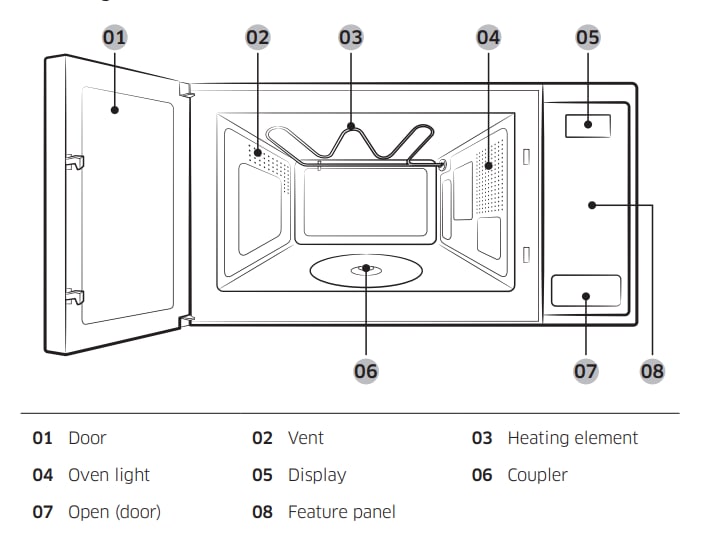
Microwave Timer Or Clock Issues
Microwave timer or clock problems can stop your microwave from working right. These issues can cause the timer to freeze, reset randomly, or not show the time at all. Such problems affect your cooking and make it hard to use the microwave properly. Simple steps often fix these common faults quickly.
Reset The Timer
Try resetting the microwave timer first. Press the clear or stop button to cancel the current setting. Then, set the timer or clock again following the microwave’s manual. This can fix minor glitches and restore normal function. A reset often solves frozen or stuck timers fast.
Check For Power Interruptions
Power cuts can cause the timer to lose settings or stop working. Make sure the microwave is plugged in securely. Check your home circuit breaker for any tripped switches. If power cuts happen often, the timer may need resetting each time power returns.
Replace The Control Board
The control board controls the timer and clock functions. Faulty boards cause persistent problems with time settings. If resets and power checks do not help, the control board might need replacement. A new board often fixes deeper electronic issues and restores full microwave control.
Preventive Tips For Microwave Care
Taking care of your microwave can extend its life and keep it working well. Small habits help prevent common problems. Simple steps protect your appliance and save repair costs. Follow easy tips to keep your microwave safe and clean.
Regular Cleaning
Wipe the inside of the microwave after each use. Use a soft cloth and mild soap. Avoid harsh chemicals that can damage the surface. Clean spills quickly to stop stains and odors. A clean microwave heats food evenly and works better.
Avoid Metal Inside
Do not put metal objects or foil inside the microwave. Metal reflects microwave energy and causes sparks. Sparks can damage the microwave or start a fire. Always check containers before microwaving. Use only safe materials to avoid accidents.
Use Microwave-safe Containers
Choose containers labeled microwave-safe for heating food. Some plastics can melt or release harmful chemicals. Glass or ceramic containers are usually safe options. Avoid using containers with metal trims or decorations. Safe containers help food heat evenly and keep you safe.

Frequently Asked Questions
Why Is My Microwave Not Heating Food Properly?
The microwave might have a faulty magnetron or door switch. Check if the food heats unevenly or not at all. Repairs usually need a professional technician.
How To Fix A Microwave That Won’t Start?
Ensure the door is fully closed and the power cord is plugged in. A blown fuse or faulty control board can also stop it from starting. Testing parts safely is best left to experts.
What Causes A Microwave To Make Loud Noises?
Loud noises often come from a broken turntable motor or magnetron. Loose parts inside can also cause noise. Turn off the microwave and inspect it carefully.
Why Does My Microwave Turn Off Mid-cycle?
This might happen due to overheating or a faulty door switch. Some microwaves have safety features that stop them if they get too hot. Let it cool and try again.
How Do I Reset A Microwave After A Power Outage?
Unplug the microwave for a few minutes to reset the control panel. Plug it back in and set the clock. This usually clears error codes after power loss.
Conclusion
Microwave problems can be fixed with simple steps. Check power supply and door latch first. Clean the inside regularly to avoid issues. Listen for strange noises or sparks during use. Remember safety: unplug before any repair attempt. Small fixes save time and money.
Stay calm and follow these tips carefully. Your microwave can work well again soon. Keep this guide handy for quick help. Troubleshooting does not need to be hard. You can handle common microwave issues easily.