Is your AC not cooling like it used to? Or maybe the temperature in your room feels off even though the thermostat shows the right setting?
If you’re facing issues with your AC thermostat, you’re not alone—and the good news is, many of these problems are easier to fix than you might think. Understanding how to troubleshoot your AC thermostat can save you time, money, and a lot of frustration.
Keep reading, and you’ll discover simple steps you can take right now to get your cooling system back on track.
Common Thermostat Issues
Thermostats control your AC to keep your home comfortable. Sometimes, they stop working properly. Common issues can cause your system to act strangely. Understanding these problems helps you fix them fast. Here are some frequent thermostat troubles you may face.
Thermostat Not Responding
A thermostat that won’t respond can be frustrating. It might not turn on or change settings. Often, dead batteries cause this issue. Loose wiring or a blown fuse also stop the thermostat. Check power sources first to solve this problem quickly.
Inaccurate Temperature Readings
When the thermostat shows wrong temperatures, your AC runs too much or too little. Dust or dirt on sensors can cause wrong readings. Placing the thermostat near heat sources or sunlight also leads to errors. Cleaning the device and moving it helps keep readings correct.
Display Problems
Faded or blank displays make it hard to use your thermostat. Low batteries are often the cause. Wiring issues or a broken screen might also affect the display. Replace batteries or check connections to restore clear visibility.
Basic Troubleshooting Steps
Basic troubleshooting steps help fix common AC thermostat problems. These steps are simple and easy to follow. They can save time and money before calling a technician.
Start with the power supply to ensure the thermostat has electricity. Next, reset the thermostat to clear any errors. Finally, inspect wiring connections for loose or damaged wires.
Check Power Supply
Confirm the thermostat is getting power. Look at the circuit breaker or fuse box for tripped switches. Replace batteries if your thermostat uses them. No power means the thermostat cannot control the AC.
Reset The Thermostat
Turn off the thermostat for a few minutes. Then, turn it back on to reset the system. This step clears minor glitches that may stop the AC from working properly. Follow the manufacturer’s instructions for a proper reset.
Inspect Wiring Connections
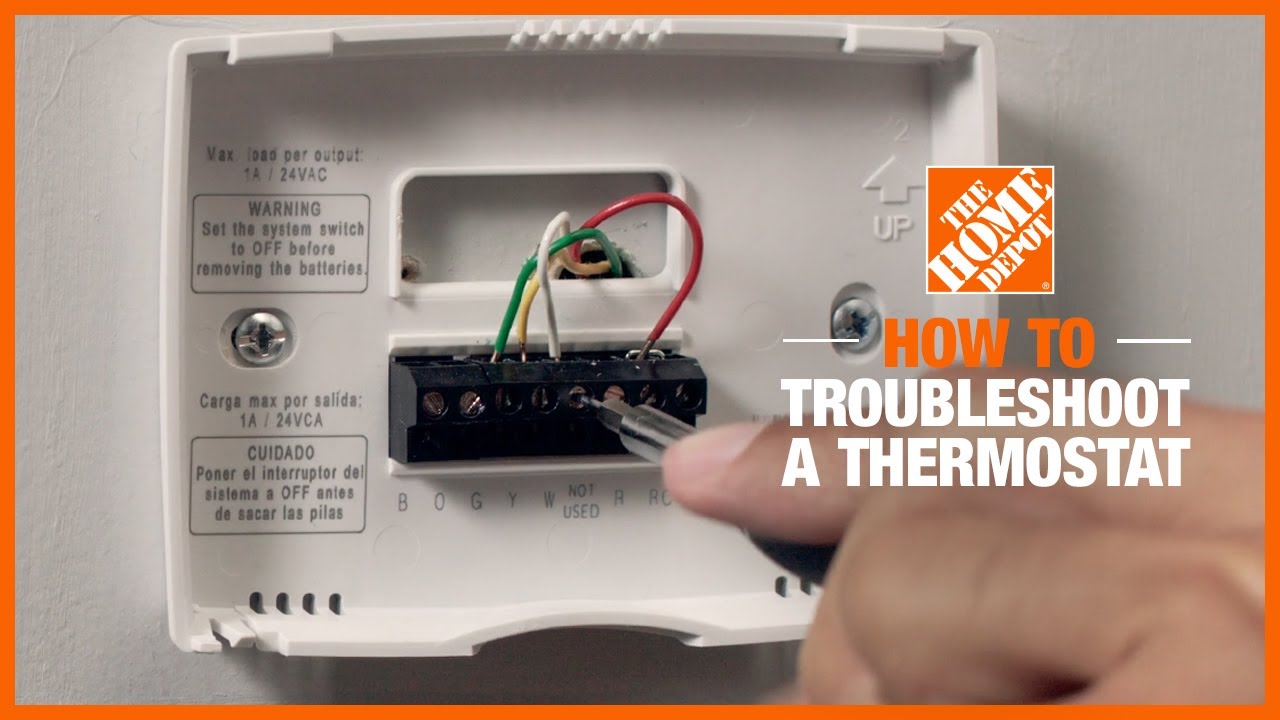
Remove the thermostat cover carefully. Check for loose or disconnected wires. Tighten any loose connections but do not force wires. Damaged wires need professional repair. Proper wiring ensures the thermostat communicates with the AC system.
Thermostat Settings To Check
The thermostat controls your AC’s performance. Checking its settings can solve many problems. Simple mistakes in settings cause the AC not to work properly. Below are key thermostat settings to review before calling a technician.
Correct Mode Selection
Thermostats have different modes: cool, heat, fan, or off. Choose the “cool” mode to start the AC. Sometimes the thermostat stays on “heat” or “fan” by mistake. This stops the AC from cooling your room. Verify the mode is set to cool for proper operation.
Temperature Calibration
Set the thermostat temperature below the current room temperature. If set too high, the AC will not turn on. Adjust the temperature in small steps to check responsiveness. Some thermostats need recalibration if they show wrong temperatures. Use a separate thermometer to compare and adjust the thermostat reading.
Fan Settings
Fan settings control air movement. “Auto” mode runs the fan only when cooling. “On” mode runs the fan continuously. Running the fan nonstop can waste energy and reduce cooling efficiency. Choose “auto” for best results. Check this setting if the fan runs but the room stays warm.

When To Replace Batteries
Batteries in an AC thermostat play a key role in its proper functioning. Knowing when to replace them helps avoid sudden interruptions. Weak batteries can cause your thermostat to lose settings or stop working. Regular checks keep your system running smoothly and save you from unexpected issues.
Battery Life Indicators
Most thermostats show a low battery warning on the display. This alert appears as a blinking icon or a message. Some models beep or flash a light to signal battery replacement. If the screen fades or buttons stop responding, the batteries might be dead. Checking these signs early prevents complete failure.
Replacing Batteries Safely
Turn off your thermostat before replacing the batteries. Use the correct battery type recommended by the manufacturer. Remove old batteries carefully to avoid damage or leaks. Insert new batteries with the right polarity, usually marked inside the compartment. After replacement, check if the display returns to normal and settings stay saved.
Advanced Troubleshooting Tips
Advanced troubleshooting helps find hidden problems in your AC thermostat. Basic checks might miss small issues. These tips dig deeper to solve tough problems.
Examining The Circuit Board
Start by opening the thermostat carefully. Look for burnt marks or broken parts on the circuit board. Dust or dirt can cause poor connections. Clean the board gently with a soft brush. Check if any wires are loose or disconnected. Tighten or reconnect them as needed. A damaged circuit board often needs replacement.
Testing The Thermostat Sensor
The sensor tells the thermostat the room temperature. A bad sensor gives wrong readings and causes poor cooling. Use a multimeter to test the sensor’s resistance. Compare the readings to the manufacturer’s guide. If the sensor is out of range, replace it. Sensors are usually easy to swap out.
Checking For Software Updates
Many modern thermostats use software to work properly. Outdated software can cause glitches or errors. Check the thermostat’s settings menu for update options. Connect the device to Wi-Fi if needed. Follow the instructions to download and install updates. Updated software can improve performance and fix bugs.
Preventive Maintenance Tips
Keeping your AC thermostat in good shape prevents many common problems. Simple steps can save you time and money on repairs. Regular care improves the system’s performance and comfort.
Regular Cleaning
Dust and dirt can block your thermostat sensors. Wipe the surface gently with a soft cloth every few weeks. Keep the area around the thermostat clear of debris. Clean sensors help the thermostat read temperatures correctly.
Seasonal Checks
Before summer or winter, test your thermostat settings. Make sure it switches between heating and cooling smoothly. Replace batteries if your thermostat uses them. Check for any unusual noises or errors on the display.
Professional Inspections
Have a technician inspect your thermostat yearly. Experts find hidden issues and fix them early. They can also update your system for better efficiency. Scheduling inspections keeps your AC running longer and saves money.
When To Call A Technician
Knowing when to call a technician for your AC thermostat saves time and money. Some problems need expert care to avoid damage or safety risks. Recognizing these signs helps you act fast and keep your home comfortable.
Signs Of Major Malfunctions
Your thermostat may show major issues if the AC does not turn on or off. Constantly fluctuating temperatures can mean sensor or wiring problems. A display that is blank or shows error codes also signals trouble. Strange noises or smells near the thermostat need immediate attention. These signs mean the problem is beyond simple fixes.
Safety Considerations
Thermostat issues can cause electrical hazards or even fires. Avoid touching wires or opening the thermostat casing yourself. If you smell burning or see smoke, turn off power at the breaker. Call a professional right away for safe repairs. Protecting your home and family comes first with thermostat problems.

Frequently Asked Questions
How Do I Reset My Ac Thermostat?
To reset your AC thermostat, turn it off and remove the batteries. Wait for one minute, then replace the batteries and turn it back on. This often clears simple errors and restores normal function.
Why Is My Ac Thermostat Not Cooling Properly?
Poor cooling can be due to dirty filters, wrong thermostat settings, or low refrigerant. Check and clean filters, set the temperature lower, and call a technician if needed. These steps often fix the problem quickly.
How Can I Tell If My Thermostat Needs Replacement?
Signs include inaccurate temperature reading, unresponsive controls, or constant cycling. If your thermostat is old and these issues persist, it might be time to replace it. A new thermostat improves comfort and efficiency.
What Causes My Ac Thermostat To Show The Wrong Temperature?
Wrong readings may come from poor placement, direct sunlight, or electrical issues. Move the thermostat away from heat sources and check wiring if needed. Correct placement ensures accurate temperature control.
How Do I Troubleshoot A Thermostat That Won’t Turn On?
Check if the thermostat has power by inspecting batteries or circuit breakers. Clean any dust around the unit and ensure it’s properly connected. These steps often solve the power issue quickly.
Conclusion
Troubleshooting your AC thermostat can save time and money. Start by checking the batteries and settings. Clean the thermostat to avoid false readings. Ensure the wiring is secure and undamaged. Resetting the thermostat might fix simple errors. If problems persist, call a professional technician.
Regular maintenance helps keep your AC running smoothly. Small steps make a big difference in comfort and energy use. Stay calm and follow these easy tips for better cooling. Your home will feel cooler and more comfortable soon.