The most common way to perform defiant 180 motion security light troubleshooting is to verify the power supply and clean the motion sensor lens. If your light fails to turn on or stays on constantly, the issue is usually a tripped circuit breaker, a loose wire connection, or a dirty sensor cover. You should first check your home’s electrical panel for any tripped breakers before attempting any other adjustments. If the breaker is fine, the sensor lens likely has dust or debris blocking its view.
Causes of Defiant 180 motion security light failure
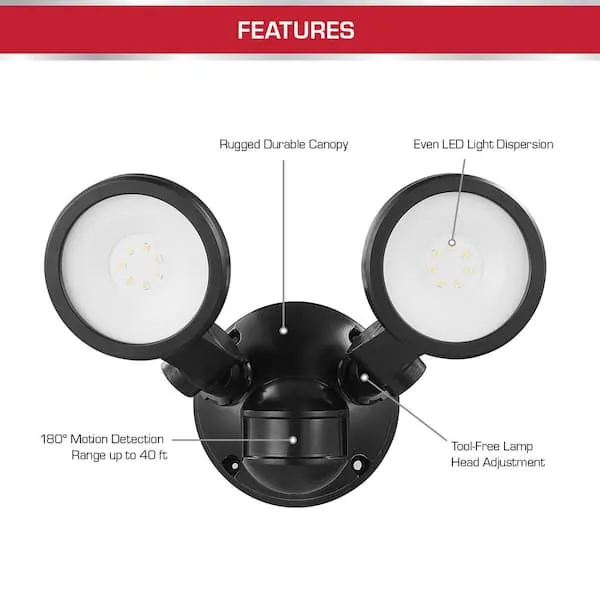
The primary cause of sensor failure is often environmental interference or simple lack of maintenance. Motion sensors work by detecting changes in infrared energy, which means anything that blocks the sensor or creates false heat signatures will cause erratic behavior. If your light stays on, it might be detecting heat sources like a vent, a nearby tree branch moving in the wind, or even a small animal.
Another frequent cause is improper sensitivity settings. If the range is set too high, the sensor might catch movement from a busy street or sidewalk, causing it to trigger constantly. Conversely, if the sensitivity is too low, it will only trigger when someone is standing directly under the unit. You can adjust these settings using the dials usually found on the underside of the sensor head.
Finally, internal electrical issues often stem from moisture. Outdoor fixtures are prone to water buildup if the gaskets are worn or the installation isn’t sealed correctly. If water enters the housing, it can corrode the internal contacts. If you notice signs of water inside the unit, you should stop using it immediately to avoid a shock hazard. For specific safety standards regarding outdoor lighting installations, you can consult the National Electrical Code guidelines.
Safety: Inside a mains-powered machine, the parts behind the outer cover can hold a dangerous electrical charge even after it has been unplugged — that’s why they sit behind a cover. Opening the housing, or testing or replacing anything behind it, is a job for a qualified technician, never a home repair.
Check the power source
You must first ensure the light is actually receiving electricity before assuming the unit is broken. Start by looking at your home’s main breaker panel to see if the switch labeled for your outdoor lights has tripped. If it has, flip it back to the “on” position. If it trips again right away, you have a short circuit, and you should call a licensed electrician.
Check the wall switch that controls the light as well. Sometimes, a switch can be bumped into the off position without you noticing. If the switch is on but the light remains dark, verify that the bulb is screwed in fully. If you’re using an LED bulb, ensure it’s rated for outdoor use, as standard indoor bulbs can fail quickly when exposed to temperature changes.
If the power is present at the wires but the light still fails, the internal control module is likely faulty.
Adjust the sensitivity and range
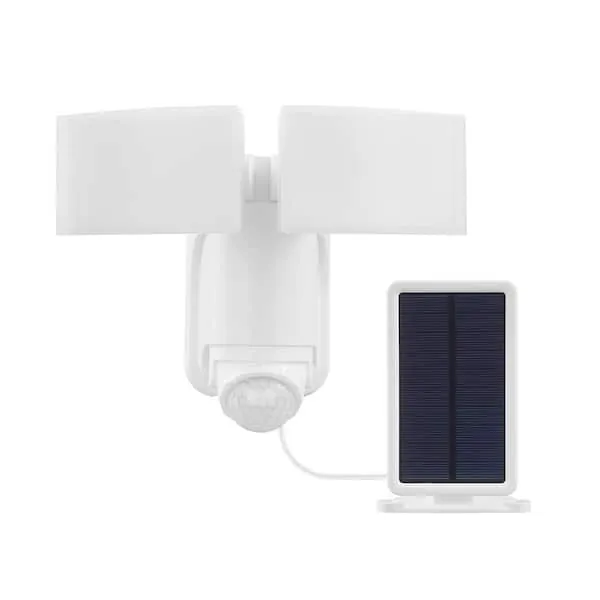
If your light turns on randomly, you need to recalibrate the sensitivity dial on the sensor. Most units have two or three dials: one for sensitivity, one for the time duration, and sometimes one for light level. Start by turning the sensitivity dial to the lowest setting and slowly increase it until it triggers only when you walk into the desired zone.
The range varies based on the mounting height; a higher mount generally provides a wider detection area but reduces the sensor’s ability to detect movement directly below it. If you have the sensor mounted at 8 feet, it will perform differently than one mounted at 10 feet. Check your specific manual for the recommended height, as this is the one factor that changes the effective coverage area for every installation.
If the light stays on for too long, adjust the “time” dial. This dial dictates how many seconds or minutes the light stays active after the last motion is detected. Moving this dial toward the “test” or “short” position will reduce the duration. If the dial is already at the minimum and the light still stays on, the sensor is likely picking up a constant heat source.
Clean the sensor lens
Debris on the sensor lens is a frequent cause of unresponsive behavior. Over time, bugs, spider webs, and dust build up on the plastic cover, which weakens the sensor’s ability to detect infrared heat. You should clean the lens using a soft, dry cloth. Never use harsh chemicals or abrasive sponges, as these can scratch the plastic and permanently damage the sensor’s sensitivity.
If cleaning doesn’t resolve the issue, check for physical obstructions. Ensure that no large shrubs or hanging decorations are blocking the field of view. If you have a porch light nearby, it might be causing interference with the sensor’s ability to distinguish between ambient light and motion. If the light is positioned too close to a bright constant light source, it may think it’s daytime and refuse to activate.
This repair is ideal for those who notice the light is only partially responsive or slow to trigger. If you clean the lens and remove all nearby obstructions but the light still doesn’t work, the sensor itself may have reached the end of its functional life. In such cases, replacing the entire fixture is usually more cost-effective than trying to repair internal components.
What not to do with security lights
- Don’t spray the motion sensor with water or glass cleaner, as liquid can seep inside the casing and cause a short circuit.
- Don’t try to force the adjustment dials past their stopping points, as they’re fragile and will snap easily if handled with too much pressure.
- Don’t attempt to bypass the internal wiring to keep the light on permanently, as this creates a fire hazard and voids any existing product warranty.
- Don’t use standard household tools to pry open the sealed sensor housing, because you risk damaging the internal seals which keep the unit weather-resistant.
Managing your motion sensor settings
| If you’re doing this | Do this instead | Why |
|---|---|---|
| Pointing sensor at trees | Point sensor toward the ground | Trees move and create false triggers |
| Using high sensitivity | Start at low sensitivity | High settings cause random activations |
| Leaving lens dirty | Wipe with a dry cloth | Dirt blocks the infrared signal |
| Installing near bright lights | Move or shield the sensor | Light sensors detect the neighbor’s porch |
Most users make the mistake of mounting sensors at eye level. This forces the device to scan a wide horizon, which inevitably catches passing cars or swaying branches. Instead, mount the unit roughly seven feet high and angle it downward at a 15-degree tilt. This creates a focused detection cone that ignores distant motion.
If your sensor triggers during heavy rain or wind, your sensitivity is likely set too high. Start at the lowest setting and trigger the device yourself by walking through the zone. Only increase the sensitivity by one notch if the sensor fails to detect your movement.
Finally, check the “on-time” duration. If you set it for longer than two minutes, you’ll waste electricity and potentially annoy neighbors. Use a 30-second window for high-traffic areas like doorways and a 60-second window for driveways.
Frequently asked questions
Can I replace just the sensor on my light?
No, most security light sensors are integrated into the fixture and can’t be replaced separately. If the sensor fails, you must replace the entire unit. Some high-end commercial models allow for sensor swaps, but this is rare for standard consumer-grade versions.
How long should the light stay on?
The light can be set to stay on for anywhere from 30 seconds to 10 minutes. This duration is determined by the position of the “time” dial on the underside of the sensor. Turn the dial toward the minimum or maximum setting to adjust the duration.
Is it safe to fix a light in the rain?
No, you should never attempt to troubleshoot an outdoor light while it’s wet. Water is an excellent conductor of electricity, and working on a wet fixture significantly increases your risk of electrical shock. Wait for a dry day to perform any maintenance.
Why does my light stay on all day?
Your light is likely in “manual override” mode or the light level sensor is misconfigured. Many models enter manual mode if you flip the wall switch rapidly. Reset this by turning the indoor wall switch off for 30 seconds before turning it back on.
How often should I clean the sensor?
Clean the sensor lens whenever you notice debris or dust buildup to ensure it remains free of obstructions. Dust and spider webs can interfere with performance. Simply wipe the lens with a dry, lint-free cloth to maintain the sensor’s functionality.
What happens if I use a non-dimmable bulb?
Using a non-dimmable bulb in a motion-sensing fixture often causes the light to flicker or fail. Many motion sensors require specific bulb types to function correctly, as some LED bulbs can interfere with the sensor’s internal circuitry. Swap the bulb for a dimmable LED to resolve these issues.
Conclusion
If you have performed these checks and the light still doesn’t function, the internal electronics have likely failed. When a unit is beyond simple maintenance, it’s time to look for a replacement fixture that matches your current mounting bracket to make the installation process easier.
Related guides