To fix a signal interruption caused by directv troubleshooting 775, you must ensure the power inserter is plugged into a wall outlet and the green light is active. This error code indicates that the receiver isn’t communicating with the satellite dish because the power supply, which pushes electricity up the cable to the dish’s internal electronics, has failed or become disconnected. If the power inserter is plugged in but the light is off, the unit itself likely needs replacement.
Why the satellite signal is failing
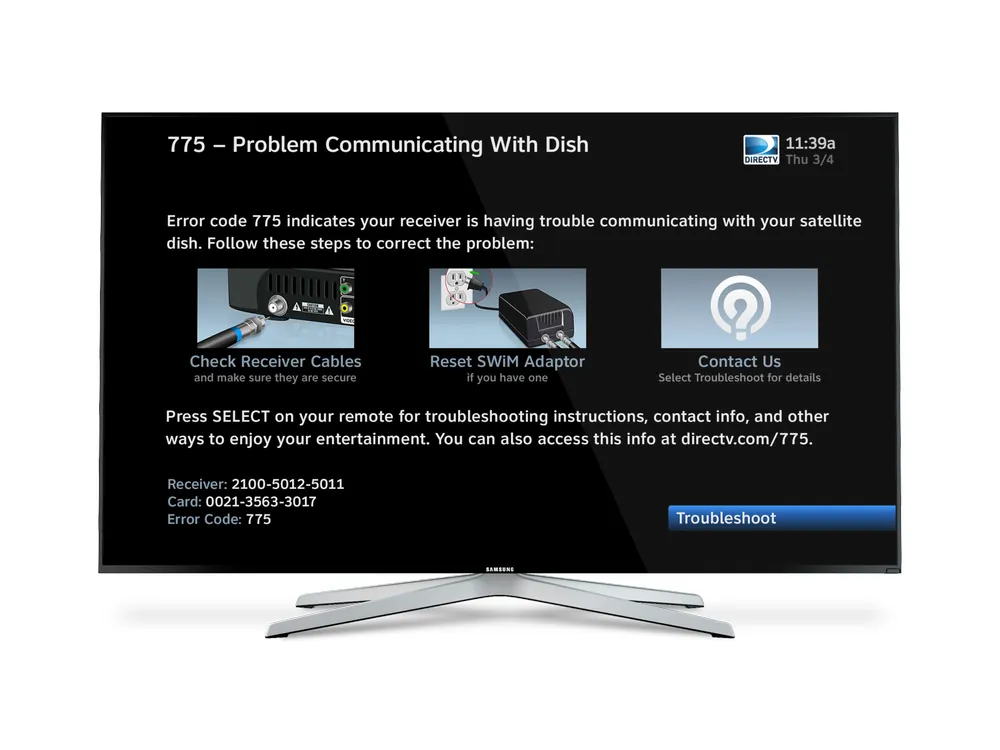
The primary cause of this error is a loss of power to the satellite dish’s Low Noise Block (LNB) converter. Your system relies on a power inserter to send electricity through the coaxial cable to the dish. If this voltage doesn’t reach the LNB, a technician must inspect the connection to restore the signal.
Another common reason is a loose or damaged cable connection between the wall plate and the receiver. If the coaxial cable is bent, frayed, or simply unscrewed, the electrical current can’t travel the path it needs to stay active. Even a small gap in the connection can drop the voltage enough to trigger a failure.
Finally, some power inserters fail due to age or power surges. If the device was connected to a wall outlet that experienced a spike, the internal components might have burned out. You can verify this by looking at the power inserter box; if the official DirecTV support guidelines show a solid green light, the unit is functioning. If there’s no light at all, the unit isn’t receiving power from your home or the unit has suffered an internal hardware failure.
Tighten your coaxial cable connections
Check every cable connection starting from the back of your receiver all the way to the wall plate. A loose connector is often the culprit because the power inserter needs a solid metal-to-metal contact to push the voltage through the cable. Grip the round connector at the end of the cable and turn it clockwise with your fingers until it’s snug.
Don’t use pliers to tighten these connectors, as you might strip the threads or damage the delicate center pin. If you find a cable that looks frayed or has a bent center copper wire, that cable must be replaced with a standard RG6 coaxial cable. Once you have confirmed every connection is tight, wait about 60 seconds to see if the receiver clears the error code automatically.
If you’re renting your home or aren’t comfortable working with wall-mounted cabling, contact your property manager or a professional installer. Any attempt to modify the wiring inside the wall can lead to further signal loss or damage to your equipment.
A common mistake is assuming the connection is secure simply because it feels firm to the touch. If the signal remains intermittent, perform the “wiggle test” while the device is powered on. If the picture flickers or the error code shifts when you touch the cable, the internal shielding is likely compromised. In that case, the connector itself is faulty and requires a full replacement rather than just a tightening.
If you have a multi-room setup, prioritize the primary splitter located in your attic or basement. These junctions are prone to oxidation over time. If the metal surfaces look dull or discolored, use a dry cloth to wipe them clean before reattaching. This simple maintenance step often restores signal integrity that tightening alone can’t fix.
Resetting the power inserter for DirecTV 775
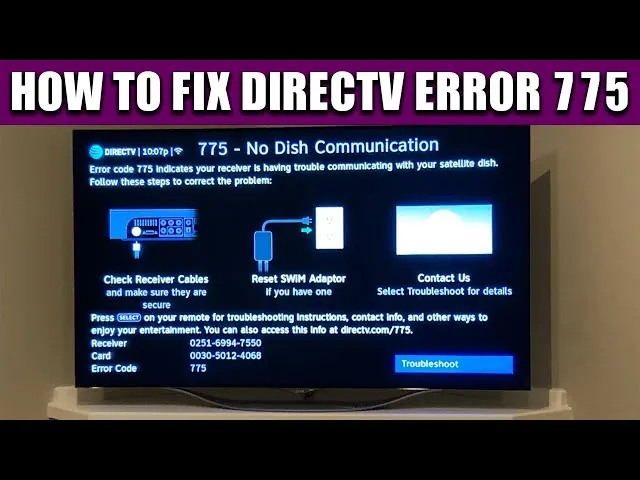
Locate the black power inserter box, which is usually a small, separate device plugged into a standard wall outlet near your equipment. Unplug the power cord from the wall outlet and wait at least 30 seconds before plugging it back in. This simple power cycle often resets the internal circuit and restores the flow of electricity to the dish.
Watch the LED light on the front of the device as it powers up. If the light remains off after you plug it back in, try moving the power cord to a different wall outlet that you know is working. If the light stays off even in a different outlet, the power inserter is likely broken and requires a replacement.
This fix is intended for users who have direct access to their power equipment. If your power inserter is located in an attic, crawl space, or on the roof, don’t attempt to reach it yourself. These areas present significant fall risks, and you should call a certified technician to handle the hardware instead.
Inspect the equipment for damage
Examine the power inserter and the coaxial cables for signs of physical damage, such as bite marks from pets, crushing from furniture, or water exposure. If you see any exposed copper shielding or the outer jacket of the cable is sliced, the signal path is compromised. Water inside the cable will corrode the wire, creating high resistance that prevents the power inserter from functioning.
This step is for identifying when you need to stop troubleshooting and call for support. If you see signs of water damage, such as rust on the connectors or discoloration on the cable jacket, the issue is likely outside your home. You shouldn’t attempt to repair damaged outdoor cabling yourself, as this requires specialized weatherproofing tools to prevent moisture from entering the system again.
Professional installers use a signal meter to verify the exact voltage reaching the dish. If you have checked your cables and the power inserter is plugged in but the error persists, the issue might be a faulty LNB on the dish itself. A technician has the climbing gear and diagnostic tools to test the LNB safely and replace it if necessary.
Avoid common repair mistakes
Avoid replacing the receiver first: Many people assume the receiver is broken, but the 775 code almost always points to the power supply or the cable path. Replacing the unit costs you an unnecessary shipping fee and hours of setup time. Always test the power inserter at a different outlet before assuming the hardware itself has failed.
Don’t use splitters: Never add an extra cable splitter to the line. These devices block the voltage from the power inserter and keep the error active. If you have an existing splitter in your wall, bypass it with a direct barrel connector to verify if the signal improves.
Avoid over-tightening: Using tools to force a connection causes the center pin to break. This permanently ruins the cable or the port on your device. Finger-tight is sufficient; if the connection feels loose, check for debris rather than reaching for a wrench.
Don’t bypass the power inserter: The dish requires external power to operate. Connecting the receiver directly to the dish will result in a total signal loss. Ensure the power inserter is plugged into a wall outlet, not a power strip that might be switched off.
Prevent future signal interruptions
| If you’re doing this | Do this instead | Why |
|---|---|---|
| Leaving cables loose | Hand-tighten all connections | Ensures constant voltage flow |
| Using old, thin cables | Use high-quality RG6 cable | Prevents signal drop and corrosion |
| Blocking the air vent | Keep equipment in open air | Prevents overheating and hardware failure |
| Putting cables under rugs | Run cables along the wall | Protects the wire from being crushed |
Most users ignore the “f-connector” at the back of the device. If you can turn the nut with your fingers, your connection is too loose. A loose connection creates micro-arcing, which degrades your signal quality over time.
If you see pixelation on high-definition channels but not standard ones, your signal strength is likely too low.
Avoid “daisy-chaining” splitters, as each additional splitter significantly degrades signal strength. If you have more than three devices, install a powered distribution amplifier instead of a passive splitter. This simple swap prevents the intermittent signal drops that plague most multi-room setups.
Frequently asked questions
Can I fix a 775 error without calling a professional?
You can fix most 775 errors by ensuring your power inserter is plugged into a wall outlet and all coaxial cables are hand-tight. Power cycling the inserter often restores the connection if the light is off. If these steps fail, a damaged cable or external component likely requires a professional service visit.
How long does it take for the signal to return after a reset?
The system usually takes about 3 to 5 minutes to re-establish a link with the satellite once you have restored power. After you plug the power inserter back in, the receiver will run a series of diagnostic checks to confirm it can talk to the dish. If you don’t see the picture return within 10 minutes, verify that the green light on your power inserter is still solid.
Is it safe to unplug the power inserter?
Yes, it’s perfectly safe to unplug the power inserter from the wall outlet to perform a reset. It functions just like any other household appliance power cord and doesn’t carry enough current to cause injury. Always pull the plug by the head rather than the cord itself to prevent damaging the internal wires, and ensure your hands are dry before touching the outlet.
What happens if the power inserter light stays red?
A red light on many models indicates a power surge or a short circuit in the coaxial cable line. You should immediately unplug the device to prevent further damage to the electronics. Check the entire length of the cable for any kinks or cuts that might be causing a short, and if none are found, the power inserter itself has likely failed and needs to be replaced.
How do I know if the cable is the problem?
You can perform a visual inspection of the coaxial cable to see if the center copper pin is bent, broken, or missing. If the pin looks damaged, the cable can’t carry the voltage required to power the satellite dish. If the cable looks fine but you still have the 775 error, the problem might be a hidden break inside the wall or a failure at the dish itself.
Is the 775 error related to my internet connection?
No, the 775 error is strictly related to the satellite dish communication and has nothing to do with your home internet. While some newer DirecTV systems use the internet for on-demand features, the 775 code specifically means the receiver can’t talk to the dish because the power supply is failing. Troubleshooting your router or Wi-Fi won’t resolve this specific satellite signal issue.
Conclusion
If your system still shows the error after you have verified the power and tightened all connections, it’s time to contact the provider for a service appointment. They will send a technician to test the voltage levels at the dish and replace any damaged outdoor equipment.