The DonJoy IceMan Clear 3 is a sophisticated cold therapy unit designed to provide consistent cooling for post-surgical recovery or injury management. When you find yourself needing to perform donjoy iceman clear 3 troubleshooting, it usually involves addressing issues with water flow, pump noise, or temperature regulation. While these devices are built for durability, they rely on a precise balance of ice, water, and electrical power to function correctly. By understanding the mechanical requirements of the pump and the insulation needs of the cooling pad, you can often restore your device to full operation without professional intervention. This guide will walk you through the most common technical hurdles and provide actionable steps to ensure your recovery remains uninterrupted.
Key Takeaways
- Ensure the water level is consistently maintained between the fill lines to prevent pump damage.
- Check that all quick-connect fittings are fully seated until you hear an audible click.
- Clear air bubbles from the lines by elevating the cooler relative to the therapy pad.
- Clean the filter and intake screen regularly to maintain optimal water circulation.
- Verify that the power supply is firmly connected to both the wall outlet and the device.
Is My Cooler Flowing Properly?
The most common issue users encounter is a reduction or total loss of water circulation. If you feel the pad isn’t cooling, the first step is to inspect the quick-connect couplings. These connectors are spring-loaded; if they aren’t fully engaged, the internal valve will remain closed, preventing water from reaching the wrap. Push the connectors together until you hear a distinct click.
Additionally, verify that the internal hoses aren’t kinked. Because the IceMan Clear 3 relies on a gravity-assisted priming process, ensure the cooler is placed on a stable surface slightly higher than the treatment site. If the unit is sitting on the floor while you’re in a high bed, the pump may struggle to overcome the head pressure required to circulate the fluid effectively.
Why Is The Pump Noisy?
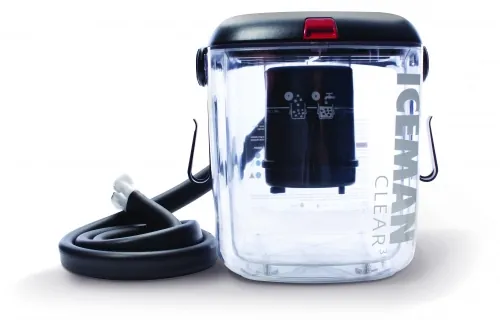
A loud or rattling pump is often a sign of air in the system or debris obstructing the intake. When the system is first set up, or if the water level drops too low, air becomes trapped in the impeller housing. To resolve this, gently rock the unit from side to side while it’s running to dislodge air pockets.
Warning: Never run the pump dry, as this can cause the motor to overheat and suffer permanent mechanical failure. If the noise persists, check the intake screen at the bottom of the cooler basin. Over time, small ice chips or debris can accumulate there, causing the pump to cavitate. Use a soft brush to remove any buildup from the screen to ensure the pump can pull water freely.
Managing Temperature and Ice Levels
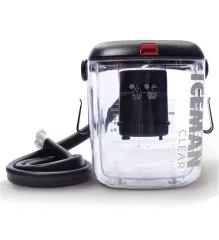
The IceMan Clear 3 is designed to provide consistent cooling, but its effectiveness depends heavily on the ratio of ice to water. To achieve the best results, fill the cooler with ice to the designated line, then add cold water until the water level reaches the inner fill line.
This creates a slurry mixture that maximizes surface area contact with the cooling coils. If you use only ice without water, the heat transfer will be significantly less efficient, leading to a warmer wrap.
| Component | Function | Maintenance Interval |
|---|---|---|
| Intake Screen | Filters debris | Every 2-3 uses |
| Quick-Connects | Facilitates water flow | Inspect before each use |
| Power Cord | Supplies electricity | Inspect for fraying monthly |
| Cooling Pad | Transfers cold therapy | Wipe down after each use |
How to Handle Leakage Issues

Leakage is rarely a result of a broken tank and almost always stems from the connection points. If you notice water pooling near the lid or the hose attachments, first inspect the O-rings inside the connectors. If these rubber seals are dry or cracked, they will fail to create a watertight seal. Applying a tiny amount of silicone-based lubricant can often restore the seal.
If the leak is occurring at the pad itself, inspect the fabric for punctures. According to the FDA Medical Device Reporting guidelines regarding cold therapy systems, users should immediately discontinue use if any part of the device shows signs of structural compromise or fluid leakage to prevent skin irritation or potential electrical hazards.
Addressing Power and Electrical Faults
If the unit fails to turn on entirely, start by checking the power supply connection. The IceMan Clear 3 uses a specific transformer; ensure you’re using the original manufacturer-supplied power cord. A loose connection at the wall outlet or the back of the device is a frequent culprit. If the power light doesn’t illuminate, try testing the outlet with another appliance to confirm the circuit is live.
Pro Tip: Use a surge protector to safeguard the unit’s sensitive electronic components from voltage spikes that can damage the internal control board during operation. If the unit has power but the motor remains silent, the internal fuse or the motor itself may have reached the end of its service life.
Cleaning and Maintenance Steps
Maintaining your device ensures it remains hygienic and functional throughout your recovery period. After every use, drain the unit completely. Stagnant water can lead to mold or bacterial growth within the hoses and the cooling pad. To clean the system, run a mixture of warm water and a mild, non-abrasive detergent through the unit for five minutes, then flush it with clean, cold water.
Avoid using harsh chemicals or bleach, as these can degrade the plastic housing and the internal rubber seals. Store the device in a cool, dry place with the lid slightly ajar to allow any remaining moisture to evaporate, preventing internal odor buildup.
Comparing Common Troubleshooting Scenarios
When you encounter a problem, identifying the symptoms quickly can save time and prevent further damage. The table below outlines common issues and their primary solutions to help you navigate the repair process.
| Symptom | Primary Cause | Recommended Action |
|---|---|---|
| No water flow | Air in lines | Elevate cooler; reconnect hoses |
| Loud pump noise | Debris or low water | Clean screen; add more water |
| Warm cooling pad | Poor ice-water ratio | Use 50/50 ice-water slurry |
| Leaking connectors | Worn O-rings | Lubricate or replace seals |
| Unit won’t start | Power supply issue | Check outlet and cable seating |
Managing Condensation and Moisture
Condensation is a natural byproduct of cold therapy and shouldn’t be mistaken for a leak. When cold water circulates through the pad in a warm room, moisture will collect on the exterior of the hose and the wrap. This is entirely normal. To manage this, you can wrap the hoses in a light towel or ensure the room is well-ventilated.
If the moisture becomes excessive, check the exterior insulation of your cooling pad. If the wrap feels saturated or heavy, it may be time to let it air dry completely before the next session. Don’t attempt to use the device if the electrical components have been exposed to significant amounts of condensation, as this could pose a safety risk.
Frequently Asked Questions
Why is my unit not cooling?
Your unit is likely not cooling because of an improper ice-to-water ratio. Ensure the basin is filled with ice to the top line and then filled with cold water to the inner line. Without the water, the ice can’t effectively conduct cold to the pump and through the hose system. Also, ensure the flow isn’t restricted by kinks in the tubing.
How often should I change the ice?
You should refresh the ice every four to six hours of continuous use to maintain the desired therapeutic temperature. As the ice melts, the water temperature will gradually rise, making the therapy less effective. For the best results, drain a portion of the water before adding fresh ice to ensure the basin doesn’t overflow and the temperature remains low.
Can I run the unit without water?
No, you must never run the unit without water. The pump relies on the water to act as a lubricant and a coolant for the motor. Running the device dry will cause the pump to overheat, leading to mechanical failure and potentially damaging the internal electrical components. Always verify that the water level is clearly above the intake screen before turning the device on.
What should I do if the hose is leaking?
First, disconnect the hose and check the O-ring for debris or damage. If the O-ring is intact, try re-seating the connector firmly. If the leak is coming from a puncture in the hose itself, the hose assembly likely needs to be replaced. Avoid using tape or adhesives to fix leaks, as these are temporary and can lead to larger spills during operation.
How do I store the device long-term?
For long-term storage, drain all water from the cooler and the cooling pad. Run the pump for thirty seconds to ensure the internal lines are as dry as possible. Wipe the interior of the basin with a clean, dry cloth and leave the lid open for several hours to ensure complete evaporation. Store in a cool, dry environment away from direct sunlight to preserve the plastic parts.
Conclusion
Maintaining your DonJoy IceMan Clear 3 through consistent inspection and proper water management will ensure that your recovery process remains efficient and comfortable. By addressing minor issues like air bubbles or connection alignment early, you prevent unnecessary stress on the motor and extend the lifespan of your device. If you encounter persistent mechanical failures, consult the manufacturer’s official documentation or contact their support team for further assistance.