
If your DeWalt table saw fails to start, check the power supply, the reset button, or the blade guard alignment. The most common cause is a tripped circuit breaker or a loose connection. Always disconnect the machine from the power source before inspecting any part to ensure your safety.
Fixing Dewalt table saw power problems
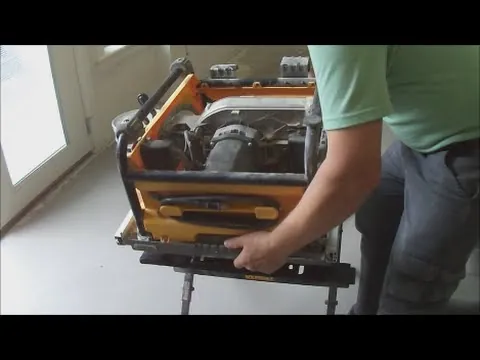
When the saw loses power during a cut, the cause is frequently an overloaded circuit or a buildup of sawdust inside the switch mechanism. Many saws have a thermal overload protector that shuts the motor down if it gets too hot from heavy use.
If the motor stops, wait at least 5 minutes for the internal components to cool down before you attempt to press the reset button. You can find the reset button on the motor housing, usually near the power cord entry point.
Another frequent problem involves the blade stalling while cutting dense hardwoods. This happens when the feed rate is too fast or the blade is dull, causing the motor to struggle. If you notice a burning smell or the motor slows significantly, stop pushing the wood immediately.
Check your DeWalt product manual for the recommended blade types for specific wood densities. If the motor hums but the blade doesn’t turn, the internal drive belt may be broken or slipping, which requires a professional service center to open the housing and replace the belt.
Adjusting the Blade for Accurate Cuts
If your cuts aren’t square or the blade is drifting, you need to check the alignment of the blade to the miter slot. Most inaccuracies come from the blade not being parallel to the fence or the table surface. First, ensure the saw is unplugged. Use a combination square to measure the distance from the front of the blade tooth to the miter slot, then rotate the blade and measure the same tooth at the back of the slot.
If these two measurements differ by more than 0.01 inches, you must adjust the trunnion bolts. These bolts hold the blade assembly to the table frame and allow for fine-tuning. This process requires patience, as moving one bolt often shifts another.
A common mistake is tightening the bolts fully before checking the alignment again. This causes the assembly to shift back into its original, incorrect position. Always snug the bolts just enough to hold the assembly, verify your measurement, and then torque them down in small, incremental steps.
If you’re unsure whether your trunnions are the issue, check if the blade is square to the table at 90 degrees. If the blade is square but still drifts, the trunnion alignment is the culprit. If the blade itself isn’t square to the table, adjust the bevel stop first. If you’re uncomfortable loosening internal structural bolts, take the saw to a repair shop. This avoids misaligning the entire motor assembly.
Clearing Obstructions in the Dust Port
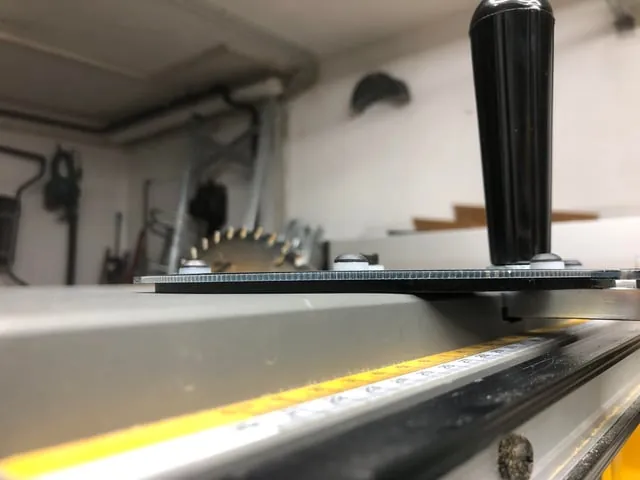
A clogged dust port is a common culprit when the saw kicks back or produces excessive vibration during operation. When sawdust accumulates around the blade throat or underneath the table, it prevents the blade from moving freely and can cause the motor to labor. You should vacuum out the throat plate area after every major project to ensure the internal components remain free of debris.
To clear the path, remove the throat plate using the provided key and inspect the area beneath the blade. If you see packed sawdust, use a shop vacuum to pull it out. Never use a metal tool to scrape near the motor or wiring, as this could damage internal insulation.
A common mistake is using compressed air to blow out the dust. This often forces fine particles deeper into the motor housing, which can cause premature electrical shorts. Always use a vacuum with a HEPA filter instead.
If you still hear a grinding noise after cleaning the area, the arbor bearings might be worn out. You can distinguish a bearing failure from a clog by checking for blade play: if the blade wobbles laterally while locked, the bearings are failing. Bearing replacement is a specialized task that requires removing the motor assembly. You should contact a professional if the noise persists or if you detect this mechanical play.
Troubleshooting Motor and Blade Performance
When the saw fails to reach full speed or produces excessive vibration, the problem often lies in the drive system or the blade mounting. A loose arbor nut can cause the blade to wobble, creating a dangerous situation and poor cut quality. Always check that the blade is seated properly against the inner flange before tightening the nut with the provided wrenches.
If the vibration continues, inspect the blade itself for missing teeth or warped metal. A bent blade will cause the saw to shake regardless of how well the motor is running. To test for flatness, lay the blade on a known level surface like a granite countertop. If you can slide a feeler gauge thicker than 0.005 inches under any edge, the plate is warped and requires replacement.
If the blade is flat and tight but the vibration remains, check the table surface for loose mounting screws. A loose table causes the unit to move under load, leading to inaccurate cuts. If you notice the motor sounds uneven or creates a metallic rattling, the internal cooling fan might be blocked. Clear any sawdust buildup from the intake vents to prevent the thermal overload switch from tripping during prolonged use.
Avoiding Common Maintenance Pitfalls
Don’t use water or wet rags to clean the interior of the saw. Moisture corrodes electrical contacts and triggers internal shorts that permanently disable the motor. Use a dry vacuum only.
Never bypass the blade guard or anti-kickback pawls. These components are engineered to engage in milliseconds during a bind. Removing them turns a minor snag into a high-velocity kickback event.
Avoid forcing a dull blade or one with an incorrect tooth count for your specific motor. This creates excessive heat buildup. If you notice the motor whining or smelling like ozone, stop immediately; ignoring this sign often leads to a total burnout that costs more than the saw itself.
Don’t overtighten the arbor nut. Use only firm hand pressure with the provided wrench. Overtightening strips the threads or warps the blade washer. If the nut requires a hammer or cheater bar to remove, you have already damaged the assembly, making future blade changes impossible.
Maintaining Your Table Saw Properly

Keeping your saw in top shape requires a regular schedule of cleaning and alignment checks. You should adjust your maintenance frequency based on how often you work with resinous woods like pine, which create sticky buildup. If you notice the motor laboring or the wood burning, you’re likely overdue for a deep clean of the arbor and trunnions.
| If you’re doing this | Do this instead | Why |
|---|---|---|
| Using a dull blade | Sharpen or replace it | Dull blades cause motor strain |
| Ignoring sawdust buildup | Vacuum the throat plate | Dust causes heat and friction |
| Overtightening fences | Use light, firm pressure | Overtightening warps the rails |
| Leaving the saw outside | Store in a dry area | Humidity causes rust on steel |
Most operators make the mistake of ignoring the underside of the cabinet. Accumulated dust here creates a fire hazard and traps moisture against critical metal components. If your saw sits in an unheated garage, apply a thin coat of paste wax to the cast iron top every month. This simple step prevents oxidation that ruins smooth gliding for your workpieces.
Frequently asked questions
Why does my table saw keep tripping the breaker?
Your saw is drawing too much current, usually caused by using an inadequate extension cord. Use a 12-gauge or 10-gauge cord no longer than 50 feet. If the breaker still trips, the motor may have internal wear.
How do I know if the arbor bearings are bad?
You can identify bad bearings by a grinding noise when the motor spins or by excessive play in the blade. This isn’t a user-serviceable part requiring specialized tools. If you suspect bearing failure, take the unit to a certified service center.
Is it safe to use a table saw if the blade guard is missing?
No, it isn’t safe to operate the saw without the blade guard, as it protects you from contact and kickback. The guard is a critical safety component. If yours is broken or missing, order a replacement from the manufacturer before using the saw again.
How often should I check the blade alignment?
You should check the blade alignment whenever you notice the saw producing wavy or burnt cuts. Changes in temperature and heavy vibration can shift settings, so alignment frequency depends on your specific usage; consult your owner’s manual for the authoritative maintenance schedule.
What happens if I use a blade meant for a different saw?
Using an incompatible blade can cause severe vibration, unstable cuts, and potential damage to the arbor or motor. Always verify that the blade diameter and arbor hole size match the specifications listed in your owner’s manual. A blade that’s too large or too heavy will put unnecessary load on the motor, leading to faster wear and potential overheating. Stick to the manufacturer’s recommended blade sizes for the best performance.
How long should the motor last before it needs repair?
The motor lifespan depends on total hours of use and the hardness of the wood you cut. You can tell the motor is failing if it struggles to reach full speed or emits a burning smell. Avoid overloading the tool to extend its life.
Conclusion
If you’re still having trouble after checking these basics, don’t hesitate to reach out to a professional repair shop. They’ll have the right tools to get your equipment running smoothly again. It’s worth the investment to keep your workshop safe and productive, so you won’t have to worry about future projects.