To fix a table that won’t move or hold its height, you should perform drive medical overbed table troubleshooting by checking the tension knob and the release trigger. The most common cause for a table that slips or stays stuck is debris or a loose spring mechanism inside the column. If the table is brand new and remains stuck, check the shipping packaging for any plastic ties or locking pins that must be removed before use.
Fixing your overbed table height issues
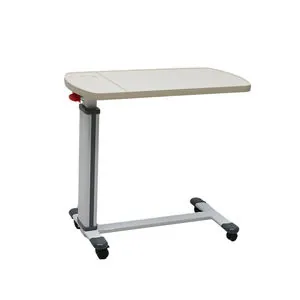
The primary reason for adjustment issues is a lack of tension in the internal spring or a buildup of dust within the sliding column. Most of these tables use a spring-loaded mechanism that relies on a specific amount of friction to lock the top in place.
When the internal spring loses its recoil, the table top will drop even when you have tightened the knob. Conversely, if the column is dirty, the friction lock may become stuck, making it feel like the lever is disconnected.
Another common cause is the improper tightening of the adjustment knob. If the knob is only turned halfway, the internal plate doesn’t grab the vertical column, causing the table to slide down under light pressure. To test this, tighten the knob until you feel firm resistance, then turn it one additional quarter-turn. If the table still slips, the internal friction plate is likely worn down and requires replacement.
You can verify the load capacity for your specific model by checking the official product specifications provided by the manufacturer. If you’re using the table for items heavier than the rated limit, the locking mechanism will eventually fail to hold the position. A common mistake is overloading the table with heavy medical monitors or large desktop computers. This constant stress permanently deforms the tension spring.
Always check the base for stability. If the wheels aren’t locked or the floor is uneven, the entire frame may shift, which makes the height adjustment feel unstable or jerky. If the table wobbles while the wheels are locked, your floor is likely the culprit; use a shim under the low wheel to restore balance.
Tightening the tension knob
This fix is for users whose table top slowly sinks or feels loose when resting their arms on it. You need to identify the height adjustment knob, which is usually located on the side of the vertical support column. Turn the knob clockwise until it feels firm against the column. If the table still slides, turn it another quarter turn. Don’t force the knob past the point of firm resistance, as this can strip the threads inside the plastic housing.
If the table doesn’t move after you loosen the knob, gently wiggle the table top while pulling the lever. This releases the internal locking plate if it has become wedged at an angle.
A common mistake is over-tightening the knob when the table is at its maximum height. This creates excessive pressure on the internal friction collar, which can cause the plastic to crack over time. If you feel a “crunch” or a sudden drop in resistance, stop immediately.
If the knob spins without ever tightening, the internal threading is likely stripped. In this situation, the table is no longer safe for use. You should stop using it immediately and contact the supplier for a replacement part. Attempting to glue or repair internal threaded components often leads to sudden failure while the table is in use, potentially damaging your equipment or causing injury.
Cleaning the sliding column
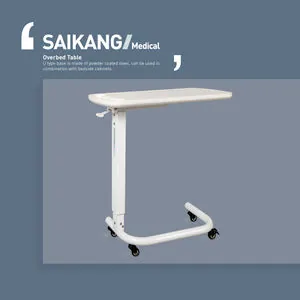
Use this method if your table is stuck at one height and won’t budge even when the lever is fully engaged. You need a clean, dry microfiber cloth and a mild surface cleaner.
Wipe the exterior of the vertical column to remove any sticky residue, food crumbs, or dust that may be preventing the sliding mechanism from moving smoothly. If you see visible grime, use a small amount of warm water on the cloth, but ensure the metal is completely dry afterward to prevent rust.
Once the column is clean, test the movement by holding the lever and sliding the table up and down five times. If it still feels gritty or stuck, the issue is likely internal. Don’t attempt to take the column apart or spray oil inside the housing.
Most of these tables are designed as sealed units for safety. If the internal mechanism remains jammed after cleaning the outside, it has reached its mechanical limit and requires professional service or replacement by the vendor.
A common mistake is applying silicone lubricant or WD-40 to the column exterior. This creates a magnet for dust and hair, which will eventually migrate into the internal track and permanently seize the mechanism. If the column feels “dry” or creates a metallic screeching sound, clean it thoroughly with a dry cloth; don’t apply any lubricants.
If the table still refuses to move, check for a bent inner guide rail. If the column looks slightly tilted or oval-shaped rather than perfectly circular, the internal rollers have failed, and the unit is beyond repair.
Replacing the locking spring
This fix is intended for advanced users who have verified the knob is tight and the column is clean, but the table still fails to lock. If the lever feels loose or “floppy” when you pull it, the internal spring may have snapped or detached from the pin. This is a common issue after several years of daily use. You’ll need to check the user manual to see if your specific model allows for spring replacement.
If the manual doesn’t show a part number for the spring, it isn’t a user-serviceable item. Attempting to force the column open or using makeshift tools to catch the spring can cause the heavy table top to fall unexpectedly, risking injury to your hands.
A common mistake is assuming the spring is merely stretched when it has actually snapped. If you hear a metallic rattle when shaking the column, the spring has likely broken into multiple pieces. In this case, stop immediately. Attempting to re-tension a broken spring will cause the locking mechanism to jam permanently.
If the spring is broken, the safest path is to contact the manufacturer’s support line to see if they offer a replacement column assembly. If they do not, it’s time to replace the table, as a non-locking overbed table presents a significant risk of items sliding off and hitting a user.
Common mistakes to avoid
Using heavy cleaning chemicals: Harsh cleaners strip the finish on the column, increasing friction and making the table harder to adjust. Use only a damp microfiber cloth. If you use bleach or ammonia, you risk damaging the finish or causing surface discoloration.
Applying oil to the column: Lubricants attract dust and hair, turning into a thick paste that jams the sliding mechanism. If the table sticks, clean the column with isopropyl alcohol instead.
Forcing the adjustment lever: Pulling the lever with extreme force breaks the internal plastic cable or pin. This turns a simple adjustment issue into a total unit failure. If the lever feels stuck, release pressure and wiggle the table top slightly to realign the internal teeth.
Using the table as a support: These tables are designed for light items. Leaning your full body weight on them bends the column and snaps the locking mechanism. Never exceed the manufacturer’s stated weight limit, usually 25 pounds.
Keeping the mechanism working well
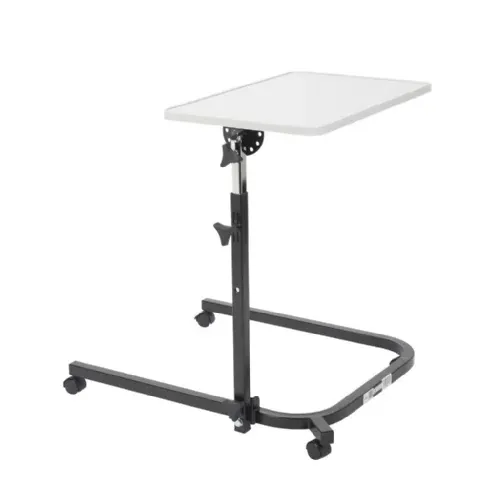
You should adjust your habits to match the intended use of the table to prevent future mechanical failure.
| If you’re doing this | Do this instead | Why |
|---|---|---|
| Leaning on the table | Use a stable side table | Protects the fragile height lock |
| Using oily cleaners | Wipe with a dry cloth | Prevents dust buildup on the track |
| Forcing a jammed lever | Wiggle the table top gently | Prevents breaking the internal cable |
| Ignoring loose knobs | Tighten firmly before use | Stops the table from dropping suddenly |
Related guides
- Medical Guardian Troubleshooting: Quick Fixes Guide
- Chamberlain Whisper Drive Troubleshooting: Easy Fixing
- LG Direct Drive Washer Troubleshooting: Expert Solutions
Frequently Asked Questions
How do I know if my table is broken?
Your table is broken if the height adjustment knob spins freely or the top drops under light pressure. These issues usually indicate a snapped internal cable, which is rarely sold for consumer repair. If the table fails to hold a set height, it’s no longer safe for medical equipment or food.
Is it safe to use a table that slips?
No, you shouldn’t use a slipping table because it poses a significant risk of spills or falling items. A table that can’t maintain a fixed height is a hazard for hot drinks or medications. If tightening the tension knob doesn’t resolve the slipping, you must stop using the table entirely.
How often should I clean the column?
You should clean the column once a month or whenever you notice the height adjustment feels gritty. A quick wipe with a dry cloth keeps dust from entering the sliding mechanism. If you use the table in a bedroom where there’s a lot of fabric lint, you might need to clean it more often. Never let liquids run down the column, as this can cause corrosion inside the base.
What happens if I lose the adjustment knob?
If you lose the adjustment knob, the table won’t lock in place and will be unusable. The knob is a specific size and thread count designed for that exact model. You can’t use a generic nut or bolt from a hardware store to replace it, as these can damage the internal threads of the column. Contact the manufacturer to order a replacement knob that matches your specific model number.
Can I repair a bent column?
No, you can’t repair a bent column, as the steel is thin and will weaken further if you try to straighten it. A bent column prevents the sliding sleeve from moving freely and will always cause the table to stick. If the column is bent, the entire frame is compromised. You’ll need to replace the unit to ensure it remains stable and safe for the user.
Why does my table wobble?
Your table wobbles if the floor is uneven or if the base wheels aren’t fully tightened into the frame. Check that all four wheels are touching the floor firmly. If the table still wobbles after checking the floor, the base frame may be twisted. Avoid putting heavy objects on one side of the table, as this creates uneven pressure that leads to structural instability over time.
Conclusion
If your table still doesn’t glide smoothly after these quick checks, don’t worry. It’s a good idea to contact the manufacturer’s support team for a replacement part or further guidance. They’ll help you get everything working perfectly again, so you won’t have to struggle with an unstable surface any longer.