To restore your refrigerator to working order, you should perform ge gfe28gskss troubleshooting by checking the power connection, the temperature settings, and the status of your air vents. The most common cause for cooling issues in this model is restricted airflow from overpacking the shelves. You can verify your specific model’s requirements by visiting the GE Appliances support center to view the digital manual for your unit. If the unit has no power at all, check your home’s circuit breaker before assuming the appliance itself is broken.
Troubleshooting why your GFE28GSKSS stopped cooling
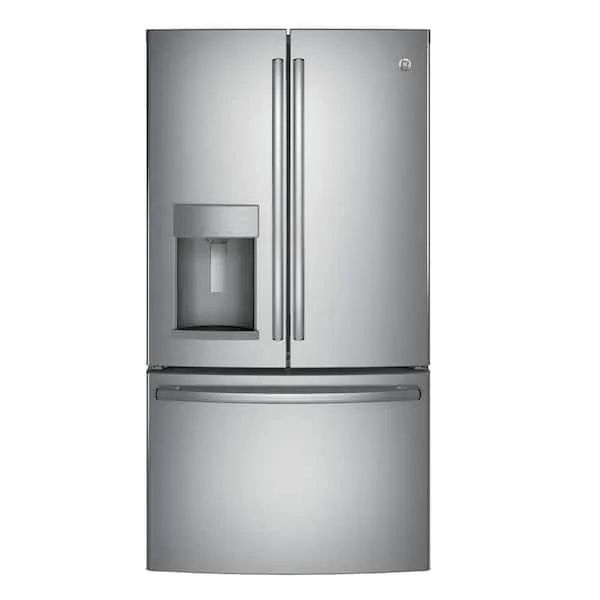
Cooling problems in this French-door model usually stem from three distinct areas: airflow, temperature calibration, and door integrity. When the internal vents are blocked by food containers, the cold air can’t circulate, causing warm spots in the fresh food section.
This is a common issue because the cooling system relies on a steady, unobstructed path to maintain the set temperature across all shelves. If you can’t slide a piece of paper easily between the shelf and the back wall, you have likely restricted the primary air return.
Another frequent cause involves the door seals, known as gaskets. If these rubber strips are dirty or torn, warm air from your kitchen leaks into the cabinet. This forces the compressor to run constantly to compensate for the heat gain.
Over time, this extra work leads to ice buildup on the evaporator coils, which further blocks airflow and prevents cooling. Test your seals by closing the door on a dollar bill; if it slides out with zero resistance, the gasket is compromised and must be replaced to prevent compressor failure.
Finally, the temperature control board may require a reset after a power surge. If the display shows a strange code or the lights flicker, the internal software might be stuck. This doesn’t always mean a part has failed, but it does mean the sensors are no longer communicating with the fan. If the unit remains warm after a hard reset—unplugging it for ten full minutes—the control board likely requires a professional diagnostic to verify voltage output to the compressor.
Safety: Inside a mains-powered machine, the parts behind the outer cover can hold a dangerous electrical charge even after it has been unplugged — that’s why they sit behind a cover. Opening the housing, or testing or replacing anything behind it, is a job for a qualified technician, never a home repair.
Adjust the Internal Temperature Settings
If your refrigerator isn’t cooling, the first step is to verify the control panel settings. The standard factory recommendation for this unit is 37°F for the refrigerator section and 0°F for the freezer. Use the digital display to confirm these numbers, then wait 24 hours to see if the internal environment stabilizes. If you have recently moved the unit or added a large amount of room-temperature food, the system needs this time to recover.
To check if the controls are responding, press the temperature buttons and listen for a beep or watch for a change on the screen. If the display is unresponsive, check the power cord behind the unit to ensure it’s pushed firmly into the wall outlet. If you find the plug is loose, push it in firmly until it’s fully seated in the outlet.
This fix is for users who have power to the display but warm interior temperatures. If the display is completely dark, don’t attempt to open the rear panel to inspect the main board yourself. If you aren’t comfortable moving the refrigerator to check the plug, or if the unit remains warm after 24 hours, contact a licensed appliance repair professional to inspect the internal cooling system.
Clear the Air Vents and Gaskets
Restricted airflow is the most common reason for uneven cooling in this model. Open both doors and inspect the back wall of the refrigerator and freezer sections. You’ll see small plastic slots or vent openings; ensure that no food items or containers are touching these vents. If your shelves are full, move items at least one inch away from the back wall to allow air to pass through the vents.
Next, inspect the door gaskets for debris or gaps. Run your hand along the rubber seals on both the refrigerator and freezer doors to check for any stiff areas or food buildup. If you see crumbs or sticky residue, clean the gaskets using a soft cloth and a mixture of mild soap and warm water. Wipe them dry afterward to prevent the rubber from sticking to the frame.
This process is for anyone noticing frost buildup or warm food. If the gaskets are torn or clearly misshapen, they won’t seal the unit properly. A damaged gasket must be replaced to keep the cold air inside. If you see a large amount of ice buildup inside the back panel, don’t use a hair dryer or metal tool to chip it away, as this can damage the internal components.
Inspect the Condenser Coils
If the unit is running but struggling to maintain temperature, the condenser coils might be covered in dust. These coils are located behind the bottom kick plate. When dust collects here, it acts like a blanket and prevents the refrigerator from releasing heat. This causes the compressor to overheat and cycle off before the interior is cold enough.
To perform this check, pull the refrigerator forward and remove the bottom grille. Use a vacuum with a soft brush attachment to gently remove any dust or pet hair from the coils. Don’t use a stiff wire brush, as this can bend the delicate fins. After cleaning, replace the grille and ensure the unit has at least two inches of space on all sides for proper ventilation.
This is worth the effort if you have pets or live in a dusty environment, as it can significantly improve cooling efficiency. However, if the compressor makes a loud grinding noise or doesn’t run at all despite the coils being clean, the issue is likely internal. In that case, professional repair is required to avoid voiding your warranty or causing further damage to the motor.
What Not to Do During Troubleshooting
Don’t use sharp tools to remove ice: Poking the back wall with a knife can puncture the coolant lines. This creates a leak that renders the entire unit impossible to repair, effectively totaling the appliance.
Don’t adjust internal screws: The screws inside the cabinet anchor the cooling components. Turning them won’t regulate the temperature. Instead, you risk shifting the evaporator coils, which leads to refrigerant leaks.
Don’t turn the unit off and on rapidly: Rapid cycling creates a pressure imbalance that can seize the compressor motor. Always wait at least five minutes before plugging it back in. This delay allows the internal pressure to equalize safely.
Don’t bypass the safety switches: Door switches are designed to halt the fan when the door opens. Disabling them forces the motor to run against an open system. This causes frost buildup on the coils and wastes energy, significantly shortening the lifespan of your cooling unit.
How to Stop Cooling Problems From Returning
To keep your refrigerator running smoothly, compare your current habits with the recommended maintenance steps below. Small changes to how you load the shelves and monitor the seals will prevent most cooling failures.
| If you’re doing this | Do this instead | Why |
|---|---|---|
| Overstuffing the shelves | Leave space for air | Air must circulate to keep food cold |
| Cleaning with harsh chemicals | Use soap and water | Chemicals can dry out and crack gaskets |
| Blocking the back vents | Move items forward | Vents are the source of cold air |
| Ignoring dust on coils | Vacuum every 6 months | Dust traps heat and kills the compressor |
Most owners fail by leaving the door slightly ajar when the unit is packed too tightly. If the door seal doesn’t snap shut with a firm suction, replace the magnetic gasket immediately.
Use this decision rule: if the back wall of your fridge feels warm or shows frost buildup, you have an airflow obstruction. Clear a three-inch gap between your groceries and the rear wall. If the temperature remains inconsistent after clearing the space, check the condenser coils for a thick layer of grime.
Frequently asked questions
How long does it take for the fridge to cool down after a reset?
Refrigerators typically take 24 hours to reach the set temperature after a reset. This assumes the doors remain closed and the unit isn’t being opened frequently. If the unit remains warm after a full day, a faulty sensor or cooling system error may require professional diagnosis.
Why is there water pooling inside the fresh food section?
Water pooling inside is usually caused by a clogged defrost drain. This drain allows melted frost to flow into a pan near the compressor where it evaporates; if blocked by debris or ice, water overflows into the compartment. If the drain is clear but water persists, a technician may be needed.
Is it safe to unplug the fridge to reset it?
Yes, it’s safe to unplug the unit to perform a hard reset. Leave the refrigerator unplugged for at least five minutes to allow the electrical components to discharge fully. If the appliance still shows an error code or fails to cool, the problem is likely a hardware failure.
How often should I clean the condenser coils?
You should clean the condenser coils every 6 months to ensure the compressor stays cool and efficient. If you have pets or live in a dusty home, check them every 3 months instead. This simple task prevents the unit from working harder than necessary and extends the compressor’s life.
What happens if the door gaskets aren’t sealing?
If the door gaskets don’t seal, warm air enters the refrigerator, causing the compressor to run constantly. You can test the seal by closing the door on a piece of paper; if the paper pulls out with no resistance, the gasket is likely worn out and needs replacement.
Conclusion
If these quick checks don’t get things running smoothly again, don’t hesitate to reach out for professional help. You shouldn’t wait if your food is at risk of spoiling. Scheduling a certified technician’s visit online is the best way to ensure your appliance stays reliable for years to come.