Having trouble with your Panasonic phone? Whether your handset won’t turn on, the ringer stays silent, or you see the frustrating “Check Phone Line” message, these issues can disrupt your daily calls and cause serious headaches.
But don’t worry—most problems are easier to fix than you might think. In this guide, you’ll find simple, step-by-step troubleshooting tips to get your Panasonic phone back in perfect working order. Keep reading, and you’ll learn how to quickly resolve power failures, connection errors, and ringer issues so you can stay connected without missing a beat.
Your next call is just a few fixes away!
Power Issues
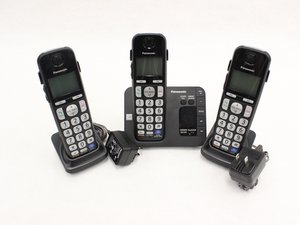
Power issues are common problems with Panasonic phones. They can stop your handset from turning on or cause it to lose charge quickly. Understanding basic troubleshooting steps can help you get your phone working again without delay. This section covers solutions for power-related problems, including why your handset won’t turn on, tips for battery replacement, and how to perform a hard reset.
Handset Won’t Turn On
First, check if the handset is properly placed on the charging cradle. Sometimes, a loose connection stops charging. Remove the handset and place it back firmly. If it still does not turn on, remove the batteries and reinsert them. This can clear any power disconnect. Make sure the charging cradle is plugged into a working power outlet. Inspect the charging contacts on both the handset and cradle for dirt or damage. Clean them gently with a dry cloth if needed.
Battery Replacement Tips
Use only Panasonic-approved rechargeable NiMH batteries for your handset. Avoid mixing old and new batteries as this may cause charging issues. Replace batteries if the phone loses charge quickly or does not hold power. Always turn off the handset before removing batteries. Dispose of old batteries properly according to local regulations. Charge new batteries fully before first use. This helps extend battery life and improves performance.
Performing A Hard Reset
A hard reset can fix many power and software problems. Remove the batteries and unplug the charging cradle from power. Wait for 10 seconds. Reinsert the batteries and place the handset back on the cradle. Plug the cradle into the power outlet again. This process clears temporary errors and restarts the phone system. Avoid performing hard resets too often as it may affect your saved settings.
Connection Problems
Connection problems are common with Panasonic phones. These issues can stop calls or cause poor sound quality. Many connection errors come from simple causes. Checking the phone line and related hardware often solves the problem quickly. Follow these steps to identify and fix connection troubles.
Check Phone Line Error
The “Check Phone Line” message appears when the phone base can’t detect a proper connection. This error usually means the phone line is loose or damaged. Start by unplugging the phone line cord from both the base unit and the wall jack. Then, plug it back in firmly until you hear a click sound. This ensures a secure connection.
Try using a different phone on the same line. If the other phone works, the problem is with your Panasonic phone. If not, the issue might be with the phone line itself or your service provider.
Inspecting Phone Cord And Base
Look closely at the phone cord for any visible damage. Cracks, cuts, or bends can disrupt the connection. Replace the cord if it looks worn out. Also, check the base unit for dirt or dust in the ports. Clean the ports gently with a dry cloth or compressed air to remove debris.
Ensure the base unit is placed on a flat, stable surface. Avoid placing it near devices that cause interference, such as microwaves or routers. A stable base helps maintain a strong connection.
Testing Wall Jack And Cables
Test the wall jack by plugging another working phone into it. If the other phone does not get a dial tone, the wall jack or wiring might be faulty. Contact your phone service provider to check or repair the wiring.
Use a different phone cable to connect your Panasonic phone to the wall jack. Sometimes, cables wear out or break inside. A new cable can restore a clear connection. Testing each component helps find the exact cause of connection problems.

Frequently Asked Questions
What Is The Most Common Problem With Panasonic Cordless Phones?
The most common problem with Panasonic cordless phones is connection issues, often caused by unregistered handsets or loose phone line cords. Users also face power failures and ringer malfunctions. Checking connections, ensuring handset registration, and performing a reset usually resolve these problems.
How Do I Reset My Panasonic Landline Phone?
To reset your Panasonic landline phone, unplug the base from power for 10 seconds. Then, plug it back in and restart the handset.
How Do I Reboot My Landline Phone?
Unplug your landline phone from the power source and phone jack. Wait 30 seconds, then reconnect both cables. This reboots the device and clears minor issues.
How Long Should A Panasonic Cordless Phone Last?
A Panasonic cordless phone typically lasts 3 to 5 years with proper care and regular battery replacement. Usage and environment affect its lifespan.
How Do I Fix The “check Phone Line” Error On Panasonic Phones?
Ensure the phone line cord is firmly plugged into the base and wall jack. Test the phone line with another working phone to confirm the connection. This often resolves the issue quickly.
Conclusion
Troubleshooting Panasonic phones often solves common issues quickly. Check power sources and connections first. Resetting the phone can clear many errors. Make sure handsets are properly charged and registered. Adjust the ringer volume if you miss calls. These simple steps help keep your phone working well.
Regular care can prevent many problems from starting. Stay calm, follow these tips, and enjoy clear calls.