Is your Samsung dishwasher acting up and leaving you frustrated? You’re not alone.
Whether it won’t start, won’t fill with water, or is flashing confusing error codes, these common problems can disrupt your daily routine. But don’t worry—understanding the root causes and simple fixes can save you time, money, and stress. In this guide, you’ll find easy-to-follow troubleshooting tips tailored specifically for Samsung dishwashers.
By the end, you’ll know exactly how to tackle issues like power failures, leaks, and error codes so your dishwasher works like new again. Keep reading to get your dishwasher back on track quickly and confidently.
Power Issues
Power issues can stop your Samsung dishwasher from working. These problems often prevent the machine from turning on or starting a cycle. Checking simple things first can save time and effort.
Understanding common power problems helps you fix them quickly. Below are key areas to check for power issues on your dishwasher.
Delay Start Problems
The Delay Start feature lets you set the dishwasher to begin later. Sometimes, this causes confusion when the machine won’t start. Press the Delay Start button repeatedly until the delay turns off. This resets the timer and often fixes the issue. A stuck delay timer blocks the dishwasher from powering on.
Door Latch Failures
The dishwasher won’t start if the door is not properly latched. Listen for a click sound when you close the door. If the door does not click, the latch or door switch may be broken or misaligned. Check the latch for damage or debris. A faulty latch stops the dishwasher from getting power as a safety measure.
Circuit Breaker Checks
No power can come from a tripped circuit breaker or a switched-off wall outlet. Locate your home’s breaker panel and check if the dishwasher’s breaker is off. Reset it if needed by switching it off and on again. Also, check any wall switches that control the dishwasher’s power. Restoring power at the source often solves the problem.
Leak And Moisture Errors
Leak and moisture errors in Samsung dishwashers can cause frustration. These errors often show as LC or LE codes on the display. They signal that water or moisture is trapped where it should not be. Addressing these problems quickly helps avoid bigger issues.
Base Pan Water Removal
Water can collect in the base pan under the dishwasher. This triggers the moisture sensor and shows an error code. To fix this, turn off the power at the circuit breaker. Remove the front kick plate carefully. Use towels to dry the metal or plastic pan at the bottom. Make sure it is completely dry before reassembling. This step often clears the error code.
Suds Overflow Causes
Suds overflow happens when too much foam builds up inside the dishwasher. Using regular dish soap instead of dishwasher detergent causes this. Over-pouring rinse aid or detergent also leads to excess suds. These suds can reach the leak sensor and cause a false alarm. Use only the recommended dishwasher detergent. Measure it properly to prevent foam from overflowing.
Gasket Inspection
The door gasket seals the dishwasher and keeps water inside. A damaged or dirty gasket can cause leaks. Check the rubber seal carefully for cracks, tears, or misalignment. Dirt and grime buildup can also prevent a tight seal. Clean the gasket with a soft cloth and mild soap. Replace the gasket if it is cracked or worn out. A good seal stops leaks and moisture errors.
Drainage Problems
Drainage problems are a common issue with Samsung dishwashers. Water may not drain fully, leaving dishes wet and dirty. These problems often arise from blockages or mechanical faults. Fixing drainage issues can restore your dishwasher’s performance quickly.
Two main causes for drainage problems are clogged filters and jammed drain pumps. Cleaning these parts is essential for smooth water flow. The steps are simple and safe to perform at home without special tools.
Clogged Filter Cleaning
The filter traps food particles during washing. Over time, it can clog and stop water from draining. Remove the bottom rack to access the filter at the tub’s base. Twist and pull the cylindrical filter out carefully.
Rinse the filter under hot running water. Use a soft brush to scrub away grease and debris. Avoid harsh tools that can damage the mesh. After cleaning, place the filter back firmly in its slot. This helps prevent future drainage blockages.
Jammed Drain Pump Clearing
The drain pump pushes water out of the dishwasher. Small objects can jam its impeller, stopping it from working. To check, remove the filter and look into the sump area below. Use a flashlight to spot bits of glass, seeds, or plastic.
Remove any debris gently using tweezers or your fingers. Turn the impeller by hand to ensure it spins freely. If stuck, clear all blockages until it moves smoothly. Reassemble the parts and run a test cycle to confirm drainage is fixed.
Error Codes Explained
Samsung dishwashers use error codes to signal problems. These codes help identify specific issues quickly. Understanding these codes can save time and avoid costly repairs. This section breaks down the most common error codes and shows how to run diagnostics. It helps you fix simple problems yourself.
Common Samsung Codes
Samsung dishwashers display codes like LC, LE, and OC to show errors. LC or LE means water leaked inside the base pan. This often happens due to a damaged door seal or excess suds. The OC code points to a drainage problem, like a clogged filter or jammed pump.
Other common codes include 4E and 5E. The 4E code signals water supply issues. Check if the water valve is open or if the hose is kinked. The 5E code means the dishwasher cannot drain. Clean the drain hose and filter to fix this error.
How To Run Diagnostics
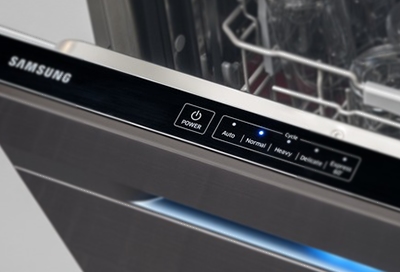
Running a diagnostic test helps find hidden issues inside the dishwasher. Start by turning off the dishwasher. Press and hold the “Heated Dry” and “Normal” buttons together for three seconds. The dishwasher will enter diagnostic mode.
Listen for beeps and watch the control panel. The dishwasher will cycle through tests of water valves, sensors, and motors. Note any error codes that appear during this test. This information guides you on what to fix next.
Water Filling Issues
Water filling issues in Samsung dishwashers can stop your appliance from working properly. Without enough water, dishes won’t get cleaned well. The dishwasher might show error codes or fail to start its cycle. Fixing these problems quickly helps keep your dishwasher running smoothly.
Child Lock Effects
The child lock feature can block water from filling the dishwasher. This safety setting stops changes during a wash cycle. If water is not filling, check if the child lock is active. Turn it off using the control panel buttons. This simple step often solves water filling problems.
Water Supply Checks
Check the water supply line to your dishwasher. Make sure the valve is fully open to allow water flow. Inspect the hose for any kinks or blockages. A clogged hose can prevent water from entering the machine. Also, check the water pressure; low pressure may affect filling. Fixing these supply issues restores proper water filling.

Door Operation Problems
Door operation problems are common issues with Samsung dishwashers. These problems can stop the door from opening or closing properly. A faulty door can affect the dishwasher’s cleaning performance and safety. Understanding the causes helps fix the issue quickly.
Door Won’t Open
A dishwasher door that won’t open may be stuck or locked. The latch might be engaged or broken. Sometimes, the door lock sensor malfunctions and keeps the door sealed. Check if the dishwasher is still running. It won’t open during a cycle for safety.
Try pressing the door release gently. Avoid forcing it open as this can cause damage. If the door remains locked after the cycle ends, reset the dishwasher by turning off power for a minute. If the door still won’t open, the latch or lock assembly may need replacement.
Seal And Alignment Issues
Door seals keep water inside the dishwasher. Worn or dirty seals cause leaks and poor door closure. Inspect the rubber gasket around the door for cracks or debris. Clean the seal with a damp cloth to remove grime. Replace the gasket if it is damaged.
Misaligned doors prevent proper sealing. Check if the door sits flush with the dishwasher frame. Adjust the hinges if the door is uneven or loose. Proper alignment ensures the door closes tightly and prevents water leaks. Regular maintenance of seals and hinges keeps the door working smoothly.
Diy Repair Tips
DIY repair tips for your Samsung dishwasher can save time and money. Small problems often have simple solutions. Basic tools and patience help fix common issues at home.
Start by unplugging the dishwasher before any repair. This keeps you safe from electric shocks. Check the user manual for model-specific advice. Keep parts and screws organized during the process.
Simple fixes like cleaning filters, checking door latches, or resetting the unit can restore function. Watch for leaks or unusual noises. These signs guide you to the problem source. Use gentle force and avoid harsh chemicals that may damage parts.
Parts Cost Breakdown
Common dishwasher parts vary in price. Filters usually cost $10 to $30. Door gaskets range from $15 to $40. Drain pumps may cost $50 to $100. Control boards are more expensive, around $100 to $200.
Compare prices online before buying. Choose genuine Samsung parts for best fit and durability. Some parts are easy to replace. Others need more skill and tools. Factor shipping costs if ordering online.
When To Call A Technician
Call a technician if the dishwasher still fails after basic checks. Complex electrical or motor problems require expert help. If water leaks persist or error codes show repeatedly, professional service is best.
Do not ignore burning smells or sparks. These issues are dangerous and need immediate attention. Technicians also provide warranty-covered repairs. Save yourself stress and potential damage by hiring a pro for tough fixes.
Frequently Asked Questions
What Is The Most Common Problem With The Samsung Dishwasher?
The most common problem with Samsung dishwashers is failure to start, often caused by door latch issues, power supply problems, or delayed start mode activation.
How To Do Hard Reset On Samsung Dishwasher?
To hard reset a Samsung dishwasher, turn off power at the circuit breaker for 1 minute. Then, restore power and press Start to reset.
How Do I Run Diagnostics On My Samsung Dishwasher?
Press the “Heated Dry” and “Normal” buttons simultaneously for 3 seconds. The dishwasher will enter diagnostic mode and run tests automatically. Watch for error codes on the display to identify issues. Exit by pressing the “Start/Pause” button.
What Do The Flashing Lights On My Samsung Dishwasher Mean?
Flashing lights on a Samsung dishwasher indicate errors like door latch issues, delay start active, or water leaks. Check door alignment, cancel delay, and inspect for moisture or blockages. Addressing these quickly helps restore normal operation.
Why Won’t My Samsung Dishwasher Start Or Power On?
Check if the Delay Start feature is enabled; cancel it by pressing the button. Ensure the door latch clicks when closed and verify your home’s circuit breaker. A misaligned door switch or no power supply often causes this issue.
Conclusion
Samsung dishwasher issues can often be fixed with simple steps. Check the door latch, filters, and error codes first. Regular cleaning helps prevent leaks and blockages. Avoid using regular dish soap to stop suds overflow. Keep an eye on error codes like LC, LE, or OC for clues.
Taking quick action saves time and money. Stay calm and follow the troubleshooting tips carefully. Your dishwasher will run smoothly again with some patience and care.