Is your Toro self-propelled lawn mower suddenly refusing to move on its own? You’re not alone, and the good news is that many common issues can be fixed without a costly repair bill.
Whether the mower won’t engage, feels sluggish, or stops propelling midway, the problem often lies in simple parts like the drive belt, cable, or wheel gears. In this guide, you’ll discover easy-to-follow troubleshooting tips to get your Toro mower back in action quickly.
Keep reading to learn how to spot the signs, make quick adjustments, and know when to replace worn parts—so your lawn stays perfectly trimmed with less hassle.
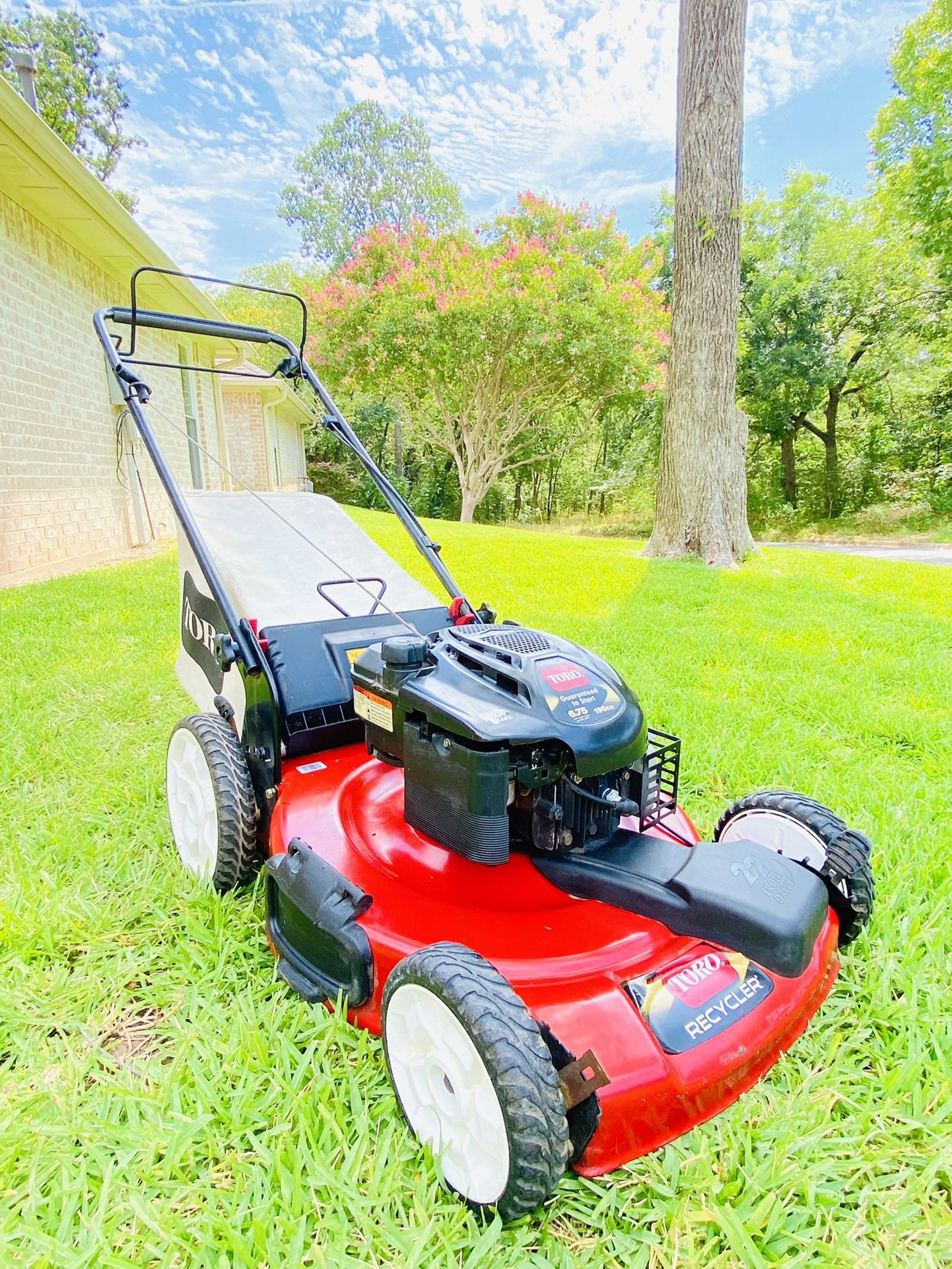
Common Self-propel Issues
Self-propel systems in Toro lawn mowers often face a few common problems. These issues stop the mower from moving forward on its own. Knowing these problems helps fix your mower quickly. Below are the main causes of self-propel troubles and how they affect mower performance.
Drive Cable Problems
The drive cable connects the handle to the transmission. It controls the self-propel feature. Over time, the cable can stretch or disconnect. A stretched cable feels loose and may not engage properly. A disconnected cable means no power transfer to the wheels. Checking the cable tension often solves this issue. Adjusting or replacing the cable restores smooth operation.
Drive Belt Damage
The drive belt transfers power from the engine to the wheels. It can slip off or break due to wear. A worn belt causes the mower not to move or to move slowly. Grass and dirt buildup can also cause the belt to slip. Inspect the belt for cracks or breaks regularly. Replacing a damaged belt fixes most self-propel problems.
Wheel Gears Wear
Wheel gears help the mower move forward. They connect the drive system to the wheels. Gears wear out from regular use and rough terrain. Worn gears cause the wheels to slip or not turn. You may hear grinding noises during operation. Checking and replacing worn gears ensures proper wheel movement and smooth mowing.
Grass Debris Buildup
Grass clippings and dirt can clog the mower’s drive system. Debris buildup blocks the drive belt and gears. This stops the self-propel function from working. Cleaning the mower deck and drive parts prevents buildup. Regular maintenance keeps the mower running smoothly and avoids costly repairs.
Checking The Drive Cable
Checking the drive cable is a key step in troubleshooting your Toro self-propelled lawn mower. This cable connects the handle to the transmission. It controls the mower’s movement when you push the lever. A loose, stretched, or damaged cable can stop the mower from moving forward. Understanding how to inspect and fix the drive cable can save you time and money.
Locating The Traction Cable
Start by finding the traction cable on your Toro mower. It runs from the mower handle down to the transmission near the wheels. Look for a thin, metal cable inside a plastic or metal housing. The cable should be attached securely at both ends. Dirt or grass might cover it, so clear any debris to see it well.
Testing Cable Tension
Grab the mower handle and squeeze the self-propel lever. Watch the cable to see if it pulls tight. The cable should feel firm, not loose or limp. If it feels slack, the mower may not move properly. Loose cables cannot engage the transmission correctly. Test the cable several times to confirm the tension.
Adjusting Cable Slack
To fix a loose cable, find the adjustment point near the handle or transmission. Loosen the clamp holding the cable housing in place. Pull the cable tight by hand and then retighten the clamp. Check the tension again by squeezing the lever. Repeat until the cable feels firm but not too tight. Proper adjustment ensures smooth mower operation.
Replacing A Damaged Cable
If the cable is frayed, broken, or rusted, it needs replacement. First, disconnect the cable from the handle and transmission. Remove any clips or bolts holding it in place. Install the new cable by attaching it to the same points. Adjust the new cable’s tension as described above. A fresh cable restores reliable mower movement.
Inspecting The Drive Belt
Inspecting the drive belt is a key step in fixing a Toro self-propelled lawn mower. The drive belt connects the engine to the wheels, making the mower move forward. If the belt is broken or worn, the mower may stop propelling. Checking the belt helps find problems early and keeps your mower running smoothly.
Regular inspection saves time and money. It prevents bigger damage to the mower. This guide explains how to safely check the belt, spot signs of wear, and replace it if needed.
Safety Precautions
Always turn off the mower and remove the spark plug wire. This prevents accidental starting. Wear gloves to protect your hands from sharp parts. Work on a flat, stable surface to avoid slipping. Keep tools handy and use proper lighting. Safety first keeps the job safe and easy.
Accessing The Belt
Locate the belt cover near the mower’s wheels. Use a screwdriver to remove the screws or clips holding the cover. Carefully lift the cover to expose the drive belt. Note the belt’s path around the pulleys before removing it. This helps during reinstallation. Keep all parts safe for reassembly.
Signs Of Belt Wear
Look for cracks, fraying, or splits on the belt surface. Check if the belt feels loose or stretched. A shiny or glazed belt means it is slipping. Uneven wear or missing teeth signals replacement time. Worn belts reduce mower power and cause poor self-propelling.
Replacing The Drive Belt
Remove the old belt by slipping it off the pulleys. Compare the new belt with the old one for size and type. Fit the new belt around the engine pulley first. Then guide it through the wheel pulley and any guides. Ensure the belt is tight but not too tight. Replace the belt cover and fasten screws securely. Test the mower by engaging the self-propel lever. The mower should move forward smoothly.

Examining Drive Wheels And Gears
Examining the drive wheels and gears is a key step in fixing your Toro self-propelled lawn mower. These parts help the mower move smoothly across your lawn. Dirt, wear, or damage can stop them from working properly. Careful inspection can reveal problems early. This saves time and money on repairs.
Start by removing the rear wheels to see the gears clearly. Check the gear teeth for any signs of wear or damage. Dirt and debris often get stuck in these parts. Cleaning them helps the mower run better. Replace any worn components to restore full function.
Removing Rear Wheels
First, turn off the mower and disconnect the spark plug. This prevents accidental starts. Use a wrench to loosen the bolts holding the rear wheels. Pull the wheels off gently. Set them aside on a clean surface. Now you can access the gears and drive system.
Checking Gear Teeth
Look closely at each gear tooth. Check for cracks, chips, or missing teeth. Worn gears cause slipping or jerky movement. Rotate the gears by hand to feel any rough spots. Smooth and intact teeth ensure proper engagement with the drive system.
Cleaning Dirt And Debris
Use a brush or compressed air to remove grass, dirt, and debris. Packed debris can block gears and wheels. Clean all nooks and crannies carefully. Avoid using water directly on gears to prevent rust. A clean system runs more smoothly and lasts longer.
Replacing Worn Components
If you find broken or worn gears, order replacements from Toro or a trusted supplier. Remove damaged parts using the correct tools. Install new gears firmly in place. Reattach the rear wheels and tighten the bolts securely. Test the mower to confirm the repair worked well.
Fixing Engagement Mechanism
The engagement mechanism on a Toro self-propelled lawn mower controls the drive system. It lets the mower move forward without pushing. Fixing this mechanism is key when the mower won’t self-propel. Simple checks and adjustments can often restore function quickly.
Start by inspecting the engagement lever. This lever connects the handle control to the drive system. Over time, dirt or damage can stop it from working smoothly. Next, adjust the tensioner that keeps the drive cable tight. A loose cable won’t engage the drive properly. Finally, test the self-propel activation to ensure the mower moves forward as expected. These steps help keep your mower running well.
Checking Engagement Lever
Look closely at the engagement lever for any visible damage or wear. Make sure it moves freely without sticking. Dirt and grass can clog the lever’s pivot points. Clean these areas with a brush or cloth. Check the connection between the lever and the drive cable. The cable must be secure and not frayed. Replace any broken parts to maintain proper engagement.
Adjusting Tensioner
The tensioner keeps the drive cable tight. Find the tension adjustment near the mower handle or engine. Loosen the clamp holding the cable and pull the cable slightly to increase tension. Tighten the clamp back carefully. Avoid making the cable too tight, as it can cause damage. Proper tension ensures the drive system activates when the lever is pressed. Test the cable movement to confirm smooth operation.
Testing Self-propel Activation
With the mower on a flat surface, hold the handle and pull the engagement lever. The mower wheels should start turning forward on their own. If the mower does not move, double-check the lever and tension settings. Listen for any unusual sounds from the drive system. Try pressing and releasing the lever a few times. The self-propel should engage and disengage smoothly. Repeat adjustments if needed until the mower moves steadily.
Maintenance Tips For Longevity
Proper maintenance helps your Toro self-propelled lawn mower run longer and better. Keeping parts clean, lubricated, and checked prevents many common problems. This saves time and money on repairs. Follow these simple steps regularly to keep your mower in top shape.
Regular Cleaning
Remove grass clippings and dirt after each use. Use a brush or air compressor to clean under the deck. Clear the wheels and drive system from debris. This prevents buildup that can stop the mower from moving smoothly. Clean parts reduce wear and tear and improve performance.
Lubrication Points
Apply lubricant to the mower’s moving parts regularly. Focus on wheel bearings, cables, and pivot points. Use a suitable grease or oil as recommended in the owner’s manual. Proper lubrication reduces friction and prevents rust. It helps the self-propel system work without sticking or slowing down.
Routine Belt And Cable Checks
Inspect the drive belt for cracks or signs of wear. Replace the belt if it looks damaged or loose. Check the drive cable for stretching or breaks. Adjust or replace the cable to ensure smooth traction control. Regular checks prevent unexpected breakdowns and keep your mower moving steadily.
Finding Model-specific Parts
Finding the right parts for your Toro self-propelled lawn mower is crucial for quick repairs and smooth operation. Using model-specific parts ensures compatibility and keeps your mower running efficiently. Identifying the correct parts can be simple with the right approach. This section guides you through locating your model number, choosing the correct replacement parts, and knowing where to buy them.
Locating Model Number
Start by finding the model number on your Toro mower. It is usually on a sticker or metal plate. Check near the engine, deck, or handle area. The model number includes letters and numbers. Write it down for reference. This number helps identify the exact parts your mower needs.
Selecting Correct Replacement Parts
Use the model number to find parts that fit your mower. Avoid generic parts; they may not work well. Check the part number in your mower’s manual or online parts catalog. Match parts like belts, cables, and wheels carefully. Correct parts ensure your mower works safely and smoothly.
Where To Buy Parts
Buy Toro mower parts from authorized dealers or online stores. Official Toro websites offer genuine parts with warranties. Local lawn mower shops may have parts in stock. Trusted online retailers provide a wide range of parts and fast shipping. Always verify the part fits your model before buying.

Frequently Asked Questions
Why Is My Toro Self-propelled Mower Stopped Propelling?
Your Toro mower may stop propelling due to a broken or slipped drive belt, stretched or disconnected drive cable, worn wheel gears, or grass debris blocking movement. Check and adjust the cable, inspect and replace the belt if damaged, and clean or replace gears and wheels as needed.
What Are The Common Problems With Toro Mowers?
Common problems with Toro mowers include stretched or broken drive cables, slipped or damaged drive belts, worn wheel gears, and grass debris clogging the mechanism. Regularly inspect and clean these parts to maintain proper mower function and self-propel operation.
Why Won’t My Toro Self-propelled Lawn Mower Start?
Your Toro mower may not start due to a disconnected or stretched drive cable, broken or slipped drive belt, worn wheel gears, or grass debris blocking movement. Check and adjust the cable, inspect and replace the belt if damaged, and clean or replace wheels and gears to fix the issue.
Why Is My Toro Self-propelled Mower Not Moving?
The drive cable may be loose, stretched, or disconnected. Check the drive belt for breaks or slippage. Also, clear any grass debris from wheels and gears.
How Do I Fix A Broken Drive Belt On Toro Mower?
Remove the belt cover and transmission bracket to access the belt. Replace the broken belt with a new one. Make sure it fits tightly to ensure proper function.
Conclusion
Troubleshooting your Toro self-propelled mower can save time and money. Check the drive belt, cable, and wheel gears regularly. Clear any grass buildup that might block movement. Tighten or replace loose or damaged parts promptly. Small fixes often restore smooth self-propel function.
Routine maintenance keeps your mower running well. Stay patient and follow simple steps to fix common issues. Your lawn mower will be ready for the next cut in no time.